
1. Wprowadzenie
Dziękujemy za zakupasing the TURBOX Giantpeak Mechanical Feel RGB Gaming Keyboard. This manual provides essential information for setting up, operating, and maintaining your new keyboard. Please read this manual carefully before use to ensure optimal performance and longevity of your device.
2. Informacje dotyczące bezpieczeństwa
- Keep the keyboard away from excessive heat, direct sunlight, and moisture.
- Although the keyboard is spill-resistant, avoid intentionally exposing it to large amounts of liquid. In case of spills, disconnect the keyboard immediately and allow it to dry completely before reconnecting.
- Do not attempt to disassemble or modify the keyboard. This will void the warranty and may cause damage.
- Use only with compatible devices and power sources as specified.
- Przechowywać w miejscu niedostępnym dla dzieci.
3. Zawartość opakowania
Proszę sprawdzić, czy w paczce znajdują się następujące elementy:
- TURBOX Giantpeak Mechanical Feel RGB Gaming Keyboard
- Instrukcja obsługi (ten dokument)
4. Koniec produktuview
The TURBOX Giantpeak keyboard is designed for gaming, featuring a mechanical feel, customizable RGB lighting, and macro capabilities. It also includes a convenient mobile device holder.
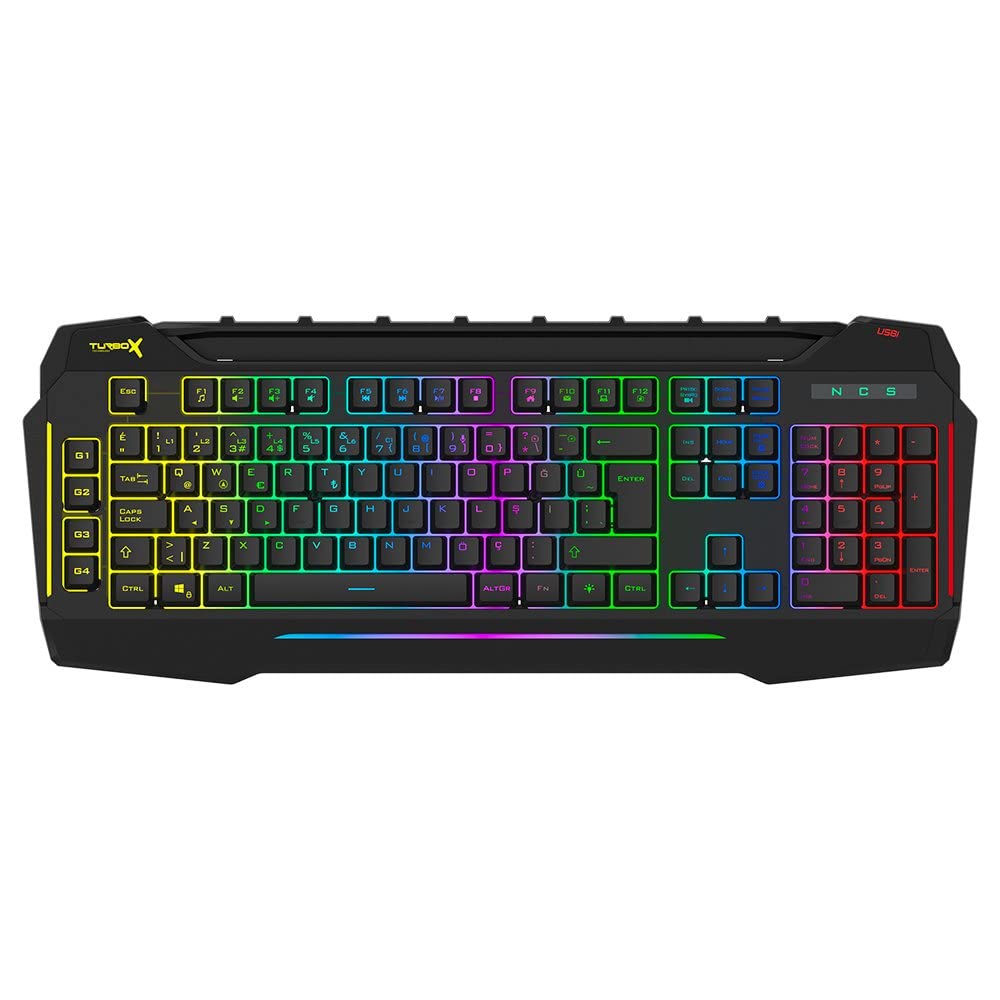
Figure 4.1: TURBOX Giantpeak keyboard with integrated mobile device stand.
This full-size keyboard offers a standard Q layout, providing a comfortable and responsive typing experience for both gaming and general use.

Rysunek 4.2: Góra view of the TURBOX Giantpeak keyboard.
The keyboard features vibrant RGB backlighting that can be customized to various effects, including sound-sensitive modes. Its spill-resistant design provides added durability.

Rysunek 4.3: Kątowy view showing RGB lighting.
Dedicated macro keys (G1-G4) are located on the left side, allowing for quick execution of complex commands or sequences.

Figure 4.4: Close-up of programmable G-keys.
The keyboard also includes a full numeric keypad for data entry and additional functions.

Figure 4.5: Numeric keypad detail.
Connectivity is provided via a durable USB cable, ensuring a stable and responsive connection to your computer.

Rysunek 4.6: Strona view z kablem USB.
5. Konfiguracja
Follow these steps to set up your TURBOX Giantpeak keyboard:
- Rozpakuj klawiaturę: Carefully remove the keyboard and any packaging materials from the box.
- Połącz z komputerem: Plug the USB connector of the keyboard into an available USB port on your desktop or laptop computer.
- Instalacja sterownika: Your operating system (Windows, macOS, etc.) should automatically detect and install the necessary drivers. This process may take a few moments.
- Sprawdź funkcjonalność: Once drivers are installed, test the keyboard by typing in a text editor or browser to ensure all keys are functioning correctly. The RGB lighting should also illuminate.
6. Instrukcja obsługi
6.1 Podstawowe funkcje klawiatury
The TURBOX Giantpeak keyboard operates like a standard Q-layout keyboard. All standard keys (alphanumeric, function keys, numeric keypad, navigation keys) function as expected.
6.2 Sterowanie oświetleniem RGB
The keyboard features customizable RGB backlighting with 7 different color options and sound-sensitive modes. Specific key combinations are used to cycle through lighting effects and adjust brightness:
- Zmień tryb oświetlenia: Użyj Fn + Blokada przewijania keys to cycle through various lighting effects.
- Dostosuj jasność: Użyj Fn + Strona w górę (wzrost) lub Fn + Strona w dół (decrease) keys to adjust the brightness level of the backlighting.
- Sound-Sensitive Mode: The keyboard supports sound-sensitive lighting. Refer to specific software or key combinations (if available) for activation. (Note: Specific key combinations for sound-sensitive mode may vary or require software.)
6.3 Macro Programming (G1-G4 Keys)
The TURBOX Giantpeak keyboard includes 4 programmable macro keys (G1, G2, G3, G4) for executing custom commands or sequences. Follow these general steps for macro recording:
- Enter Macro Recording Mode: Naciśnij MR key (Macro Record, usually near the G-keys). The keyboard's indicator light may flash to indicate recording mode.
- Wybierz klawisz makro: Press one of the G-keys (G1, G2, G3, or G4) where you want to save the macro.
- Record Sequence: Type the sequence of keys you wish to record. This can include multiple keystrokes, delays, and modifier keys.
- Exit Macro Recording Mode: Naciśnij MR key again to save the macro and exit recording mode. The indicator light should stop flashing.
- Wykonaj makro: To use the recorded macro, simply press the assigned G-key.
Note: For advanced macro settings or specific software-based macro management, please check the manufacturer's website for any available utility software.
6.4 Mobile Device Holder
The integrated slot at the top of the keyboard is designed to hold smartphones or small tablets, providing a convenient viewing angle while gaming or working.
7. Konserwacja
To ensure the longevity and performance of your keyboard, follow these maintenance guidelines:
- Czyszczenie: Do czyszczenia powierzchni klawiatury użyj miękkiej, suchej ściereczki. W przypadku uporczywych zabrudzeń delikatnie przetrzyjampPrzetrzyj ściereczkę wodą lub delikatnym środkiem czyszczącym. Unikaj stosowania silnych środków chemicznych i materiałów ściernych.
- Usuwanie kurzu: Usuń kurz i zanieczyszczenia spomiędzy klawiszy za pomocą sprężonego powietrza.
- Zarządzanie wyciekami: In case of liquid spills, immediately disconnect the keyboard from your computer. Turn it upside down to drain any liquid and allow it to air dry completely for at least 24-48 hours before reconnecting.
- Składowanie: Jeśli klawiatura nie będzie używana przez dłuższy czas, należy ją przechowywać w czystym i suchym miejscu.
8. Rozwiązywanie Problemów
If you encounter issues with your TURBOX Giantpeak keyboard, refer to the following common problems and solutions:
| Problem | Możliwe rozwiązanie |
|---|---|
| Klawiatura nie odpowiada. |
|
| Oświetlenie RGB nie działa lub jest zablokowane. |
|
| Macro keys (G1-G4) are not working. |
|
| Klawisze są lepkie lub nie reagują. |
|
9. Specyfikacje
| Funkcja | Szczegół |
|---|---|
| Nazwa modelu | Giantpeak |
| Numer części | ID9923266 |
| Marka | TURBOX |
| Technologia łączności | Przewodowy USB |
| Kompatybilne urządzenia | Laptop, komputer osobisty |
| Typ klucza | Mechanical Feel (Membrane) |
| Cechy specjalne | RGB Lighting, Macro Keys (4), Sound-Sensitive Lighting, Spill-Resistant, Mobile Device Holder |
| Liczba kluczy | 87 (Note: Visuals suggest a full-size layout, this number may refer to a specific key group or variant.) |
| Interfejs sprzętowy | USB |
| Wymiary opakowania | Wymiary 51.2 x 22.2 x 5.2 cm |
| Waga przedmiotu | 1 kilogram |
10. Gwarancja i wsparcie
For warranty information and technical support, please refer to the warranty card included with your product or visit the official TURBOX webZachowaj dowód zakupu na wypadek roszczeń gwarancyjnych.
If you require further assistance, please contact TURBOX customer support through their official channels.