
IPRO EPro A25
Instrukcja obsługi telefonu komórkowego IPRO EPro A25
Model: EPro A25 | Brand: IPRO
1. Wprowadzenie
Welcome to the user manual for your new IPRO EPro A25 mobile phone. This guide provides detailed instructions on how to set up, operate, and maintain your device. The IPRO EPro A25 is a reliable feature phone designed for essential communication, featuring dual SIM support, a camera, multimedia capabilities, and a wireless FM radio.
2. Koniec produktuview
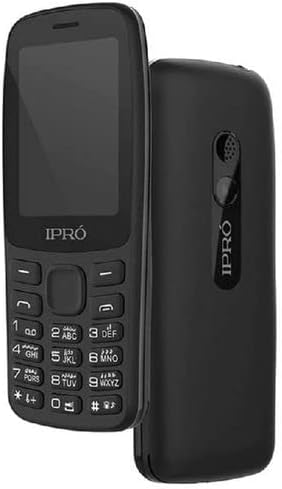
Obraz: przód i tył view of the IPRO EPro A25 mobile phone. The front shows the screen and keypad, while the back highlights the speaker and camera area.
The IPRO EPro A25 is a compact and user-friendly mobile phone. Key features include a 2.4-inch screen, dual SIM card slots for managing two numbers simultaneously, a 3.5mm audio jack, MP3/MP4 playback, wireless FM radio, and an HD camera. It also supports a Micro SD card for expandable storage.
3. Rozpoczęcie pracy: Konfiguracja początkowa
3.1 Inserting SIM Cards and Battery
- Carefully remove the back cover of the phone by gently prying it from the notch usually located at the bottom or side.
- Insert your SIM card(s) into the designated SIM card slots. Ensure the gold contacts face downwards and the cut corner aligns with the slot. This phone supports dual SIMs.
- Align the battery contacts with the terminals inside the phone and gently press the battery into place.
- Załóż tylną pokrywę i upewnij się, że jest pewnie zamocowana na swoim miejscu.
3.2 Inserting a Memory Card (Micro SD)
- Locate the Micro SD card slot, typically near the SIM card slots.
- Insert the Micro SD card with the gold contacts facing downwards until it clicks into place.
- Aby wyjąć kartę, delikatnie wciśnij ją do środka, aż wysunie się.
3.3 Ładowanie urządzenia
Before first use, fully charge the phone's battery. Connect the charger to the phone's charging port and plug it into a power outlet. The battery indicator on the screen will show the charging status. Disconnect the charger once the battery is full.
4. Podstawowe operacje
4.1 Włączanie/wyłączanie zasilania
To power on, press and hold the Power/End Call key until the screen lights up. To power off, press and hold the Power/End Call key until the power-off options appear, then select 'Power off'.
4.2 Wykonywanie połączeń
From the home screen, enter the phone number using the keypad. Press the Call key (usually green) to initiate the call. To end a call, press the End Call key (usually red).
4.3 Wysyłanie wiadomości
Navigate to 'Messages' from the main menu. Select 'Write message' or 'New message'. Enter the recipient's number or select from contacts, then type your message. Press 'Send'.
4.4 Funkcja aparatu
Access the 'Camera' application from the main menu. Frame your shot using the screen. Press the center navigation key or a dedicated camera button to capture a photo. Photos are saved to the phone's memory or inserted Micro SD card.
4.5 Multimedia Playback (MP3/MP4)
To play music (MP3) or videos (MP4), transfer your media files to the phone's memory or a Micro SD card. Access the 'Music Player' or 'Video Player' from the main menu, then browse and select your files do odtwarzania.
4.6 Bezprzewodowe radio FM
Access the 'FM Radio' application from the main menu. This phone supports wireless FM, meaning headphones are not required as an antenna. Scan for available stations and select your preferred one.
5. Konserwacja i pielęgnacja
- Czyszczenie: Do czyszczenia ekranu i obudowy telefonu używaj miękkiej, suchej ściereczki. Unikaj płynnych środków czyszczących i materiałów ściernych.
- Pielęgnacja baterii: Do not expose the battery to extreme temperatures. Avoid overcharging or completely draining the battery frequently to prolong its lifespan.
- Składowanie: Przechowuj telefon w chłodnym i suchym miejscu, z dala od bezpośredniego światła słonecznego i wilgoci.
- Wodoodporność: Ten telefon nie jest wodoodporny. Unikaj narażenia na działanie wody i wysokiej wilgotności.
6. Rozwiązywanie typowych problemów
| Problem | Możliwe rozwiązanie |
|---|---|
| Telefon się nie włącza | Ensure the battery is correctly inserted and fully charged. Try charging for at least 30 minutes. |
| Nie można wykonywać/odbierać połączeń | Check if SIM card is properly inserted. Ensure you have network signal. Contact your service provider if issues persist. |
| Słaba jakość dźwięku | Check volume settings. Ensure speaker/earpiece is not blocked. |
| Karta pamięci nie została wykryta | Reinsert the memory card. Ensure it is properly formatted and not damaged. |
7. Specyfikacje techniczne
| Funkcja | Specyfikacja |
|---|---|
| Nazwa marki | Generic (Manufacturer: iPro) |
| Rozmiar ekranu | 2.4 cala (widoczna przekątna ekranu: 3" / 7 cm) |
| Technologia komórkowa | 2G (sieć komórkowa) |
| Technologia łączności | Bluetooth, WiFi |
| Kolor | multicolor (Product image shows black) |
| Liczba gniazd karty SIM | Podwójna karta SIM |
| Współczynnik kształtu | Łupek |
| Typ wyświetlacza | LCD |
| Opis aparatu | Rear, Front (HD Camera mentioned in description) |
| Gniazdo audio | 3.5mm |
| Wsparcie medialne | MP3/MP4 |
| Możliwość rozbudowy pamięci masowej | Obsługa kart Micro SD |
8. Gwarancja i wsparcie
This product comes with a standard manufacturer's warranty. Please refer to the warranty card included in your product packaging for specific terms and conditions. For technical support, service, or warranty claims, please contact your retailer or the manufacturer's authorized service center. Keep your purchase receipt as proof of purchase.
For further assistance, you may visit the official IPRO website or contact their customer service line, if available in your region.
Ask a question about this manual
Ask about setup, troubleshooting, compatibility, parts, safety, or missing instructions. Manuals+ will review the question and use this page’s manual context to help answer it.