
1. Wprowadzenie
This manual provides essential information for the safe and effective use of your Canon PowerShot G1 X Mark III Digital Camera. Please read this manual thoroughly before using the camera and retain it for future reference.

Rycina 1.1: Przód view of the Canon PowerShot G1 X Mark III Digital Camera with the lens extended. This image displays the camera's compact body, the integrated zoom lens, and the Canon branding.
The PowerShot G1 X Mark III is an advanced compact camera featuring a 24.2MP APS-C CMOS sensor and a DIGIC 7 image processor. It is designed for high-quality still photography and Full HD video recording, offering a versatile 3x optical zoom lens and Dual Pixel CMOS AF for precise focusing.
2. Co znajduje się w pudełku
Sprawdź, czy w pakiecie znajdują się wszystkie poniższe elementy:
- Canon PowerShot G1 X Mark III Digital Camera
- Canon NB-13L Lithium-Ion Battery Pack (3.6V, 1250mAh)
- Canon CB-2LH Battery Charger for NB-13L Li-Ion Batteries
- Osłona obiektywu
- Sznurek do dekielka obiektywu
- NS-DC12 Neck Strap
- Strap Adapter for NS-DC12
- Kabel Micro HDMI
3. Konfiguracja
3.1. Ładowanie i instalacja akumulatora
- Insert the NB-13L battery into the CB-2LH charger.
- Podłącz ładowarkę do gniazdka elektrycznego. Zaświeci się wskaźnik ładowania.
- Po zakończeniu ładowania wskaźnik zmieni kolor lub zgaśnie. Wyjmij baterię.
- Otwórz pokrywę komory baterii w aparacie.
- Insert the charged battery into the camera, ensuring correct orientation. Close the cover securely.
3.2. Wkładanie karty pamięci
The camera supports SD, SDHC, and SDXC memory cards. For optimal performance, especially with video recording and continuous shooting, use a UHS Speed Class 3 (U3) card.
- Otwórz pokrywę gniazda karty pamięci.
- Włóż kartę pamięci etykietą skierowaną w stronę przodu aparatu, aż zatrzaśnie się na miejscu.
- Zamknij dokładnie pokrywę gniazda karty pamięci.
3.3. Mocowanie paska na szyję
Thread the NS-DC12 neck strap through the strap adapters and then through the camera's strap mounts. Ensure both ends are securely fastened to prevent accidental drops.
3.4. Pierwsze włączenie i ustawienia podstawowe
Naciśnij WŁ./WYŁ. button to power on the camera. Follow the on-screen prompts to set the date, time, and language. These settings are crucial for proper image file kierownictwo.
4. Obsługa aparatu
4.1. Sterowanie kamerąview

Rysunek 4.1: Góra view of the camera, illustrating the mode dial, hot shoe, and various control dials for quick adjustments.

Rysunek 4.2: Tył view of the camera, highlighting the LCD screen, electronic viewfinder, and the arrangement of control buttons for menu navigation and settings.
Familiarize yourself with the camera's buttons and dials. The mode dial on the top allows selection of various shooting modes, including Program AE, Shutter-priority AE, Aperture-priority AE, Manual, and Automatic modes. Dedicated dials provide direct adjustment of exposure compensation and other settings.
4.2. Podstawy fotografii
Zrobić zdjęcie:
- Turn the mode dial to your desired shooting mode (e.g., AUTOMATYCZNY for automatic settings).
- Frame your subject using the electronic viewwizjer lub ekran LCD.
- Press the shutter button halfway down to focus. The camera uses Dual Pixel CMOS AF for fast and accurate phase-detection autofocus.
- Aby uchwycić obraz, naciśnij do końca przycisk migawki.
4.3. Nagrywanie wideo
The camera supports Full HD 1080p video recording at up to 60 frames per second in MP4 format.
- Set the camera to video recording mode (if applicable, or press the dedicated video record button).
- Naciśnij przycisk nagrywania wideo, aby rozpocząć nagrywanie.
- Naciśnij ponownie przycisk, aby zatrzymać nagrywanie.
4.4. Using the LCD Monitor and Electronic Viewznalazca

Rysunek 4.3: Strona view of the camera with the vari-angle touchscreen LCD extended, demonstrating its flexibility for various shooting angles.
The camera features a 3.0-inch vari-angle touchscreen LCD, allowing for flexible shooting angles and intuitive control. You can also use the built-in 2.36m-dot OLED electronic viewfinder for a clear view, szczególnie w jasnych warunkach.
4.5. Wbudowana pamięć Flash
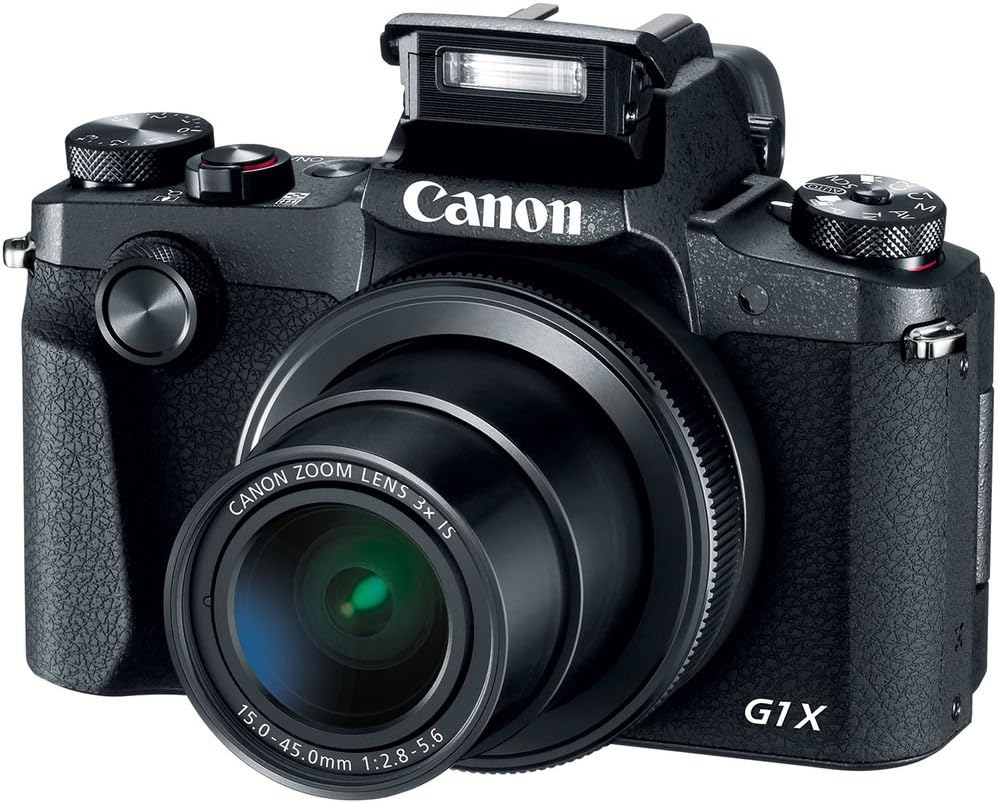
Rycina 4.4: Przód view of the camera with the pop-up flash in the raised position, ready for use in low-light conditions.
The camera includes a built-in pop-up flash. To activate it, press the flash release button. Flash modes include Auto, On, Slow Synch, and Off. The hot shoe allows for external flash units.
4.6. Łączność
The PowerShot G1 X Mark III offers Wi-Fi, NFC, and Bluetooth connectivity for transferring images to smart devices and remote control. Refer to the camera's menu for pairing instructions.
5. Konserwacja
5.1. Czyszczenie aparatu
- Do czyszczenia korpusu aparatu należy używać miękkiej, niepozostawiającej włókien ściereczki.
- Do czyszczenia obiektywu i ekranu LCD należy używać specjalnej ściereczki i płynu do czyszczenia obiektywów. Unikać silnych środków chemicznych.
- Use a blower brush to remove dust from the lens and sensor area (when exposed).
5.2. Pielęgnacja baterii
- Przed każdym użyciem należy całkowicie naładować akumulator.
- Baterie, które nie są używane, przechowuj w chłodnym i suchym miejscu.
- Unikaj wystawiania baterii na działanie ekstremalnych temperatur.
5.3. Przechowywanie
When storing the camera for extended periods, remove the battery and memory card. Store the camera in a dry, dust-free environment, preferably in a camera bag.
6. Rozwiązywanie Problemów
| Problem | Możliwa przyczyna / rozwiązanie |
|---|---|
| Kamera się nie włącza. | Bateria może być rozładowana lub nieprawidłowo włożona. Upewnij się, że bateria jest naładowana i prawidłowo włożona. |
| Nie można robić zdjęć. | Memory card may be full, locked, or not inserted. Check card status and free space. |
| Obrazy są niewyraźne. | Check focus settings. Ensure sufficient light. Use image stabilization or a tripod if necessary. |
| Lampa błyskowa się nie uruchamia. | Flash may be set to 'Off' or in a mode where it does not fire automatically. Check flash settings. |
7. Specyfikacje
- Transduktor: 24.2 MP APS-C CMOS Sensor
- Procesor obrazu: DIGIC7
- Obiektyw: 24-72mm (35mm Equivalent) 3x Optical Zoom, f/2.8-5.6
- Stabilizacja obrazu: Optyczny
- Autofokus: Dual Pixel CMOS AF (Phase Detection)
- Zakres ISO: 100-25600 (rozszerzone)
- Ciągłe strzelanie: Do 9 fps
- Nagrywanie wideo: Full HD 1080p at 60 fps (MP4)
- Viewznalazca: 2.36m-dot OLED Electronic Viewznalazca
- LCD: 3.0" Vari-Angle Touchscreen LCD (1280 x 720 resolution)
- Łączność: Built-In Wi-Fi, NFC, Bluetooth, Micro HDMI
- Nośniki danych: SD, SDHC, SDXC (UHS-I compatible)
- Bateria: NB-13L Lithium-Ion
- Wymiary (w przybliżeniu): 4.53 x 3.00 x 2.36 cala (115 x 76 x 60 mm)
- Waga (w przybliżeniu): 14.0 oz (399 g) with battery and memory card
- Budowa: Dust- and Water-Resistant
8. Gwarancja i wsparcie
This product is covered by a 90-day limited warranty. For warranty claims or technical support, please refer to the official Canon support channels or contact your retailer.