
UNIWA F100
Instrukcja obsługi smartfona UNIWA F100 4G LTE PoC Radio
Model: F100 | Brand: UNIWA
1. Wprowadzenie
Thank you for choosing the UNIWA F100 4G LTE PoC Radio Smartphone. This device combines the functionality of a modern smartphone with the robust features of a Push-to-Talk over Cellular (PoC) radio, designed for reliable communication in various environments. It features a durable IP54 waterproof rating, a powerful 3800mAh battery, and runs on Android 10.0, offering a versatile and resilient communication tool. Please read this manual carefully to ensure proper use and maintenance of your device.
2. Zawartość opakowania
Before you begin, please check the contents of your package. If any items are missing or damaged, contact your retailer.
- UNIWA F100 Smartphone
- Removable Li-polymer Battery (3800mAh)
- Zasilacz
- Kabel USB
- Instrukcja obsługi
- Charging Dock (if included with your purchase)

Image: Contents of the UNIWA F100 package, including the smartphone, charger, battery, and user manual.
3. Układ urządzenia
Familiarize yourself with the physical components of your UNIWA F100 device.

Obraz: Wielokrotny views of the UNIWA F100 smartphone, showing the front display, side buttons, and rear panel.
- Przód: 4-inch IPS WVGA Touchscreen, Front Camera, Earpiece.
- Lewa strona: Volume Up/Down Buttons, Push-to-Talk (PTT) Button.
- Prawa strona: Power/Lock Button.
- Szczyt: Antenna, SOS Button.
- Spód: Port ładowania USB, mikrofon.
- Tył: Rear Camera, LED Flash, Loudspeaker, NFC Area.

Image: Close-up of the rear top section of the UNIWA F100, highlighting the camera, speaker grille, and SOS button.
4. Konfiguracja
4.1. Instalacja karty SIM i karty MicroSD
The UNIWA F100 supports dual SIM cards and one MicroSD card for expanded storage (up to 128GB).
- Całkowicie wyłącz urządzenie.
- Zdejmij pokrywę baterii z tyłu urządzenia.
- Carefully insert the SIM card(s) into the designated SIM slots. Ensure the gold contacts face downwards.
- If using a MicroSD card, insert it into the MicroSD card slot.
- Replace the battery cover, ensuring it clicks securely into place to maintain IP54 rating.

Obraz: Tył view of the UNIWA F100 with the battery cover removed, showing the dual SIM card slots and the MicroSD card slot.
4.2. Montaż i ładowanie akumulatora
The device comes with a removable 3800mAh Li-polymer battery.
- After installing SIM/MicroSD cards, insert the battery into the battery compartment, aligning the contacts.
- Załóż z powrotem pokrywę baterii.
- Connect the USB cable to the device's charging port and the other end to the power adapter. Plug the adapter into a power outlet.
- Alternatively, place the device into the charging dock (if purchased) to charge.
- Allow the device to fully charge before first use. The charging indicator will show the charging status.

Image: The UNIWA F100 smartphone placed in its dedicated charging dock.

Image: Two UNIWA F100 devices shown in their respective charging docks, illustrating different angles.
4.3. Pierwsze włączenie zasilania
Press and hold the Power button on the right side of the device until the UNIWA logo appears. Follow the on-screen prompts to complete the initial setup, including language selection, Wi-Fi connection, and Google account setup.
5. Instrukcja obsługi
5.1. Podstawowa nawigacja
- Ekran dotykowy: Tap, swipe, pinch-to-zoom as you would on any Android smartphone.
- Przyciski głośności: Adjust media volume during playback or call volume during a call.
- Przycisk zasilania: Short press to lock/unlock the screen. Long press to power off or restart the device.
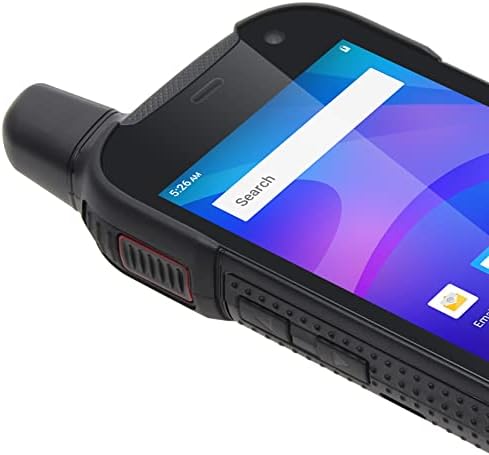
Image: Close-up of the side of the UNIWA F100, showing the textured grip and physical buttons.
5.2. Wykonywanie połączeń
Use the standard Phone application to dial numbers or select contacts for voice calls over the cellular network.
5.3. Using PoC (Push-to-Talk over Cellular)
The UNIWA F100 is designed for PoC communication, often utilizing applications like Zello.
- Ensure you have a PoC application (e.g., Zello) installed and configured with your account and channels.
- Select the desired channel or contact within the PoC application.
- Press and hold the dedicated PTT button on the left side of the device to transmit your voice. Release to listen.
- The φ36 loudspeaker ensures clear audio even in noisy environments.
5.4. Korzystanie z aparatu
The device features an 8MP rear camera and a 5MP front camera.
- Otwórz aplikację Aparat z ekranu głównego lub szuflady aplikacji.
- Tap the shutter button to take photos or switch to video mode to record.
- Use the settings within the app to adjust camera parameters.
5.5. Funkcjonalność NFC
The UNIWA F100 supports Near Field Communication (NFC) for quick pairing with other NFC-enabled devices or for mobile payments.
- Enable NFC in the device settings (Settings > Connected devices > Connection preferences > NFC).
- Tap the back of your device near another NFC-enabled device or tag to initiate a connection or transaction.
5.6. Funkcja SOS
The dedicated SOS button on the top of the device can be configured for emergency situations.
- Go to Settings to configure emergency contacts and messages for the SOS function.
- In an emergency, press the SOS button to activate the pre-set emergency actions (e.g., sending an SOS message with location, dialing an emergency contact).
6. Konserwacja
6.1. Czyszczenie urządzenia
To keep your device in optimal condition, clean it regularly.
- Do przecierania ekranu i obudowy należy używać miękkiej, niepozostawiającej włókien ściereczki.
- W przypadku uporczywych zabrudzeń, delikatnieampWyczyść szmatkę wodą lub płynem do czyszczenia ekranów.
- Avoid using harsh chemicals, abrasive cleaners, or aerosols.
- Przed czyszczeniem przy użyciu wilgoci należy upewnić się, że wszystkie osłony portów są szczelnie zamknięte.
6.2. Pielęgnacja baterii
Prawidłowa pielęgnacja akumulatora wydłuża jego żywotność i zapewnia optymalną wydajność.
- Unikaj ekstremalnych temperatur (wysokich i niskich), ponieważ mogą one obniżyć wydajność akumulatora.
- Do not leave the device charging for excessively long periods after it's fully charged.
- Jeżeli urządzenie nie będzie używane przez dłuższy czas, przed schowaniem należy je naładować do poziomu około 50%.
6.3. Odporność na wodę i kurz (IP54)
The UNIWA F100 is rated IP54, meaning it is protected against dust ingress and splashing water from any direction.
- This rating does not mean the device is fully waterproof or submersible.
- Ensure all port covers (USB, headphone jack if present) and the battery cover are securely closed to maintain the IP54 rating.
- Avoid exposing the device to high-pressure water jets or prolonged submersion.
- If the device gets wet, dry it thoroughly before charging or opening any covers.
7. Rozwiązywanie Problemów
If you encounter issues with your UNIWA F100, try the following solutions before seeking professional assistance.
| Problem | Możliwe rozwiązanie |
|---|---|
| Urządzenie nie włącza się. | Ensure the battery is correctly installed and charged. Connect to charger and try again. |
| Nie można wykonywać ani odbierać połączeń. | Check SIM card installation. Verify network signal strength. Ensure airplane mode is off. |
| PoC (Zello) not working. | Check internet connection (Wi-Fi or mobile data). Ensure the PoC app is logged in and configured correctly. |
| Bateria szybko się rozładowuje. | Reduce screen brightness. Close unused apps. Disable Wi-Fi/Bluetooth when not in use. Check for background app activity. |
| Urządzenie jest wolne lub nie reaguje. | Restart the device. Clear cache of frequently used apps. Consider a factory reset (backup data first). |
8. Specyfikacje
| Funkcja | Szczegół |
|---|---|
| Model | UNIWA F100 |
| System operacyjny | Android 10.0 |
| Wyświetlacz | 4-inch IPS WVGA Touchscreen, 800 x 480 px, 240 dpi |
| BARAN | 2 GB |
| Pamięć wewnętrzna | 16 GB pamięci ROM |
| Możliwość rozbudowy pamięci masowej | Karta microSD do 128 GB (brak w zestawie) |
| Kamera tylna | 8 MP |
| Przednia kamera | 5 MP |
| Bateria | 3800 mAh Removable Li-polymer |
| Gniazda kart SIM | Podwójna karta SIM |
| Wsparcie sieciowe | 2G/3G/4G/WLAN |
| Łączność | NFC |
| Cechy specjalne | IP54 Waterproof, SOS Button, φ36 Loudspeaker |
9. Gwarancja i wsparcie
The UNIWA F100 comes with a standard manufacturer's warranty. Please refer to the warranty card included in your package for specific terms and conditions, including warranty period and coverage details.
For technical support, troubleshooting beyond this manual, or warranty claims, please contact your point of purchase or the official UNIWA customer service. Contact information can typically be found on the manufacturer's webmiejscu lub na opakowaniu produktu.
Ważny: Zachowaj paragon jako dowód zakupu na potrzeby gwarancji.
Powiązane dokumentyF100


Ask a question about this manual
Ask about setup, troubleshooting, compatibility, parts, safety, or missing instructions. Manuals+ will review the question and use this page’s manual context to help answer it.