
Wprowadzenie i koniecview
The URAMAZ Food Scale with Nutritional Calculator is designed to assist you in tracking your dietary intake with precision. This smart digital scale connects to the "Foodiet" app, offering comprehensive nutritional analysis and personalized health goal tracking. Its compact design and multiple measurement units make it a versatile tool for any kitchen.
- Free App with 20 Nutrient Metrics: Track nutritional content of foods and recipes using the "Foodiet" app, which accesses a vast USDA database.
- Achieve Your Health Goals: Automatically tracks consumption and visualizes progress through charts, syncing with Apple Health or Fitbit.
- Customizable 30-Minute Auto-Off: Conserves battery life with adjustable auto-shut off settings via the app.
- User-friendly Tare Function: Easily reset the scale to zero for net weight measurements and continuous weighing of multiple ingredients.
- 5 Accurate Measurements: Equipped with high-precision sensors, it provides accurate readings from 3g/0.1oz up to 5kg/11lb in multiple units (g, lb:oz, ml, fl:oz, and ml for milk).
- Lightweight & Easy to Store: Made from food-grade plastic, its compact design allows for convenient storage.
Organizować coś
1. Instalacja baterii
The URAMAZ Food Scale comes with two CR2032 coin batteries included. To install or replace batteries:
- Znajdź komorę baterii na spodzie wagi.
- Otwórz pokrywę baterii.
- Remove the plastic film protecting the batteries (if new).
- Insert the two CR2032 batteries, ensuring correct polarity.
- Dokładnie zamknij pokrywę baterii.

Image: Underside of the URAMAZ food scale, highlighting the battery compartment and non-slip feet.
2. Pobieranie aplikacji i łączenie
To unlock the full nutritional tracking features, download the "Foodiet" app:
- Scan the QR code provided in the instruction pamphlet or search for "Foodiet" in your device's app store (Apple App Store or Google Play Store).
- Zainstaluj aplikację na swoim smartfonie lub tablecie.
- Włącz Bluetooth w swoim urządzeniu.
- Open the "Foodiet" app and follow the on-screen instructions to pair with your URAMAZ Food Scale.

Image: A smartphone displaying the Foodiet app interface, illustrating barcode scanning and manual food entry, with integration options for Apple Health and Fitbit.
Instrukcja obsługi
1. Włączanie/wyłączanie zasilania
Press the "ON/TARE" button to power on the scale. The display will light up. To power off, press and hold the "ON/TARE" button for a few seconds, or the scale will automatically shut off after a period of inactivity (default 2 minutes, customizable via app).
2. Konwersja jednostek
Press the "UNIT" button to cycle through the available measurement units: grams (g), pounds and ounces (lb:oz), milliliters (ml), fluid ounces (fl:oz), and milliliters for milk (ml for milk). Select the unit appropriate for your ingredients.
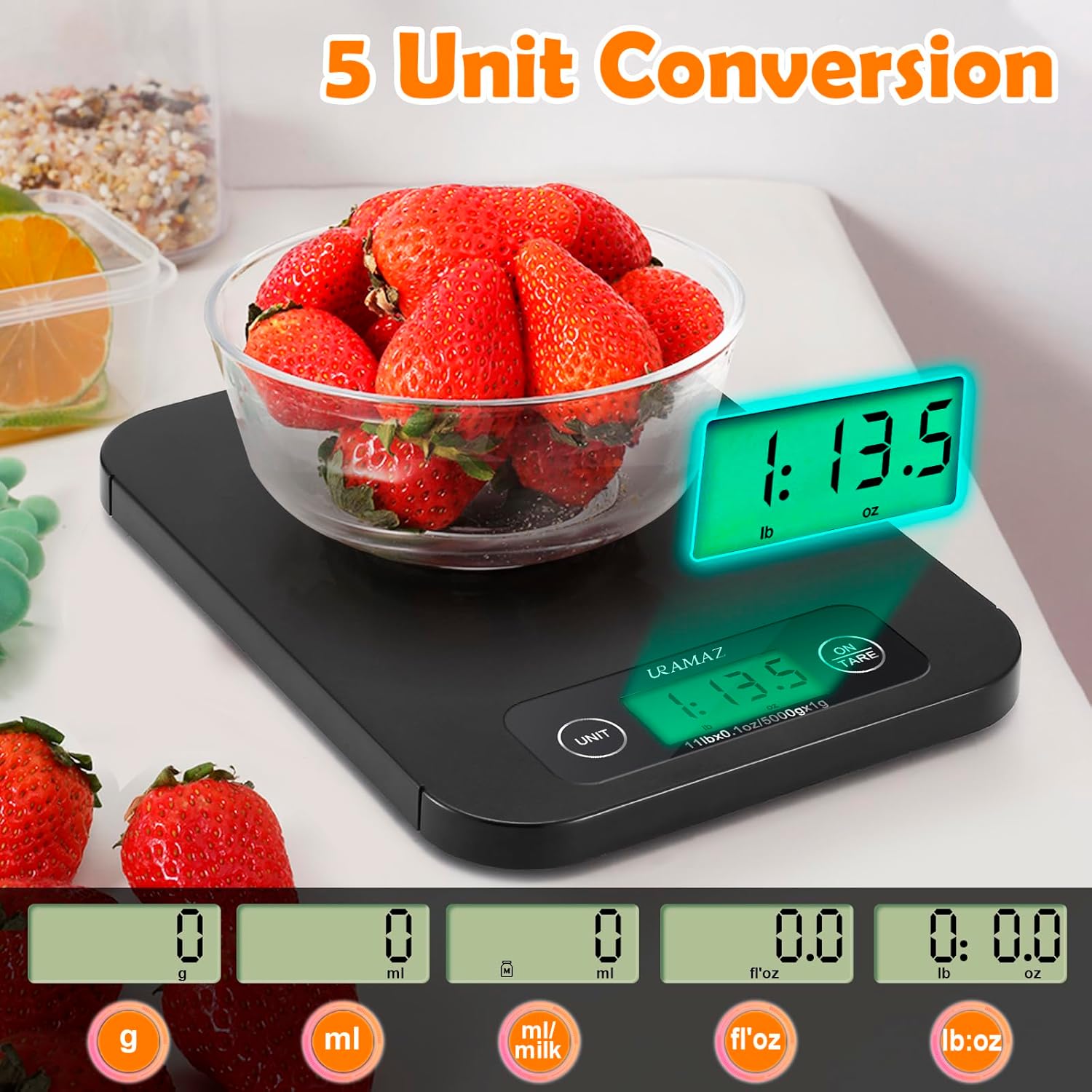
Image: The URAMAZ food scale's digital display showing various measurement units, including grams, milliliters, fluid ounces, and pounds:ounces, indicating its versatility.
3. Funkcja tarowania
The tare function allows you to weigh ingredients in a container without including the container's weight, or to weigh multiple ingredients consecutively in the same bowl.
- Postaw pusty pojemnik na wadze. Wyświetlacz pokaże jego wagę.
- Press the "ON/TARE" button. The display will reset to zero.
- Dodaj składniki do pojemnika. Na wyświetlaczu pojawi się tylko waga netto składników.
- To add more ingredients, simply add them to the container, and the scale will display the new total net weight. Press "ON/TARE" again to zero out the current weight before adding the next ingredient.

Image: A visual guide illustrating the tare function in three steps: placing a container, pressing the "TARE" button to reset to zero, and then adding ingredients to measure their net weight.
4. Nutritional Tracking with "Foodiet" App
Once connected via Bluetooth, the "Foodiet" app provides detailed nutritional information:
- Weigh and Sync: Place food on the scale, and its weight will instantly appear in the app.
- Search & Scan: Use the app to search for food items in the USDA database (over 1 million items) or scan barcodes for quick identification.
- 20 Nutrient Metrics: View detailed metrics including calories, fat, sugar, protein, carbohydrates, vitamins, and minerals.
- Custom Foods & Recipes: Create and save your own custom food entries and recipes for personalized tracking.
- Wizualizacja postępu: The app generates easy-to-read charts and reports to help you monitor your progress towards health goals.
- Integracja aplikacji zdrowotnej: Sync your data with Apple Health or Fitbit for a holistic view Twojego zdrowia.
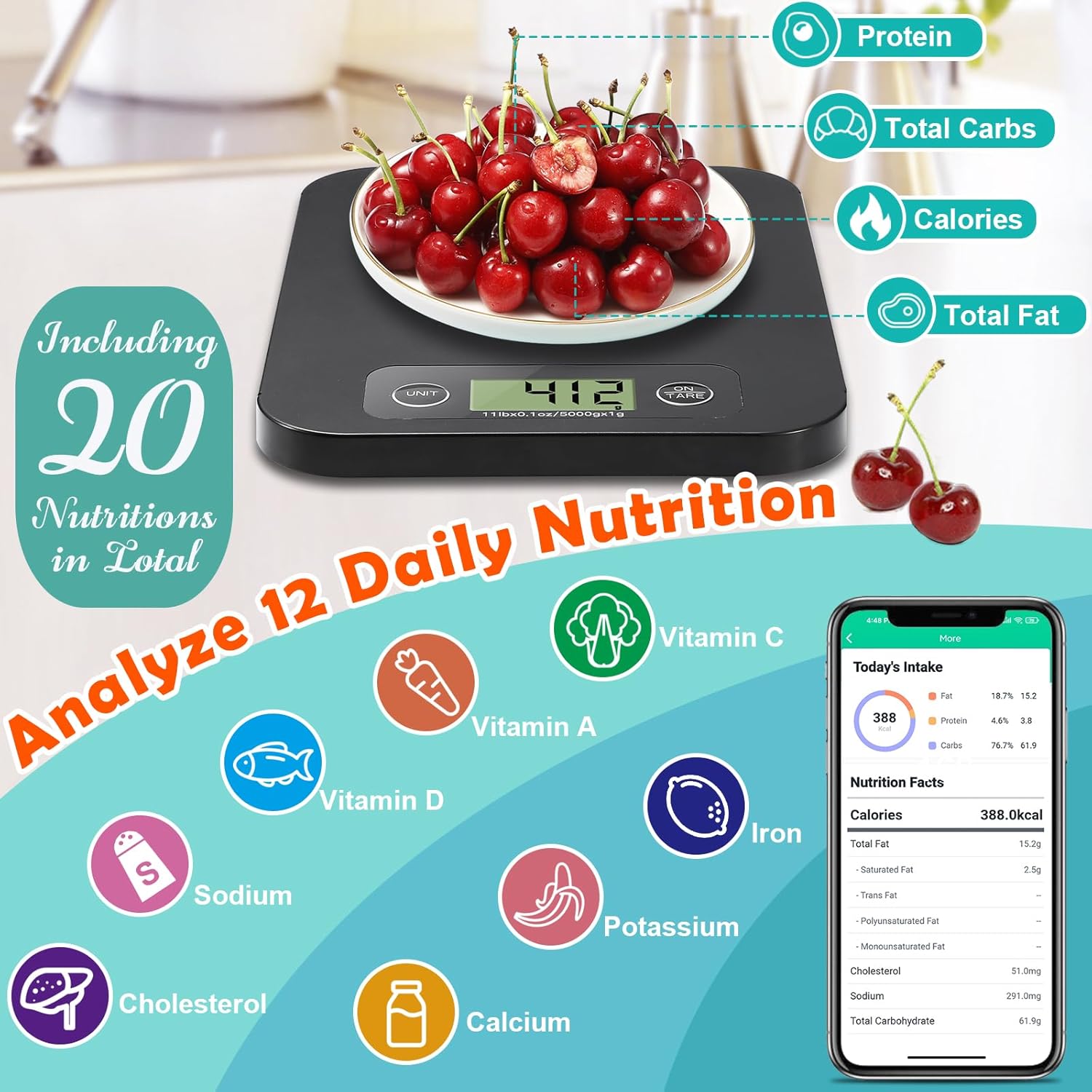
Image: The URAMAZ food scale weighing cherries, accompanied by an infographic illustrating the 20 nutrients tracked by the Foodiet app, such as protein, total carbs, calories, total fat, Vitamin C, Vitamin A, Vitamin D, Sodium, Potassium, Iron, and Cholesterol.

Image: A hand holding a smartphone, displaying the Foodiet app's detailed nutrition facts panel for a meal, with the URAMAZ food scale visible in the background.
Video: A demonstration of the URAMAZ Smart Food Scale's app features, showing how to track food intake and monitor nutritional goals.
5. Customizable Auto-Off Time
The default auto-shut off time is 2 minutes. You can customize this setting via the "Foodiet" app to 2, 3.5, 5, or 30 minutes, preventing unwanted shutdowns during longer food preparation sessions.

Image: The URAMAZ food scale with a bowl of flour, alongside a smartphone displaying the Foodiet app's settings for customizing the auto-off time to various durations.
6. Micro Measurement Mode
For enhanced precision, especially with tiny objects or small quantities (down to 1g), activate the micro measurement mode through the "Foodiet" app. This ensures accurate readings for even the smallest ingredients.

Image: The URAMAZ food scale with a small bowl of salt, accompanied by a smartphone displaying the Foodiet app's micro measurement mode, indicating precision for small quantities.
7. Integrated Timer
The "Foodiet" app includes a timer function, allowing you to set timers from 1 second up to 7 hours. This is useful for various cooking and baking tasks, from quick brews to slow cooking.

Image: The URAMAZ food scale with a coffee pour-over setup, next to a smartphone displaying the Foodiet app's timer function, set for 35 seconds.
Konserwacja
1. Czyszczenie
The URAMAZ Food Scale is crafted from food-grade plastic, making it easy to clean. Wipe the surface with a damp szmatką i łagodnym detergentem. Nie zanurzaj wagi w wodzie ani nie używaj środków czyszczących o działaniu ściernym.
2. Przechowywanie
Due to its compact and lightweight design, the scale can be easily stored in a drawer, cabinet, or travel bag. Ensure it is stored in a dry place away from extreme temperatures.
Rozwiązywanie problemów
If you encounter any issues with your URAMAZ Food Scale, please refer to the following common solutions:
- Niedokładne odczyty: Ensure the scale is placed on a flat, stable surface. Avoid placing it near strong electromagnetic fields. Recalibrate if necessary (refer to app instructions for calibration).
- Wyświetlacz się nie włącza: Check if the batteries are correctly installed and have sufficient charge. Replace batteries if needed.
- Problemy z łącznością aplikacji: Ensure Bluetooth is enabled on your device and the scale is within range. Restart both the app and the scale, then attempt to re-pair.
- Auto-Off Too Soon: Adjust the auto-off time setting within the "Foodiet" app to a longer duration.
Specyfikacje
- Marka: URAMAZ
- Numer modelu: CK10E
- Kolor: Czarny
- Tworzywo: Plastikowy
- Limit wagowy: 11 funtów (5 kg)
- Dokładność odczytu: 1 gramów / 0.1 uncji
- Typ wyświetlacza: LCD
- Waga przedmiotu: 7.1 uncji
- Wymiary produktu: 7.9 x 5.94 x 0.43 cala
- Baterie: 2 baterie CR2032 (w zestawie)
- Cechy szczególne: 20 Nutrient Tracking Analysis, Auto Shut Off, Connect to Fitbit, Digital Food Scale, Macro Counting APP
Gwarancja i wsparcie
For warranty information or technical support, please refer to the contact details provided in your product packaging or visit the official URAMAZ webstrona. Zachowaj dowód zakupu na potrzeby roszczeń gwarancyjnych.