
1. Wprowadzenie
Thank you for choosing the FLEXISPOT EG1 Electric Standing Desk. This manual provides essential information for the safe and efficient assembly, operation, and maintenance of your new height-adjustable desk. The EG1 desk is designed to promote a healthier work environment by allowing seamless transitions between sitting and standing positions, enhancing focus and comfort throughout your workday.
The FLEXISPOT EG1 features a wide height adjustment range, a smooth one-piece desktop, and an intuitive control panel for ease of use. Please read this manual thoroughly before assembly and operation to ensure proper functionality and longevity of your product.
2. Informacje dotyczące bezpieczeństwa
- Przed montażem upewnij się, że wszystkie elementy są kompletne i nieuszkodzone. Nie używaj, jeśli brakuje którejkolwiek części lub jest ona uszkodzona.
- Aby zapobiec obrażeniom, podczas pracy biurka należy trzymać dzieci i zwierzęta z dala od niego.
- Podczas regulacji wysokości nie należy zbliżać rąk ani innych przedmiotów do ruchomych części (np. kolumn podnoszących).
- Aby zachować stabilność, należy ustawić biurko na równej powierzchni.
- Nie przeciążaj biurka. Zapoznaj się ze specyfikacją, aby poznać maksymalny udźwig.
- Należy używać wyłącznie dołączonego zasilacza i kabli.
- Odłącz zasilanie przed czyszczeniem lub konserwacją.
- Unikaj rozlewania płynów na panel sterowania i elementy elektryczne.
- This desk is equipped with an anti-collision rebound function. However, always be aware of surroundings during movement.
3. Zawartość opakowania
The FLEXISPOT EG1 Electric Standing Desk is shipped in two separate packages to ensure better protection during transit. Please verify that all components listed below are present before beginning assembly.
- Desktop (1 piece)
- Desk Frame (includes legs, motor, control box)
- Panel sterowania
- Zasilacz i kabel
- Sprzęt montażowy (śruby, śruby, narzędzia)
- Instrukcja obsługi

Image: The FlexiSpot EG1 desk components are shipped in two distinct packages: one containing the desktop and another for the desk frame, ensuring secure delivery.
4. Instalacja i montaż
Assembly of the FLEXISPOT EG1 desk is designed to be straightforward with pre-drilled holes and a complete set of tools included. Follow these general steps for assembly:
- Rozpakuj komponenty: Ostrożnie wyjmij wszystkie części z opakowania i połóż je na czystej, miękkiej powierzchni, aby zapobiec zarysowaniom.
- Złóż ramę biurka: Attach the lifting columns to the crossbar, ensuring all screws are securely tightened.
- Zamontuj stopy: Secure the foot pads to the bottom of the lifting columns. The anti-slip foot pads provide stability and protect your floor.
- Zamontuj pulpit: Carefully place the desktop upside down on a soft surface. Align the assembled desk frame with the pre-drilled holes on the desktop and secure it with the provided screws.
- Zainstaluj Panel sterowania: Attach the control panel to the underside of the desktop in a convenient location.
- Podłącz kable: Connect the motor cables, control panel cable, and power adapter to the control box. Ensure all connections are firm.
- Zarządzanie kablami: Use cable ties or clips (if provided) to organize and secure cables, preventing them from snagging during height adjustments.
- Stanowisko: Carefully flip the desk upright and place it in its desired location. Ensure there is adequate clearance for height adjustments.

Image: The desk features a smooth, one-piece desktop, eliminating gaps and burrs often found in spliced desktops, contributing to a clean and stable work surface.
5. Instrukcja obsługi
The FLEXISPOT EG1 Electric Standing Desk is operated using a simple 2-button control panel, allowing for quick and easy height adjustments and memory presets.
5.1 Funkcje panelu sterowania

Image: The smart control panel features an LED display, up/down buttons for height adjustment, and four memory preset buttons for saving preferred desk heights.
- Wyświetlacz LED: Shows the current desk height in centimeters or inches.
- Przyciski góra/dół (▲ / ▼): Press and hold to move the desk up or down. Release the button to stop at the desired height.
- Ustawienia pamięci (1, 2, 3, 4): These buttons allow you to save and recall up to four preferred desk heights.
5.2 Ustawianie ustawień pamięci
- Dostosuj wysokość biurka do swoich potrzeb za pomocą przycisków Góra/Dół.
- Press the 'M' or 'SET' button (if available, otherwise proceed to step 3). The display may flash.
- Press one of the numbered memory buttons (1, 2, 3, or 4) within a few seconds. The display will confirm the setting.
- To recall a saved height, simply press the corresponding numbered memory button. The desk will automatically move to that height.
5.3 Funkcja antykolizyjna
Biurko jest wyposażone w system antykolizyjny. Jeśli biurko napotka przeszkodę podczas regulacji wysokości, automatycznie się zatrzyma i lekko cofnie, aby zapobiec uszkodzeniom. Zawsze upewnij się, że obszar wokół biurka jest wolny podczas pracy.

Image: The desk offers a wide height range (71.5 to 116 cm), accommodating various users for comfortable sitting or standing positions.
6. Konserwacja
Regular maintenance ensures the longevity and optimal performance of your FLEXISPOT EG1 Electric Standing Desk.
- Czyszczenie: Przetrzyj blat i ramę miękką szmatką.amp Ściereczką. Unikaj środków czyszczących o działaniu ściernym i silnych środków chemicznych, które mogłyby uszkodzić wykończenie. Przed czyszczeniem upewnij się, że biurko jest odłączone od zasilania.
- Zarządzanie kablami: Periodically check cables for wear or damage. Ensure they are neatly organized and not pinched or tangled.
- Kontrola elementów złącznych: Od czasu do czasu sprawdzaj, czy wszystkie śruby i nakrętki są dokręcone. W razie potrzeby dokręć.
- Kontrola Ruchu: Operate the desk through its full height range periodically to ensure smooth and consistent movement.
7. Rozwiązywanie Problemów
If you encounter issues with your FLEXISPOT EG1 desk, refer to the following troubleshooting guide:
| Problem | Możliwa przyczyna | Rozwiązanie |
|---|---|---|
| Biurko się nie porusza. | Power cable disconnected, control box error, motor issue. | Check power connections. Unplug and replug the desk for 10 seconds to reset. If problem persists, contact customer support. |
| Biurko porusza się nierównomiernie lub wydaje nietypowe dźwięki. | Uneven load, loose fasteners, obstruction. | Ensure weight is evenly distributed. Check and tighten all assembly fasteners. Clear any obstructions. |
| Biurko zatrzymuje się podczas regulacji. | Anti-collision activated, overload. | Remove any obstacles. Reduce weight on the desk if it exceeds maximum capacity. |
| Ustawienia pamięci nie działają. | Presets not properly saved. | Ponownie zapisz ustawienia pamięci, postępując zgodnie z instrukcjami podanymi w rozdziale 5.2. |
8. Specyfikacje
Key specifications for the FLEXISPOT EG1 Electric Standing Desk:
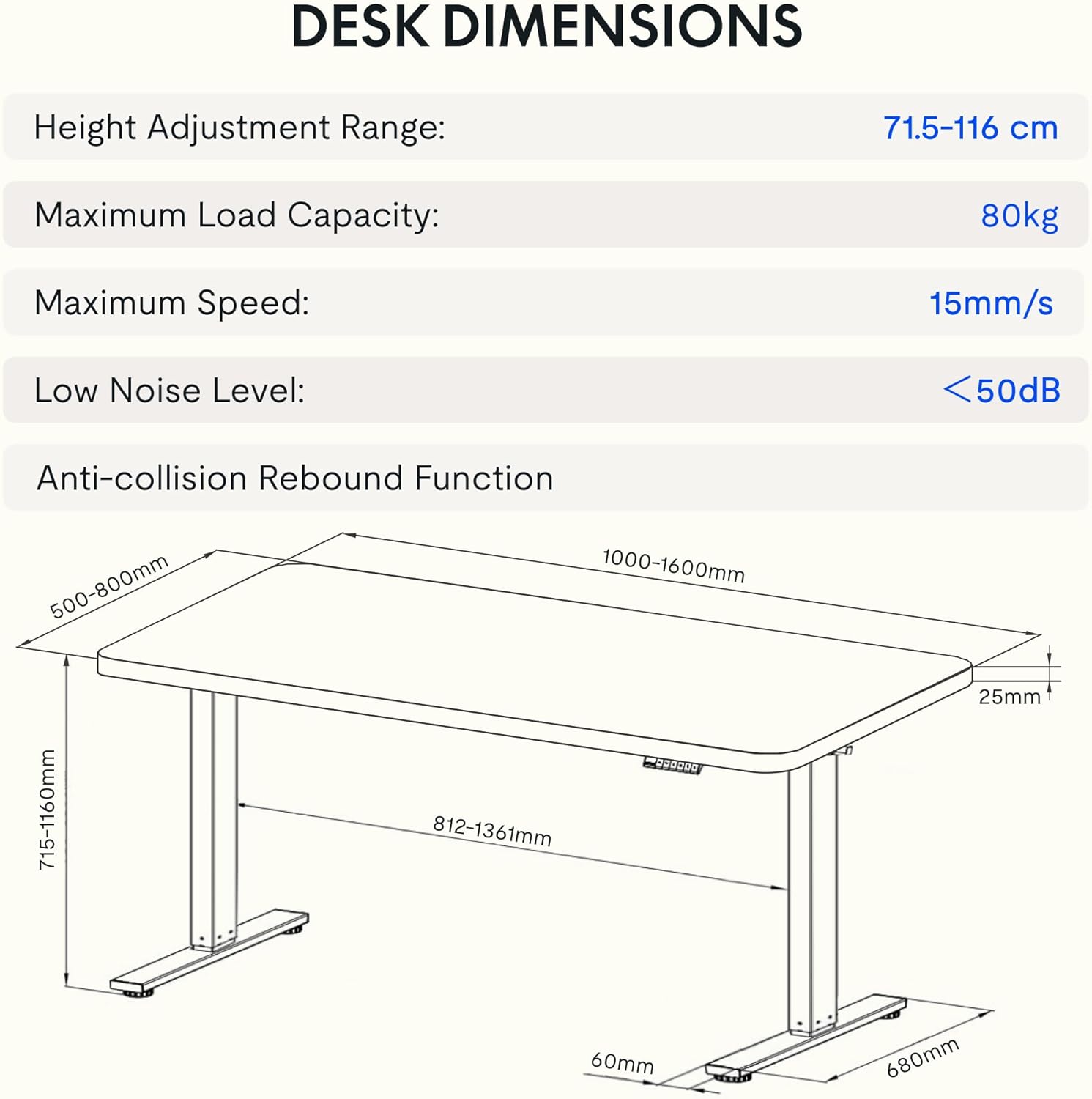
Image: Detailed diagram illustrating the desk's dimensions, height adjustment range (71.5-116 cm), maximum load capacity (80kg), maximum speed (15mm/s), and low noise level (<50dB).
| Funkcja | Specyfikacja |
|---|---|
| Numer modelu | EG1B+TP1608-Black |
| Zakres regulacji wysokości | 71.5 - 116 cm (28 - 48 cala) |
| Maksymalna ładowność | 80 kg (176 funta) |
| Maksymalna prędkość | 15 mm/s |
| Niski poziom hałasu | < 50 dB |
| Materiał na biurko | Wood (2.5 cm thickness) |
| Materiał ramy | Stal |
| Wymiary produktu (Gł. x Szer. x Wys.) | 31.5" x 62.99" x 11.02" (packaged) |
| Waga przedmiotu | 30 kilograma |
| Cechy specjalne | Electric, Anti-collision Rebound Function, 4 Memory Presets |
9. Gwarancja i wsparcie
FLEXISPOT is committed to providing high-quality ergonomic solutions. With over 20 years of experience, our products undergo rigorous testing and meet various European certifications (IGR, CE, TÜV).
For warranty information, technical support, or any questions regarding your FLEXISPOT EG1 Electric Standing Desk, please visit the official FLEXISPOT website or contact our customer service department. You can find more information and contact details on the Sklep FLEXISPOT na Amazon.