
Wstęp
This manual provides detailed instructions for the LENVII CW888 Bluetooth Wireless 1D/2D QR Barcode Scanner. Please read this manual carefully before using the device to ensure proper operation and to maximize its performance and lifespan. This scanner supports multiple connection methods and is designed for efficient barcode data collection.
Organizować coś
1. Zawartość opakowania
Sprawdź, czy wszystkie komponenty są obecne:
- LENVII CW888 Barcode Scanner
- Baza ładująca
- Kabel USB
- Instrukcja obsługi (ten dokument)
2. Ładowanie skanera
The scanner is equipped with a 2200 mAh built-in battery. Before initial use, fully charge the scanner.
- Charging with Base: Place the scanner onto the charging base. Ensure the scanner is properly seated.
- Ładowanie za pomocą kabla USB: Connect the USB cable directly to the scanner and a power source (e.g., computer USB port, USB wall adapter).
A full charge takes approximately 5 hours. The scanner will emit five short beeps (low frequency) and stop scanning when the battery is low. Connect the USB cable for charging when this occurs.
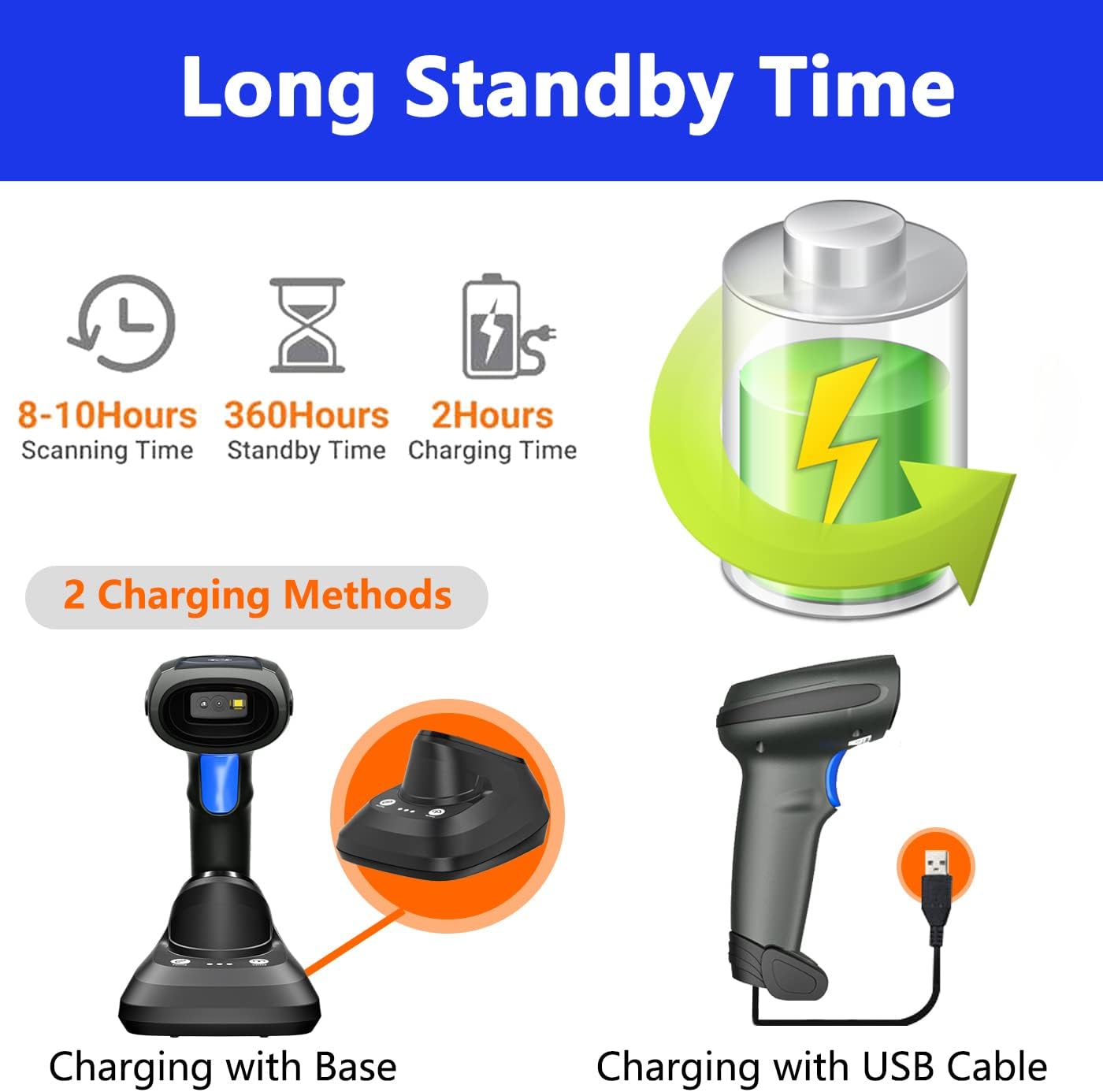
Image: Two charging methods for the LENVII CW888 barcode scanner: using the charging base or directly via USB cable.
3. Metody połączenia
The LENVII CW888 scanner offers three connection options:
3.1. Połączenie Bluetooth
Connect the scanner wirelessly to Bluetooth-enabled devices such as smartphones, tablets, or computers.
- Sprawdź, czy skaner jest włączony.
- Aktywuj Bluetooth na urządzeniu hosta (np. smartfonie, tablecie, komputerze).
- Scan the Bluetooth pairing barcode (usually found in the quick start guide or by scanning a specific configuration code).
- On your device, search for available Bluetooth devices and select "LENVII CW888" (or similar name) to pair.
- O pomyślnym nawiązaniu połączenia poinformuje odpowiedni dźwięk lub światło na skanerze.
3.2. 2.4G Wireless Connection (via Charging Base)
Use the charging base as a wireless receiver for a 2.4G connection to your computer.
- Connect the charging base to your computer via the USB cable.
- The computer should automatically recognize the base as a HID keyboard device.
- Ensure the scanner is powered on and within range of the base.
- The scanner and base should automatically establish a 2.4G wireless connection.
3.3. Połączenie przewodowe USB
Connect the scanner directly to your computer using the USB cable for a wired connection.
- Podłącz kabel USB skanera do wolnego portu USB w komputerze.
- The computer will recognize the scanner as a plug-and-play device, requiring no additional drivers.
- The scanner is ready for use once recognized.

Image: Illustration of the three connection types: Bluetooth, 2.4G wireless via charging base, and USB wired, along with compatible operating systems.
4. Zgodność
The LENVII CW888 barcode scanner is compatible with various operating systems and devices:
- Systemy operacyjne: Windows (7/8/10/XP), Linux, Mac OS
- Urządzenia: Laptops, Tablets, Smartphones, PCs
Instrukcja obsługi
1. Skanowanie kodów kreskowych
The scanner supports both 1D and 2D barcode types, including those on screens (mobile phones, computers).

Obraz: Byłyamples of supported 1D and 2D barcode types, including QR codes, Data Matrix, and various linear barcodes.
Obsługiwane typy kodów kreskowych:
- 1D: UPC / EAN / JAN, UPC-A and UPC-E, EAN-8 and EAN-13, JAN-8 and JAN-13, ISBN / ISSN, Code 39 (with full ASCII), Codabar (NW7), Code 128 and EAN 128, Code 93, etc.
- 2D: QR Code, Data Matrix, PDF417, Aztec, Maxicode.
The scanner features an advanced decoding chip capable of recognizing colorful, blurry, distorted, and reflective barcodes, improving efficiency for mobile payments and various scanning environments.
2 Tryby skanowania
Skaner oferuje dwa podstawowe tryby skanowania:
- Kluczowy tryb wyzwalania: Naciśnij przycisk spustowy, aby zeskanować każdy kod kreskowy osobno.
- Tryb ciągłego skanowania: The scanner continuously emits a scanning beam, allowing for hands-free operation when placed on the charging base.

Image: Comparison of Key Trigger Mode, where the user presses a button for each scan, and Continuous Scanning Mode, which allows hands-free operation with the scanner on its base.
3 Tryby przesyłania danych
Skaner obsługuje dwie metody przesyłania danych:
- Tryb błyskawicznego przesyłania: Dane kodu kreskowego są synchronicznie przesyłane do podłączonego urządzenia natychmiast po zeskanowaniu.
- Tryb przechowywania: The scanner can store up to 1,500,000 barcodes in its internal 16MB memory. Data can be collected and stored, then uploaded to the computer together at a later time. This is useful for inventory management or when out of range.

Image: Visual representation of Instant Upload Mode, where scanned data is immediately sent to the device, and Storage Mode, where data is saved internally (16MB capacity) for batch upload.
4. Odległość transmisji
The effective transmission range varies based on the environment:
- Obstacle Environment (Bluetooth): Do 49 stóp (15 metrów).
- Obstacle Environment (2.4G Wireless): Do 98 stóp (30 metrów).
- Barrier-Free Environment: Do 262 stóp (80 metrów).

Image: Diagram illustrating the effective transmission distances for the scanner under different conditions and connection types.
5. Cradle Functionality
The charging base (cradle) provides additional functionality beyond charging:
- One-Click Pairing: Simplifies the pairing process with the scanner.
- One-Click Upload: Facilitates quick data upload from the scanner's storage memory to the connected device.
- Rejestrowanie danych: The base also supports data logging functions.

Image: Close-up of the charging cradle, highlighting the "One click pairing" and "One click upload" buttons, along with LED indicators for pairing status, data upload, and power.
6. Adding Prefix/Suffix
The scanner can be configured to add custom prefixes or suffixes to scanned barcode data. This feature is typically enabled by scanning specific configuration barcodes found in the full user manual or quick start guide.

Image: Illustration of how prefixes and suffixes can be added to barcode data after scanning.
Konserwacja
1. Pielęgnacja baterii
- The scanner has a 2200 mAh battery, providing approximately 9 hours of continuous operation on a full charge.
- Czas ładowania to około 5 godziny.
- When the battery is low, the scanner will emit five short beeps. Connect it to a power source immediately.
- Aby przedłużyć żywotność akumulatora, należy unikać jego całkowitego rozładowywania.
- Jeśli skaner nie będzie używany przez dłuższy czas, należy go przechowywać w chłodnym i suchym miejscu.

Image: Information on the scanner's battery performance, including scanning time, standby time, and charging duration.
2. Czyszczenie
- Use a soft, dry cloth to clean the scanner's exterior.
- For the scanning window, use a lens cleaning cloth or a soft cloth lightly dampczyścić łagodnym, nieściernym środkiem czyszczącym.
- Do not use harsh chemicals or abrasive materials, as they can damage the device.
- Przed czyszczeniem upewnij się, że urządzenie jest wyłączone.
Rozwiązywanie problemów
1. Skaner nie łączy się
- Sprawdź moc: Ensure the scanner is powered on and has sufficient battery charge.
- Połączenie Bluetooth: Verify Bluetooth is enabled on your host device and the scanner is in pairing mode. Re-pair if necessary.
- Połączenie bezprzewodowe 2.4G: Ensure the charging base is properly connected to the computer via USB and the scanner is within range.
- Połączenie przewodowe USB: Try a different USB port or cable. Ensure the cable is securely connected.
- Kierowcy: The scanner is plug-and-play; no specific drivers are usually needed. If issues persist, restart your computer.
2. Unable to Scan Barcodes
- Typ kodu kreskowego: Confirm the barcode type is supported by the scanner (refer to "Supported Barcode Types" section).
- Stan kodu kreskowego: Ensure the barcode is not severely damaged, smudged, or too small/large. While the scanner can read blurry/distorted codes, extreme cases may fail.
- Odległość i kąt: Dostosuj odległość i kąt między skanerem a kodem kreskowym.
- Oświetlenie: Zadbaj o odpowiednie oświetlenie, ale nie pozwól, aby oślepiające światło padało na kod kreskowy.
- Tryb skanowania: Verify the scanner is in the correct scanning mode (Key Trigger or Continuous).
3. Data Not Uploading
- Połączenie: Sprawdź, czy skaner jest prawidłowo podłączony do urządzenia (Bluetooth, 2.4G lub USB).
- Tryb przesyłania: If in Storage Mode, ensure you have initiated the "One-Click Upload" process from the charging base or via a specific command barcode.
- Skupienie się na zastosowaniu: Ensure the target application (e.g., text editor, POS software) on your device is active and ready to receive input.
Specyfikacje
| Funkcja | Szczegół |
|---|---|
| Numer modelu | CW888 |
| Wymiary (dł. x szer. x wys.) | Wymiary: 19 cm x 8 cm x 10 cm |
| Waga | 210 gramów |
| Typ baterii | 1 litowo-jonowy (w zestawie) |
| Pojemność baterii | 2200 mAh |
| Czas działania | Około. 9 godzin (ciągłe użytkowanie) |
| Czas ładowania | Około 5 godzin |
| Technologia łączności | Bluetooth, łączność bezprzewodowa 2.4G, kabel USB |
| Kompatybilne urządzenia | Laptop, Tablet, Smartphone, PC |
| Kompatybilny system operacyjny | Windows (7/8/10/XP), Linux, Mac OS, Android, iOS |
| Image Sensor (Pixels) | 640 pixels (H) * 480 pixels (V) |
| Źródło światła | Aiming: 617 nm LED; Illumination: 6500K LED |
| Możliwość dekodowania (1D) | UPC / EAN / JAN, UPC-A and UPC-E, EAN-8 and EAN-13, JAN-8 and JAN-13, ISBN / ISSN, Code 39 (with full ASCII), Codabar (NW7), Code 128 and EAN 128, Code 93, etc. |
| Możliwość dekodowania (2D) | Kod QR, Data Matrix, PDF417, Aztec, Maxicode |
| Odległość skanowania | 40-200 mm @ UPC / EAN 13mil PCS = 90%; 20-250 mm @ QR 20mil PZ = 100% |
| Kąt skanowania | 65° elevation / 30° / 55° |
| Precyzja odczytu | ≥4mil |
| Pojemność przechowywania danych | 16 MB (do 80 000 kodów kreskowych) |
| Objętość operacyjnatage | 5 V (prąd stały) |
| Maksymalna temperatura przechowywania | 60 stopni Celsjusza |
| Pochodzenie | Chiny |
Gwarancja i wsparcie
1. Informacje o gwarancji
LENVII stands behind the quality of this wireless handheld scanner. Specific warranty terms and duration may vary by region and retailer. Please retain your proof of purchase for warranty claims.
2. Obsługa klienta
If you encounter any issues or have questions regarding the LENVII CW888 barcode scanner, please contact LENVII customer support. We are committed to providing satisfactory assistance.
For support, please refer to the contact information provided with your product packaging or visit the official LENVII webstrona.