
Wstęp
This manual provides essential instructions for the proper installation, use, and maintenance of your Transwon MB1001 Tablet Case. Designed for durability and user convenience, this case offers robust protection for your tablet while maintaining full accessibility to all features.
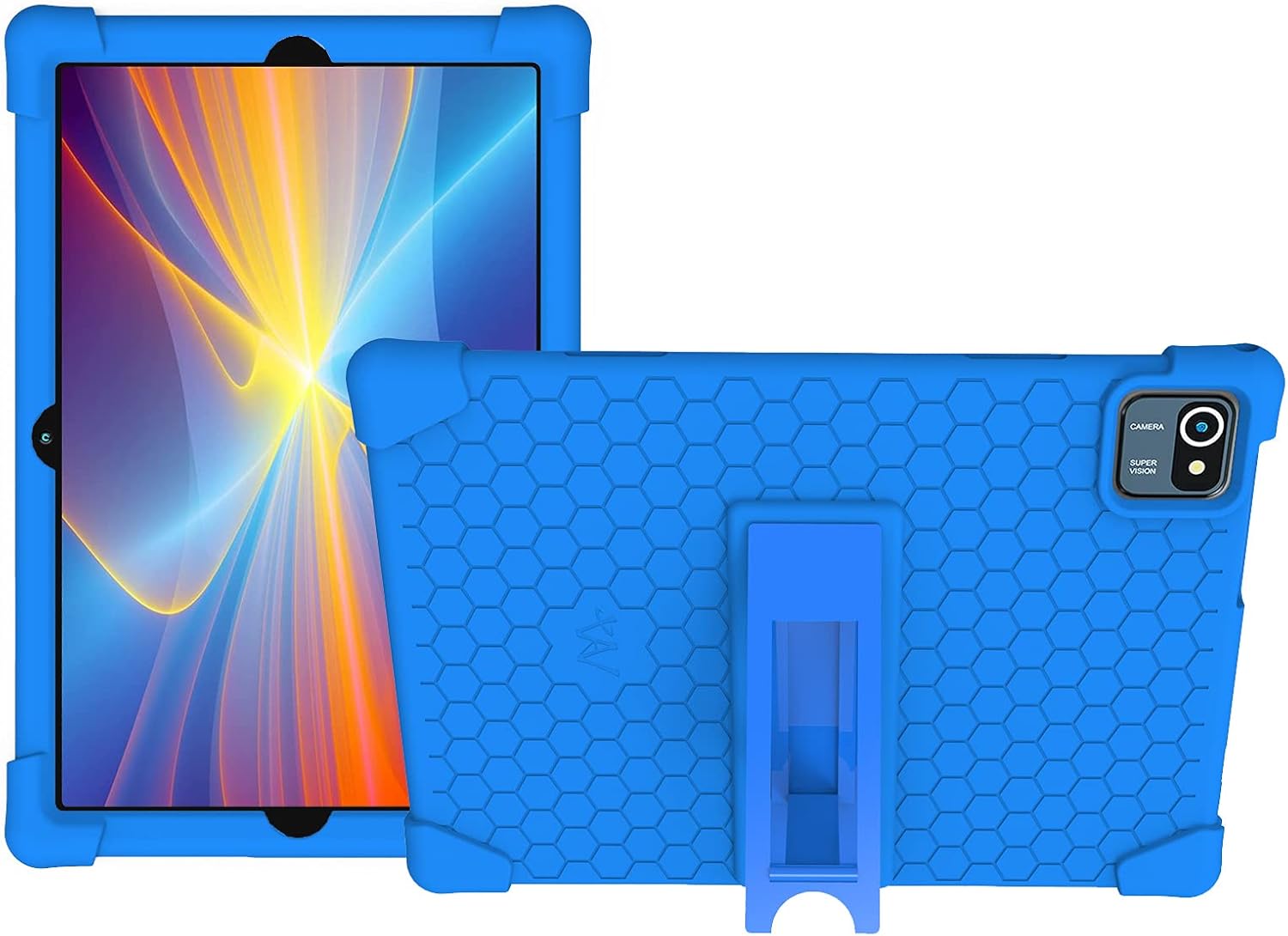
Image: The Transwon MB1001 Tablet Case in blue, showcasing both the front view with a tablet inserted and the back view with the integrated kickstand in a folded position.
Cechy produktu
- Trwały materiał: Constructed from impact-resistant, rubber-like silicone material for enhanced protection against drops and impacts.
- Precyzyjne wycięcia: Ensures full access to all tablet controls, ports, and features without needing to remove the case.
- Zintegrowana podpórka: Features a foldable kickstand that provides multiple viewing angles for media consumption, typing, or learning. The kickstand is designed for easy opening and closing.
- Lekka konstrukcja: Offers protection without adding significant bulk, making it kid-friendly and easy to handle.
- Łatwe do czyszczenia: The silicone material allows for direct washing with water, ensuring hygiene and longevity.

Image: Visual representation of the key features of the Transwon MB1001 Tablet Case, including its shockproof design, soft material, lightweight construction, and built-in stand functionality.
Konfiguracja i instalacja
- Przygotuj tablet: Ensure your tablet is clean and free of dust or debris before installation.
- Włóż tabletkę: Gently align your tablet with the case, starting from one corner. Carefully push the tablet into the case, ensuring all edges are securely seated within the silicone frame.
- Sprawdź dopasowanie: Verify that all ports, buttons, and the camera lens are correctly aligned with the case's cutouts and remain fully accessible.

Image: The Transwon MB1001 Tablet Case fitted onto a tablet, emphasizing the precise cutouts that allow full access to the tablet's screen controls and functions.
Instrukcja obsługi
Using the Foldable Kickstand
The integrated kickstand allows for hands-free viewing. Aby rozłożyć podpórkę:
- Locate the foldable kickstand on the back of the case.
- Gently pull the kickstand outwards until it locks into an open position, forming a stable triangle.
- Place your tablet on a flat surface to enjoy a comfortable viewkąt.
- To fold the kickstand back, gently push it inwards until it lies flat against the case.

Image: A visual guide demonstrating the proper method for deploying and using the foldable kickstand integrated into the Transwon tablet case, showing both correct and incorrect usage.
Konserwacja i pielęgnacja
To ensure the longevity and cleanliness of your Transwon MB1001 Tablet Case, follow these care instructions:
- Czyszczenie: The silicone material is washable. If the case gets dirty, you can wash it directly with water. Use mild soap if necessary.
- Wysuszenie: Po umyciu odczekaj, aż etui całkowicie wyschnie, zanim ponownie założysz tablet.
- Unikaj silnych środków chemicznych: Nie należy używać środków czyszczących o właściwościach ściernych ani silnych środków chemicznych, gdyż mogą one uszkodzić materiał silikonowy.

Image: A comparative image demonstrating the superior shock absorption of the Transwon soft shell case, which flexes to protect the tablet, contrasted with a hard shell case that shows cracking upon impact.
Rozwiązywanie problemów
Case Does Not Fit Properly
- Sprawdź zgodność: Ensure your tablet model is listed as compatible with the Transwon MB1001 case. This case is designed for MB1001 Tablet 10.1 Inch, Smart Life Within Reach Tablet MB1001, and Tablet 10.1 KT1006.
- Ponowna instalacja: Remove the tablet from the case and attempt re-installation, ensuring all corners and edges are properly seated.
- Sprawdź pod kątem przeszkód: Check for any foreign objects or debris preventing a snug fit.
Specyfikacje
| Funkcja | Szczegół |
|---|---|
| Marka | Transwon |
| Model | MB1001 |
| Kompatybilne urządzenia | MB1001 Tablet 10.1 Inch, Smart Life Within Reach Tablet MB1001, Tablet 10.1 KT1006 |
| Tworzywo | Guma silikonowa |
| Współczynnik kształtu | Sprawa |
| Cechy specjalne | Foldable Kickstand, Shockproof, Lightweight, Washable |
| Waga przedmiotu | 6.4 uncji |
| Wymiary opakowania | 11.06 x 8.35 x 0.83 cala |
Wsparcie
For further assistance or inquiries regarding your Transwon MB1001 Tablet Case, please contact Transwon customer support. If you have a different tablet model and require compatibility information, please refer to the product listing or contact the manufacturer directly.