
1. Wprowadzenie
Dziękujemy za zakupasing the beFree Sound BFS-855 5.1 Channel Surround Sound Bluetooth Speaker System. This manual provides essential information for the safe and efficient operation of your new audio system. Please read these instructions thoroughly before use and retain them for future reference.
2. Instrukcje bezpieczeństwa
- Źródło zasilania: Upewnij się, że napięcie zasilaniatage matches the requirements specified on the unit (110V/60Hz).
- Wentylacja: Nie blokuj żadnych otworów wentylacyjnych. Zachowaj odpowiednią przestrzeń wokół urządzenia, aby zapewnić prawidłowy przepływ powietrza.
- Woda i wilgoć: Nie wystawiaj urządzenia na działanie deszczu, wilgoci ani kapiących/rozpryskujących się płynów. Nie stawiaj na urządzeniu przedmiotów wypełnionych płynami, takich jak wazony.
- Ciepło: Trzymaj urządzenie z dala od źródeł ciepła, takich jak grzejniki, kratki wentylacyjne, piece lub inne urządzenia (w tym amp(lifiers) wytwarzające ciepło.
- Czyszczenie: Przed czyszczeniem odłącz urządzenie od gniazdka elektrycznego. Użyj miękkiej, suchej ściereczki. Nie używaj środków czyszczących w płynie ani w aerozolu.
- Serwisowanie: Nie próbuj samodzielnie naprawiać tego produktu. Wszelkie czynności serwisowe należy powierzyć wykwalifikowanemu personelowi serwisowemu.
3. Zawartość opakowania
Sprawdź, czy w przesyłce znajdują się wszystkie elementy wymienione poniżej:
- 1 x Subwoofer
- 5 x głośniki satelitarne
- 4 x kable audio
- 1 x antena FM
- 1 x Pilot zdalnego sterowania
- 1 x Instrukcja obsługi (ten dokument)

Image: Various audio cables and an FM antenna included with the system.
4. Koniec produktuview
Familiarize yourself with the components of your beFree Sound BFS-855 system.
4.1. Subwoofer Unit

Obraz: przód i bok view of the main subwoofer unit, featuring the beFree logo and a sleek black finish.

Obraz: Bok view of the subwoofer, showing the USB port, SD card slot, and auxiliary input jacks.

Image: Rear panel of the subwoofer, detailing the optical input, coaxial input, AUX audio input, FM antenna port, DVD audio input, LED power, audio output for satellite speakers, and power switch.
4.2. Głośniki satelitarne
The system includes five satellite speakers: a center speaker, two front speakers, and two rear speakers.

Image: A compact satellite speaker, typically used for front or rear channels.

Image: The horizontal center channel speaker, designed for clear dialogue.
4.3. Pilot zdalnego sterowania

Image: The remote control unit, featuring buttons for input selection, volume, channel tuning, and various audio adjustments.
5. Konfiguracja
5.1. Rozmieszczenie głośników
- Głośnik niskotonowy: Place the subwoofer on the floor, preferably near the front of your listening area.
- Głośnik centralny: Position the center speaker directly above or below your television/monitor.
- Głośniki przednie: Place the front left and right speakers equidistant from your listening position, to the left and right of your television/monitor.
- Głośniki tylne: Position the rear left and right speakers behind your listening position, facing towards you.
5.2. Podłączanie głośników
Connect the satellite speakers to the corresponding output jacks on the rear panel of the subwoofer. Ensure correct polarity (red to red, black to black) for optimal sound quality.
5.3. Podłączanie źródeł audio
Your system supports multiple audio input options:
- Bluetooth: Do bezprzewodowego połączenia z kompatybilnymi urządzeniami.
- Wejście AUX: Use the provided audio cables to connect devices with a 3.5mm or RCA audio output.
- Wejście optyczne: For high-quality digital audio from TVs, game consoles, or DVD/Blu-ray players.
- Wejście koncentryczne: Another option for digital audio connection.
- Karta USB/SD: Insert a USB drive or SD card into the designated slots on the subwoofer for direct media playback.
- Antena FM: Connect the included FM antenna to the FM ANT port for radio reception.
5.4. Podłączenie zasilania
After all audio connections are made, connect the power cord to the subwoofer and then plug it into a standard 110V/60Hz electrical outlet. Turn on the power switch located on the rear panel of the subwoofer.
6. Instrukcja obsługi
6.1. Włączanie/wyłączanie zasilania
Press the 'POWER' button on the remote control or the power switch on the rear of the subwoofer to turn the system on or off.
6.2. Wybór wejścia
Press the 'INPUT' button on the remote control to cycle through available input sources: Bluetooth, AUX, Optical, Coaxial, USB, SD, FM.
6.3. Regulacja głośności
Use the 'VOL+' and 'VOL-' buttons on the remote control to adjust the master volume. Individual channel volumes (FL, FR, CEN, SL, SR, SW) can also be adjusted using their respective buttons on the remote.
6.4. Parowanie Bluetooth
- Select 'Bluetooth' as the input source. The display will indicate 'BT'.
- Włącz Bluetooth w swoim urządzeniu mobilnym lub komputerze.
- Szukaj 'BFS-855' in the list of available devices.
- Select 'BFS-855' to pair. Once connected, a confirmation sound will play.
6.5. Obsługa radia FM
- Wybierz „FM” jako źródło sygnału wejściowego.
- Press the 'AUTO' button on the remote to automatically scan and save available FM stations.
- Use 'CH+' and 'CH-' buttons to navigate through saved stations.
- Use 'TUNE+' and 'TUNE-' buttons for manual frequency adjustment.
6.6. Odtwarzanie z USB/karty SD
- Insert a USB drive or SD card into the corresponding slot.
- The system will automatically switch to USB/SD input and begin playback. If not, select 'USB' or 'SD' input manually.
- Use the 'PLAY/PAUSE', 'PREV', and 'NEXT' buttons on the remote for media control.
7. Konserwacja
Aby zapewnić długowieczność i optymalną wydajność systemu głośnikowego, należy przestrzegać poniższych wskazówek dotyczących konserwacji:
- Czyszczenie: Regularly wipe the surfaces of the speakers and subwoofer with a soft, dry, lint-free cloth. Avoid using abrasive cleaners, waxes, or solvents.
- Pył: Keep the ventilation openings free from dust accumulation. Use a soft brush or vacuum cleaner with a brush attachment to gently remove dust.
- Składowanie: Jeśli system będzie przechowywany przez dłuższy czas, należy odłączyć go od gniazdka zasilania i przechowywać w chłodnym, suchym miejscu, z dala od bezpośredniego światła słonecznego i ekstremalnych temperatur.
8. Rozwiązywanie Problemów
Jeśli masz problemy z systemem głośników, zapoznaj się z poniższymi typowymi problemami i ich rozwiązaniami:
| Problem | Możliwa przyczyna | Rozwiązanie |
|---|---|---|
| Brak zasilania | Przewód zasilający nie jest podłączony; Wyłącznik zasilania jest wyłączony; Awaria gniazdka | Ensure power cord is securely plugged in; Turn on power switch; Test outlet with another device. |
| Brak dźwięku | Incorrect input selected; Volume too low; Speaker cables loose; Mute function active | Select correct input source; Increase master volume; Check all speaker connections; Press 'MUTE' on remote. |
| Bluetooth nie łączy się | Speaker not in Bluetooth mode; Device not discoverable; Already connected to another device | Ensure 'BT' input is selected; Make sure device Bluetooth is on and searching; Disconnect from other devices. |
| Słaby odbiór FM | Antena FM nie jest podłączona lub jest źle ustawiona | Connect FM antenna securely; Adjust antenna position for better signal. |
9. Specyfikacje
- Nazwa modelu: BFS-855
- Typ głośnika: System dźwięku przestrzennego
- Konfiguracja kanałów dźwięku przestrzennego: 5.1
- Moc wyjściowa: 50W (Subwoofer) + 15W x 5 (Satellites) = 125 Watts Total
- Średnica subwoofera: 8 cali
- Rozmiar głośnika satelitarnego: 3.5 cale (x5)
- Pasmo przenoszenia: 40Hz - 20KHz
- Rozdzielenie: >50dB
- Stosunek sygnału do szumu: >75dB
- Źródło zasilania: Corded Electric (110V/60Hz)
- Technologia łączności: Bluetooth, USB, SD Card, Optical, Coaxial, AUX (RCA)
- Metoda sterowania: Zdalne sterowanie
- Wymiary produktu (subwoofer): 21" gł. x 11" szer. x 21" wys.
- Waga przedmiotu: 33 funtów
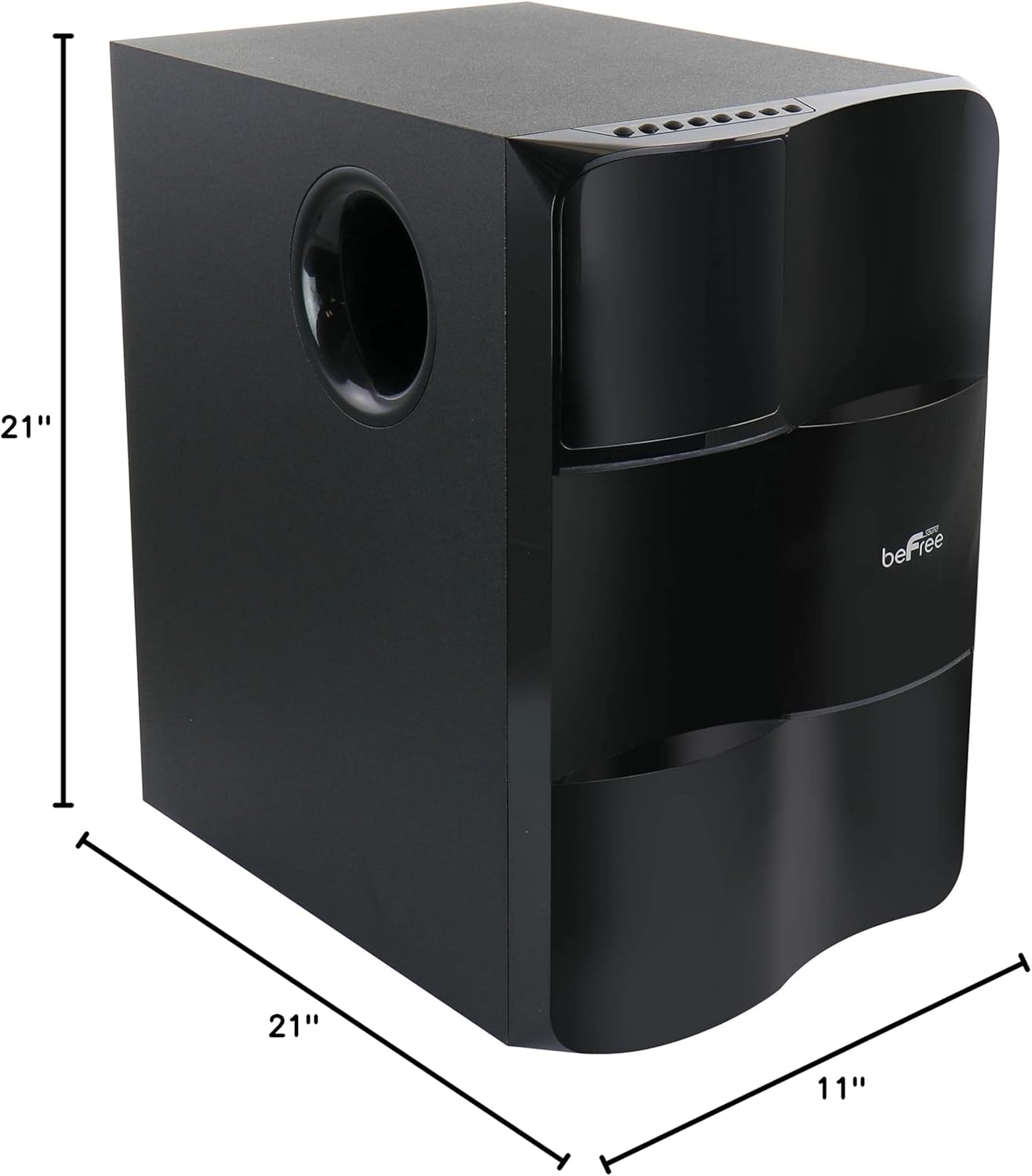
Image: Diagram illustrating the dimensions of the subwoofer unit (21"D x 11"W x 21"H).
10. Gwarancja i wsparcie
This product comes with a limited warranty. For specific details regarding warranty coverage and duration, please refer to the warranty card included in your package or contact your retailer. For technical support or service inquiries, please reach out to the point of purchase or the manufacturer's customer service channels.