
1. Wprowadzenie
Thank you for choosing the TOPSKY Dual Motor Electric Adjustable Standing Desk. This manual provides essential information for the safe assembly, operation, and maintenance of your new standing desk. Please read these instructions thoroughly before use and retain them for future reference.
This product combines a robust dual-motor frame (DF02.01) with a durable oak desktop board (ZB001) to offer a versatile and ergonomic workspace solution.
2. Instrukcje bezpieczeństwa
- Przed montażem upewnij się, że wszystkie elementy są kompletne i nieuszkodzone. Nie używaj, jeśli brakuje którejkolwiek części lub jest ona uszkodzona.
- Aby zapobiec obrażeniom, podczas pracy biurka należy trzymać dzieci i zwierzęta z dala od niego.
- Do not place hands or other objects near moving parts of the desk frame during height adjustment.
- Ensure the power cord is not pinched or damaged. Do not operate the desk with a damaged power cord or plug.
- Do not overload the desk. The maximum weight capacity is 225 lbs (102 kg). Exceeding this limit may cause damage or injury.
- If the desk displays an "OVR" code, reduce the load on the desktop to less than 175 lbs before attempting further operation.
- Używaj biurka wyłącznie na równej i stabilnej powierzchni.
- Przed przystąpieniem do czyszczenia lub wykonywania prac konserwacyjnych należy odłączyć zasilanie.
- Biurko jest przeznaczone wyłącznie do użytku w pomieszczeniach zamkniętych.
3. Zawartość opakowania
Your TOPSKY Dual Motor Electric Adjustable Standing Desk package includes the following components:
- 1 x Desk Frame (Model DF02.01)
- 1 x Desk Board (Model ZB001, Oak finish, 58.3''x26.8'')
- Assembly Hardware (screws, tools, etc. - specific list may vary, refer to included assembly guide)
- Panel sterowania i zasilacz
Note: The desk frame and desk board may arrive in separate packages and at different times.
4. Instalacja i montaż
Assembly is required for this product. Please follow the detailed instructions provided in the separate assembly guide included with your package. The general steps involve:
- Rozpakowywanie: Ostrożnie rozpakuj wszystkie elementy i sprawdź ich zawartość na liście.
- Montaż ramy: Assemble the dual-motor desk frame according to the instructions. Ensure all screws are tightened securely.
- Załącznik na pulpit: Place the oak desktop board onto the assembled frame. Align the pre-drilled holes on the desktop with the mounting points on the frame.
- Bezpieczny pulpit: Use the provided screws to securely attach the desktop to the frame. Refer to the screw hole distance diagram for proper alignment.
- Control Panel & Wiring: Mount the control panel to the underside of the desktop in a convenient location. Connect all motor and control cables to the control box, and then connect the power adapter. Ensure cables are neatly managed to avoid interference with desk movement.

Figure 4.1: Desk Frame Dimensions and Weight Capacity. This image illustrates the adjustable width (43"-59" / 108.8cm-150cm), adjustable height (27.6"-47.3" / 70cm-120cm), and the maximum weight capacity of 225 lbs (102 kg).

Figure 4.2: Desktop Screw Hole Distances. This diagram provides measurements for the screw hole placement on the desktop, crucial for proper frame attachment.
5. Instrukcja obsługi
The TOPSKY Electric Standing Desk features a user-friendly control panel for easy height adjustment and personalized settings.
5.1 Podstawowa regulacja wysokości
- Użyj Up I W dół arrow buttons on the control panel to smoothly adjust the desk height.
- The desk moves at approximately 1 inch per second with low noise operation (around 45.1 dB).
- The LCD display will show the current height in inches or centimeters.

Figure 5.1: Low Noise Operation and Speed. This image highlights the desk's quiet operation at 45.1 dB and an operating speed of 1 inch per second, with a height range from 27.6" to 47.3".
5.2 Ustawienia pamięci
The desk allows you to save up to 3 preferred height positions for quick adjustment.
- Dostosuj wysokość biurka do swoich potrzeb.
- Naciśnij "M" button (Memory button). The display will flash.
- Natychmiast naciśnij jeden z ponumerowanych przycisków ustawień wstępnych ("1", "2", Lub "3") aby zapisać aktualną wysokość w tej pozycji.
- To recall a saved position, simply press the corresponding numbered button. The desk will automatically move to the saved height.
5.3 Funkcja antykolizyjna
The anti-collision feature protects the desk from damage by automatically stopping and slightly reversing if it encounters an obstacle during height adjustment.
- Ensure there are no obstructions above or below the desk before adjusting its height.
- If the desk stops unexpectedly, check for obstacles and remove them before resuming operation.
5.4 Konwersja jednostek
The control panel allows you to switch between inches and centimeters for height display.
- Refer to your control panel's specific instructions for unit conversion, typically involving a long press on a specific button or a combination of buttons.
5.5 Container and Self-Stop Positions
This function allows you to set limits for the desk's movement range, useful for preventing collisions with overhead cabinets or under-desk drawers.
- Consult the detailed control panel manual for instructions on setting container (upper limit) and self-stop (lower limit) positions.
6. Konserwacja
- Czyszczenie: Przetrzyj powierzchnię biurka i ramę miękką szmatką.amp szmatką. Unikaj silnych środków chemicznych i ściernych środków czyszczących, które mogłyby uszkodzić wykończenie.
- Kontrola: Okresowo sprawdzaj wszystkie śruby i połączenia, aby upewnić się, że są dobrze dokręcone. W razie potrzeby dokręć.
- Zarządzanie kablami: Ensure all cables are properly routed and secured to prevent snagging or damage during desk movement.
- Pielęgnacja silnika: The dual motors are designed for long-term use and generally require no special maintenance. Avoid exposing them to excessive moisture or dust.
7. Rozwiązywanie Problemów
If you encounter issues with your TOPSKY standing desk, refer to the following common problems and solutions:
| Problem | Możliwa przyczyna | Rozwiązanie |
|---|---|---|
| Biurko się nie porusza. | Power cord disconnected, control panel not connected, motor cable loose, power outage. | Check all power and motor connections. Ensure the power outlet is functional. Reset by unplugging for 30 seconds and plugging back in. |
| Biurko porusza się nierównomiernie lub wydaje nietypowe dźwięki. | Uneven load, loose connections, damaged motor. | Ensure weight is evenly distributed. Check all frame connections. If problem persists, contact customer support. |
| "OVR" code displayed. | Wykryto przeciążenie. | Reduce the load on the desktop to less than 175 lbs. Allow the desk to cool down if it has been operating continuously. |
| System antykolizyjny włącza się często. | Obstacles in the path of movement, sensitivity setting too high. | Remove any obstructions. Refer to the control panel manual for adjusting anti-collision sensitivity if available. |
| Ustawienia pamięci nie działają. | Ustawienia predefiniowane nie zostały zapisane prawidłowo. | Re-save your desired height positions following the instructions in section 5.2. |
If you experience a problem not listed here or if the suggested solutions do not resolve the issue, please contact TOPSKY customer support for assistance.
8. Specyfikacje
| Model | DF02.01 (Frame) + ZB001 (Board) |
| Marka | TOPSKY |
| Typ | Dual Motor Electric Adjustable Standing Desk |
| Materiał na biurko | Drewno dębowe |
| Materiał ramy | Stal stopowa (malowana proszkowo) |
| Zakres regulacji wysokości | 27.6" - 47.3" (70 cm - 120 cm) |
| Zakres regulacji szerokości | 43" - 59" (108.8 cm - 150 cm) |
| Wymiary biurka (dł. x szer.) | 58.3" x 26.8" (148 cm x 68 cm) |
| Grubość blatu | 0.7" (1.8 cm) |
| Maksymalna nośność | 225 funta (102 kg) |
| Prędkość robocza | Approx. 1 inch/second |
| Poziom hałasu | Low noise, approx. 45.1 dB |
| Cechy specjalne | 3 Memory Presets, Anti-Collision, LCD Display, Unit Conversion, Container/Self-Stop Positions |
| Wymagany montaż | Tak |
| Typ pokoju | Biuro |
| Zalecane zastosowania | Pracujący |
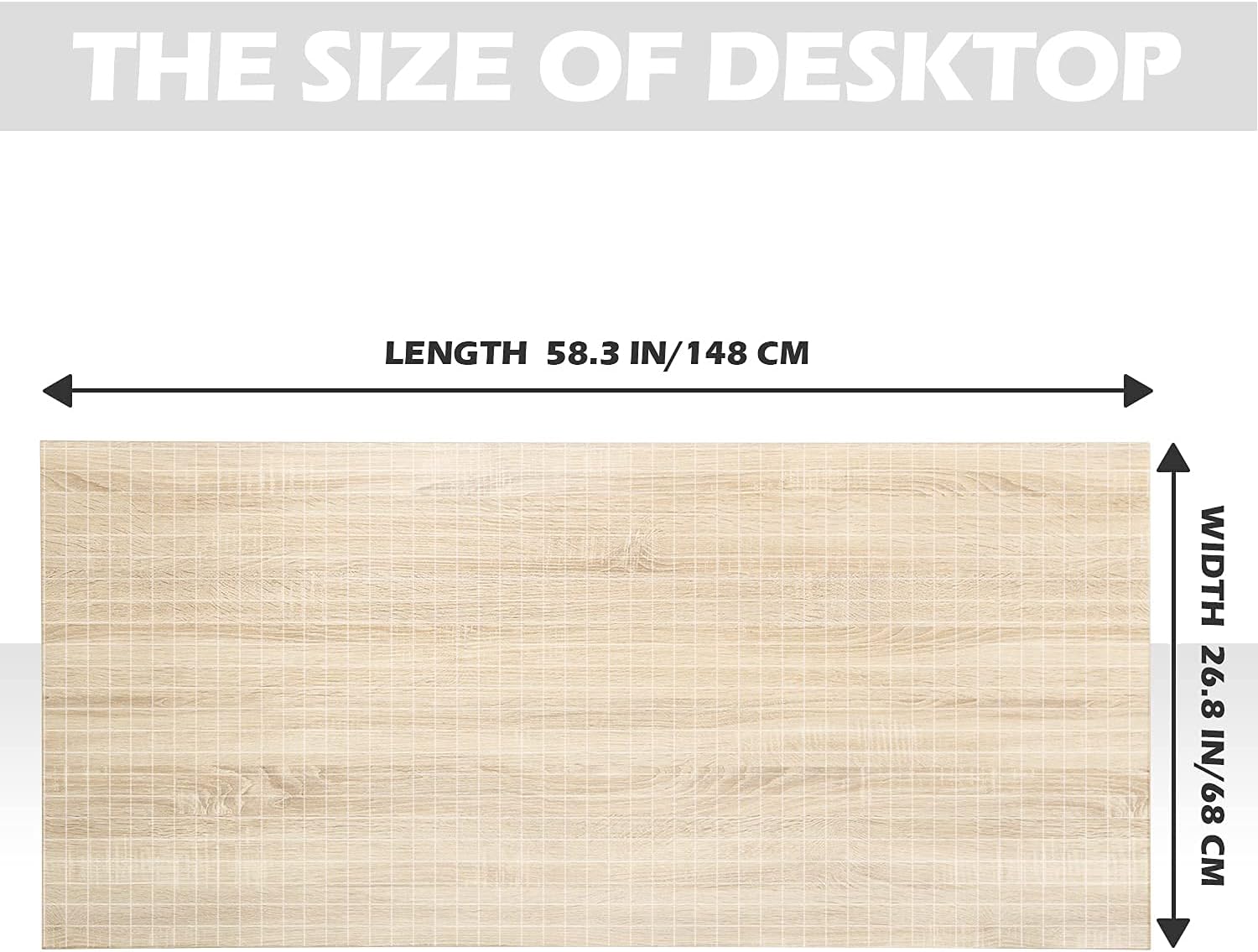
Figure 8.1: Desktop Dimensions. This image details the desktop length of 58.3 inches (148 cm) and width of 26.8 inches (68 cm).

Figure 8.2: Desktop Thickness. This image shows the desktop thickness of 0.7 inches (1.8 cm).

Figure 8.3: One-Piece Desktop. This image confirms the desktop is a single, complete board.
9. Gwarancja i pomoc techniczna
9.1 Gwarancja na produkt
The TOPSKY Dual Motor Electric Adjustable Standing Desk (Model DF02.01 + ZB001) comes with a 1-roczna ograniczona gwarancja od daty zakupu. Niniejsza gwarancja obejmuje wady produkcyjne materiałów i wykonania powstałe w wyniku normalnego użytkowania. Nie obejmuje ona uszkodzeń spowodowanych niewłaściwym użytkowaniem, wypadkami, nieautoryzowanymi modyfikacjami ani normalnym zużyciem.
Proszę zachować dowód zakupu na potrzeby roszczeń gwarancyjnych.
9.2 Obsługa klienta
For any questions, technical assistance, or warranty claims, please contact TOPSKY customer support. Refer to the contact information provided with your purchase documentation or visit the official TOPSKY webstrona.
When contacting support, please have your product model (DF02.01 + ZB001) and purchase date ready.