
Wstęp
Thank you for choosing the Audizio SB85 Soundbar with Subwoofer. This manual provides essential information for the safe and correct operation of your new audio system. Please read it thoroughly before use and retain it for future reference. The SB85 is designed to enhance your television's audio, providing a rich, immersive sound experience for movies, games, and music, complete with a dedicated subwoofer for powerful bass.
Instrukcje bezpieczeństwa
- Przed przystąpieniem do użytkowania urządzenia należy uważnie przeczytać wszystkie instrukcje.
- Keep the unit away from water, moisture, and heat sources.
- Nie blokuj żadnych otworów wentylacyjnych.
- Używaj wyłącznie dodatków/akcesoriów wskazanych przez producenta.
- Odłączaj urządzenie od zasilania podczas burzy z piorunami lub jeśli nie używasz go przez dłuższy czas.
- Wszelkie prace serwisowe należy powierzać wykwalifikowanemu personelowi.
- Do not expose the battery (if applicable) to excessive heat such as sunshine, fire, or the like.
Zawartość opakowania
Sprawdź, czy w pudełku znajdują się wszystkie elementy:
- Audizio SB85 Soundbar
- Subwoofer przewodowy
- Zdalne sterowanie
- Kabel optyczny (Toslink)
- Kabel AUX
- Zasilacz
- Instrukcja obsługi
Produkt ponadview
The Audizio SB85 system consists of a soundbar and a separate wired subwoofer, designed to deliver a powerful and clear audio experience.
Funkcje soundbara
- Integrated 150W speaker system with 4 speakers (2x 2cm range, 2x 2cm tweeter).
- Front LED display for status indication.
- Control buttons on the side panel.
- Multiple input options: HDMI (ARC), USB, Line In (AUX), Coaxial, Optical.
- Bluetooth 5.0 do bezprzewodowego przesyłania strumieniowego dźwięku.

Image: Close-up of the Audizio SB85 Soundbar's control panel and its remote control, highlighting Bluetooth 5.0 and ease of use.

Obraz: Wewnętrzny view of the Audizio SB85 Soundbar's full-range speaker, emphasizing its 150W speaker system for an immersive audio experience.
Funkcje subwoofera
- 5.25-inch wired subwoofer for enhanced bass response.

Image: Close-up of the Audizio SB85 wired subwoofer, designed to amplify bass frequencies.
Organizować coś
1. Umieszczenie
Place the soundbar centrally below your television. The subwoofer can be placed on the floor near the soundbar, ideally in a corner for optimal bass reflection, but ensure it is not obstructed.

Image: Audizio SB85 Soundbar and Subwoofer setup in a living room, demonstrating room-filling sound and clean design.

Image: Audizio SB85 Soundbar placed below a television, illustrating its universal compatibility with any TV.
2. Podłączanie do zasilania
Connect the power adapter to the DC IN port on the soundbar and then plug it into a wall outlet (230 Vac/50 Hz).
3. Podłączenie subwoofera
Connect the wired subwoofer to the dedicated subwoofer output port on the soundbar.
4. Podłączanie do źródeł dźwięku
The SB85 offers several connection options:
- HDMI (ARC): For the best audio quality and control, connect an HDMI cable from the HDMI (ARC) port on the soundbar to the HDMI ARC port on your TV. This allows the TV to send audio to the soundbar and often enables TV remote control of the soundbar's volume.
- Optyczny (Toslink): Connect the included optical cable from the OPTICAL port on the soundbar to the Optical Digital Audio Out port on your TV or other audio source.
- Line In (AUX): Use the included AUX cable to connect the LINE IN port on the soundbar to the headphone jack or audio output of your device (e.g., smartphone, MP3 player).
- Współosiowy: Connect a coaxial cable (not included) from the COAXIAL port on the soundbar to the Coaxial Digital Audio Out port on your TV or other audio source.
- USB: Aby odtwarzać pliki MP3, podłącz dysk flash USB do portu USB.
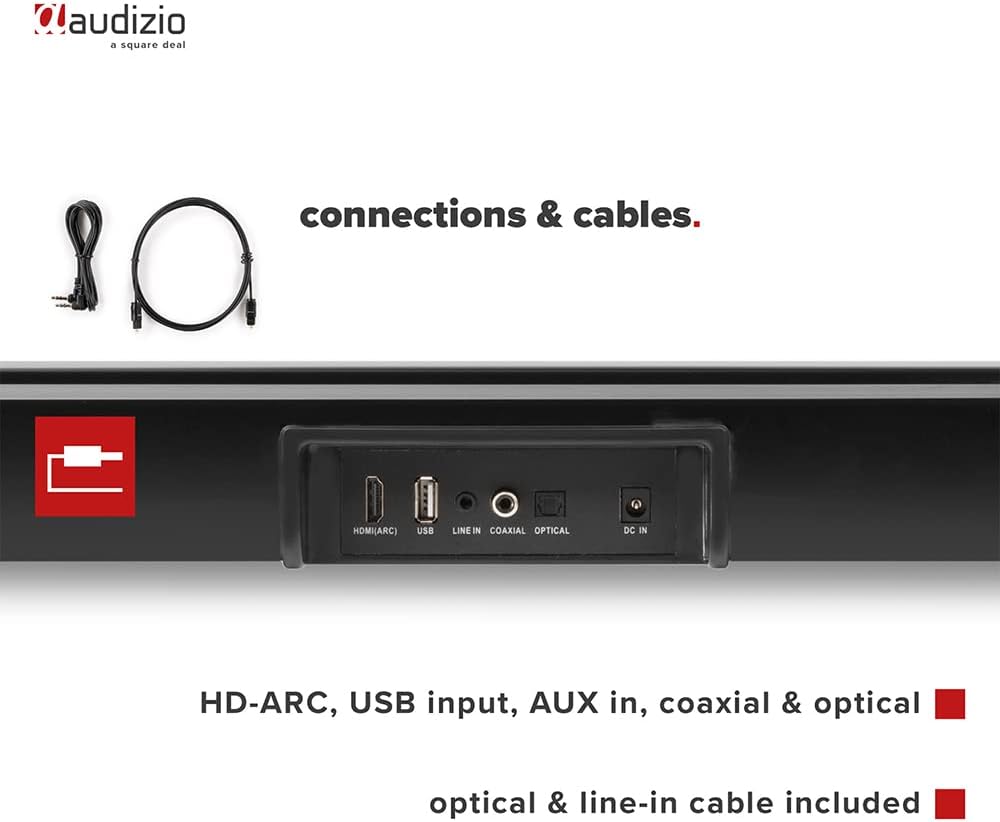
Obraz: Tył view of the Audizio SB85 Soundbar showing various connection ports: HDMI (ARC), USB, Line In, Coaxial, and Optical. Includes optical and line-in cables.
Instrukcja obsługi
1. Włączanie/wyłączanie zasilania
Naciśnij przycisk zasilania na soundbarze lub pilocie, aby włączyć lub wyłączyć urządzenie.
2. Wybór źródła wejściowego
Press the 'MODE' button on the soundbar or the remote control repeatedly to cycle through the available input sources: HDMI (ARC), Optical, Coaxial, AUX, USB, and Bluetooth. The selected input will be shown on the front LED display.
3. Regulacja głośności
Use the 'VOL+' and 'VOL-' buttons on the soundbar or the remote control to adjust the volume. The 'MUTE' button on the remote control will temporarily silence the audio.
4. Parowanie Bluetooth
- Switch the soundbar to Bluetooth mode using the 'MODE' button. The LED display will show 'BT'.
- Na smartfonie lub tablecie włącz Bluetooth i wyszukaj dostępne urządzenia.
- Select 'Audizio SB85' from the list of devices.
- Once paired, the soundbar will indicate a successful connection, and you can stream audio wirelessly.
5. Odtwarzanie USB
Włóż dysk flash USB zawierający dźwięk w formacie MP3 files into the USB port. The soundbar will automatically switch to USB mode and begin playing the music. Use the remote control to navigate tracks (play/pause, next/previous).
6. Funkcje pilota
The remote control provides full functionality for the soundbar, including power, mode selection, volume, mute, and playback controls for USB and Bluetooth modes.
Konserwacja
Czyszczenie
Wipe the soundbar and subwoofer surfaces with a soft, dry cloth. Do not use abrasive cleaners, waxes, or solvents as they may damage the finish. Ensure the device is unplugged before cleaning.
Składowanie
Jeśli urządzenie będzie przechowywane przez dłuższy czas, należy odłączyć je od gniazdka zasilania i przechowywać w chłodnym, suchym miejscu, z dala od bezpośredniego światła słonecznego i ekstremalnych temperatur.
Rozwiązywanie problemów
| Problem | Możliwa przyczyna | Rozwiązanie |
|---|---|---|
| Brak zasilania | Kabel zasilający nie jest podłączony; gniazdko elektryczne jest uszkodzone | Sprawdź podłączenie kabla zasilającego; spróbuj użyć innego gniazdka. |
| Brak dźwięku | Incorrect input selected; Volume too low; Mute activated; Cable connection loose | Select correct input source; Increase volume; Deactivate mute; Check all audio cable connections. |
| Bluetooth nie łączy się | Soundbar not in Bluetooth mode; Device too far; Device already connected to another unit | Switch soundbar to BT mode; Move device closer; Disconnect from other devices and try again. |
| Pilot nie działa | Baterie są rozładowane; przeszkoda między pilotem a soundbarem | Wymień baterie. Usuń wszelkie przeszkody. |
Specyfikacje
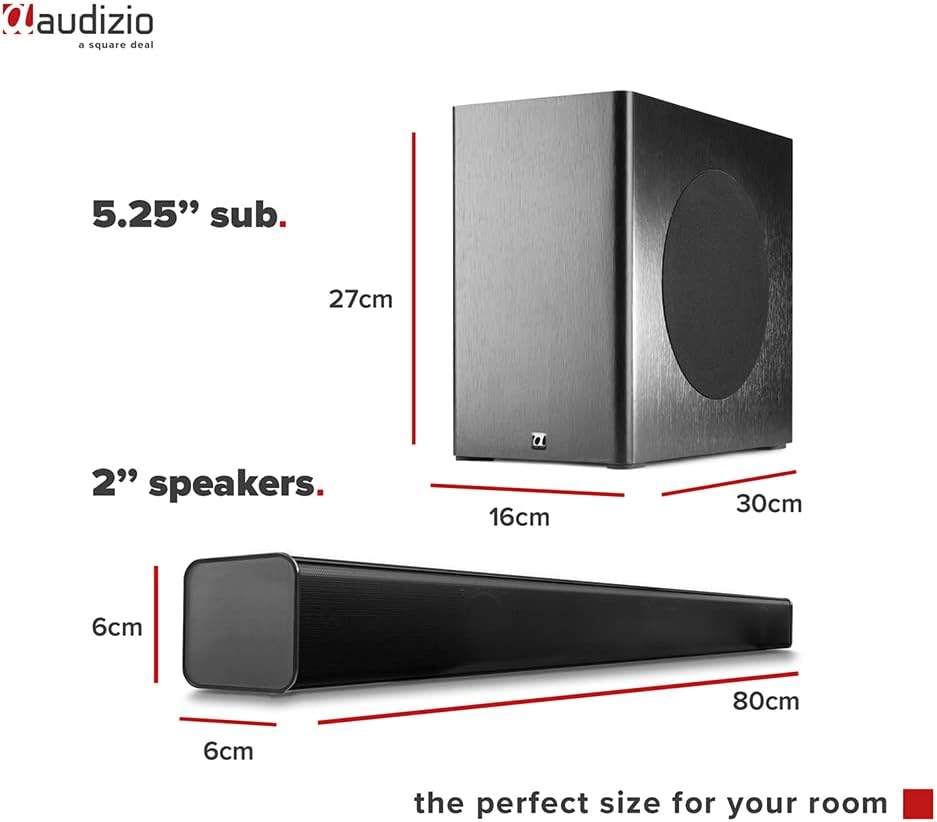
Image: Diagram showing the dimensions of the Audizio SB85 Soundbar and its subwoofer.
- Moc wyjściowa: 150 W (maks.)
- Konfiguracja głośników: 4 speakers (2x 2cm range, 2x 2cm tweeter)
- Rozmiar subwoofera: 5.25 cali
- Zakres częstotliwości: 50 Hz - 20 000 Hz
- Maksymalne ciśnienie akustyczne (SPL): 125dB
- Łączność: Bluetooth 5.0, HDMI (ARC), USB, Line In (AUX), Coaxial, Optical
- Tryb wyjścia audio: Stereofoniczny
- Zgodne urządzenia: MP3 Player, Smartphone, TV
- Źródło zasilania: 230 Vac/50 Hz (via electric cable)
- Wymiary soundbara (dł. x szer. x wys.): Wymiary 80 x 6 x 6 cm
- Wymiary subwoofera (dł. x szer. x wys.): Wymiary 16 x 30 x 27 cm
- Całkowita waga: 3.9 kilogramów
- Numer modelu: 100.292
Gwarancja i wsparcie
Aby uzyskać informacje dotyczące gwarancji lub wsparcia technicznego, zapoznaj się z dokumentacją dołączoną do produktu lub skontaktuj się ze sprzedawcą. Zachowaj dowód zakupu na wypadek roszczeń gwarancyjnych.


