
1. Wprowadzenie
This manual provides essential instructions for setting up, operating, and maintaining your Fossil Bronson HR Hybrid Smartwatch (Model FTW7059). This device combines the classic aesthetics of a traditional watch with modern smartwatch functionalities, including heart rate monitoring, activity tracking, and smartphone notifications. Please read this manual thoroughly before using your watch.
2. Konfiguracja
2.1 Rozpakowanie i opłata początkowa
Upon unboxing, ensure all components are present: the Fossil Bronson HR Hybrid Smartwatch and its charging cable. Before first use, fully charge your watch. Connect the charging cable to the watch's charging points and a USB power source. A full charge typically takes approximately 2 hours.
2.2 Instalacja i parowanie aplikacji
- Pobierz Fossil Smartwatches aplikację ze sklepu z aplikacjami na Twoim smartfonie (dostępną dla systemów iOS i Android).
- Otwórz aplikację i załóż konto lub zaloguj się.
- Follow the on-screen instructions to add a new device. Select your Bronson HR Hybrid Smartwatch from the list.
- The app will guide you through the Bluetooth pairing process. Ensure your watch is sufficiently charged and your phone's Bluetooth is enabled.
- Once paired, the app will synchronize with your watch, allowing you to customize settings and view dane.
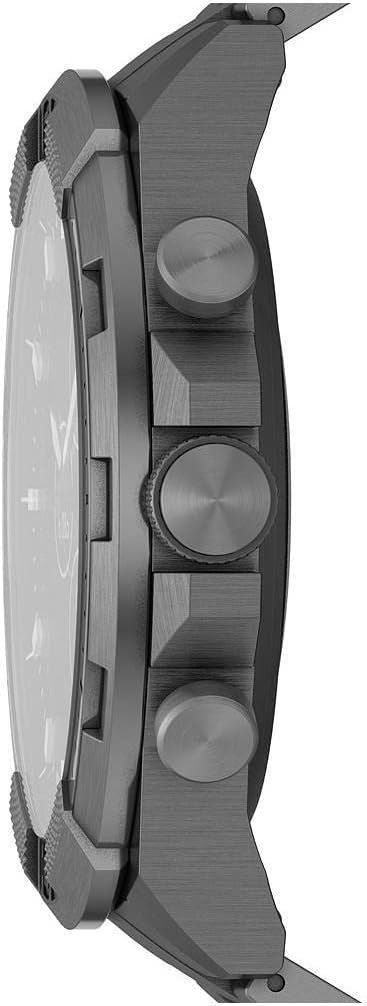
Obraz: Bok view of the Fossil Bronson HR Hybrid Smartwatch, highlighting the functional buttons and crown.
3. Instrukcja obsługi
3.1 Podstawowa nawigacja
Your Bronson HR Hybrid Smartwatch features a traditional watch face with physical hands and a discreet digital display. It is operated primarily through its three side buttons and the crown.
- Najlepszy Pusher: Customizable function (e.g., view date, control music).
- Middle Crown: Used for navigating menus on the digital display and confirming selections.
- Dolny popychacz: Customizable function (e.g., start workout, check heart rate).
3.2 Monitorowanie aktywności i zdrowia
The watch continuously tracks your heart rate, steps, and sleep patterns. This data is synchronized with the Fossil Smartwatches app, where you can view szczegółowe statystyki i postęp w czasie.
- Tętno: The watch monitors your heart rate throughout the day and during workouts.
- Kroki: Tracks your daily step count and estimated distance.
- Spać: Automatically detects sleep and tracks sleep stages (light, deep, awake) and duration.
3.3 Powiadomienia i funkcje inteligentne
Once paired with your smartphone, the watch can display notifications for calls, messages, and app alerts. You can customize which notifications appear via the Fossil Smartwatches app.
- Powiadomienia na smartfonie: Receive discreet vibrations and text previews on your watch.
- Sterowanie muzyką: Steruj odtwarzaniem muzyki na swoim smartfonie bezpośrednio z zegarka.
- Pogoda: View aktualne warunki pogodowe i prognozy.
- Kalendarz: See upcoming events from your synced calendar.

Image: The hybrid display of the Fossil Bronson HR Smartwatch, illustrating various data points like heart rate, steps, and weather.
4. Konserwacja
4.1 Czyszczenie zegarka
Regularly clean your watch to maintain its appearance and functionality. Use a soft, damp cloth to wipe the case and band. For stainless steel bands, a mild soap solution can be used, followed by thorough rinsing and drying. Avoid harsh chemicals or abrasive materials.
4.2 Wodoodporność
The Fossil Bronson HR Hybrid Smartwatch is water-resistant. It is suitable for everyday use, including splashes, rain, and showering. However, it is not recommended for diving or high-pressure water activities. Avoid pressing buttons underwater.
4.3 Pielęgnacja baterii
To maximize battery life, avoid extreme temperatures. Charge the watch fully when the battery is low. The watch offers over 2 weeks of battery life on a single charge, depending on usage.
4.4 Aktualizacje oprogramowania
Ensure your Fossil Smartwatches app is up to date, as it delivers firmware updates to your watch. These updates can improve performance, add new features, and fix bugs.
5. Rozwiązywanie Problemów
5.1 Watch Not Connecting to Phone
- Upewnij się, że Bluetooth jest włączony w Twoim smartfonie.
- Sprawdź czy zegarek jest wystarczająco naładowany.
- Uruchom ponownie zegarek i smartfon.
- Try unpairing and re-pairing the watch through the Fossil Smartwatches app.
5.2 Niedokładne dane śledzenia
- Upewnij się, że zegarek ściśle przylega do nadgarstka – nie jest za luźny, ani za ciasny.
- Wyczyść czujnik tętna znajdujący się z tyłu zegarka.
- Update the watch firmware via the app.

Obraz: Tył view of the Fossil Bronson HR Hybrid Smartwatch, displaying the heart rate sensor and Fossil logo.
5.3 Krótki czas pracy baterii
- Zmniejsz częstotliwość powiadomień.
- Upewnij się, że zegarek jest za każdym razem w pełni naładowany.
- Avoid using the watch in extreme temperatures.
5.4 Wyświetlacz nie odpowiada
- Perform a soft reset by holding down the middle crown for approximately 10-15 seconds until the watch restarts.
- Sprawdź, czy zegarek jest naładowany.
6. Specyfikacje
| Numer modelu | FTW7059 |
| Marka | Skamieniałość |
| Typ wyświetlacza | Analog with Digital Screen |
| Materiał obudowy | Stal nierdzewna |
| Materiał paska | Stal nierdzewna |
| Kolor paska | Szary |
| Kształt obudowy | Okrągły |
| Rozmiar ekranu | 44 milimetrów |
| Przepustowość łącza | 22 milimetrów |
| Poziom wodoodporności | Wodoodporny |
| System operacyjny | AsteroidOS |
| Technologia łączności | Bluetooth |
| Kompatybilne urządzenia | Smartphone (iPhone and Android) |
| Typ ogniwa baterii | Tlenek srebra |
7. Gwarancja
This product is covered by a manufacturer's warranty. For detailed information regarding warranty terms, conditions, and duration, please refer to the official Fossil webstronę internetową lub kartę gwarancyjną dołączoną do zakupu. Zachowaj dowód zakupu na wypadek roszczeń gwarancyjnych.
8. Wsparcie
Aby uzyskać dalszą pomoc, wsparcie techniczne lub view frequently asked questions, please visit the official Fossil support website. You can typically find contact information for customer service there as well.