
Wstęp
The New Bee M50 Bluetooth Headset is designed for clear communication and comfortable wear throughout your day. Featuring advanced Dual Mic Noise Cancelling technology and Bluetooth 5.2 connectivity, it ensures stable signal transmission and superior audio quality. This manual provides detailed instructions for setting up, operating, and maintaining your headset.
Zawartość opakowania
Proszę zaznaczyć pole dotyczące następujących elementów:
- Nowy zestaw słuchawkowy Bluetooth Bee M50
- Kabel ładujący USB
- 3 x Optional Eartips (Small, Medium, Large)
- Przenośny futerał
- Instrukcja obsługi

Image: New Bee M50 Bluetooth Headset with its accessories, including the charging cable, various eartips, and a protective carry case.
Produkt ponadview
Familiarize yourself with the buttons and components of your New Bee M50 headset.

Image: A detailed diagram highlighting the control buttons on the New Bee M50 Bluetooth Headset, including volume, multi-function, and mute buttons.
- Przycisk wielofunkcyjny: For Music Play/Pause, Answer/Hang up calls.
- Volume Up (+)/Next Track Button: Zwiększ głośność, przejdź do następnego utworu.
- Volume Down (-)/Previous Track Button: Zmniejsz głośność, przejdź do poprzedniego utworu.
- Przycisk wyciszenia: Mute/unmute microphone during calls.
- Mikrofon: Flexible arm for optimal voice capture.
- Haczyk na ucho: Rotatable for left or right ear wearing.
Organizować coś
1. Ładowanie zestawu słuchawkowego
Before first use, fully charge your headset. Connect the provided USB charging cable to the headset's charging port and to a USB power source (e.g., computer, wall adapter).
- Czas ładowania: około 2-3 godzin.
- The indicator light will change to show charging status (refer to product for specific light indicators).
2. Włączanie/wyłączanie zasilania
- Włączanie: Press and hold the Multi-function Button until the indicator light flashes (e.g., blue).
- Wyłączone: Press and hold the Multi-function Button until the indicator light turns off (e.g., red).
3. Parowanie Bluetooth
Aby podłączyć zestaw słuchawkowy do urządzenia:
- Upewnij się, że zestaw słuchawkowy jest wyłączony.
- Press and hold the Multi-function Button for approximately 5-7 seconds until the indicator light flashes red and blue alternately, indicating pairing mode.
- Na swoim urządzeniu (smartfonie, tablecie, laptopie) włącz Bluetooth i wyszukaj dostępne urządzenia.
- Select "New Bee M50" from the list of devices.
- Once connected, the indicator light on the headset will typically flash blue slowly.
The headset supports pairing with two Bluetooth devices simultaneously. After connecting the first device, disable its Bluetooth, pair the second device, then re-enable Bluetooth on the first device to connect both.

Image: The New Bee M50 Bluetooth Headset demonstrating its compatibility with various devices such as music players, Android phones, iPhones, iPads, laptops, and desktop computers, highlighting Bluetooth 5.2 technology.
Instrukcja obsługi
Funkcje wywoławcze
- Odbieranie/kończenie połączeń: Naciśnij przycisk wielofunkcyjny jeden raz.
- Odrzuć połączenie: Naciśnij i przytrzymaj przycisk wielofunkcyjny przez 2 sekundy.
- Ponowne wybieranie ostatniego numeru: Naciśnij dwukrotnie przycisk wielofunkcyjny.
- Wycisz/Włącz wyciszenie: During a call, press the Mute Button once. Note: Mute function is only supported on mobile phones.

Image: A visual representation of the mute function on the New Bee M50 headset, indicating how to protect privacy during calls.
Sterowanie muzyką
- Odtwórz/Pauza: Naciśnij przycisk wielofunkcyjny jeden raz.
- Następny utwór: Naciśnij raz przycisk zwiększania głośności (+).
- Poprzedni utwór: Naciśnij raz przycisk zmniejszania głośności (-).
- Regulacja głośności: Naciśnij i przytrzymaj przycisk zwiększania głośności (+) lub zmniejszania głośności (-).
Asystent głosowy
To activate your device's voice assistant (e.g., Siri), press the Mute Button for 2 seconds. This feature enhances safety, especially while driving.
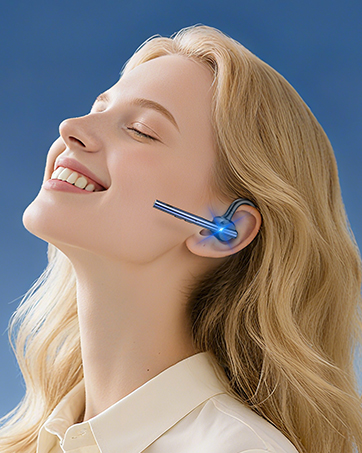
Image: A user activating the Siri voice assistant using the New Bee M50 headset, emphasizing hands-free operation for driving safety.
Noszenie zestawu słuchawkowego
The New Bee M50 headset is designed for comfort and versatility.
- The ear hook is rotatable by 180 degrees, allowing you to wear the headset on either your left or right ear.
- The microphone arm is flexible and can be rotated 270 degrees to position it optimally for voice capture.
- Choose from the three provided eartip sizes to find the most secure and comfortable fit for your ear.
- Weighing only 16g, the headset is lightweight for extended wear.

Image: A diagram illustrating the 270-degree rotatable microphone and 180-degree rotatable ear hook of the New Bee M50 headset, demonstrating its adaptable design for comfortable wearing on either ear.

Image: A visual guide demonstrating the correct way to wear the New Bee M50 headset for optimal sound and microphone performance, contrasting with incorrect positions.
Konserwacja
To ensure the longevity and optimal performance of your New Bee M50 Bluetooth Headset, follow these maintenance guidelines:
- Czyszczenie: Do czyszczenia zestawu słuchawkowego używaj miękkiej, suchej ściereczki. Unikaj stosowania silnych środków chemicznych i materiałów ściernych.
- Składowanie: When not in use, store the headset in its portable carry case to protect it from dust, moisture, and physical damage.
- Unikaj ekstremalnych warunków: Do not expose the headset to extreme temperatures, direct sunlight, or high humidity.
- Ładowanie: Używaj wyłącznie dołączonego kabla ładującego lub certyfikowanego odpowiednika. Unikaj przeładowywania akumulatora.
- Wodoodporność: The headset is not water resistant. Avoid contact with liquids.
Rozwiązywanie problemów
Jeśli masz problemy ze swoim zestawem słuchawkowym, zapoznaj się z poniższymi typowymi rozwiązaniami:
| Problem | Możliwe rozwiązanie |
|---|---|
| Headset won't power on | Ensure the headset is fully charged. Press and hold the Multi-function Button for a longer duration (5 seconds). |
| Nie można sparować z urządzeniem | Make sure the headset is in pairing mode (flashing red and blue). Turn off Bluetooth on other nearby devices. Restart your device and the headset. Ensure the headset is within 49 feet of your device. |
| Brak dźwięku lub niska głośność | Sprawdź poziom głośności zarówno w zestawie słuchawkowym, jak i podłączonym urządzeniu. Upewnij się, że zestaw słuchawkowy jest prawidłowo podłączony. Spróbuj ponownie sparować zestaw słuchawkowy. |
| Mikrofon nie działa | Ensure the microphone is not muted. Check microphone settings on your connected device. Adjust the microphone arm for optimal positioning. |
| Przerywane połączenie | Move closer to your connected device. Avoid obstacles between the headset and device. Ensure no other devices are causing interference. |
Specyfikacje
| Funkcja | Szczegół |
|---|---|
| Nazwa modelu | M50 |
| Technologia łączności | Bezprzewodowa (Bluetooth 5.2) |
| Zasięg Bluetooth | Do 49 stóp (15 metrów) |
| Kontrola hałasu | Active Noise Cancellation (Dual Mic DSP) |
| Czas rozmowy | Do 24 godzin |
| Czas odtwarzania muzyki | Do 20 godzin |
| Czas czuwania | Do 1440 godzin |
| Czas ładowania | 2-3 godzin |
| Waga przedmiotu | 16 gramów (0.564 uncji) |
| Kształt słuchawki | In Ear, Ear Hook |
| Tworzywo | Silikon |
| Kompatybilne urządzenia | Smartphones, Tablets, Laptops (iOS and Android systems) |
Gwarancja i wsparcie
New Bee provides a 3-letnia gwarancja for the M50 Bluetooth Headset, ensuring peace of mind regarding product quality and performance.
If you encounter any problems or have suggestions, please contact our customer service team. Our professional technical team is available 24 hours to assist you.

Image: Icons representing the 3-year warranty and 30-day free returns policy for New Bee products.
Wideo produktu
Video: Official product video demonstrating the features and usage of the New Bee M50 Bluetooth Headset.