
Marea B57009/4
Instrukcja obsługi smartwatcha Marea B57009/4
Model: B57009/4
Wstęp
Welcome to your Marea Smartwatch B57009/4. This comprehensive user manual provides detailed instructions for setting up, operating, and maintaining your device. Please read this manual carefully to ensure optimal performance and longevity of your smartwatch.
Zawartość opakowania
- Marea Smartwatch B57009/4 (Green)
- Kabel ładujący USB
- Instrukcja obsługi
Organizować coś
1. Ładowanie urządzenia
Before first use, fully charge your Marea Smartwatch. Connect the provided USB charging cable to the charging port on the back of the watch and plug the other end into a standard USB power adapter (not included) or a computer's USB port. The watch screen will indicate charging status. A full charge typically takes approximately 2 hours.
2. Parowanie ze smartfonem
- Pobierz aplikację towarzyszącą: Szukaj the official Marea smartwatch application (or a compatible generic smartwatch app) in your smartphone's app store (Google Play Store for Android, Apple App Store for iOS). Install the application.
- Włącz Bluetooth: Upewnij się, że Bluetooth jest włączony w Twoim smartfonie.
- Otwórz aplikację: Launch the installed companion app on your smartphone.
- Postępuj zgodnie z instrukcjami wyświetlanymi na ekranie: Within the app, follow the prompts to search for and pair with your Marea B57009/4 smartwatch. You may need to confirm the pairing on the watch screen.
3. Wstępna konfiguracja
After successful pairing, use the companion app to set up your personal profile. This includes entering your age, weight, and height for accurate activity tracking. You can also set the correct time and date, and configure notification preferences.
Instrukcja obsługi
Podstawowa nawigacja
- Ekran dotykowy: Swipe up, down, left, or right on the 1.69-inch touchscreen to navigate through menus, access different functions, and view dane.
- Przycisk boczny: Press the physical button on the side of the watch to return to the home screen. Press and hold the button to power the device on or off.
Dostosowywanie tarczy zegarka
The Marea B57009/4 features a customizable dial. You can change the watch face directly on the device by long-pressing the home screen, or through the companion app, which often offers a wider selection of designs.
Śledzenie aktywności
Your smartwatch automatically tracks various fitness metrics. The main screen often displays a summary of your daily activity.
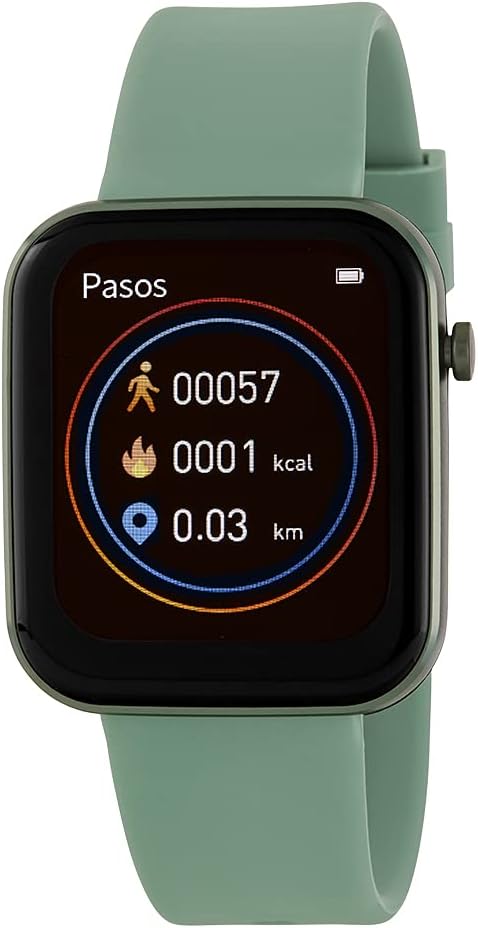
Image: Marea Smartwatch B57009/4 with a green strap. The screen displays activity tracking data, including steps (00057), calories burned (0001 kcal), and distance traveled (0.03 km). A battery icon is visible in the top right corner.
- Kroki: The watch counts your daily steps.
- Kalorie: Estimates calories burned based on your activity and personal profile.
- Dystans: Calculates the distance you have walked or run.
Detailed historical data and additional insights can be viewed within the companion app on your smartphone.
Powiadomienia
Once paired with your smartphone, the Marea B57009/4 can receive notifications for calls, messages, and app alerts. Configure which notifications you wish to receive through the companion app settings.
Sterowanie głosowe
The smartwatch supports voice control functionality. Activate this feature and issue commands directly to your watch for hands-free operation. Refer to the companion app or device settings for specific voice commands and supported functions.
Konserwacja
Czyszczenie smartwatcha
To keep your Marea B57009/4 clean, gently wipe the screen and strap with a soft, slightly damp, lint-free cloth. Avoid using abrasive cleaners, solvents, or harsh chemicals, as these can damage the device's finish and seals.
Wodoodporność (IP67)
The Marea B57009/4 has an IP67 water resistance rating. This means it is protected against dust ingress and can withstand immersion in fresh water up to 1 meter (3.3 feet) for a maximum of 30 minutes. It is suitable for everyday use, such as washing hands or light rain. It is not recommended for swimming, diving, showering, or exposure to high-pressure water. Prolonged exposure to water or use in hot water may compromise the water resistance.
Pielęgnacja baterii
To maximize the lifespan of your smartwatch battery:
- Unikaj wystawiania urządzenia na działanie ekstremalnych temperatur (bardzo wysokich lub bardzo niskich).
- Charge the watch regularly, but avoid leaving it fully charged or completely depleted for extended periods.
- Używaj wyłącznie dostarczonego kabla ładującego.
Rozwiązywanie problemów
Zegarek się nie włącza
- Upewnij się, że zegarek jest w pełni naładowany. Podłącz go do ładowarki na co najmniej 30 minut.
- Perform a soft reset by pressing and holding the side button for approximately 10-15 seconds until the Marea logo appears.
Nie można sparować ze smartfonem
- Sprawdź, czy Bluetooth jest włączony w Twoim smartfonie i smartwatchu.
- Uruchom ponownie smartfon i smartwatch.
- Upewnij się, że aplikacja towarzysząca jest zaktualizowana do najnowszej wersji.
- Jeśli urządzenie zostało wcześniej sparowane, spróbuj usunąć sparowanie z ustawień Bluetooth w telefonie, a następnie sparować je ponownie za pomocą aplikacji.
Inaccurate Activity Data
- Check that your personal profile (height, weight, age) in the companion app is accurate.
- Upewnij się, że zegarek ściśle przylega do nadgarstka, mniej więcej na szerokość jednego palca nad kością nadgarstka.
- Calibrate the watch if the app provides such an option.
Specyfikacje
| Numer modelu | B57009/4 |
| Marka | Marea |
| Rozmiar ekranu | 1.69 cala (44 mm) |
| Wymiary | 38x44mm |
| Odporność na wodę | IP67 |
| Zgodność z systemem operacyjnym | iOS 8.2 lub nowszy, Android 4.4 lub nowszy |
| Łączność | Bluetooth |
| Cechy specjalne | Customizable dial, Voice control |
| Skład baterii | Tlenek srebra |
| Kolor | Zielony |
Gwarancja i wsparcie
For detailed warranty information, technical support, and customer service, please refer to the official Marea website or contact the retailer from whom you purchased the Marea Smartwatch B57009/4. Keep your proof of purchase for warranty claims.