
1. Wprowadzenie
Dziękujemy za zakupasing the AIYIMA TUBE T9 Bluetooth 5.0 6K4 Tube Amplifier. This device combines a tube preamplifier with a digital power amplifier, offering multiple audio inputs including Bluetooth 5.0, USB, Coaxial, Optical, and RCA. It features a classic VU meter and tone controls for a personalized audio experience. This manual provides detailed instructions for setup, operation, and maintenance to ensure optimal performance and longevity of your ampliyfikator.
2. Informacje dotyczące bezpieczeństwa
- Zasilanie: Używaj wyłącznie dołączonego zasilacza DC24V. Upewnij się, że napięcietage is within the specified range (DC18V-30V).
- Wentylacja: Umieść ampPrzechowywać w dobrze wentylowanym pomieszczeniu. Nie blokować otworów wentylacyjnych.
- Wilgoć: Trzymaj urządzenie z dala od wody, wilgoci i wysokiej wilgotności powietrza.
- Ciepło: Unikaj umieszczania ampPrzechowywać w pobliżu źródeł ciepła lub w bezpośrednim świetle słonecznym.
- Handling Tubes: Vacuum tubes can become hot during operation. Exercise caution when handling or replacing them. Allow the unit to cool down before touching the tubes.
- Czyszczenie: Przed czyszczeniem odłącz zasilanie. Użyj miękkiej, suchej ściereczki. Nie używaj płynów ani aerozoli do czyszczenia.
- Serwisowanie: Nie próbuj samodzielnie naprawiać tego produktu. Wszelkie prace serwisowe zlecaj wykwalifikowanemu personelowi.
3. Zawartość opakowania
Proszę sprawdzić, czy w paczce znajdują się następujące elementy:
- AIYIMA TUBE T9 Ampliyfikator x 1
- 6K4 Vacuum Tube x 2
- Antena Bluetooth x 1
- Zasilacz DC24V x 1
- Kabel PC-USB x 1
- Remote Control x 1 (AA batteries not included)
- Instrukcja obsługi x 1
- Karta gwarancyjna x 1

Image: Contents included in the AIYIMA TUBE T9 amplifier package, showing the amplifier unit, two 6K4 tubes, a Bluetooth antenna, power adapter, USB cable, remote control, user manual, and warranty card.
4. Koniec produktuview
4.1 Panel przedni
The front panel features controls for power, input selection, volume, and tone, along with a classic VU meter and input indicators.
- Miernik VU: Displays audio signal level in real-time.
- Wskaźnik wejściowy: LEDs indicate the currently selected input (Bluetooth, PC-USB, RCA, Coaxial, Optical).
- Pokrętło głośności/wejściowe: Rotate to adjust volume. Press to cycle through input sources. Press and hold to power on/off.
- Kontrola basu: Reguluje wyjście o niskiej częstotliwości.
- Kontrola tonów wysokich: Reguluje wyjście wysokiej częstotliwości.
- Odbiornik IR: Do poleceń zdalnego sterowania.

Obraz: Szczegółowy view of the AIYIMA TUBE T9 amplifier's front panel, showing the VU meter, input indicators, volume knob, bass and treble controls, and the two visible 6K4 vacuum tubes.
4.2 Panel tylny
The rear panel provides all necessary audio input and output connections.
- Port anteny Bluetooth: Podłącz dołączoną antenę Bluetooth.
- Wejście RCA (L/P): Do analogowych źródeł dźwięku.
- Wejście koncentryczne: Do źródeł dźwięku cyfrowego.
- Wejście optyczne: Do źródeł dźwięku cyfrowego.
- Wejście PC-USB: Do podłączenia do komputera jako przetwornik cyfrowo-analogowy USB.
- AUX Out (3.5mm): For connecting to an active subwoofer or another ampliyfikator.
- Wyjście głośnikowe (L/P): Connect passive speakers (3-8Ω).
- DC18-30V Power Input: Podłącz zasilacz.
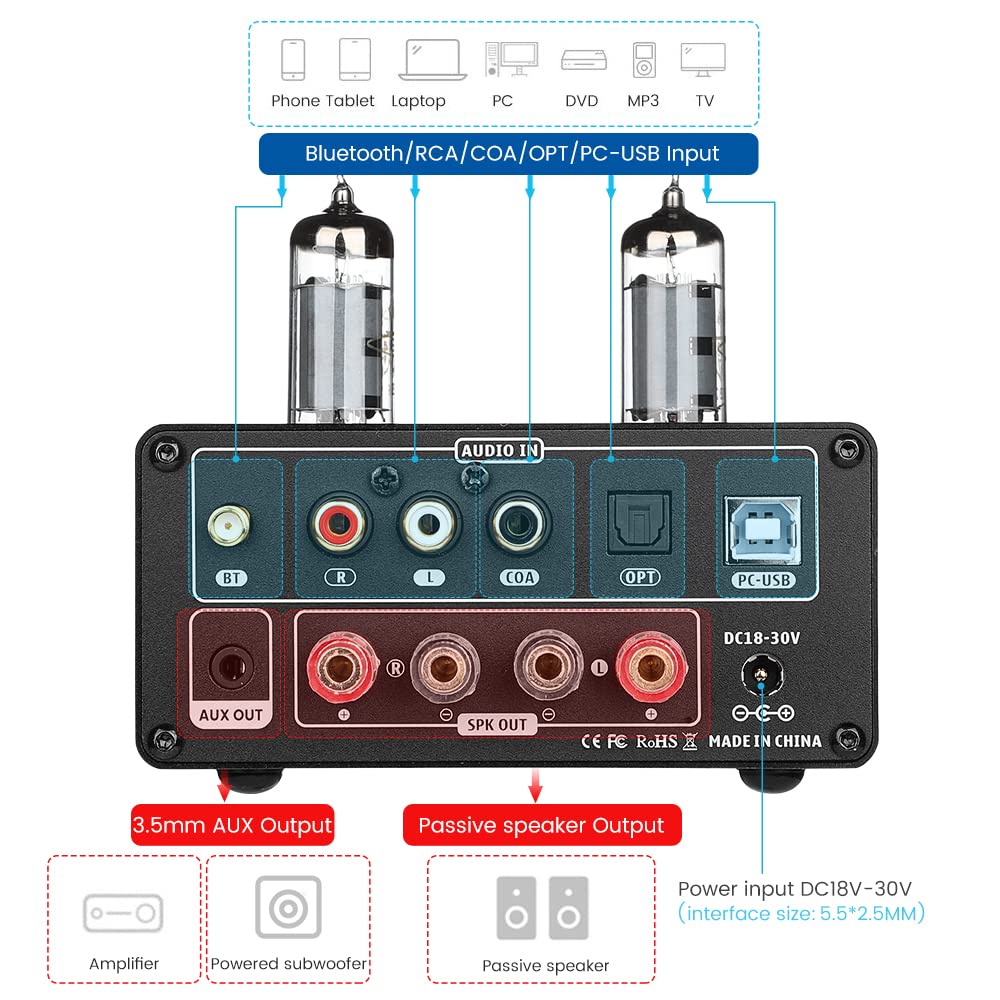
Obraz: Tył view of the AIYIMA TUBE T9 amplifier, highlighting the various input and output ports including Bluetooth, RCA, Coaxial, Optical, PC-USB, AUX Out, speaker terminals, and power input.
5. Konfiguracja
5.1 Instalacja rurki
- Carefully unpack the two 6K4 vacuum tubes.
- Align the pins of each tube with the corresponding holes on the ampgniazda lamp likierowych.
- Gently push the tubes straight down into the sockets until they are firmly seated. Do not force them.
5.2 Podłączanie głośników
The TUBE T9 is designed for passive speakers with an impedance of 3-8Ω.
- Podłącz głośniki pasywne do Speaker Output (SPK OUT) Zaciski na tylnym panelu. Upewnij się, że biegunowość jest prawidłowa (+ do + i - do -).
- For a 2.1 channel system, connect an active subwoofer to the AUX Out (3.5mm) port.
5.3 Podłączanie źródeł dźwięku
Connect your desired audio sources to the corresponding input ports:
- Bluetooth: Screw the included Bluetooth antenna into the BT port.
- PC-USB: Use the provided USB cable to connect your computer to the PC-USB port.
- RCA: Connect analog audio devices (e.g., CD player, streamer) using RCA cables to the RCA (lewy/prawy) wejście.
- Koncentryczne/optyczne: Connect digital audio devices (e.g., TV, game console) using Coaxial or Optical cables to the respective inputs.
Ważna uwaga: Ten amplifier does not have a built-in phono preamplifier. Do not connect a vinyl record player directly to the RCA input without an external phono preamp, as this may result in very low volume or distorted sound.

Image: Diagrams illustrating various connection scenarios for the AIYIMA TUBE T9 amplifier, including connecting to passive speakers, an amplifier, and different audio sources like phones, tablets, laptops, PCs, DVDs, and TVs.

Image: A visual warning indicating that the AIYIMA TUBE T9 amplifier cannot be directly connected to a vinyl record player without an external phono preampliyfikator.
5.4 Połączenie zasilania
- Upewnij się, że wszystkie połączenia audio są bezpieczne.
- Connect the DC24V power adapter to the Prąd stały 18-30 V port wejściowy na tylnym panelu.
- Podłącz zasilacz do gniazdka ściennego.
6. Instrukcja obsługi
6.1 Włączanie/wyłączanie zasilania
Press and hold the main Volume/Input Knob on the front panel for approximately 1 second to power the amplifier on or off. The VU meter and tubes will illuminate upon power-on.
6.2 Wybór wejścia
Short press the main Volume/Input Knob to cycle through the available input sources: Bluetooth, PC-USB, RCA, Coaxial, Optical. The corresponding LED indicator on the front panel will light up.
6.3 Regulacja głośności
Rotate the main Volume/Input Knob zgodnie z ruchem wskazówek zegara, aby zwiększyć głośność, i przeciwnie do ruchu wskazówek zegara, aby ją zmniejszyć.
6.4 kontrola tonów
Użyj Bas I Potroić knobs on the front panel to adjust the low and high frequencies according to your preference. This allows for fine-tuning the sound profile.
6.5 parowanie Bluetooth
- Select the Bluetooth input using the Volume/Input Knob. The Bluetooth indicator will flash.
- Na urządzeniu mobilnym (telefonie, tablecie itp.) włącz Bluetooth i wyszukaj dostępne urządzenia.
- Select "AIYIMA TUBE T9" from the list of devices to pair.
- Once paired, the Bluetooth indicator will stop flashing and remain solid. You can now play audio from your device.

Image: A smartphone connected via Bluetooth 5.0 to the AIYIMA TUBE T9 amplifier, demonstrujący bezprzewodowe przesyłanie strumieniowe dźwięku.
Miernik 6.6 VU
The integrated VU meter provides a visual representation of the audio output level. Its warm light and dynamic movement add a retro aesthetic to your listening experience. The meter is designed to respond to various volume levels.

Obraz: Zbliżenie view of the illuminated VU meter on the AIYIMA TUBE T9 amplifier, showing its needle indicating audio levels.
7. Konserwacja
7.1 Wymiana rurki
The 6K4 vacuum tubes can be replaced to customize the sound or if they wear out. Compatible tube models include:
- 6J1
- 6J2
- GE5654
- 6J3
- 6J4
- 6J5
- 6Ж1п (6Zh1p)
- 6AK5
To replace tubes:
- Wyłącz zasilanie amplifier and disconnect it from the power outlet.
- Allow the tubes to cool completely (this may take several minutes).
- Gently pull the existing tubes straight up from their sockets.
- Insert the new compatible tubes, aligning the pins carefully, and push them straight down until seated firmly.
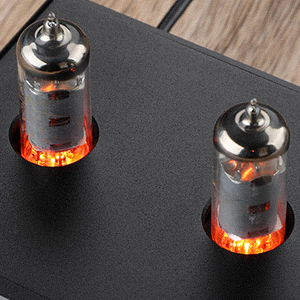
Obraz: Zbliżenie view of the two 6K4 vacuum tubes installed on the AIYIMA TUBE T9 amplifier, showing their glowing filaments during operation.
7.2 Czyszczenie
Wytrzyj ampZewnętrzną część urządzenia czyścić miękką, suchą ściereczką. Nie używać środków czyszczących ani rozpuszczalników o działaniu ściernym.
7.3 Wentylacja
Zapewnij odpowiedni przepływ powietrza wokół amplifier to prevent overheating. Do not place objects on top of the unit that could obstruct ventilation.
8. Rozwiązywanie Problemów
| Problem | Możliwa przyczyna | Rozwiązanie |
|---|---|---|
| Brak dźwięku |
|
|
| Zniekształcony dźwięk |
|
|
| Problemy z połączeniem Bluetooth |
|
|
| Clicking sound after silence | Automatic hibernation mode engaging | Ten amplifier may enter a hibernation state after a period of no audio signal, producing a soft click. This feature can be disabled using the remote control: press the M1 button on the remote to toggle the hibernation prompt on/off. |
| Wskaźnik VU nie porusza się | Very low volume or specific audio characteristics | The VU meter is designed to respond to audio levels. Ensure the volume is sufficiently high for the meter to register movement. This issue has been addressed in updated models to work at various levels. |
9. Specyfikacje

Image: The AIYIMA TUBE T9 amplifier shown with its physical dimensions and a table summarizing its key specifications.
| Funkcja | Specyfikacja |
|---|---|
| Numer modelu | TUBE T9 |
| Marka | AIYIMA |
| Interfejsy wejściowe | Bluetooth 5.0, PC-USB, RCA, Coaxial, Optical |
| Interfejsy wyjściowe | Passive Speaker Output, 3.5mm AUX Out (for active subwoofer/amplżejszy) |
| Moc wyjściowa | 100W x 2 (at 4Ω load) |
| Impedancja głośnika | 3-8Ω |
| Odpowiedź częstotliwościowa | 20-20 kHz (±1dB) |
| Stosunek sygnału do szumu (S/N) | ≥98dB |
| Objętość roboczatage | DC18V-30V |
| Wymiary (dł. x szer. x wys.) | 22 x 22 x 10 cm (ok. 8.66 x 8.66 x 3.94 cala) |
| Waga przedmiotu | 1 kg (ok. 2.2 funta) |
| Certyfikaty | CE |
| Kraj pochodzenia | Chiny |
10. Gwarancja i wsparcie
10.1 Informacje o gwarancji
According to the product specifications, there is no explicit warranty provided for this product. Please refer to your retailer's return policy for any issues within the initial purchase period.
10.2 Obsługa klienta
For technical assistance or inquiries, please contact the seller or AIYIMA customer support through their official channels. Keep your purchase receipt or order details handy for any support requests.