
beFree Sound 6910759
beFree Sound 12 Inch Bluetooth Rechargeable Portable PA Party Speaker User Manual
Model: 6910759
1. Wprowadzenie
This manual provides essential instructions for the safe and efficient operation of your beFree Sound 12 Inch Bluetooth Rechargeable Portable PA Party Speaker. Please read this manual thoroughly before using the product and retain it for future reference.
The beFree Sound portable PA speaker is designed for versatile audio playback and public address applications, featuring Bluetooth connectivity, various input options, and reactive LED lighting.
2. Informacje dotyczące bezpieczeństwa
- Do not expose the speaker to water or excessive moisture. The product is not waterproof.
- Unikaj umieszczania głośnika w pobliżu źródeł ciepła lub w bezpośrednim świetle słonecznym przez dłuższy czas.
- Zapewnij odpowiednią wentylację, nie blokuj żadnych otworów wentylacyjnych.
- Należy używać wyłącznie zasilacza dostarczonego przez producenta.
- Nie próbuj samodzielnie otwierać ani naprawiać urządzenia. Wszelkie prace serwisowe zleć wykwalifikowanemu personelowi.
- Przechowywać w miejscu niedostępnym dla dzieci.
- Odłączaj przewód zasilający podczas burzy z piorunami lub jeśli nie używasz urządzenia przez dłuższy czas.
3. Zawartość opakowania
Sprawdź, czy w opakowaniu znajdują się wszystkie elementy:
- One beFree Sound 12 Inch Portable PA Speaker
- Jeden mikrofon
- Jeden pilot zdalnego sterowania
- Jedna instrukcja obsługi (ten dokument)

4. Koniec produktuview
4.1 Panel przedni

- Kratka głośnika: Protects the speaker components.
- Reactive LED Lights: Illuminates in various colors, reacting to audio playback.
4.2 Elementy sterujące i porty na tylnym panelu

- Wyjście AUX: 3.5mm jack for connecting to external audio devices.
- Gniazdo USB: Do dysków flash USB.
- Gniazdo karty TF: Do kart TF (MicroSD).
- Wskaźnik poziomu naładowania: Wyświetla stan baterii.
- Lights Switch: Toggles the reactive LED lights on/off.
- Wejście mikrofonowe: Gniazdo 6.35 mm do podłączenia dołączonego mikrofonu.
- Antena: Do odbioru radia FM.
- Regulacja głośności: Reguluje ogólną głośność głośnika.
- Regulacja głośności mikrofonu: Reguluje głośność mikrofonu.
- Kontrola echa: Adjusts echo effect for the microphone.
- Kontrola tonów wysokich: Dostosowuje dźwięk o wysokiej częstotliwości.
- Kontrola basu: Dostosowuje dźwięk o niskiej częstotliwości.
- Przycisk zasilania: Włącza/wyłącza głośnik.
- Wejście DC 12V: Wejście zasilania umożliwiające ładowanie i obsługę.
4.3 Inne funkcje
- Wysuwany uchwyt: Dla łatwego przenoszenia.
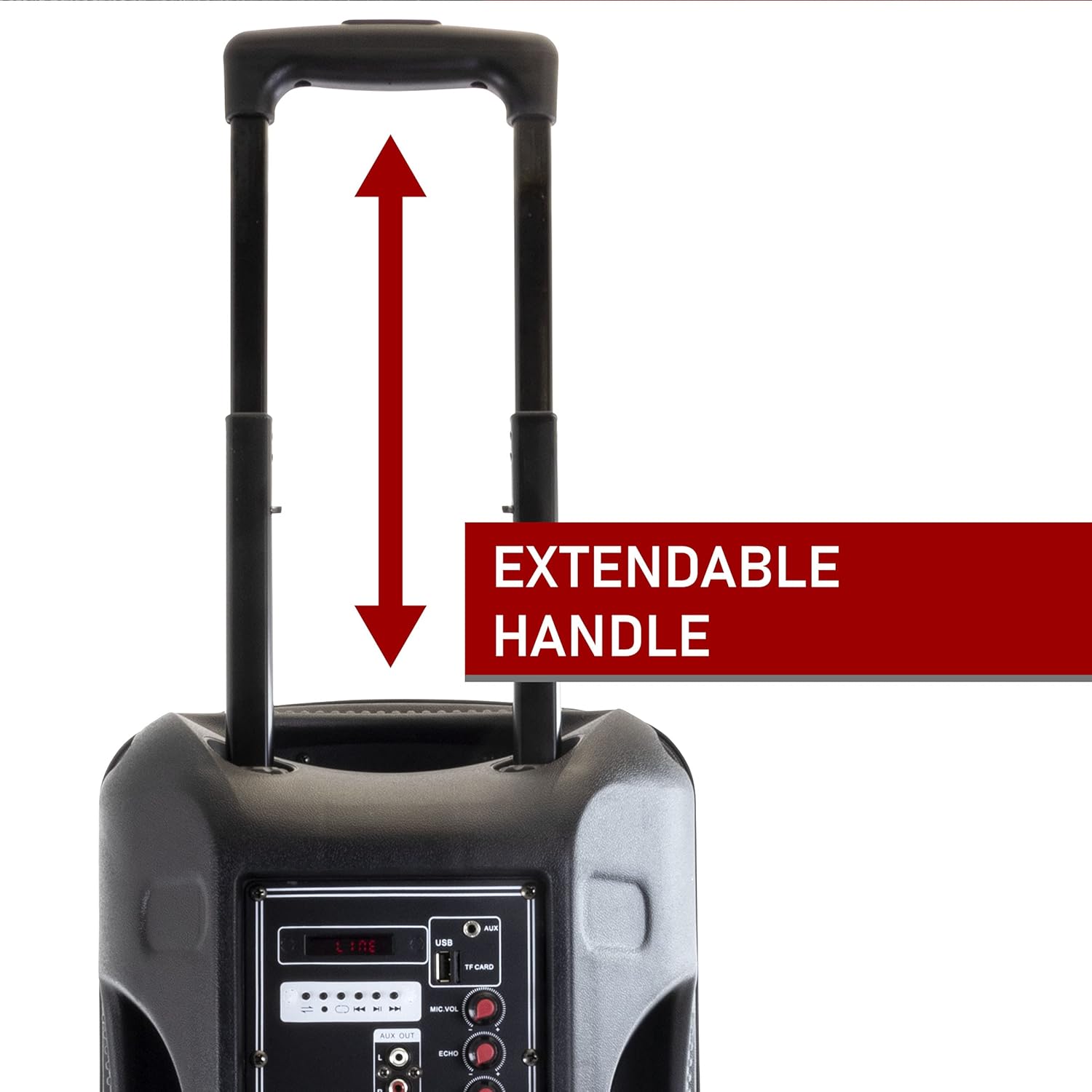
Figure 4.3: Extendable Handle. This image shows the speaker's extendable handle in its extended position, indicating its function for easy transport. - Sturdy Caster Wheels: Dla wygodnego przemieszczania się.

Figure 4.4: Caster Wheels. A close-up view of one of the durable caster wheels located at the bottom of the speaker, designed for smooth mobility. - Molded Side Handle: For additional carrying options.

Figure 4.5: Molded Side Handle. This image provides a detailed look at the ergonomic molded handle on the side of the speaker, offering an alternative grip for lifting or carrying. - Zdalne sterowanie: Do wygodnej obsługi z odległości.

Figure 4.6: Remote Control. An image of the compact black remote control, featuring buttons for power, mute, mode selection, volume adjustment, track navigation, and equalizer settings. - Mikrofon: For public address or karaoke.

Figure 4.7: Included Microphone. A close-up of the black wired microphone, showing its on/off switch and standard design for vocal input.
5. Konfiguracja
- Rozpakowywanie: Ostrożnie wyjąć wszystkie elementy z opakowania.
- Ładowanie: Before first use, fully charge the speaker. Connect the power adapter to the "DC 12V IN" port on the rear panel and plug it into a power outlet. The charge level indicator will show charging status. A full charge can last up to 3 hours of operation.
- Umieszczenie: Place the speaker on a stable, flat surface. Utilize the extendable handle and caster wheels for easy positioning.
- Włączanie: Przełącz przełącznik zasilania na tylnym panelu do pozycji „ON”.
6. Instrukcja obsługi
6.1 Tryb Bluetooth
- Turn on the speaker. The default mode is usually Bluetooth. If not, press the "Mode" button on the speaker or remote until "Bluetooth" is announced or displayed.
- Włącz Bluetooth w swoim urządzeniu mobilnym (smartfonie, tablecie, laptopie).
- Szukaj available devices and select "beFree Sound Speaker" (or similar name) from the list.
- Once paired, you will hear a confirmation sound. You can now play audio wirelessly from your device.
- Control playback (play/pause, next/previous track) and volume using your device or the speaker/remote controls.
6.2 Tryb karty USB/TF
- Insert a USB flash drive or TF (MicroSD) card into the respective slot on the rear panel.
- The speaker should automatically switch to USB/TF mode and begin playing audio. If not, press the "Mode" button.
- Use the playback controls (play/pause, next/previous track) on the speaker or remote to manage your music.
6.3 Tryb wejścia AUX
- Connect an external audio device (e.g., MP3 player, CD player) to the "AUX" input port on the rear panel using a 3.5mm audio cable.
- Press the "Mode" button until "AUX" is selected.
- Control playback from your connected device. Adjust volume using both the speaker's volume control and your device's volume.
Tryb radia FM 6.4
- Extend the antenna on the rear panel for better reception.
- Press the "Mode" button until "FM" is selected.
- Press the "Scan" button (often the Play/Pause button) to automatically scan and save available FM stations.
- Use the "Previous/Next Track" buttons to navigate through the saved stations.
6.5 Korzystanie z mikrofonu
- Connect the microphone to the "MIC INPUT" port on the rear panel.
- Ensure the microphone's power switch is in the "ON" position.
- Adjust the "MIC VOL" knob to control the microphone's volume.
- Use the "ECHO" knob to add an echo effect to your voice.
6.6 świateł LED

The speaker features reactive LED lights that illuminate during audio playback. To turn the lights on or off, use the "LIGHTS SWITCH" on the rear panel.
6.7 Regulacja korektora
Use the "TREBLE" and "BASS" knobs on the rear panel to fine-tune the audio output to your preference.
7. Konserwacja
- Czyszczenie: Przetrzyj głośnik miękką, suchą ściereczką. Nie używaj środków czyszczących ani rozpuszczalników o działaniu ściernym.
- Składowanie: Gdy głośnik nie jest używany, należy go przechowywać w chłodnym i suchym miejscu, z dala od bezpośredniego światła słonecznego i ekstremalnych temperatur.
- Pielęgnacja baterii: Aby przedłużyć żywotność baterii, unikaj częstego całkowitego rozładowywania baterii. Regularnie ładuj głośnik, nawet jeśli nie jest używany przez dłuższy czas.
8. Rozwiązywanie Problemów
| Problem | Możliwa przyczyna | Rozwiązanie |
|---|---|---|
| Brak zasilania | Battery is discharged; Power cable not connected. | Naładuj głośnik. Upewnij się, że kabel zasilający jest prawidłowo podłączony. |
| Brak dźwięku | Zbyt niski poziom głośności; Nieprawidłowy tryb wprowadzania; Urządzenie nie jest prawidłowo podłączone. | Increase volume; Select correct input mode (Bluetooth, AUX, USB/TF, FM); Reconnect device. |
| Błąd parowania Bluetooth | Głośnik nie jest w trybie parowania; Urządzenie jest za daleko; Zakłócenia. | Ensure speaker is in Bluetooth mode; Move device closer (within 10 meters); Restart both devices. |
| Mikrofon nie działa | Microphone switch off; MIC VOL too low; Microphone not connected. | Turn on microphone switch; Increase MIC VOL; Ensure microphone is securely plugged in. |
| Słaby odbiór FM | Antena nie jest wysunięta; słaby sygnał. | Fully extend the antenna; Try repositioning the speaker. |
9. Specyfikacje
| Funkcja | Szczegół |
|---|---|
| Numer modelu | 6910759 |
| Marka | Dźwięk beFree |
| Typ głośnika | Głośnik niskotonowy |
| Średnica głośnika niskotonowego | 12 cali |
| Technologia łączności | Bluetooth, Auxiliary, RCA, USB |
| Komunikacja bezprzewodowa | Bluetooth |
| Zasięg Bluetooth | Do 10 metrów |
| Źródło zasilania | Elektryczny przewodowy (akumulatorowy) |
| Typ baterii | 1 litowo-jonowy (w zestawie) |
| Żywotność baterii (w przybliżeniu) | Do 3 godzin na pełnym naładowaniu |
| Cechy specjalne | Portable, Reactive LED Lights, Equalizer (Treble, Bass) |
| Zawarte komponenty | Speaker, Microphone, Remote Control, User Manual |
| Wymiary (dł. x szer. x wys.) | 20.5 x 13 x 13 cala |
| Waga przedmiotu | 16.3 funtów |
| Tworzywo | Metal (Grille), Plastic (Casing) |
| Kolor | Czarny |
| UPC | 840191203640 |
10. Gwarancja i wsparcie
This beFree Sound product comes with a Ograniczona gwarancja. For specific details regarding warranty coverage, duration, and how to obtain service, please refer to the warranty card included with your purchase or contact beFree Sound customer support.
For technical assistance or customer service inquiries, please visit the official beFree Sound website or contact their support channels. Keep your purchase receipt as proof of purchase for warranty claims.
Ask a question about this manual
Ask about setup, troubleshooting, compatibility, parts, safety, or missing instructions. Manuals+ will review the question and use this page’s manual context to help answer it.