
PLZ MP-902
PLZ MP-902 Double Din Car Stereo User Manual
Model: MP-902 | Brand: PLZ
Wstęp
This user manual provides comprehensive instructions for the installation, operation, and maintenance of your PLZ MP-902 Double Din Car Stereo. Please read this manual thoroughly before using the product to ensure proper functionality and safety. The MP-902 is designed to enhance your in-car audio and entertainment experience with its advanced features and user-friendly interface.
Cechy produktu
- Bluetooth 5.1 & Dual Mic: Enjoy hands-free calling and audio streaming with advanced Bluetooth 5.1. Features a built-in microphone and external microphone interface for clear communication.
- Funkcjonalność Mirror Link: Supports screen mirroring for both ISO (iPhone) and Android phones via USB, allowing you to display navigation, videos, and other apps on the 7-inch touchscreen.
- Tył/Przód View Obsługa kamery: Designed for safety, the MP-902 automatically displays the rear camera image when reversing. An HD rear camera with night vision and a 170° ultra-wide viewing angle is included.
- 7 Inch Full HD Capacitive Touchscreen: Features a highly sensitive and accurate 7-inch capacitive touch screen supporting 1080P video playback for an immersive viewzdobywania doświadczenia.
- 16-Band EQ DSP: Customize your audio experience with the built-in 16-band equalizer and Digital Signal Processor (DSP) to match various music styles.
- USB Fast Charging & Data Read: Conveniently charge your devices and read data via the USB port.
- Radio FM/AM: Access your favorite radio stations with FM/AM tuner.
- Sterowanie z kierownicy: Compatible with steering wheel controls for safe and convenient operation while driving.
Zawartość opakowania
Upewnij się, że w przesyłce znajdują się wszystkie wymienione poniżej elementy:
- PLZ MP-902 Double Din Car Stereo Unit
- Zdalne sterowanie
- Tył View Kamera
- Kabel kamery cofania
- Rama
- Brackets (Mounting Hardware)
- Śruby
- Wiązka przewodów
- Instrukcja obsługi

Image: Complete package contents for the PLZ MP-902 car stereo.
Konfiguracja i instalacja
Before beginning installation, ensure your vehicle's dashboard opening is compatible with the standard double din size (173mm x 98mm). If not, a suitable dash kit or modification may be required. Professional installation is recommended.
1. Połączenia okablowania
Connect the included wiring harness to your vehicle's existing wiring. Refer to the detailed wiring diagram provided in the user manual and on the product image for correct connections. Additional wire harness adapters or antenna adapters may be needed for specific car models.

Image: Standard size and wiring diagram for the MP-902 car stereo.
2. Instalacja kamery
The MP-902 supports both front and rear view cameras. The included HD rear camera should be mounted at the rear of your vehicle. Connect the camera's video output to the 'R-CAM' input on the stereo and its power to your vehicle's reverse light circuit for automatic activation when shifting into reverse.

Image: Front and rear camera input setup, highlighting the included rear camera with night vision and wide viewkąt.
3. Instalacja fizyczna
Secure the stereo unit into the dashboard opening using the provided brackets and screws. Attach the frame for a clean, integrated look. Ensure all cables are properly routed and secured to prevent interference or damage.
Video: A demonstration of the PLZ MP-902 car stereo's functions, including a brief overview of its physical features and connections.
Instrukcja obsługi
The PLZ MP-902 features an intuitive touchscreen interface for easy navigation and control. Below are instructions for key functions.
1. Podstawowa nawigacja
From the main menu, tap on the desired icon to access functions such as Radio, Bluetooth, Phone Link, USB, Card, AV In, F-CAM (Front Camera), and Setup.

Image: Main menu interface of the MP-902.
2. Łączność Bluetooth
To connect your phone via Bluetooth 5.1, go to the 'BT' menu. Enable Bluetooth on your phone and search for 'MP-902'. Pair the devices. Once connected, you can make hands-free calls, access your phonebook, and stream audio. The dual microphone system ensures clear call quality.

Image: Bluetooth 5.1 interface for hands-free calling and music streaming.
3. Mirror Link (Phone Connectivity)
Select 'Phone Link' from the main menu. Connect your ISO or Android smartphone via a USB cable. Follow the on-screen prompts to enable screen mirroring. This allows you to display your phone's screen, including navigation apps and video content, directly on the stereo's display.

Image: Phone Mirror Link feature displaying a mirrored smartphone screen.
4. Audio Settings (16-Band EQ)
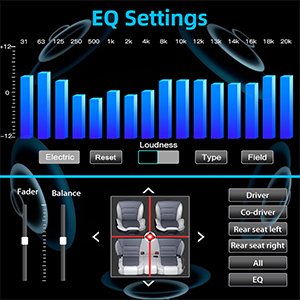
Access the 16-Band EQ settings from the 'EQ' icon. Adjust individual frequency bands to customize your audio output. You can also control fader and balance settings to optimize sound distribution within your vehicle.

Image: Detailed 16-Band EQ settings for audio customization.
5. Obsługa radia
Select 'Radio' from the main menu. You can manually tune to stations or use the auto-scan feature to find available FM/AM frequencies. Save your favorite stations as presets for quick access.
Obraz: Interfejs radia FM/AM.
6. Sterowanie z kierownicy (SWC)
If your vehicle supports steering wheel controls, you can configure them in the 'Setup' menu under 'Steering Wheel Setup'. This allows you to control volume, track changes, and other functions directly from your steering wheel.

Obraz: Interfejs konfiguracji sterowania z kierownicy.
Konserwacja
To ensure the longevity and optimal performance of your PLZ MP-902 car stereo, follow these maintenance guidelines:
- Czyszczenie ekranu: Delikatnie przetrzyj ekran dotykowy miękką, niepozostawiającą włókien ściereczką. W przypadku uporczywych plam delikatnie przetrzyj.ampPrzetrzyj ściereczkę wodą lub środkiem do czyszczenia ekranów. Unikaj materiałów ściernych i silnych środków chemicznych.
- Ogólne sprzątanie: Utrzymuj urządzenie w czystości, usuwając kurz i zanieczyszczenia. Do czyszczenia okolic przycisków i otworów wentylacyjnych używaj miękkiej szczotki lub sprężonego powietrza.
- Aktualizacje oprogramowania: Okresowo sprawdzaj producenta website or contact customer support for any available software updates. Updates can improve performance, add features, or fix bugs. Follow update instructions carefully.
- Unikaj ekstremalnych temperatur: Nie wystawiaj urządzenia na działanie ekstremalnie wysokich lub niskich temperatur przez dłuższy czas, ponieważ może to uszkodzić podzespoły elektroniczne.
Rozwiązywanie problemów
If you encounter issues with your PLZ MP-902, refer to the following common troubleshooting steps:
| Problem | Możliwa przyczyna | Rozwiązanie |
|---|---|---|
| Brak zasilania | Loose wiring, blown fuse, vehicle power issue. | Check power and ground connections. Inspect vehicle's fuse box and the stereo's inline fuse. Ensure ignition is on. |
| Brak dźwięku | Nieprawidłowe podłączenie głośników, zbyt niski poziom głośności, włączony wyciszenie, nieprawidłowe źródło dźwięku. | Verify speaker connections. Increase volume. Check if mute is active. Select the correct audio source (e.g., Radio, BT, USB). |
| Brak połączenia Bluetooth | Bluetooth not enabled on phone/stereo, device not in pairing mode, interference. | Ensure Bluetooth is on for both devices. Put stereo in pairing mode. Delete previous pairings on phone and retry. Move closer to the unit. |
| Mirror Link nie działa | Incorrect USB cable, phone settings, app compatibility. | Use a high-quality USB cable. Ensure phone's USB debugging or mirroring settings are enabled. Some apps may restrict mirroring due to copyright. |
| Obraz z tylnej kamery nie jest wyświetlany | Incorrect camera wiring, reverse trigger wire not connected, faulty camera. | Check camera video input and power connections. Ensure the reverse trigger wire is correctly connected to the vehicle's reverse light. |
If these steps do not resolve the issue, please contact PLZ customer support for further assistance.
Specyfikacje
| Funkcja | Szczegół |
|---|---|
| Numer modelu | MP-902 |
| Rozmiar ekranu | 7 cali |
| Typ ekranu | Full HD Capacitive Touchscreen |
| Wersja Bluetooth | 5.1 |
| Korektor dźwięku | 16-Band EQ DSP |
| Łączność | Bluetooth, pomocniczy, USB |
| Supported Video Playback | 1080P |
| Wymiary produktu | 3.26" gł. x 7" szer. x 3.93" wys. (8.28 x 17.78 x 9.98 cm) |
| Waga przedmiotu | 2.51 funtów (1.14 kg) |
| Dołączona kamera | HD Rear Camera with Night Vision (170° ultra-wide viewkąt) |
Gwarancja i wsparcie
PLZ is committed to providing high-quality products and excellent customer service. For any warranty claims, technical support, or inquiries regarding your MP-902 car stereo, please contact PLZ customer support directly. Refer to the contact information provided with your product packaging or visit the official PLZ webaby uzyskać pomoc.
Many common issues can be resolved by referring to the troubleshooting section of this manual or by checking for the latest software updates from PLZ.
Ask a question about this manual
Ask about setup, troubleshooting, compatibility, parts, safety, or missing instructions. Manuals+ will review the question and use this page’s manual context to help answer it.