
1. Wprowadzenie
Thank you for choosing the Andoer W200RGB LED Video Light. This manual provides detailed instructions for the proper setup, operation, and maintenance of your device. Please read this manual thoroughly before use to ensure optimal performance and longevity of the product. Keep this manual for future reference.
2. Koniec produktuview
2.1 Zawartość opakowania
Po otwarciu opakowania prosimy sprawdzić, czy wszystkie wymienione poniżej elementy znajdują się w opakowaniu i są w dobrym stanie:
- Andoer W200RGB LED Video Light
- Kabel do ładowania USB typu C.
- Miniaturowy statyw
- Pasek na nadgarstek
- User Manual (English and Chinese)

Image: Contents of the Andoer W200RGB LED Video Light package, showing the light, USB cable, mini tripod, and wrist strap.
2.2 Główne cechy
- Kompaktowa i przenośna konstrukcja: Rod-shaped design, 20cm in length, lightweight for easy transport.
- Wysoka jasność: Equipped with 184 high-quality LED beads (69 white, 69 yellow, 46 RGB) with 7W output and CRI 95+.
- RGB Colored Light Mode: 360° adjustable HUE and 0%-100% adjustable brightness for diverse colorful lighting effects.
- CCT Cold & Warm Light Mode: Wide adjustable color temperature range from 2500K to 9000K.
- 20 Special Lighting Effects: Includes ambulance, fireworks, TV, candle, party, strobe, RGB strobe, red flash, green flash, blue flash, slow HSI, fast HSI, and more.
- Wbudowany akumulator: Integrated 3.7V 3000mAh lithium battery for extended working time, rechargeable via Type-C port.
- Magnetyczny tył: Built-in magnets at both ends allow for easy attachment to magnetic surfaces.
2.3 Sterowanie i wyświetlacz
The Andoer W200RGB features intuitive controls and an LCD screen for easy operation.

Image: The control panel of the Andoer W200RGB LED Video Light, showing the power button, mode button, adjustment buttons, and LCD screen.
- Przycisk zasilania: Press and hold to turn the light on or off. Short press to switch between modes.
- Przycisk trybu (M): Short press to cycle through CCT, HSI (RGB), and Scene modes.
- Przyciski góra/dół (▲/▼): Adjust parameters such as brightness, color temperature, HUE, or saturation depending on the selected mode.
- Ekran LCD: Displays current settings including mode, brightness, color temperature, HUE, and battery level.
- Port ładowania typu C: Located at one end for charging the internal battery.
3. Konfiguracja
3.1 Ładowanie akumulatora
The Andoer W200RGB LED Video Light comes with a built-in rechargeable lithium battery. Before first use, it is recommended to fully charge the device.
- Connect the supplied USB Type-C cable to the charging port on the light.
- Podłącz drugi koniec kabla USB do standardowego zasilacza USB (nie ma go w zestawie) lub do portu USB komputera.
- The LCD screen will indicate the charging status. A full charge typically takes a few hours.

Image: The Andoer W200RGB LED Video Light highlighting its internal 3.7V 3000mAh battery and Type-C charging capability.
3.2 Mocowanie mini statywu
The included mini tripod can be attached to the 1/4-inch screw hole at the bottom of the light for stable placement.
- Locate the 1/4-inch screw hole on the bottom of the LED light.
- Screw the mini tripod securely into the screw hole.
- Adjust the tripod legs for desired height and stability.
4. Instrukcja obsługi
4.1 Włączanie/wyłączanie zasilania
- To turn on the light, press and hold the Power button (labeled with a circle and vertical line) for a few seconds.
- To turn off the light, press and hold the Power button again for a few seconds.
4.2 tryby przełączania
After powering on, short press the Mode button (M) to cycle through the available lighting modes:
- CCT Mode (Color Correlated Temperature): For adjusting white light from warm to cool.
- HSI Mode (Hue, Saturation, Intensity): For adjusting RGB colored light.
- Tryb sceny: For selecting special lighting effects.
4.3 Działanie w trybie CCT
W trybie CCT można regulować temperaturę barwową i jasność.
- Use the Up/Down buttons (▲/▼) to adjust the brightness from 0% to 100%.
- Short press the Power button to switch to color temperature adjustment. Use the Up/Down buttons (▲/▼) to adjust the color temperature from 2500K (warm) to 9000K (cool).

Image: Visual representation of brightness adjustments (0%, 50%, 100%) and color temperature settings (6000K, 5000K, 2800K) in CCT mode.
4.4 HSI Mode (RGB) Operation
In HSI mode, you can adjust the HUE (color), saturation, and brightness.
- Use the Up/Down buttons (▲/▼) to adjust the HUE (360° color spectrum).
- Short press the Power button to switch to saturation adjustment. Use the Up/Down buttons (▲/▼) to adjust saturation.
- Short press the Power button again to switch to brightness adjustment. Use the Up/Down buttons (▲/▼) to adjust brightness from 0% to 100%.
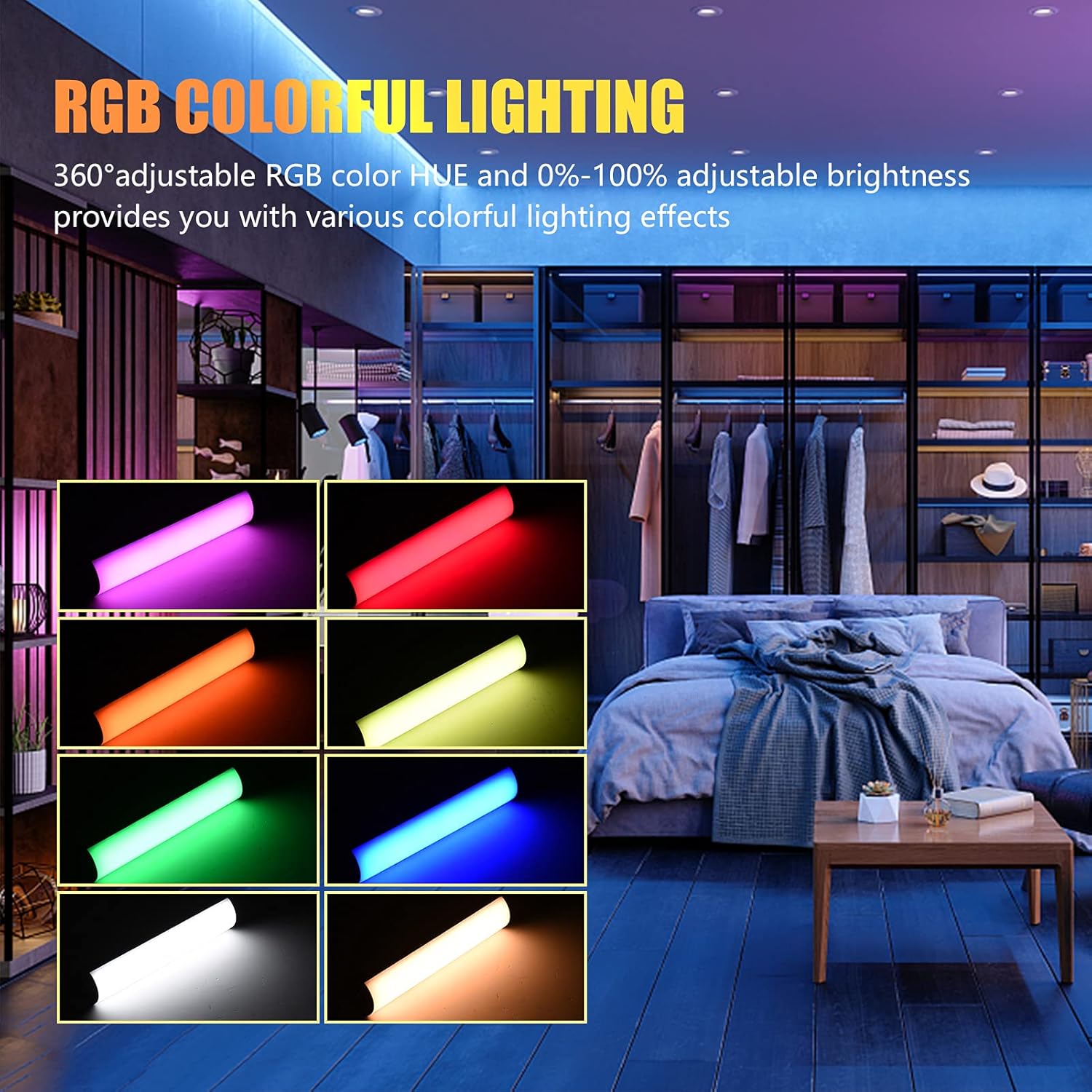
Image: The Andoer W200RGB LED Video Light demonstrating its RGB colorful lighting capabilities, showing different hues and brightness levels.

Image: Several Andoer W200RGB LED Video Lights illuminated in various solid RGB colors, showcasing the rod-shaped design.
4.5 Scene Mode Operation (Special Effects)
In Scene mode, you can select from 20 pre-programmed special lighting effects.
- Use the Up/Down buttons (▲/▼) to cycle through the 20 special effects.
- Some effects may have adjustable parameters (e.g., speed or intensity), which can be adjusted by short pressing the Power button and then using the Up/Down buttons.

Image: A visual guide to the 20 dynamic scene light effects, such as police car, ambulance, fireworks, TV, candle, party, strobe, and various color flashes.
4.6 Using the Magnetic Back
The Andoer W200RGB LED Video Light features built-in magnets at both ends, allowing it to be easily attached to metallic surfaces for flexible lighting setups.
- Simply place either end of the light onto a suitable magnetic surface.
- Ensure the surface is stable and can support the weight of the light.

Image: The Andoer W200RGB LED Video Light highlighting its magnetic ends, demonstrating how it can be attached to metal surfaces.
4.7 Zastosowania praktyczne

Image: A comparison of scenes before and after using the Andoer W200RGB LED Video Light, illustrating its effectiveness in enhancing illumination for various activities.
5. Konserwacja
5.1 Czyszczenie
- Przed czyszczeniem należy upewnić się, że urządzenie jest wyłączone i odłączone od źródła zasilania.
- Do przecierania powierzchni lampy należy używać miękkiej, suchej ściereczki.
- W przypadku uporczywych zabrudzeń, delikatnieampPrzetrzyj szmatkę wodą. Unikaj stosowania silnych środków chemicznych, rozpuszczalników i ściernych środków czyszczących.
- Nie dopuść do przedostania się wody lub innych płynów do urządzenia.
5.2 Przechowywanie
- Przechowuj lampę w chłodnym i suchym miejscu, z dala od bezpośredniego światła słonecznego i ekstremalnych temperatur.
- If storing for an extended period, charge the battery to approximately 50% every three months to maintain battery health.
5.3 Pielęgnacja baterii
- Unikaj częstego całkowitego rozładowywania akumulatora.
- Nie wystawiaj akumulatora na działanie wysokich temperatur i nie przebijaj go.
- If the battery shows signs of swelling or leakage, discontinue use immediately and dispose of it properly according to local regulations.
6. Rozwiązywanie Problemów
If you encounter any issues with your Andoer W200RGB LED Video Light, please refer to the following common problems and solutions:
- Światło się nie włącza:
- Ensure the battery is charged. Connect the light to a power source using the USB Type-C cable.
- Naciśnij i przytrzymaj przycisk zasilania przez kilka sekund, aby mieć pewność, że nie jest to tylko krótkie naciśnięcie.
- Light flickers or output is unstable:
- Check the battery level; low battery can cause unstable performance. Recharge if necessary.
- Upewnij się, że lampa nie będzie narażona na działanie ekstremalnych temperatur.
- Cannot change modes or adjust parameters:
- Ensure you are pressing the correct buttons (Mode button for mode changes, Power button to cycle through adjustable parameters within a mode, Up/Down buttons for value adjustment).
- Uruchom ponownie urządzenie, wyłączając je i włączając ponownie.
- Bateria nie ładuje się:
- Verify the USB Type-C cable is securely connected to both the light and the power source.
- Aby wykluczyć uszkodzenie akcesoriów, wypróbuj inny kabel USB lub zasilacz.
- Upewnij się, że źródło zasilania jest sprawne.
Jeśli po wypróbowaniu tych rozwiązań problem nadal występuje, skontaktuj się z obsługą klienta w celu uzyskania dalszej pomocy.
7. Specyfikacje
| Funkcja | Specyfikacja |
|---|---|
| Marka | Andoer |
| Model | W200RGB |
| Koraliki LED | 69pcs White + 69pcs Yellow + 46pcs RGB |
| Temperatura barwowa | 2500K-9000K |
| CRI (wskaźnik oddawania barw) | 95+ |
| Maksymalna moc wyjściowa | 7W |
| Strumień świetlny | 800 luksów / 0.3 m |
| Kąt wiązki | 120° |
| Typ baterii | Wbudowana bateria litowa 3.7 V 3000 mAh |
| Port ładowania | USB typu C |
| Rozmiar przedmiotu | 20 x 4 x 3.5 cm (7.9 x 1.6 x 1.4 cala) |
| Waga przedmiotu | 11.3 uncji (około 320 g) |
| Tripod (folded length) | 7.5cm (use height 4.5cm) |
| Numer modelu (ASIN) | QEX6686347803069PL (B09F8RLMSY) |
8. Informacje dotyczące bezpieczeństwa
Ostrzeżenie:
If you find the product damaged, deformed, or exhibiting abnormal performance, please stop using it immediately and contact us.
Always handle the device with care. Do not disassemble or modify the product. Keep out of reach of children.
9. Gwarancja i wsparcie
Andoer products are designed for reliability and performance. This product is covered by a standard manufacturer's warranty against defects in materials and workmanship. For specific warranty terms and conditions, please refer to the documentation provided at the time of purchase or contact your retailer.
For technical support, troubleshooting assistance, or warranty claims, please contact Andoer customer service through the retailer's platform or the official Andoer webStrona. Kontaktując się z pomocą techniczną, przygotuj model produktu i informacje o zakupie.
Odwiedź Sklep Andoer na Amazon Aby uzyskać więcej informacji i produktów.