
FLEXISPOT E4 Classic
FLEXISPOT E4 Classic Electric Standing Desk User Manual
Model: E4 Classic | Brand: FLEXISPOT
Wstęp
This manual provides detailed instructions for the assembly, operation, and maintenance of your FLEXISPOT E4 Classic Electric Standing Desk. Please read this manual thoroughly before use to ensure proper function and longevity of your product.

Figure 1: The FLEXISPOT E4 Classic Electric Standing Desk, featuring a bamboo contour desktop and silver frame, set up with dual monitors in an office environment.
Informacje dotyczące bezpieczeństwa
- Przed użyciem upewnij się, że wszystkie elementy są bezpiecznie zamocowane.
- Podczas pracy urządzenia należy trzymać dzieci i zwierzęta z dala od biurka.
- Do not overload the desk beyond its specified weight capacity (220 lbs).
- Unikaj wylewania płynów bezpośrednio na panel sterowania i elementy silnika.
- Odłącz zasilanie przed czyszczeniem lub konserwacją.
- Używaj wyłącznie dostarczonego zasilacza.
Zawartość opakowania
Przed rozpoczęciem montażu należy sprawdzić, czy wszystkie części są obecne. Jeśli brakuje którejkolwiek części lub jest ona uszkodzona, prosimy o kontakt z działem obsługi klienta.
- Bamboo Contour Whole-Piece Desktop (55"x28")
- Silver Frame Legs (Dual Motor)
- Panel sterowania
- Zasilacz i kabel
- Sprzęt montażowy (śruby, narzędzia itp.)
- Instrukcja obsługi (ten dokument)
Konfiguracja i montaż
Ten produkt wymaga montażu. Prosimy o dokładne wykonanie poniższych kroków.
- Rozpakuj komponenty: Ostrożnie wyjmij wszystkie części z opakowania i połóż je na czystej, miękkiej powierzchni, aby zapobiec zarysowaniom.
- Przymocuj nogi do biurka: Position the desktop upside down. Align the leg frames with the pre-drilled holes on the underside of the desktop. Secure them using the provided screws and tools.
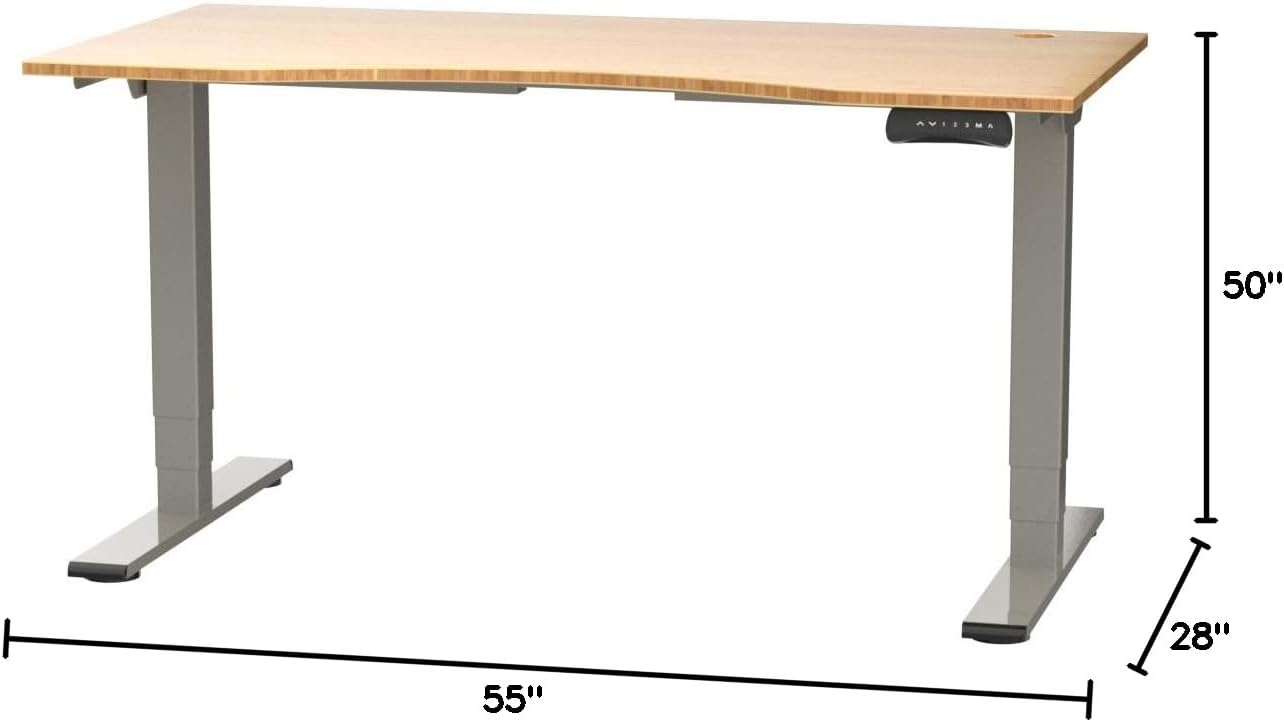
Figure 2: Desk dimensions indicating 55 inches width, 28 inches depth, and adjustable height up to 50 inches.
- Zainstaluj Panel sterowania: Mount the control panel to the desired location on the underside of the desktop, typically on the front edge for easy access. Connect the control panel cable to the motor control box.

Figure 3: The programmable control panel with LED display, up/down buttons, and memory presets (1, 2, 3, M, A).
- Podłącz zasilanie: Plug the power adapter into the control box, and then plug the power cable into a standard electrical outlet.
- Zarządzanie kablami: Utilize the two cable management holes on the desktop to route and organize your cables, preventing clutter.

Figure 4: Detail showing the integrated cable management holes and the water-resistant surface of the bamboo desktop.
- Kalibracja początkowa: After assembly and power connection, the desk may require an initial calibration. Refer to the "Operating Instructions" section for details on resetting or calibrating the desk.
Instrukcja obsługi
Regulacja wysokości
The FLEXISPOT E4 Classic desk features a dual-motor lift system for smooth and quiet height adjustments.
- Podnieś biurko: Naciśnij i przytrzymaj Strzałka w górę button (▲) on the control panel. The desk will move upwards.
- Dolne biurko: Naciśnij i przytrzymaj Strzałka w dół button (▼) on the control panel. The desk will move downwards.
- Release the button at your desired height. The desk can adjust from 24.4 inches to 50 inches.
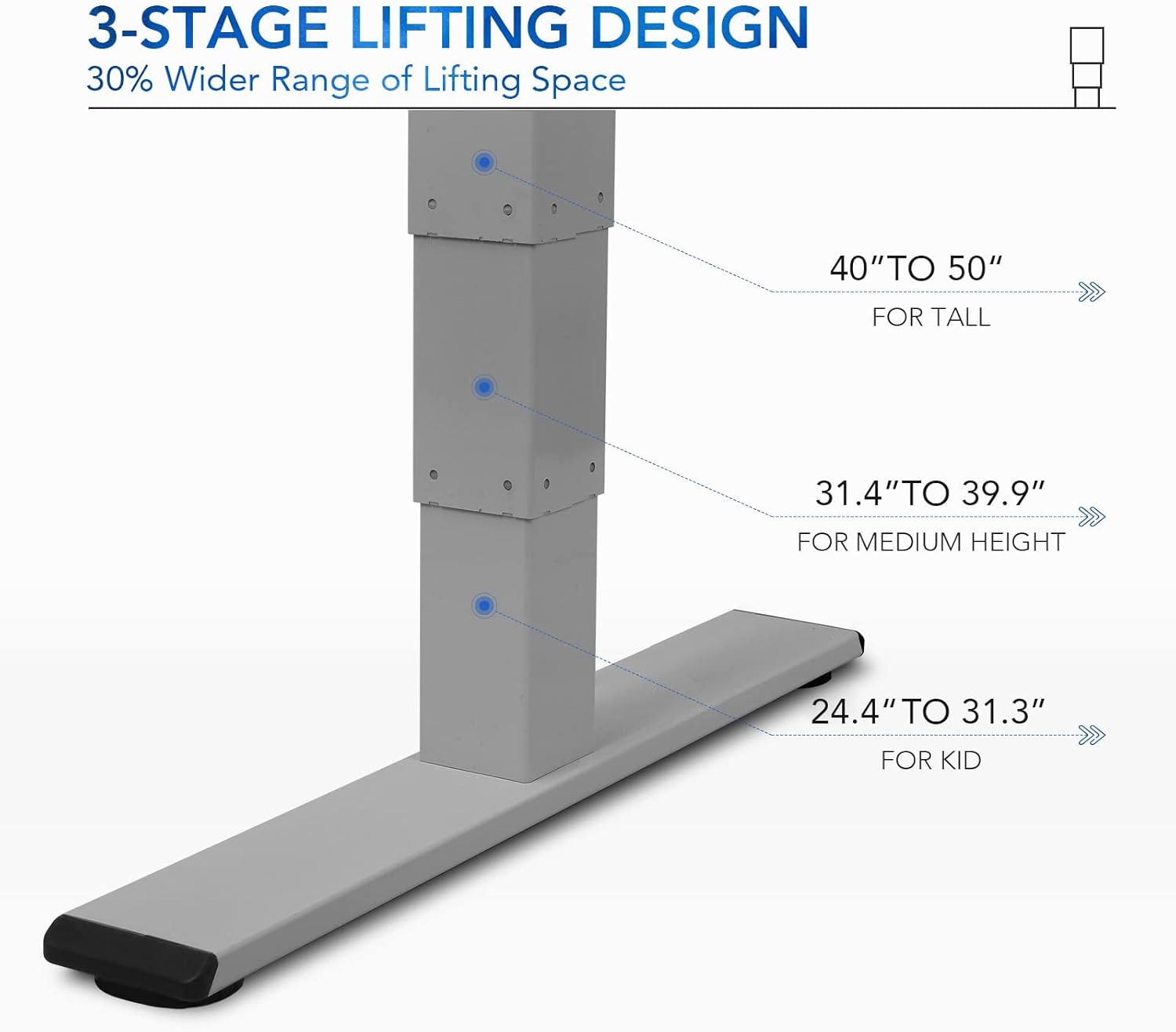
Rysunek 5: 3-stage lifting design provides a wide range of height adjustments, suitable for various user heights, from 24.4" (kid) to 50" (tall).
Programmable Memory Presets
Panel sterowania umożliwia zapisanie do trzech preferowanych ustawień wysokości, co pozwala na szybką regulację.
- Ustaw pozycję pamięci:
- Dostosuj wysokość biurka do swoich potrzeb za pomocą przycisków Góra/Dół.
- Naciśnij "M" przycisk. Na wyświetlaczu LED pojawi się „S-”.
- Within 3 seconds, press one of the number buttons ("1", "2", Lub "3") to save the current height to that preset. The display will show "S-1", "S-2", or "S-3" to confirm.
- Przypomnij sobie pozycję z pamięci: Simply press the corresponding number button ("1", "2", Lub "3"). Biurko automatycznie przesunie się na zapisaną wysokość.
Sit/Stand Reminder
The "A" button can be used to set a reminder to switch between sitting and standing positions.
- Consult the full manual for detailed instructions on setting and customizing the sit/stand reminder function.
Ergonomic Curved Design
The 55"x28" desktop features an ergonomic curved design for enhanced comfort and efficiency during work or study.

Figure 6: The ergonomic curved edge of the desktop, designed to provide a more comfortable and natural working posture.
Konserwacja
- Czyszczenie: Przetrzyj powierzchnię biurka i ramę miękką szmatką.amp cloth. Avoid abrasive cleaners or harsh chemicals. The bamboo surface is designed to be water-resistant, making it easy to clean.
- Pielęgnacja silnika: The dual-motor system is designed for low noise and durability. No specific user maintenance is required for the motors.
- Zarządzanie kablami: Periodically check that all cables are neatly routed through the cable management holes and are not pinched or tangled.
- Kontrola elementów złącznych: Od czasu do czasu sprawdzaj wszystkie śruby i elementy mocujące, aby upewnić się, że są dobrze dokręcone. W razie potrzeby dokręć je.
Rozwiązywanie problemów
| Problem | Możliwa przyczyna | Rozwiązanie |
|---|---|---|
| Biurko się nie porusza. | Power cable disconnected; overload protection activated; motor error. | Check power connections. Reduce weight on desk. Unplug and replug power after 10 minutes. Perform a reset (see below). |
| Biurko porusza się nierównomiernie lub wydaje nietypowe dźwięki. | Loose fasteners; obstruction; motor synchronization issue. | Check and tighten all assembly screws. Ensure no obstructions under the desk. Perform a reset. |
| LED display shows an error code (e.g., "E01", "RST"). | System error; need for reset. | Procedura resetowania: Press and hold the Down Arrow button until the desk reaches its lowest position and then slightly rises. Release the button. If the error persists, unplug the desk for 10 minutes and try again. |
| Ustawienia pamięci nie działają. | Ustawienia predefiniowane nie zostały zapisane prawidłowo. | Re-save your desired memory positions following the "Programmable Memory Presets" instructions. |
If the issue persists after attempting these solutions, please contact FLEXISPOT customer support.
Specyfikacje
| Funkcja | Szczegół |
|---|---|
| Model | E4 Classic |
| Marka | ELASTYCZNI |
| Materiał na biurko | Bamboo Contour Whole-Piece Board |
| Materiał ramy | Alloy Steel (Silver Frame) |
| Wymiary produktu (Gł. x Szer. x Wys.) | 28" gł. x 55" szer. x 50" wys. (maksymalna wysokość) |
| Zakres regulacji wysokości | od 24.4" do 50" |
| System podnoszenia | Podwójny silnik, 3-Stage Lifting |
| Nośność | Do 220 funtów |
| Cechy specjalne | Electric Height Adjustment, Programmable Memory Presets, Sit/Stand Reminder, Curved Ergonomic Design, Cable Management Holes, Waterproof Surface |
| Wymagany montaż | Tak |
Gwarancja i wsparcie
FLEXISPOT products are designed for durability and performance. For specific warranty details regarding your E4 Classic Electric Standing Desk, please refer to the warranty card included with your purchase or visit the official FLEXISPOT webstrona.
For technical support, troubleshooting assistance, or to inquire about replacement parts, please contact FLEXISPOT customer service:
- Webstrona: www.flexispot.com
- E-mail: support@flexispot.com
- Telefon: Odwołaj się do urzędnika webwitryna z regionalnymi numerami kontaktowymi.
When contacting support, please have your product model (E4 Classic) and purchase information ready.