
1. Wprowadzenie
This manual provides instructions for the Keychron K14 mechanical keyboard. The K14 is a 70% layout, 72-key keyboard designed for both Mac and Windows operating systems, offering both Bluetooth wireless and USB wired connectivity. It features an RGB backlight, an aluminum frame, and Gateron G Pro Brown mechanical switches.

Obraz: Ponadview of the Keychron K14 mechanical keyboard highlighting its 70% layout, wireless/wired modes, multi-device connectivity, Gateron G Pro switches, RGB lighting, Mac/Windows compatibility, and USB-C plug.
2. Zawartość opakowania
Verify that all items are present in your Keychron K14 package:
- Klawiatura mechaniczna Keychron K14
- Kabel USB typu C.
- Ściągacz nasadek klawiszy
- Przełącznik Puller (jeśli wersja z możliwością wymiany na gorąco)
- Extra Keycaps for Windows/Mac operating systems
- Instrukcja obsługi
3. Funkcje produktu
3.1. 70% Layout and Key Cluster
The K14 features a compact 70% layout with 72 keys, providing a smaller footprint while retaining essential navigation keys such as Home, End, and Arrow keys, similar to a tenkeyless keyboard.

Obraz: Zbliżenie view of the Keychron K14 keyboard, illustrating its 70% layout which includes dedicated navigation keys such as Insert, Home, End, Delete, Page Up, Page Down, and arrow keys.
3.2. Gateron G Pro Brown Switches
The keyboard is equipped with Gateron G Pro Brown mechanical switches, known for their tactile feedback. These switches offer a durable lifespan of up to 50 million keystrokes.

Image: Specifications for the Gateron G Pro mechanical Brown Switch, detailing operating force (55±15gf), pre-travel (2±0.6mm), tactile behavior, gentle sound level, pre-lubed status (Yes), and a lifespan of up to 50 million keystrokes.
3.3. Ergonomiczna konstrukcja
The K14 features two-level adjustable feet, allowing for typing angles of 6º and 9º. This design, combined with an inclined bottom frame, provides ergonomic support for extended typing comfort.

Obraz: strona A view of the Keychron K14 keyboard, illustrating its two-level adjustable feet that allow for typing angles of 6 and 9 degrees, enhancing ergonomic support.
4. Konfiguracja
4.1. Podłączanie klawiatury
The Keychron K14 supports both Bluetooth wireless and USB Type-C wired connections.
4.1.1. Połączenie Bluetooth
- Upewnij się, że przełącznik trybu klawiatury (znajdujący się z boku) jest ustawiony na „BT” (Bluetooth).
- Press and hold the "Fn" + "1" (or "2" or "3") keys for 4 seconds to enter pairing mode. The backlight will flash rapidly.
- Na swoim urządzeniu (smartfonie, laptopie, iPadzie) włącz Bluetooth i wyszukaj „Keychron K14”.
- Select the keyboard to pair. The backlight will stop flashing upon successful connection.
- The keyboard can connect to up to 3 devices. Use "Fn" + "1", "Fn" + "2", or "Fn" + "3" to switch between paired devices.
4.1.2. Połączenie przewodowe
- Upewnij się, że przełącznik trybu klawiatury jest ustawiony na „Kabel”.
- Podłącz dołączony kabel USB typu C do klawiatury i portu USB komputera.
- The keyboard will automatically be recognized and function as a wired keyboard.

Image: The Keychron K14 keyboard shown connecting wirelessly to a desktop computer, laptop, and smartphone, indicating compatibility with Mac and Windows operating systems.

Image: The Keychron K14 keyboard displayed with icons representing its dual connectivity options: wireless Bluetooth and wired USB-C.
4.2. Zmiana systemu operacyjnego
The K14 includes a switch to toggle between Mac and Windows layouts. Locate the OS switch on the side of the keyboard and set it to the appropriate operating system for optimal key functionality.
4.3. Regulacja kąta klawiatury
The keyboard features two-level adjustable feet. Flip out the feet to select between 6º and 9º typing angles to suit your ergonomic preference.
5. Działanie
5.1. Kontrola podświetlenia
The Keychron K14 features RGB backlighting with 19 different types of lighting effects. Use the dedicated backlight key (often marked with a lightbulb icon) or function key combinations to cycle through effects, adjust brightness, and change colors.
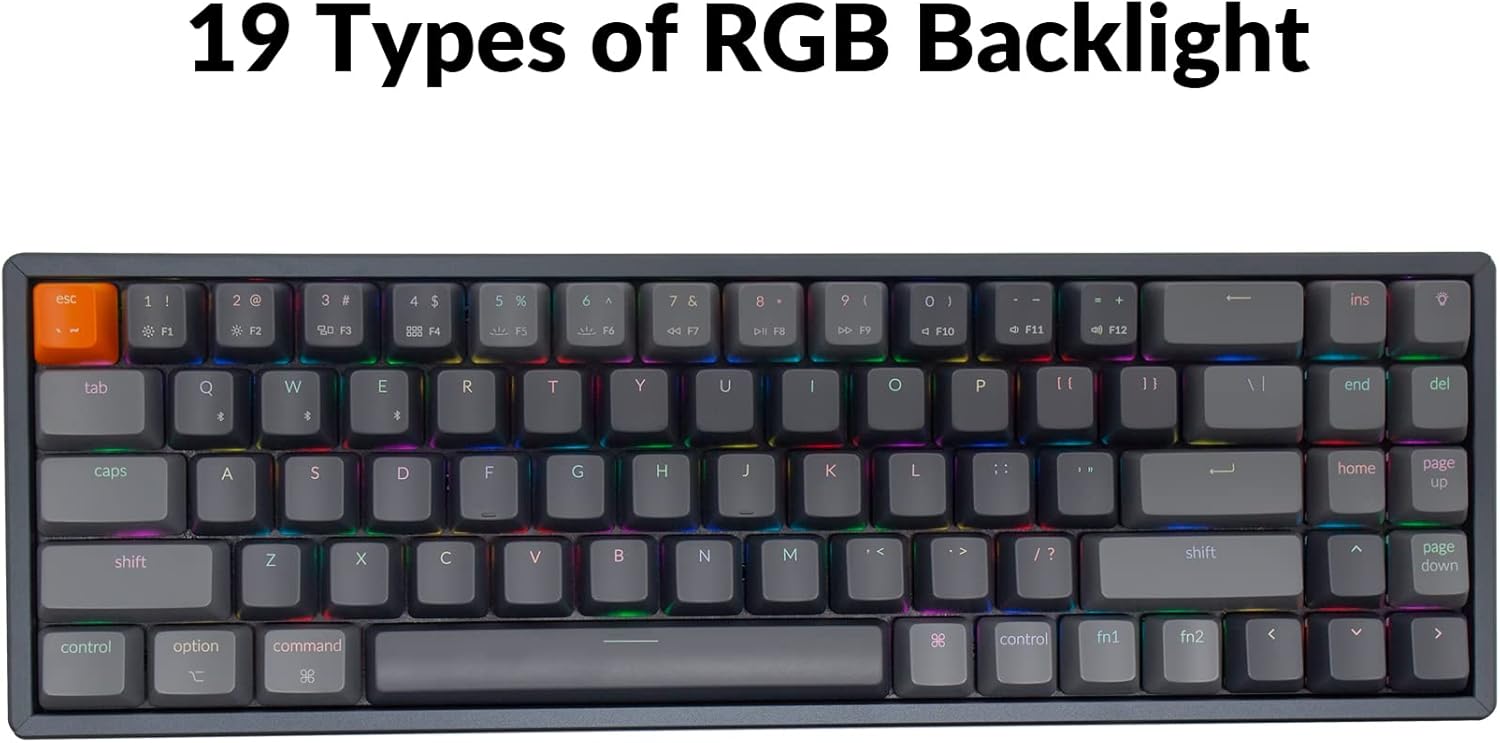
Image: The Keychron K14 keyboard illuminated with a multi-color RGB backlight, demonstrating its various lighting capabilities.
5.2. Klawisze multimedialne
Access multimedia functions (e.g., volume control, play/pause) using the Fn key in combination with the designated function row keys. Refer to the keycap legends for specific functions.
5.3. Przewijanie N-kluczy (NKRO)
Klawiatura K14 obsługuje funkcję N-key rollover (NKRO) w trybie przewodowym, umożliwiając jednoczesną rejestrację wszystkich klawiszy. W trybie bezprzewodowym obsługuje funkcję 6-key rollover (6KRO).
6. Zarządzanie baterią
The Keychron K14 is equipped with a 4000 mAh battery, providing up to 240 hours of usage with the backlight off. Connect the keyboard via the USB Type-C cable to charge the battery. The charging indicator will show the charging status.

Image: A close-up of the Keychron K14 keyboard with a prominent overlay indicating its 4000 mAh battery capacity.
7. Konserwacja
To ensure the longevity and optimal performance of your Keychron K14 keyboard, follow these maintenance guidelines:
- Czyszczenie nakładek klawiszy: Use a keycap puller to remove keycaps. Clean them with a mild soap solution and a soft cloth. Ensure they are completely dry before reattaching.
- Czyszczenie korpusu klawiatury: Use a soft, dry, lint-free cloth to wipe the aluminum frame and other surfaces. For stubborn dirt, a slightly damp Można użyć ściereczki, ale należy unikać nadmiernej wilgoci.
- Usuwanie kurzu: Za pomocą sprężonego powietrza usuń kurz i zanieczyszczenia spomiędzy klawiszy i przełączników.
- Składowanie: Jeśli klawiatura nie będzie używana przez dłuższy czas, należy ją przechowywać w suchym i chłodnym miejscu, z dala od bezpośredniego światła słonecznego i ekstremalnych temperatur.
- Unikaj płynów: The keyboard is not water-resistant. Keep liquids away to prevent damage.
8. Rozwiązywanie Problemów
If you encounter issues with your Keychron K14 keyboard, refer to the following common solutions:
8.1. Klawiatura nie odpowiada
- Sprawdź połączenie: Ensure the USB cable is securely connected or that Bluetooth is properly paired.
- Poziom naładowania baterii: If using Bluetooth, check if the battery is charged. Connect the USB cable to charge.
- Zmiana trybu: Verify the keyboard's mode switch is set correctly (BT for Bluetooth, Cable for wired).
- Uruchom ponownie: Try restarting your computer or device and the keyboard.
8.2. Bluetooth Disconnection Issues
- Ingerencja: Przesuń klawiaturę bliżej urządzenia i oddal ją od innych urządzeń bezprzewodowych, które mogą powodować zakłócenia.
- Naprawa: Unpair the keyboard from your device's Bluetooth settings and then re-pair it.
- Oprogramowanie sprzętowe: Check the official Keychron website for any available firmware updates for your K14 model.
8.3. Keys Not Registering or Double Typing
- Clean Switches: Dust or debris under the keycap or switch can cause issues. Use compressed air.
- Wymiana przełącznika: If you have a hot-swappable version, try replacing the problematic switch with a spare one.
8.4. Podświetlenie nie działa
- Jasność: Ensure the backlight brightness is not set to the lowest level.
- Klawisze funkcyjne: Try cycling through backlight modes and brightness levels using the designated function key combinations.
9. Specyfikacje
| Funkcja | Szczegół |
|---|---|
| Marka | Chronograf |
| Numer modelu | K14C3 |
| Układ | 70% (72 klucze) |
| Łączność | Bluetooth 5.1 & USB Type-C Wired |
| Przełączniki | Gateron G Pro Brown Mechaniczny |
| Podświetlenie | RGB (19 types) |
| Materiał ramy | Aluminium |
| Pojemność baterii | 4000 mAh |
| Żywotność baterii | Do 240 godzin (bez podświetlenia) |
| Regulowane nóżki | Yes (6º and 9º) |
| N-Key Rollover | NKRO (Wired), 6KRO (Wireless) |
| Kompatybilne urządzenia | Laptop, smartfon, tablet |
| Systemy operacyjne | Mac, Windows |
10. Gwarancja i wsparcie
Keychron products are covered by a limited warranty. For specific warranty terms, duration, and support inquiries, please refer to the official Keychron webOdwiedź stronę internetową lub skontaktuj się bezpośrednio z działem obsługi klienta. Zachowaj dowód zakupu na wypadek reklamacji.
Urzędnik Webstrona: www.keychron.com