
Wstęp
This manual provides comprehensive instructions for the setup, operation, and maintenance of your Nady DW-11-LT-HM Digital Wireless Lapel & Headset Microphone System. This system delivers superior digital audio quality with ultra-low latency and reliable performance in the UHF 900MHz band. Please read this manual thoroughly before using the system to ensure optimal performance and longevity.
Informacje dotyczące bezpieczeństwa
- Nie wystawiać urządzenia na działanie deszczu i wilgoci.
- Nie otwierać casing; wszelkie prace serwisowe należy zlecać wykwalifikowanemu personelowi.
- Use only the specified power adapter for the receiver.
- Ensure proper battery polarity when installing batteries in the transmitter.
- Trzymaj system z dala od źródeł ciepła i bezpośredniego światła słonecznego.
- Avoid dropping or subjecting the components to strong impacts.
Zawartość opakowania
Sprawdź, czy w przesyłce znajdują się wszystkie elementy wymienione poniżej:
- DW-11 Digital Wireless Receiver
- LT-HM Digital Wireless Bodypack Transmitter
- Mikrofon w klapie
- Mikrofon zestawu słuchawkowego
- Zasilacz do odbiornika
- 2 baterie AA (do nadajnika)
- Instrukcja obsługi (ten dokument)
Produkt ponadview
DW-11 Digital Wireless Receiver
The receiver unit processes the digital audio signal from the transmitter and outputs it to your audio system. It features a front panel display and controls, along with rear panel audio outputs and power input.
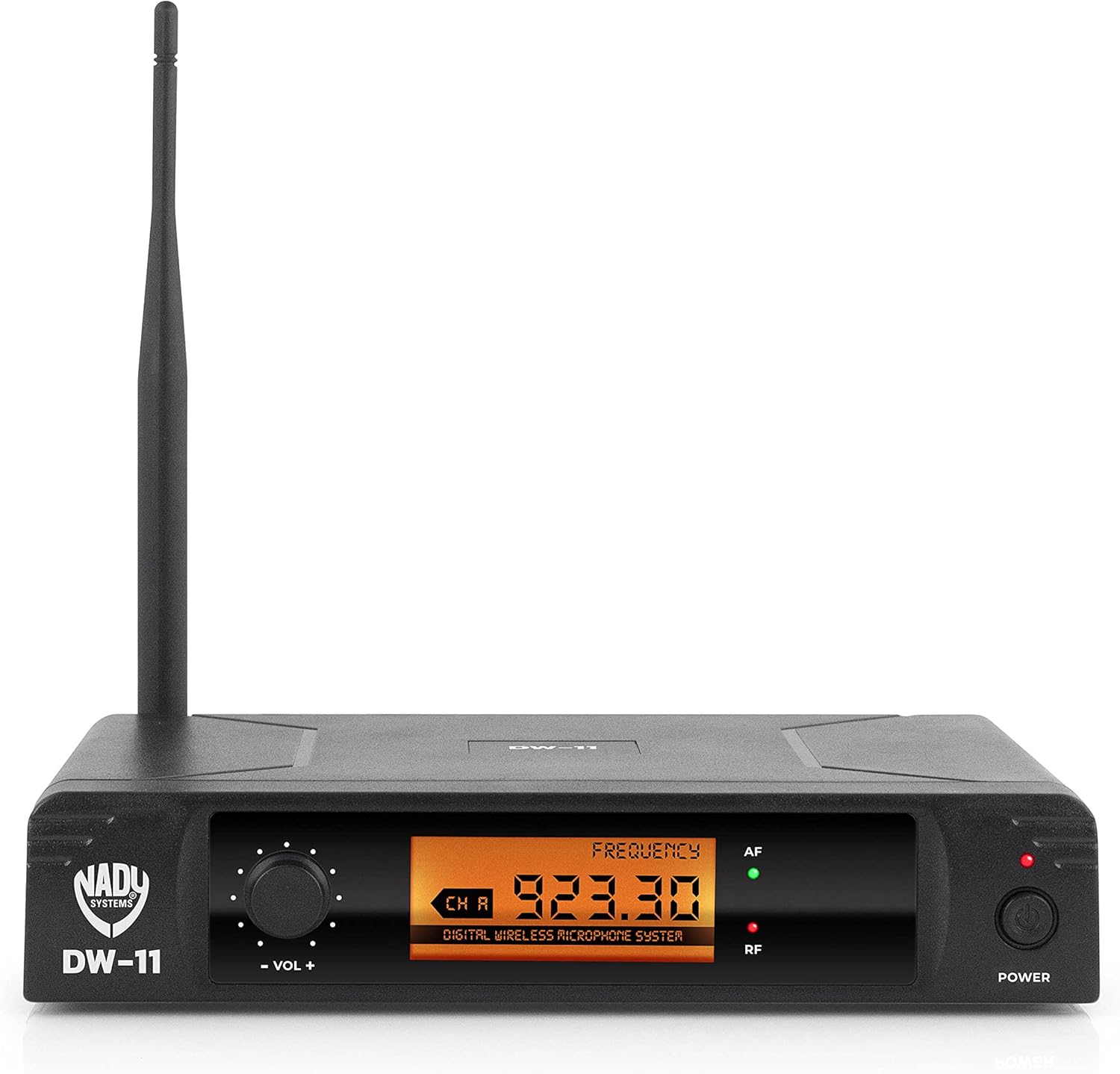
Rysunek 1: Front Panel of DW-11 Receiver. This image displays the front of the Nady DW-11 receiver, highlighting its digital display, volume control knob, and power button. Indicators for AF (Audio Frequency) and RF (Radio Frequency) are also visible.

Rysunek 2: Rear Panel of DW-11 Receiver. This image shows the rear connections of the Nady DW-11 receiver, including the balanced XLR output, unbalanced 1/4" output, and the DC 12-15V power input.
LT-HM Digital Wireless Bodypack Transmitter
The bodypack transmitter is lightweight and designed for discreet wear. It connects to either the included lapel or headset microphone and transmits the audio signal wirelessly to the DW-11 receiver. It operates on two AA batteries.
- Lapel Microphone: A small, clip-on microphone suitable for interviews, presentations, and general speech.
- Mikrofon zestawu słuchawkowego: Worn on the head, providing a secure fit and consistent microphone placement for active performers or presenters.
Instrukcje konfiguracji
- Rozpakuj komponenty: Ostrożnie wyjąć wszystkie elementy z opakowania.
- Umieszczenie odbiornika: Place the DW-11 receiver on a stable surface, away from other wireless devices or large metal objects that could interfere with the signal. Ensure the antenna is upright and unobstructed.
- Connect Receiver Power: Connect the provided power adapter to the DC 12-15V input on the rear of the DW-11 receiver and plug it into an AC outlet. Do not power on the receiver yet.
- Instalacja baterii nadajnika: Open the battery compartment on the LT-HM bodypack transmitter. Insert two fresh AA batteries, observing the correct polarity (+/-). Close the compartment securely.
- Connect Microphone to Transmitter: Plug either the lapel or headset microphone into the input jack on the LT-HM bodypack transmitter. Ensure the connection is firm.
- Connect Receiver to Audio System:
- For balanced connections, use an XLR cable to connect the "BAL MIC OUT" on the receiver to an XLR input on your mixer or audio interface.
- For unbalanced connections, use a 1/4" TS cable to connect the "UNBAL LINE SUM OUT" on the receiver to a 1/4" input on your mixer or ampliyfikator.
Instrukcja obsługi
- Włącz odbiornik: Press the "POWER" button on the front panel of the DW-11 receiver. The display should illuminate.
- Włącz nadajnik: Press and hold the power button on the LT-HM bodypack transmitter until its indicator light illuminates.
- Frequency Synchronization: The Nady DW-11 system operates on a fixed frequency (902-951MHz band). The receiver and transmitter are pre-set to communicate on a specific channel. Ensure both units are powered on and within range. The "RF" (Radio Frequency) indicator on the receiver should light up, indicating a successful connection.
- Dostosuj głośność: Use the "VOL +" and "VOL -" knob on the front of the DW-11 receiver to adjust the output level. Start with a low volume and gradually increase it to a comfortable listening level on your connected audio system. The "AF" (Audio Frequency) indicator will light up when audio is being received.
- Użycie mikrofonu:
- Lapel Mic: Clip the lapel microphone approximately 6-8 inches below your chin, centered on your clothing.
- Mikrofon zestawu słuchawkowego: Umieść wysięgnik mikrofonu zestawu słuchawkowego w odległości około 1-2 cm od kącika ust.
- Zakres: The system offers an extended wireless range of up to 300 feet (line of sight). Performance may vary depending on environmental conditions and obstructions.
- Wyłączone: To turn off the system, first power off the transmitter, then the receiver.
Konserwacja
- Czyszczenie: Use a soft, dry cloth to clean the exterior of the receiver and transmitter. Do not use liquid cleaners or solvents.
- Wymiana baterii: Replace the AA batteries in the transmitter when the battery indicator shows low power or when audio quality degrades. Always use fresh, high-quality batteries.
- Składowanie: When not in use for extended periods, remove batteries from the transmitter and store the system in a cool, dry place, away from extreme temperatures and humidity.
Rozwiązywanie problemów
| Problem | Możliwa przyczyna | Rozwiązanie |
|---|---|---|
| Brak dźwięku |
|
|
| Przerywany dźwięk lub szumy |
|
|
| Weak audio signal |
|
|
Specyfikacje
- Model: DW-11-LT-HM
- Pasmo przenoszenia: 20Hz-20kHz
- Zasięg bezprzewodowy: Do 300 stóp (w linii wzroku)
- Transmitter Battery Life: Do 11 godzin (z 2 bateriami AA)
- Wyjścia odbiornika: 1/4" Unbalanced, XLR Balanced
- Częstotliwość pracy: 902-951MHz UHF band
- Modulacja: Cyfrowy QPSK
- Cyfrowa konwersja dźwięku: 48 kHz / 24-bity
- Waga przedmiotu: 1.94 funta
- Wymiary produktu: 14 x 14 x 3 cala
Gwarancja i wsparcie
For warranty information or technical support, please refer to the official Nady webOdwiedź witrynę lub skontaktuj się z działem obsługi klienta. Zachowaj paragon jako dowód zakupu na wypadek ewentualnych roszczeń gwarancyjnych.
Nady Webstrona: www.nady.com