
Wstęp
The SJCAM C100 is a compact and versatile action camera designed for capturing high-quality video and photos in various environments. Its small size, waterproof capabilities, and wireless connectivity make it suitable for sports, travel, and daily vlogging. This manual provides essential information for setting up, operating, and maintaining your C100 camera.

Image: The SJCAM C100 Action Camera, a compact device for capturing video and photos.
Organizować coś
1. Wkładanie karty Micro SD
The SJCAM C100 requires a Micro SD card (not included) for storing recordings. Ensure the camera is powered off before inserting or removing the card.
- Znajdź gniazdo karty Micro SD z boku aparatu.
- Ostrożnie wsuń kartę Micro SD do gniazda, aż usłyszysz kliknięcie.
- Aby wyjąć kartę, naciśnij ją do wewnątrz, aż wysunie się.
Video: Demonstrates how to insert the Micro SD card into the SJCAM C100 camera.
2. Ładowanie aparatu
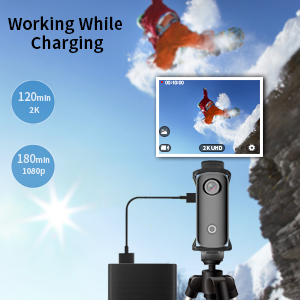
The C100 camera has a built-in battery. Connect the camera to a power source using the provided USB cable. The camera can record while charging.
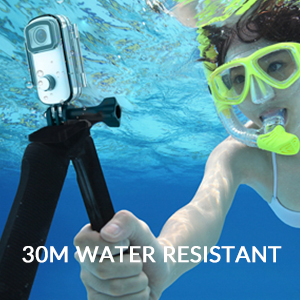
Image: The SJCAM C100 camera connected to a power bank, illustrating its ability to operate while charging. This extends recording time for longer sessions.
Obsługa aparatu
1. Włączanie/wyłączanie zasilania
- To power on: Press and hold the main button for 5 seconds. The camera will vibrate once, and a blue light will illuminate, indicating it is on.
- To power off: Press and hold the main button for 2 seconds. The blue light will turn off.
2. Rozpocznij/zatrzymaj nagrywanie
- To start recording: With the camera powered on, click the main button once. The blue light will flash, indicating recording has started.
- To stop recording: Click the main button again. The blue light will stop flashing, and the recording will be saved.
3. Connecting to the Mobile App (SJCAM Zone)
The SJCAM C100 can be controlled and managed via the "SJCAM Zone" app on your smartphone (Android or iOS).
- Download the "SJCAM Zone" app from the Sklep z aplikacjami (iOS) or Android download link.
- On the camera, double-click the main button to activate Wi-Fi. A green light will flash.
- On your mobile phone, go to Wi-Fi settings and connect to the network named "C100+_XXXXXX" (where XXXXXX is a unique identifier). The default password is 12345678.
- Once connected, open the "SJCAM Zone" app and click "Connect Camera" to establish a connection.

Image: Instructions for connecting the SJCAM C100 to the SJCAM Zone mobile application, including QR codes for app download.
4. Advanced Functions via App
Through the SJCAM Zone app, you can access and adjust various settings and modes:
- Nagrywanie w pętli: Continuously records, overwriting older footage gdy karta pamięci jest pełna.
- Slow-Motion Photography: Nagrywa wideo z większą liczbą klatek na sekundę, co umożliwia odtwarzanie w zwolnionym tempie.
- Tryb jazdy: Automatically starts recording when the vehicle starts and stops when it turns off.
- Obrót obrazu: Dostosowuje orientację obrazu.
- Tryb poklatkowy: Captures a sequence of images at set intervals to create a time-lapse video.
- Korekta ekspozycji: Controls the brightness of your recordings.
- Regulacja balansu bieli: Corrects color temperature for accurate color representation.
Obraz: Byłyample of a time-lapse video captured with an action camera, demonstrating the creative possibilities of this mode.
Główne cechy
- Wodoodporna konstrukcja: The C100 comes with an IPX65 waterproof case, allowing for underwater use up to 30 meters.
- EIS Anti-Shaking: Advanced Electronic Image Stabilization (EIS) helps produce stable and clear videos, even during fast movements.
- Obiektyw szerokokątny 115°: Rejestruje szerokie pole view, ideal for immersive action shots.
- Ciało magnetyczne: The camera body features integrated magnets, allowing for easy attachment to metallic surfaces without additional accessories.
- Wearable Accessories: Includes a back clip for attaching the camera to clothing or gear, enhancing portability and hands-free recording.
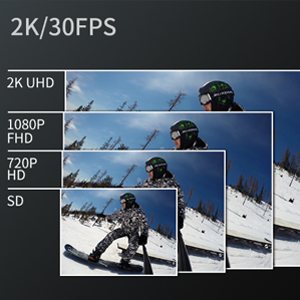
Image: The SJCAM C100 camera enclosed in its waterproof case, submerged in water, highlighting its water-resistant capability.
Obraz: Wizualna reprezentacja obiektywu szerokokątnego o kącie 115 stopni view captured by the SJCAM C100, showing a panoramic landscape.
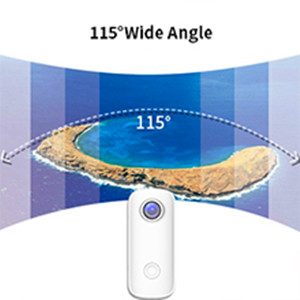
Image: The SJCAM C100 camera magnetically attached to a surface, demonstrating its versatile mounting options.

Image: A person wearing the SJCAM C100 camera attached to a backpack strap using the included wearable back clip.
Specyfikacje
| Marka | SJCAM |
| Nazwa modelu | C100 |
| Numer modelu | C100+ |
| Efektywna rozdzielczość obrazu nieruchomego | 15 MP |
| Rozdzielczość przechwytywania wideo | 1080P (1920*1080) 30FPS |
| Poziom wodoodporności | Waterproof (with case) |
| Stabilizacja obrazu | Digital (EIS) |
| Typ nośnika | Mikro SD |
| Łączność | Wi-Fi |
| Średnia żywotność baterii | 2 hours (1080P recording) |
| Waga przedmiotu | 1.4 uncji |
Konserwacja
- Czyszczenie: Do czyszczenia korpusu aparatu używaj miękkiej, suchej ściereczki. Do czyszczenia obiektywu użyj specjalnej ściereczki i płynu do czyszczenia obiektywów.
- Składowanie: Przechowuj kamerę w chłodnym, suchym miejscu, z dala od bezpośredniego światła słonecznego i ekstremalnych temperatur.
- Pielęgnacja baterii: Aby zapewnić optymalną żywotność baterii, unikaj częstego całkowitego rozładowywania. Regularnie ładuj aparat, nawet jeśli nie jest używany, aby zapobiec głębokiemu rozładowaniu.
- Wodoodporna obudowa: After using the waterproof case in saltwater, rinse it with fresh water and allow it to air dry. Inspect the O-ring seal for any debris or damage before each use.
Rozwiązywanie problemów
- Kamera nie włącza się: Ensure the battery is charged. If the camera does not respond, connect it to a power source and try again. Verify a Micro SD card is inserted, as the camera may not operate without one.
- Recording stops randomly: This can often be caused by an incompatible or slow Micro SD card. Use a high-speed (U3 or higher) Micro SD card from a reputable brand. Format the card regularly.
- Problemy z połączeniem Wi-Fi: Ensure the camera's Wi-Fi is enabled (green light flashing). Check that you are connecting to the correct Wi-Fi network name and entering the correct password (12345678). Restart both the camera and your mobile device if issues persist.
- Słaba stabilizacja obrazu: While the camera features EIS, extreme vibrations or rapid movements may still result in some blur. Ensure the camera is securely mounted.
Gwarancja i wsparcie
Aby uzyskać informacje dotyczące gwarancji i pomocy technicznej, zapoznaj się z oficjalną stroną SJCAM webOdwiedź witrynę lub skontaktuj się ze sprzedawcą. Zachowaj dowód zakupu na wypadek reklamacji.