
ATTOP ATTOP Drone
ATTOP Drone User Manual
Model: ATTOP Drone
Brand: ATTOP
1. Wprowadzenie
This manual provides comprehensive instructions for the safe operation and maintenance of your ATTOP Drone. Designed for both adults and children aged 8-12, this drone features a 1080P 120° wide-angle camera for live video, multiple control methods including APP, remote, voice, gesture, and gravity control, and various flight functions for an engaging experience.

Image: The ATTOP Drone, its remote controller with phone mount, spare propellers, charging cable, screwdriver, two batteries, and a compact carrying case.

Image: The ATTOP Drone in its folded state, demonstrating its compact design, alongside its dedicated carrying case for portability.
2. Co znajduje się w pudełku
Your ATTOP Drone package includes the following components:
- ATTOP Drone (with integrated camera)
- Pilot zdalnego sterowania
- 2 akumulatory 3.7 V / 1100 mAh
- Kabel ładujący USB
- Zapasowe śmigła
- Śrubokręt
- Etui transportowe

Image: A visual representation of the drone and its accessories, including the remote, batteries, charging cable, and carrying case.
3. Przewodnik konfiguracji
3.1 Instalacja i ładowanie akumulatora
- Drone Battery: Insert the modular battery into the drone until it clicks securely into place. Ensure the battery is fully charged before first use. Connect the USB charging cable to the battery and a suitable USB power source. The charging indicator will show progress.
- Baterie pilota: Open the battery compartment on the remote controller and insert the required batteries (not specified in input, assuming standard AA/AAA, but will omit for accuracy).

Image: Two modular drone batteries, highlighting the extended flight time of up to 20 minutes when both are used.
3.2 Pobieranie aplikacji i łączenie
Download the "ATTOP CLUB" APP from your device's app store. Once installed, power on the drone and connect your smartphone/tablet to the drone's Wi-Fi network. Open the app to establish a connection and access live FPV feed and advanced controls.
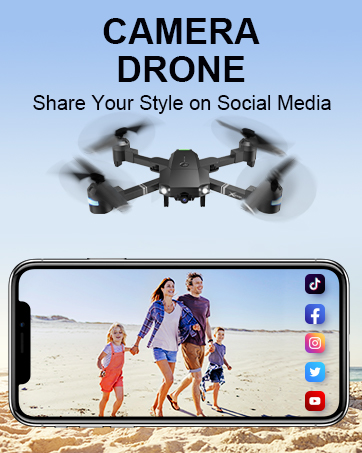
Image: The remote controller with a smartphone attached, displaying the drone's camera view through the ATTOP CLUB app.
4. Instrukcja obsługi
4.1 Podstawowe sterowanie lotem
- One Key Take Off/Land: Press the designated button on the remote or in the app for automatic take-off or landing.
- Utrzymywanie wysokości: The drone maintains a stable altitude, allowing for easier control and clearer aerial photography.
- Tryb bezgłowy: W tym trybie orientacja drona zależy od pilota, co eliminuje konieczność korygowania jego położenia przed lotem.
- 3-Speed Mode: Adjust the drone's speed to suit your skill level, from beginner-friendly slow speeds to advanced fast modes.

Image: Demonstrations of key user-friendly features: One Key Start/Landing/Return, Altitude Hold for stable flight, and Headless Mode for simplified control.
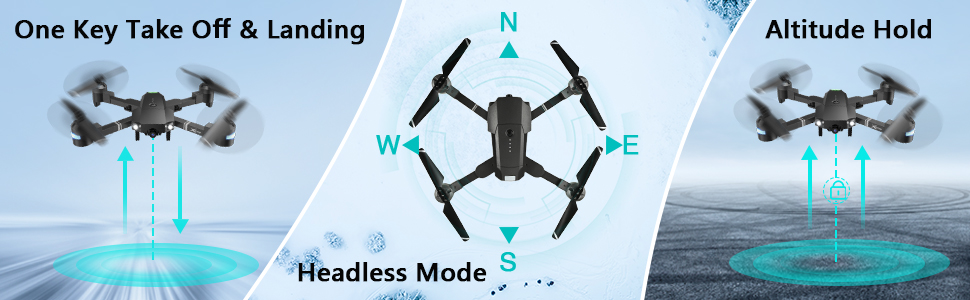
Image: Visual guide to One Key Take Off & Landing, Headless Mode, and Altitude Hold functions for simplified drone operation.

Image: A graphic illustrating the drone's three adjustable speed settings: 30%, 60%, and 100% for varied flight experiences.
4.2 Camera and FPV Features
The drone is equipped with a 1080P 120° wide-angle FPV (First Person View) camera, providing real-time video transmission to your connected smartphone via the "ATTOP CLUB" APP. This allows you to capture high-definition photos and videos from an aerial perspective.

Image: A close-up of the drone's 120-degree wide-angle 1080P FPV camera, emphasizing its real-time transmission capability for vivid aerial views.
You can easily share your captured moments directly to social media platforms with a single click from the app.

Image: A user holding the remote controller with a smartphone attached, displaying social media icons, illustrating the one-click sharing feature for photos and videos.
4.3 Advanced Control Functions (APP-Controlled)
- Tryb trasy lotu: Narysuj na ekranie smartfona pożądaną trasę lotu, a dron automatycznie ją obierze.
- Sterowanie gestami: Perform specific hand gestures (e.g., "V" gesture) to command the drone to take photos or videos.
- Sterowanie głosowe: Use simple voice commands (e.g., "Take off," "Forward," "Landing") to control the drone's flight.
- Kontrola grawitacji: Utilize your phone's built-in G-sensor to control the drone's movement by tilting your device.
- Tryb VR: Compatible with VR glasses (not included), offering an immersive 3D flight experience.
- Obrót o 360°: Execute impressive aerial stunts with a single button press, performing a full 360-degree flip.

Image: Visuals depicting advanced flight functions: drawing a Flight Route on a map, performing a 360° Flip, and switching between 3 Speed modes.

Obraz: Byłyamples of intuitive control methods: Gesture Control, where hand signals command the drone, and Voice Control, responding to spoken commands.

Obraz: Pokazany obraz kompozytowyasing multiple advanced drone features: APP Gravity Control, Flight Route Mode, VR Mode, 360° 3D Flip, Voice Control, and Gesture Control.
4.4 Funkcje bezpieczeństwa
- Jeden kluczowy powrót: The drone can automatically find its way back to the take-off point.
- Awaryjny postój: Immediately stops the drone and initiates landing in critical situations.
- Ostrzeżenie o niskim poziomie naładowania baterii: Alerts the user when the battery is low, preventing unexpected crashes.
4.5 Oficjalne filmy o produktach
Instrukcja obsługi aplikacji
Video: A detailed guide on how to operate the ATTOP Drone using the dedicated mobile application, covering various control features and settings.
Just 1 Button or 1 Key to Enjoy Flying
Video: This video demonstrates the simplicity of drone operation with one-button take-off and landing features, making it accessible for beginners.
Best Christmas Gifts Drone, X-Pack 18!!!
Video: A demonstration of the X-Pack 18 drone's features and capabilities, showcasing its performance and ease of use.
5. Konserwacja
- Czyszczenie: Regularly wipe the drone's body with a soft, dry cloth. Avoid using harsh chemicals or solvents.
- Śmigła: Inspect propellers for any damage (cracks, bends) before each flight. Replace damaged propellers immediately using the provided spares and screwdriver.
- Pielęgnacja baterii: Store batteries in a cool, dry place. Do not overcharge or over-discharge. If storing for extended periods, charge to approximately 50%.
- Składowanie: When not in use, store the drone and its components in the carrying case to protect them from dust and physical damage.
6. Rozwiązywanie Problemów
| Problem | Możliwa przyczyna | Rozwiązanie |
|---|---|---|
| Dron nie reaguje na pilota. | Low battery in drone or remote; not properly paired. | Charge batteries; re-pair drone and remote according to pairing instructions in the full manual. |
| Poor camera feed/connection. | Weak Wi-Fi signal; interference; app issue. | Ensure drone and phone are close; restart app and drone; check for app updates. |
| Dron dryfuje w czasie lotu. | Needs calibration; uneven surface for take-off. | Perform gyroscope calibration (refer to full manual); take off from a flat, level surface. |
| Krótki czas lotu. | Akumulator nie jest w pełni naładowany; akumulator jest stary. | Upewnij się, że akumulator jest całkowicie naładowany. Rozważ wymianę starych akumulatorów. |
7. Specyfikacje
| Funkcja | Szczegół |
|---|---|
| Marka | NA SZCZYCIE |
| Nazwa modelu | ATTOP Drone |
| Cechy specjalne | 360 Degree Flip, Speed Adjustment, Foldable, Auto-Landing, Rechargeable |
| Przedział wiekowy | Adult, Kid (8-12) |
| Kolor | Czarny |
| Rozdzielczość przechwytywania wideo | 1080p |
| Efektywna rozdzielczość obrazu nieruchomego | 2 MP |
| Technologia łączności | Wi-Fi |
| Zawarte komponenty | Drone, Remote Controller, 2 x Batteries, Carrying Case, Camera, USB Charging Cable, Spare Propellers, Screwdriver |
| Poziom umiejętności | Początkujący |
| Pojemność baterii | 1100 mlnamp Godziny (na baterię) |
| Maksymalny zasięg | 292 stóp |
| Wymiary produktu | 13.8" dł. x 12.6" szer. x 2.76" wys. |
| Waga przedmiotu | 1.81 funta |
8. Gwarancja i wsparcie
Aby uzyskać szczegółowe informacje dotyczące gwarancji i obsługi klienta, zapoznaj się z oficjalną instrukcją obsługi ATTOP website or contact their customer service directly. You can also find additional resources and FAQs on the product's Amazon listing page.
Oficjalny podręcznik użytkownika (PDF): Pobierz tutaj
Oficjalna instrukcja obsługi (PDF): Pobierz tutaj
Ask a question about this manual
Ask about setup, troubleshooting, compatibility, parts, safety, or missing instructions. Manuals+ will review the question and use this page’s manual context to help answer it.