
1. Wprowadzenie
The UNIWA V909T 4G Flip Phone is designed for ease of use, particularly for seniors. It features large buttons, a clear display, and essential functions to ensure reliable communication. This manual provides detailed instructions for setting up, operating, and maintaining your device.
2. Co znajduje się w pudełku
Sprawdź zawartość paczki, aby upewnić się, że znajdują się w niej wszystkie elementy:
- UNIWA V909T 4G Flip Phone
- Stacja ładująca
- Adapter
- Kabel USB
- Akumulator (wstępnie zainstalowany lub osobny)
3. Koniec produktuview
The UNIWA V909T is equipped with features designed for convenience and accessibility.
Główne cechy:
- Podwójne ekrany: A 2.8-inch QVGA main screen and a 1.77-inch QVGA outer screen for quick information display.
- Large Buttons & Display: Oversized buttons and a large font for easy dialing and menu navigation.
- Przycisk alarmowy SOS: A dedicated button on the back for quick access to emergency contacts.
- Kompatybilność z aparatami słuchowymi (HAC): Designed to work seamlessly with hearing aid devices (M4/T4 compatibility).
- Loud Speaker & Ringtones: High-quality speaker and loud ringtones to prevent missed calls.
- Stacja ładująca: Convenient charging solution, eliminating the need to plug in cables directly.
- Radio FM: Enjoy listening to news and music.
- Łączność 4G: Supports 2G(GSM)/3G(WCDMA)/4G(FDD-LTE) global network bands.

The phone features a dual-screen design, with a 2.8-inch main screen and a 1.77-inch outer screen for checking time, date, calls, and messages without opening the phone.

Large, easy-to-press buttons with clear numbering and big font for improved readability and navigation.

A dedicated SOS button on the back of the phone allows for quick contact with pre-set emergency numbers.

The phone is Hearing Aid Compatible (HAC), ensuring clear call quality for users with hearing aids.
Produkt ponadview Wideo
Ten film przedstawia ogólny przeglądview of the UNIWA 4G Unlocked Flip Phone, highlighting its key features and benefits for elderly users.
4. Konfiguracja
4.1. Instalacja karty SIM
To use your phone for calls and messages, you must install a SIM card. Ensure the phone is powered off before installation.
- Zdejmij tylną obudowę telefonu.
- Znajdź gniazdo karty SIM.
- Unlock the SIM card clip by sliding it to the left or lifting it, depending on the mechanism.
- Carefully insert your SIM card into the slot, ensuring the gold contacts face downwards and the cut corner aligns correctly.
- Close the SIM card clip and slide it to the right to lock it in place.
- Załóż tylną obudowę.
SIM Card Installation Video
This video demonstrates the correct procedure for installing the SIM card slot cover on the UNIWA V909T 4G Flip Senior Phone.
4.2. Ładowanie telefonu
The phone comes with a convenient charging dock. To charge:
- Connect the USB cable to the adapter, then plug the adapter into a power outlet.
- Connect the other end of the USB cable to the charging dock.
- Place the UNIWA V909T phone into the charging dock. Ensure it is seated correctly and the charging indicator light illuminates.
- Pełne naładowanie trwa zazwyczaj około 8 godzin.

The UNIWA V909T phone placed in its charging dock, indicating a convenient way to recharge the device.
5. Działanie
5.1. Włączanie/wyłączanie zasilania
- To power on: Press and hold the red power button until the screen lights up.
- To power off: Press and hold the red power button, then confirm power off on the screen.
5.2. Wykonywanie i odbieranie połączeń
- Aby wykonać połączenie: Open the phone, dial the number using the large keypad, and press the green call button.
- Aby odebrać połączenie: Open the phone when it rings, or press the green call button.
- Aby zakończyć połączenie: Close the phone or press the red hang-up button.
- Szybkie wybieranie: Numbers 2-9 can be set as speed dial buttons. Refer to the phone's menu for speed dial setup.
5.3. Wysyłanie i odbieranie wiadomości
- Navigate to the 'Messages' menu using the navigation buttons.
- Select 'Write message' to compose a new text.
- Wprowadź numer odbiorcy i swoją wiadomość.
- Naciśnij „Wyślij”.
5.4. Funkcja alarmowa SOS
The SOS button provides a quick way to contact emergency numbers.
- Setting up SOS contacts: Access the SOS settings in the phone's menu. You can preset up to 5 contacts to be called or sent a text message during an emergency.
- Korzystanie z przycisku SOS: In an emergency, press and hold the SOS button on the back of the phone. The phone will automatically call and/or send a pre-written text message to your designated emergency contacts.
5.5.Radio FM
Aby skorzystać z radia FM:
- Navigate to the 'FM Radio' icon in the menu.
- Select to open the radio application.
- Use the navigation buttons to scan for stations or adjust the volume.
6. Zgodność sieciowa
The UNIWA V909T is an unlocked 4G phone supporting 2G(GSM)/3G(WCDMA)/4G(FDD-LTE) global network bands. Please verify your carrier's compatibility before use.
Obsługiwani operatorzy:
- T-Mobile & T-Mobile MVNOs (Mint, Metro, Ultra, Boost, Tello)
Not Supported Carriers:
- AT&T
- Verizon
- Sprint
- Komórkowy w USA
- GCI Wireless
- Google Project Fi
- FreedomPop
- Iglica C
- Cricket Network
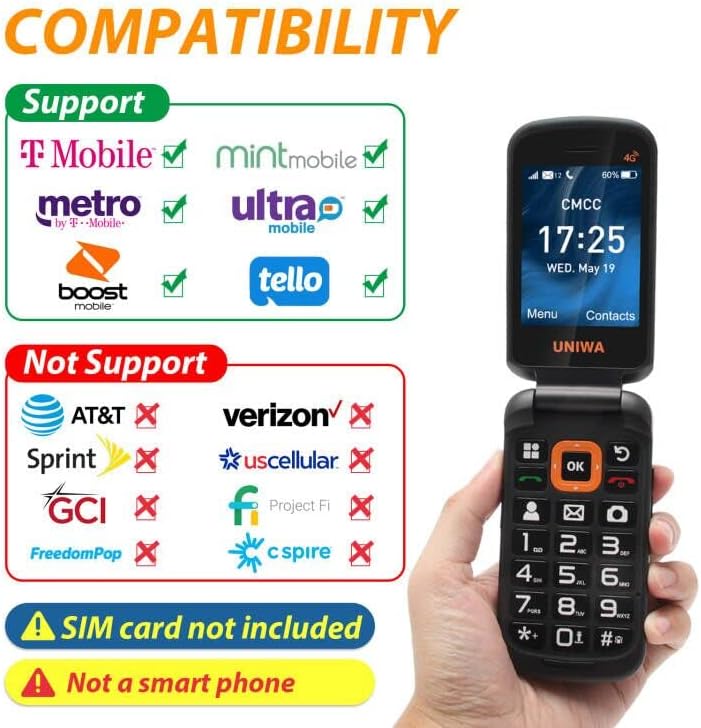
A visual guide to network compatibility for the UNIWA V909T phone, showing supported and unsupported carriers.
7. Specyfikacje
| Funkcja | Specyfikacja |
|---|---|
| Wymiary produktu | 2.2 x 0.88 x 4.33 cala |
| Waga przedmiotu | 9.9 uncji |
| Numer modelu przedmiotu | V909T |
| Baterie | 1 bateria litowo-jonowa (w zestawie) |
| System operacyjny | System czasu rzeczywistego |
| BARAN | 48 MB |
| Technologie komunikacji bezprzewodowej | Komórkowy |
| Technologie łączności | Wi-Fi |
| Cechy specjalne | Basic Phone, Camera, LTE |
| Wejście interfejsu ludzkiego | Buttons, Microphone |
| Gniazdo audio | Brak gniazda słuchawkowego |
| Współczynnik kształtu | Składany ekran |
| Moc znamionowa akumulatora | 2250 mlnamp Godziny |
| Czas rozmów telefonicznych | 6 godzin |
| Pojemność pamięci masowej | 48 MB |
| Rozmiar ekranu stojącego | 2.8 cali |
| Czas ładowania | 8 godzin |
| Technologia komórkowa | LTE |
8. Rozwiązywanie Problemów
If you encounter issues with your UNIWA V909T phone, try the following basic troubleshooting steps:
- Telefon się nie włącza: Ensure the battery is charged. Connect the phone to the charging dock and wait a few minutes before attempting to power on again.
- Brak sygnału sieciowego: Check if the SIM card is correctly inserted and locked. Ensure you are within your carrier's service area.
- Nie można wykonywać/odbierać połączeń: Sprawdź, czy Twoja karta SIM jest aktywna i czy masz wystarczające środki/plan. Sprawdź siłę sygnału sieci.
- Problemy z dźwiękiem: Ensure the volume is adjusted correctly. If using a hearing aid, confirm HAC settings are enabled if available.
- Przycisk SOS nie działa: Confirm that emergency contacts are correctly set up in the SOS settings menu.
For more complex issues, please refer to the manufacturer's support resources or contact customer service.
9. Konserwacja
To ensure the longevity and optimal performance of your UNIWA V909T phone, follow these maintenance guidelines:
- Czyszczenie: Do czyszczenia obudowy telefonu używaj miękkiej, suchej ściereczki. Unikaj stosowania płynnych środków czyszczących i materiałów ściernych.
- Pielęgnacja baterii: Avoid extreme temperatures. Do not leave the phone fully discharged for extended periods. Use only the provided charger and battery.
- Składowanie: Przechowuj telefon w chłodnym i suchym miejscu, z dala od bezpośredniego światła słonecznego i wilgoci, gdy nie używasz go.
- Ochrona: Consider using a protective case to prevent scratches and damage from accidental drops.
10. Gwarancja i wsparcie
For information regarding warranty coverage, technical support, or service, please refer to the warranty card included with your product or visit the official UNIWA webZachowaj paragon jako dowód zakupu.


