
UNITOPSCI A2878
UNITOPSCI A2878 Double Din Car Stereo User Manual
Wzór: A2878
1. Wprowadzenie
This manual provides instructions for the installation, operation, and maintenance of your UNITOPSCI A2878 Double Din Car Stereo. This unit features a 7-inch touchscreen, Apple CarPlay, Android Auto, Bluetooth connectivity, FM radio, support for a backup camera, mirror link functionality, and dual USB ports.
Przed użyciem produktu należy dokładnie przeczytać instrukcję, aby mieć pewność, że będzie on działał prawidłowo i nie dopuścić do uszkodzeń.
2. Zawartość opakowania
Sprawdź, czy w przesyłce znajdują się wszystkie elementy wymienione poniżej:
- Jednostka główna
- Kamera cofania
- Mikrofon zewnętrzny
- Dual USB Adapter
- Kabel zasilający
- Instrukcja obsługi
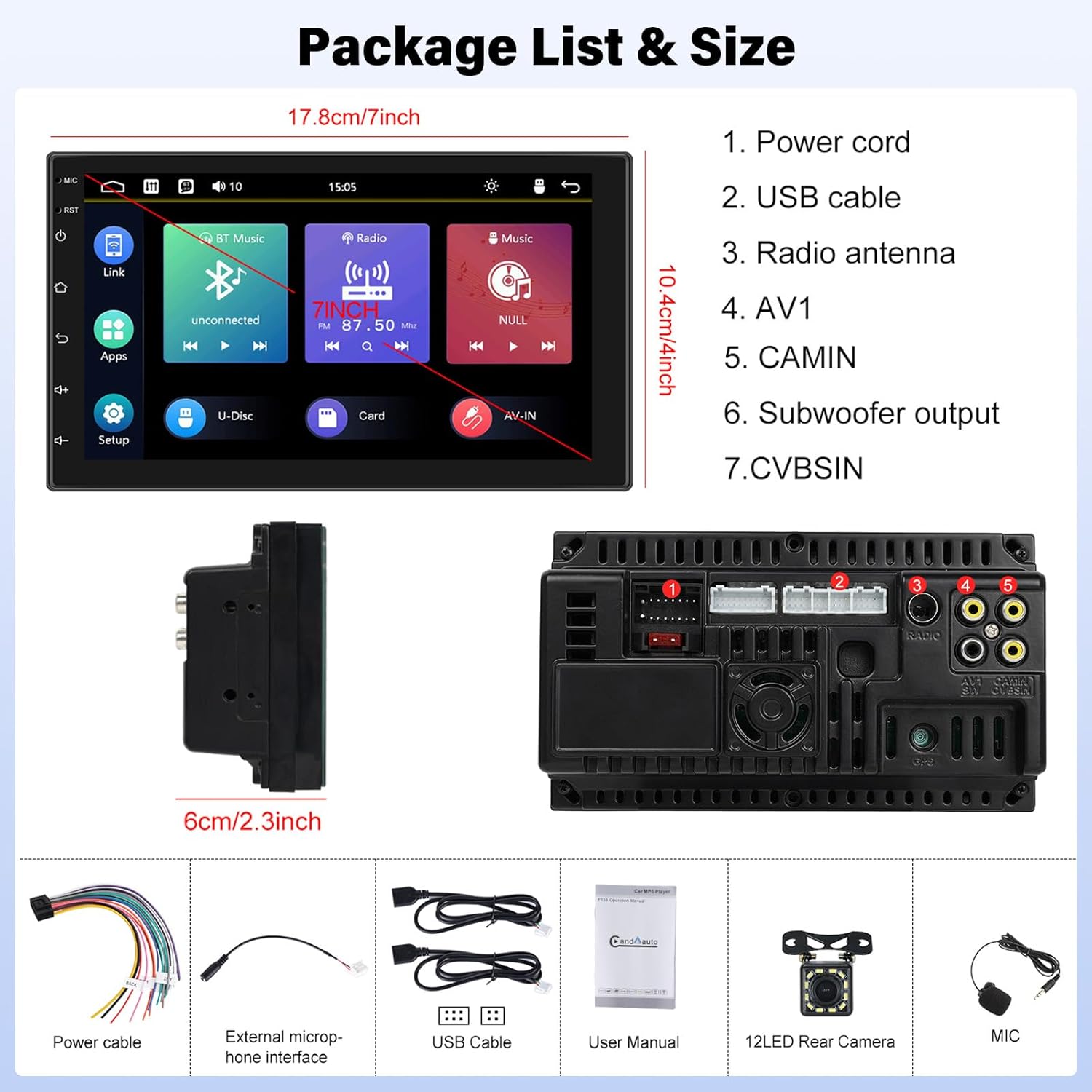
Image: Contents of the UNITOPSCI A2878 package, showing the main unit, wiring, and accessories.
3. Koniec produktuview
The UNITOPSCI A2878 is a double din car stereo featuring a 7-inch high-definition touchscreen. The front panel includes essential controls and the display for various functions. The rear panel provides all necessary connection ports for power, speakers, USB devices, and external accessories like the backup camera.

Obraz: Przód view of the UNITOPSCI A2878 car stereo with its 7-inch touchscreen interface.

Image: Rear panel connections of the UNITOPSCI A2878 head unit, indicating ports for power, USB, radio antenna, AV, camera, subwoofer, and CVBS.
4. Konfiguracja i instalacja
Proper installation is crucial for the performance and safety of your car stereo. It is recommended that installation be performed by a qualified professional.
4.1 połączeń przewodów
Szczegółowe informacje na temat połączeń znajdują się na schemacie okablowania dołączonym do urządzenia. Najważniejsze połączenia obejmują:
- Przewód zasilający: Podłącz do źródła zasilania pojazdu (stałe 12 V, dodatkowe 12 V i masa).
- Kable USB: Connect the provided USB cables for CarPlay/Android Auto and media playback.
- Antena radiowa: Podłącz antenę FM/AM swojego pojazdu.
- CAMIN (Camera Input): Connect the backup camera video signal.
- Wyjście subwoofera: Do podłączenia zewnętrznego subwoofera.
- Mikrofon zewnętrzny: Podłącz zewnętrzny mikrofon, aby poprawić jakość rozmów.
4.2 Instalacja kamery cofania
Install the backup camera at the rear of your vehicle. Connect its video output to the CAMIN port on the head unit and its power to the vehicle's reverse light circuit so it activates automatically when reversing.
5. Instrukcja obsługi
5.1 CarPlay i Android Auto
Connect your smartphone to the stereo via a USB cable to activate Apple CarPlay or Android Auto. This allows access to your phone's navigation, music, calls, and other compatible apps directly on the stereo's screen, controlled by voice or touch.

Image: Wired connection setup for CarPlay and Android Auto.

Image: CarPlay and Android Auto interfaces displayed on the stereo screen.
5.2 Łącze lustrzane
The mirror link function allows you to project your smartphone's screen (both iOS and Android) onto the stereo display via a USB cable. This enables viewing videos, navigation maps, and images from your phone on the larger screen.

Image: Mirror Link functionality with a smartphone connected to the stereo.
5.3 Bluetooth Hands-free & FM Radio
Bluetooth: Pair your smartphone with the stereo via Bluetooth for hands-free calling and wireless audio streaming. The built-in microphone facilitates clear communication. You can access your phone book and dial directly from the stereo.
Radio FM: The unit includes an FM tuner with 18 preset stations. Tune into your favorite radio programs, music, and traffic updates.

Image: FM Radio interface and Bluetooth hands-free call screen.
5.4 Backup Camera Input
When the vehicle is shifted into reverse, the stereo automatically displays the clear image from the connected backup camera, assisting with safe parking maneuvers.
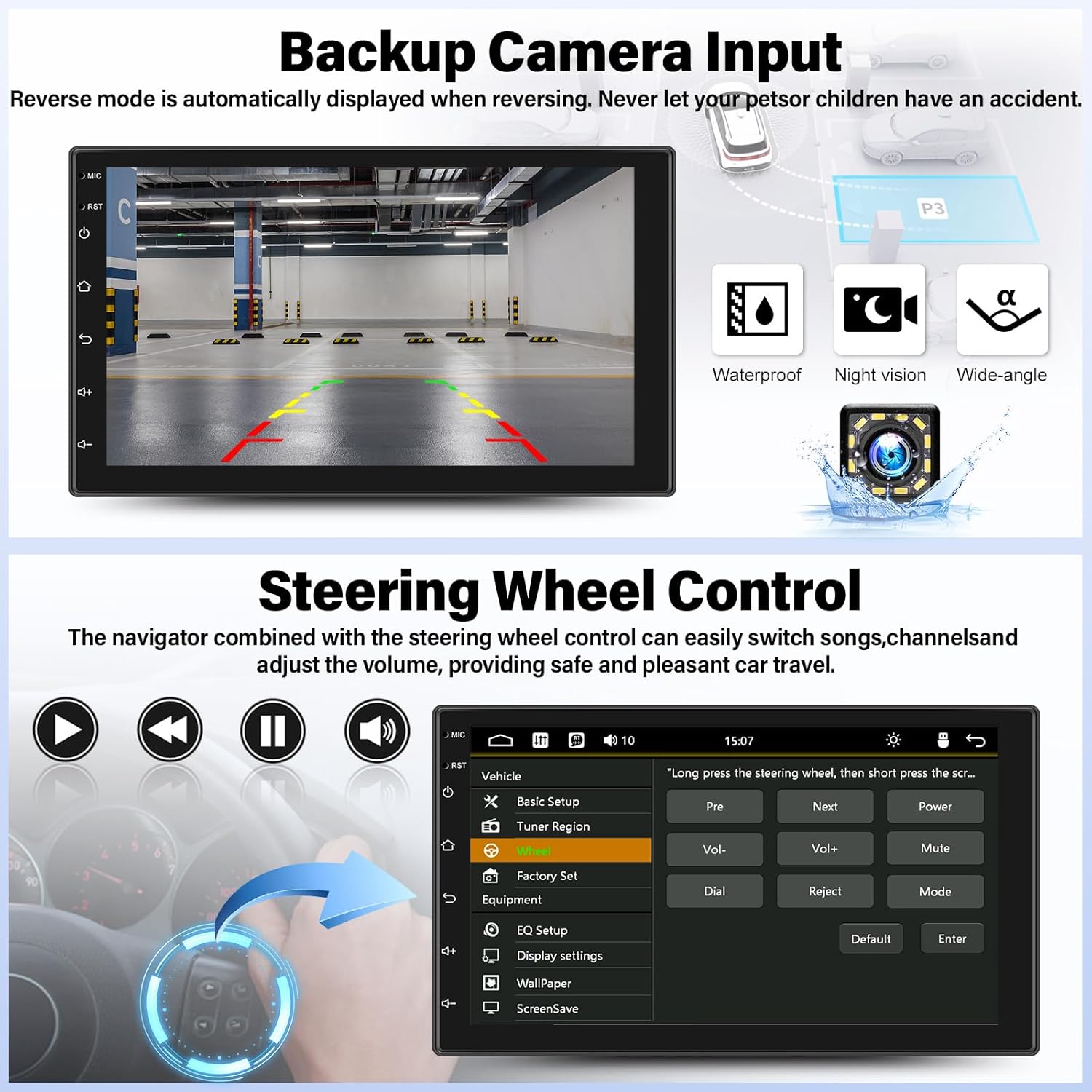
Image: Backup camera display on the stereo screen.
5.5 Sterowanie z kierownicy (SWC)
The unit supports steering wheel control, allowing you to manage functions such as volume adjustment, track skipping, and mode switching directly from your vehicle's steering wheel buttons (if compatible and wired correctly). This enhances convenience and safety while driving.
5.6 Odtwarzanie i ładowanie przez USB
The two USB adapter ports allow for media playback from a USB drive (audio/video files) and charging of compatible devices.

Image: USB media playback and charging capabilities.
5.7 Korektor dźwięku (EQ)
Adjust the audio output using the built-in equalizer. You can select from various preset audio styles (e.g., Classic, Pop, Rock, Jazz) or customize settings to match your preferences and vehicle acoustics. The unit also supports subwoofer output for enhanced bass.

Image: Audio Equalizer interface for sound customization.
6. Konserwacja
Aby zapewnić długą żywotność i optymalną pracę radia samochodowego, należy przestrzegać poniższych wskazówek dotyczących konserwacji:
- Czyszczenie: Do czyszczenia ekranu dotykowego i obudowy urządzenia używaj miękkiej, suchej ściereczki. Unikaj środków czyszczących o właściwościach ściernych i rozpuszczalników.
- Temperatura: Unikaj wystawiania urządzenia na działanie ekstremalnych temperatur, długotrwałego bezpośredniego światła słonecznego i wysokiej wilgotności.
- Znajomości: Okresowo sprawdzaj wszystkie połączenia przewodów, aby mieć pewność, że są bezpieczne.
7. Rozwiązywanie Problemów
If you encounter issues with your UNITOPSCI A2878 car stereo, refer to the following common problems and solutions:
- Brak zasilania: Check the power cable connections (constant 12V, accessory 12V, ground). Ensure the vehicle's fuse for the stereo is not blown.
- Brak dźwięku: Verify speaker connections. Check volume levels and audio settings (EQ). Ensure the mute function is not activated.
- Brak połączenia CarPlay/Android Auto: Ensure your phone is connected via a compatible USB cable. Try a different USB port or cable. Check phone settings for CarPlay/Android Auto permissions.
- Problemy z parowaniem Bluetooth: Upewnij się, że Bluetooth jest włączony zarówno w zestawie stereo, jak i w telefonie. Usuń poprzednie sparowania i spróbuj sparować ponownie.
- Kamera cofania nie jest wyświetlana: Check the camera's power and video signal connections. Ensure the camera is properly installed and wired to the reverse light trigger.
- Brak reakcji ekranu dotykowego: Try resetting the unit using the reset button (if available, typically a small pinhole).
Jeśli problemy będą się powtarzać, skontaktuj się z obsługą klienta w celu uzyskania pomocy.
8. Specyfikacje
| Funkcja | Specyfikacja |
|---|---|
| Numer modelu | A2878 |
| Rozmiar wyświetlacza | 7 cali |
| Rozdzielczość wyświetlacza | 1024x600 |
| Wymiary produktu | 7.01 x 1.77 x 4.02 cala |
| Waga przedmiotu | 2.4 funta (1.09 kilograma) |
| Technologia łączności | Bluetooth, USB, RCA |
| Typ kontrolera | Android, iOS (via CarPlay/Android Auto) |
| Tryb wyjścia audio | Stereofoniczny |
| Konfiguracja kanału dźwięku przestrzennego | 2.0 |
| Obsługa kodowania wideo | H.264, H.263 |
9. Gwarancja i wsparcie
UNITOPSCI provides comprehensive customer support for its products:
- Wymiana: Available within 24 months of purchase.
- Wsparcie techniczne: Dożywotnie konsultacje posprzedażowe i wsparcie techniczne.
- Zwroty: Możliwość zwrotu w ciągu 60 dni.
For any inquiries or support, please contact UNITOPSCI customer service at: UNITOPSCI@126.com
Powiązane dokumentyA2878


Ask a question about this manual
Ask about setup, troubleshooting, compatibility, parts, safety, or missing instructions. Manuals+ will review the question and use this page’s manual context to help answer it.