
Wstęp
This manual provides detailed instructions for the proper use and care of your Loluka Blue Wireless Over Ear Headphones. These headphones feature Bluetooth 5.1 for stable connectivity, IPX6 waterproofing for durability during activities, and noise-cancelling microphones for clear calls. Please read this manual thoroughly before using your headphones to ensure optimal performance and longevity.
1. Konfiguracja
1.1 Zawartość pudełka
Po rozpakowaniu sprawdź, czy wszystkie elementy są obecne:
- Loluka Wireless Earbuds
- Etui ładujące
- Kabel ładujący USB-C
- Multiple Sizes of Silicone Ear Tips (S/M/L)
- Detachable Earhooks (2 pairs)
- Szybki przewodnik

Opis obrazu: This image shows all items included in the product package: the Loluka headphones, charging case, USB-C charging cable, multiple sizes of silicone ear tips, detachable earhooks, and a quick start guide.
1.2 Pierwsze ładowanie
Before first use, fully charge the headphones and charging case. Connect the provided USB-C cable to the charging case and a power source. The indicator lights on the case will show charging status.
- Charging Time for Case: Approximately 1-2 hours.
- Earbud Playtime: Up to 6-7 hours on a single charge.
- Całkowity czas odtwarzania z etui ładującym: do 28 godzin.

Opis obrazu: This visual highlights the extended battery life, showing the headphones provide 7 hours of use per charge, with the charging case offering an additional 3 full charges for a total of 28 hours of playback. A USB-C charging cable is also visible.
1.3 parowanie Bluetooth
- Upewnij się, że słuchawki są naładowane.
- Otwórz etui ładujące. Słuchawki automatycznie włączą się i przejdą w tryb parowania.
- Włącz Bluetooth na swoim urządzeniu (smartfonie, tablecie itp.) i wyszukaj dostępne urządzenia.
- Select "MS-T20" from the list to connect. Once connected, a voice prompt will confirm successful pairing.

Opis obrazu: The image displays the automatic pairing process, where the headphones (identified as 'MS-T20') connect to a mobile device via Bluetooth, simplifying initial setup.
1.4 Noszenie słuchawek
The headphones are designed for comfort and stability, featuring detachable earhooks and various ear tip sizes.
- Końcówki douszne: Choose the silicone ear tips (S/M/L) that provide the best seal and comfort for your ears. A good seal enhances sound quality and noise isolation.
- Detachable Earhooks: For secure fit during intense activities like sports or workouts, attach the earhooks. For casual listening, the earhooks can be removed.

Opis obrazu: This image illustrates the versatility of the headphones, demonstrating how the detachable earhooks can be used for secure fit during activities like fitness, cycling, and running, or removed for a more casual listening experience.

Opis obrazu: A person is shown wearing the Loluka headphones, illustrating their ergonomic design and comfortable fit around the ear, suitable for extended wear.
2. Instrukcja obsługi
2.1 Włączanie/wyłączanie zasilania
- Włączanie: Open the charging case, and the earbuds will automatically power on. Alternatively, press and hold the touch control area on either earbud for 2 seconds.
- Wyłączone: Place the earbuds back into the charging case and close the lid. Alternatively, press and hold the touch control area on either earbud for 5 seconds.
2.2 Sterowanie dotykowe
The headphones feature intuitive touch controls on each earbud. Refer to the diagram below for specific functions:
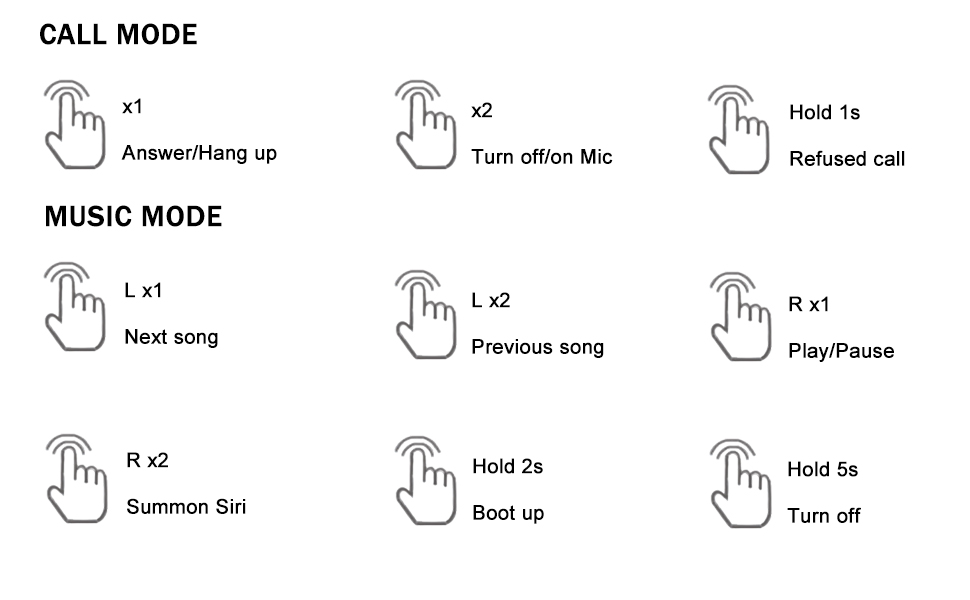
Opis obrazu: A detailed diagram outlining the touch control functions for the headphones, including single, double, and long presses for answering calls, controlling music playback, and activating voice assistants.
- Odbierz/rozłącz połączenie: Single tap (x1) on either earbud.
- Odmowa połączenia: Naciśnij i przytrzymaj (1 s) na dowolnej słuchawce.
- Turn On/Off Mic: Double tap (x2) on either earbud during a call.
- Odtwórz/wstrzymaj muzykę: Single tap (R x1) on the right earbud.
- Następna piosenka: Single tap (L x1) on the left earbud.
- Poprzednia piosenka: Double tap (L x2) on the left earbud.
- Summon Voice Assistant (Siri, Google Assistant, etc.): Double tap (R x2) on the right earbud.
3. Konserwacja
3.1 Czyszczenie
Regularne czyszczenie pomaga zachować jakość dźwięku i higienę:
- Delikatnie przetrzyj słuchawki douszne i etui ładujące miękką, suchą i niepozostawiającą włókien ściereczką.
- Zdejmij nakładki douszne i umyj je łagodnym mydłem i wodą, a następnie dokładnie wysusz przed ponownym założeniem.
- Unikaj stosowania materiałów ściernych, alkoholu i środków czyszczących zawierających substancje chemiczne.
3.2 Wodoodporność (IPX6)
The headphones are rated IPX6 waterproof, meaning they are protected against high-pressure water jets from any direction. This makes them suitable for workouts and use in rainy conditions.
- Nie zanurzaj słuchawek w wodzie.
- Przed ładowaniem upewnij się, że port ładowania jest suchy.
- Etui ładujące nie jest wodoodporne.

Opis obrazu: The image depicts the headphones and case with water splashes, emphasizing their IPX6 waterproof rating, which protects them from sweat and rain.
3.3 Przechowywanie
When not in use, store the headphones in their charging case to protect them from dust, damage, and to keep them charged.
4. Rozwiązywanie Problemów
Jeśli masz problemy ze słuchawkami, zapoznaj się z poniższymi, często stosowanymi rozwiązaniami:
- Brak dźwięku lub problemy z połączeniem:
1. Sprawdź, czy obie słuchawki są naładowane.
2. Turn off and then turn on Bluetooth on your device.
3. Delete "MS-T20" from your device's Bluetooth list and re-pair.
4. Ensure the earbuds are within the 10-meter Bluetooth range of your device. - Problemy z ładowaniem:
1. Verify the USB-C cable is securely connected to both the charging case and the power source.
2. Ensure the charging contacts on the earbuds and inside the case are clean and free of debris.
3. Make sure the charging case itself has power. - Słaba jakość dźwięku:
1. Try different sizes of ear tips to ensure a proper seal in your ear canal.
2. Ensure the earbuds are correctly positioned in your ears.
3. Clean any earwax or debris from the ear tips and speaker mesh. - Przyciski nie odpowiadają:
1. Ensure you are pressing the correct touch control area.
2. Apply firm but not excessive pressure for touch commands.
5. Specyfikacje
| Funkcja | Specyfikacja |
|---|---|
| Nazwa modelu | Loluka Earbuds with hook |
| Technologia łączności | Bezprzewodowy (Bluetooth) |
| Wersja Bluetooth | 5.1 |
| Zasięg Bluetooth | 10 metrów |
| Poziom wodoodporności | Wodoodporność IPX6 |
| Czas pracy baterii (słuchawki douszne) | 6-7 godziny |
| Całkowity czas pracy baterii (z etui) | 28 godzin |
| Czas ładowania (etui) | 1-2 Hours (Type-C) |
| Typ sterownika audio | Dynamiczny sterownik |
| Kontrola hałasu | Sound Isolation (Environmental Noise Reduction for calls) |
| Typ sterowania | Dotyk, głos |
| Kompatybilne urządzenia | Bluetooth-enabled smartphones, tablets, etc. |
| Waga przedmiotu | 2.71 uncji |
| Wymiary produktu | 3.9 x 2.44 x 1.2 cala |
6. Gwarancja i wsparcie
For warranty information and customer support, please refer to the documentation included with your purchase or contact Loluka customer service through the retailer where the product was purchased. Please retain your proof of purchase for warranty claims.