
1. Wprowadzenie
Thank you for choosing the Greadio MD-T26 Portable AM/FM/SW Radio. This manual provides detailed instructions for the proper setup, operation, and maintenance of your radio. Please read this manual thoroughly before use to ensure optimal performance and longevity of your device.
The Greadio MD-T26 is a versatile portable radio featuring AM, FM, and Shortwave (SW) bands, an LCD display for clear frequency and time viewing, and dual power options for both indoor and outdoor use. It is designed for ease of use with large, accessible controls and a built-in speaker for clear audio.

Rycina 1: Przód view of the Greadio MD-T26 Portable AM/FM/SW Radio.
2. Funkcje produktu
- Odbiór wielopasmowy: Receives AM, FM, and Shortwave (SW) frequencies.
- Wyświetlacz LCD: Clear digital display for frequency and time settings.
- Opcje podwójnego zasilania: Operates via AC power or 4 x D cell batteries (not included).
- Głośnik wysokiej jakości: Integrated 2W speaker for clear sound output.
- Kontrola tonów: Adjustable tone settings (Low/High) for personalized audio.
- Gniazdo słuchawkowe: 3.5mm stereo earphone jack for private listening.
- Przenośna konstrukcja: Equipped with a sturdy handle for easy transport.
3. Konfiguracja
3.1 Zasilanie radia
The Greadio MD-T26 radio offers two methods for power supply:
- Zasilanie prądem zmiennym: For indoor use, connect the included AC power cable to the radio's AC input jack and then plug it into a standard wall outlet.
- Zasilanie bateryjne: For portable use, insert four (4) D cell batteries (not included) into the battery compartment located on the back of the radio. Ensure correct polarity (+/-) as indicated inside the compartment.
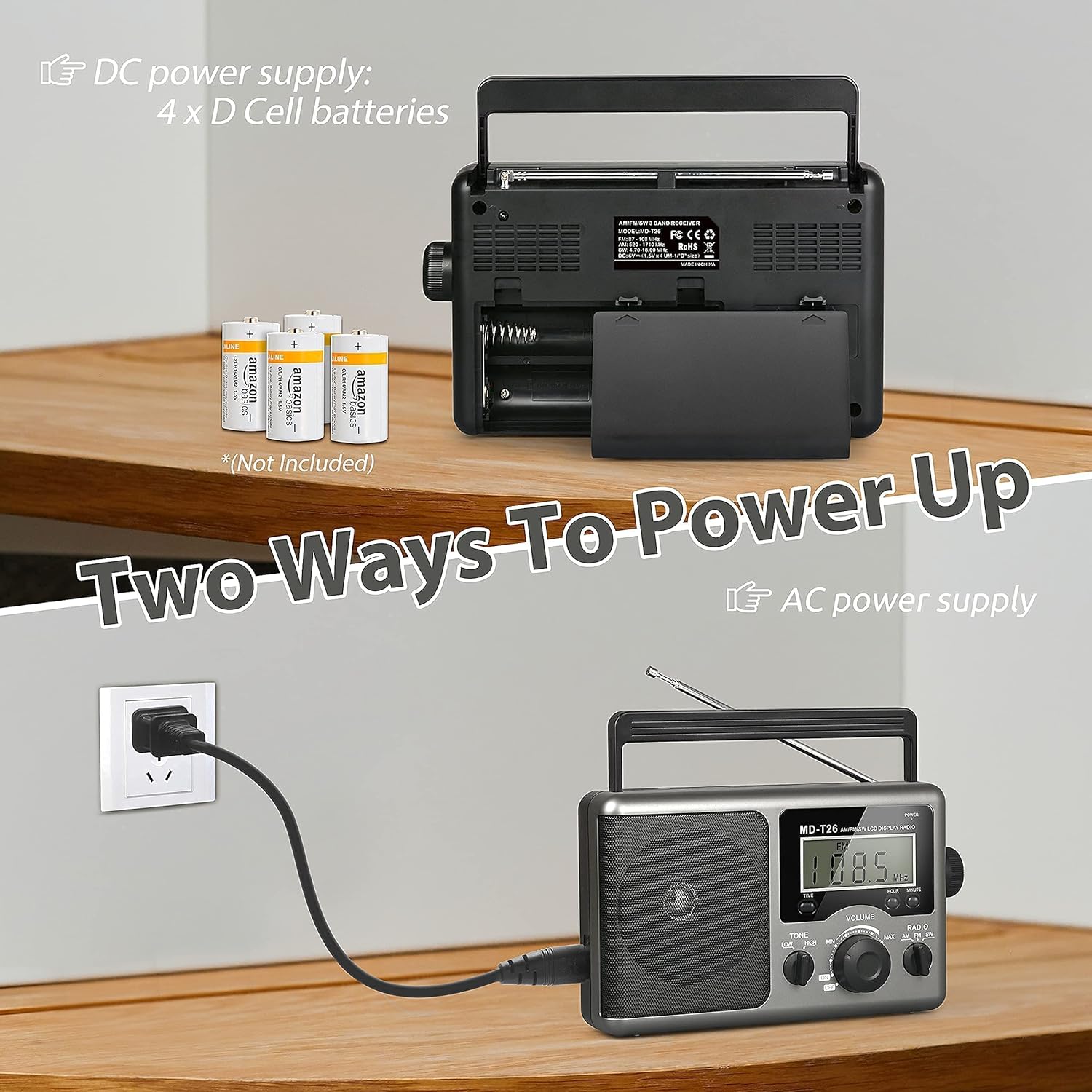
Figure 2: Illustration of AC power connection and battery compartment for D cell batteries.
3.2 Regulacja anteny
For optimal reception, adjust the antenna as follows:
- Odbiór FM/SW: Extend the telescopic antenna fully and adjust its angle for the clearest signal.
- Recepcja poranna: The radio uses a built-in ferrite rod antenna for AM. Rotate the entire radio unit to find the strongest signal.
4. Instrukcja obsługi
4.1 kontroli nadview

Rysunek 3: Szczegółowy view of the radio's control panel.
- Przycisk zasilania: Located on the top right, press to turn the radio ON/OFF.
- Pokrętło STROJENIA: Located on the right side, rotate to select radio stations.
- Gałka GŁOŚNOŚCI: Located on the front panel, rotate to adjust the sound level.
- RADIO Band Selector: Switch between AM, FM, and SW bands.
- Przełącznik TONE: Select between LOW and HIGH tone settings.
- TIME/HOUR/MINUTE Buttons: Used for setting the time on the LCD display.
4.2 Turning On and Selecting a Band
- Naciśnij MOC button to turn on the radio. The LCD display will illuminate.
- Użyj RADIO band selector switch to choose your desired band: AM, FM, or SW.
4.3 Strojenie do stacji
Once a band is selected, slowly rotate the STROJENIE knob on the right side of the radio. Observe the frequency displayed on the LCD screen. Stop rotating when you hear your desired station clearly.
4.4 Regulacja głośności i tonu
- Tom: Obróć TOM pokrętło na przednim panelu, obracając je zgodnie z ruchem wskazówek zegara, zwiększa głośność, a przeciwnie do ruchu wskazówek zegara, zmniejsza ją.
- Ton: Użyj TON switch to select between 'LOW' for a warmer sound or 'HIGH' for a brighter sound, according to your preference.
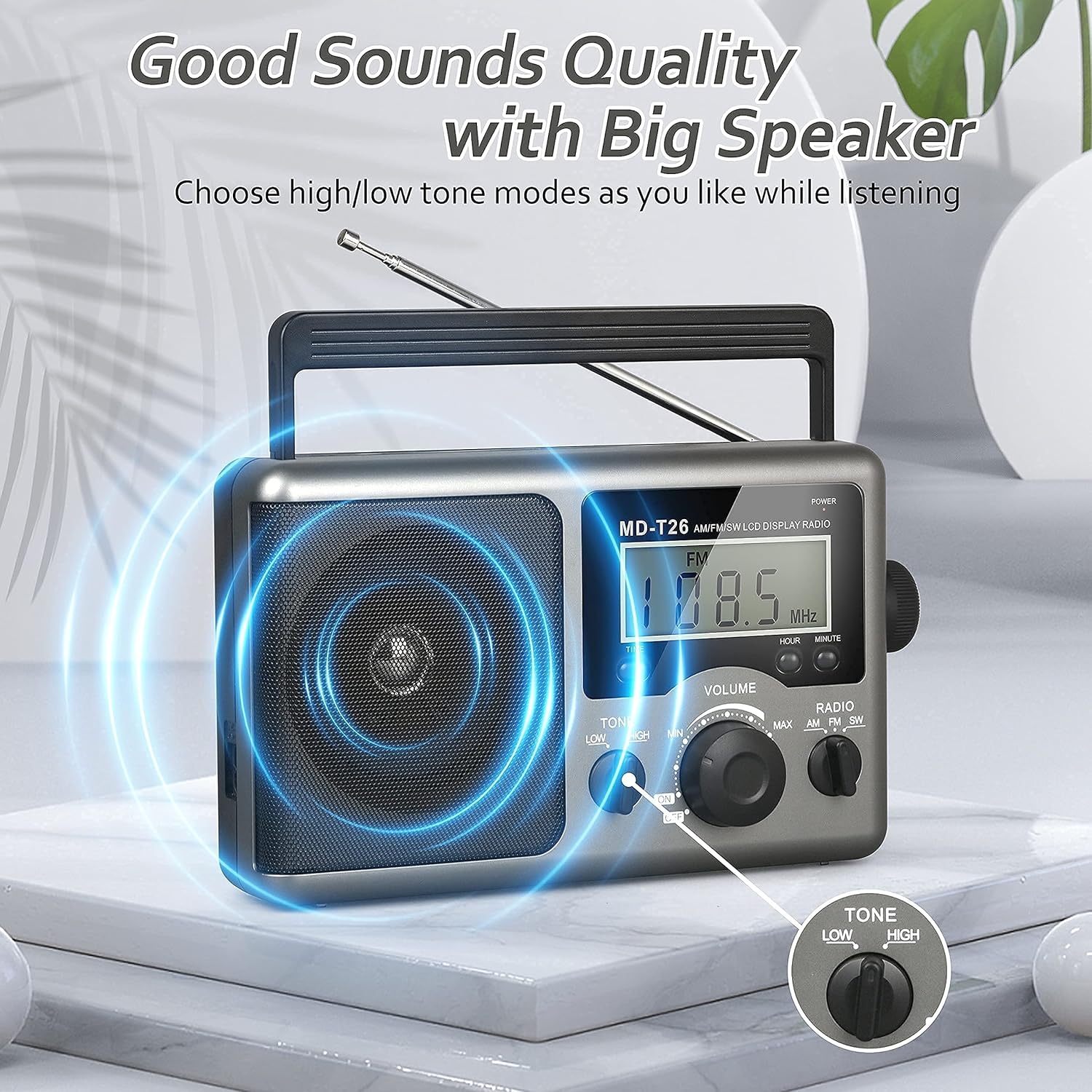
Figure 4: Speaker and Tone control detail.
4.5 Ustawianie czasu
The LCD display can also show the current time. To set the time:
- Naciśnij CZAS button once to enter time setting mode.
- Użyj GODZINA przycisk, aby ustawić godzinę.
- Użyj CHWILA przycisk, aby ustawić minuty.
- The time system is 24-hour format.
4.6 Using the Earphone Jack
For private listening, plug any standard 3.5mm stereo earphones (not included) into the GNIAZDO SŁUCHAWKOWE located on the side of the radio. The internal speaker will automatically mute when earphones are connected.
5. Konserwacja
- Czyszczenie: Przetrzyj obudowę radia miękką, suchą ściereczką. Nie używaj środków czyszczących ani rozpuszczalników o działaniu ściernym.
- Pielęgnacja baterii: If the radio will not be used for an extended period, remove the D cell batteries to prevent leakage and damage.
- Składowanie: Przechowuj radio w chłodnym i suchym miejscu, z dala od bezpośredniego światła słonecznego i ekstremalnych temperatur.
- Wodoodporność: To radio jest nie jest wodoodporny. Avoid exposure to rain, moisture, or splashing water.
6. Rozwiązywanie Problemów
| Problem | Możliwa przyczyna | Rozwiązanie |
|---|---|---|
| Brak zasilania | AC cable not connected, batteries depleted or incorrectly inserted. | Check AC cable connection. Replace batteries or ensure correct polarity. |
| Słaby odbiór / Szumy | Antenna not extended/adjusted, weak signal area, interference. | Extend and adjust telescopic antenna (FM/SW). Rotate radio for AM. Move to an area with better signal. Avoid sources of electronic interference. |
| Brak dźwięku z głośnika | Głośność jest zbyt niska, słuchawki są podłączone. | Increase volume. Disconnect earphones if not intended for private listening. |
| Wyświetlacz LCD nie działa | Problem z zasilaniem, usterka wewnętrzna. | Sprawdź zasilanie. Jeśli problem będzie się powtarzał, skontaktuj się z obsługą klienta. |
7. Specyfikacje
| Funkcja | Szczegół |
|---|---|
| Marka | Greadio |
| Numer modelu | MD-T26 |
| Technologia łączności | Auxiliary (for earphone) |
| Technologia tunera | AM, FM, SW |
| Źródło zasilania | AC Power, 4 x D Cell Batteries |
| Kompatybilne urządzenia | Nausznik |
| Typ wyświetlacza | LCD |
| Interfejs sprzętowy | Gniazdo audio 3.5mm |
| Poziom wodoodporności | Nie jest wodoodporny |
8. Gwarancja i wsparcie
8.1 Informacje o gwarancji
Greadio provides a 12-miesięczna gwarancja dla tego produktu, obejmującego wady produkcyjne od daty zakupu. Dodatkowo 30-dniowa gwarancja zwrotu pieniędzy jest oferowany.
Niniejsza gwarancja nie obejmuje uszkodzeń powstałych na skutek niewłaściwego użytkowania, wypadku, nieautoryzowanej modyfikacji lub normalnego zużycia.
8.2 Obsługa klienta
For any questions, technical assistance, or warranty claims, please contact Greadio customer service. We offer Obsługa klienta 24/7 aby Ci pomóc.
Proszę zapoznać się z opakowaniem produktu lub informacjami sprzedawcy. webna tej stronie znajdziesz najbardziej aktualne dane kontaktowe.