
Wstęp
Thank you for choosing the CHOETECH 38W Dual Port Fast Charger, Model PD5002. This charger is designed to provide efficient and rapid charging for your mobile devices, featuring both a USB Type-C port with Power Delivery (PD) and a USB Type-A port with Quick Charge (QC) technology. Please read this manual carefully to ensure proper use and optimal performance of your charger.
Informacje dotyczące bezpieczeństwa
- Use this charger indoors only. Avoid exposure to rain, moisture, or extreme temperatures.
- Do not disassemble, modify, or repair the product yourself. This may cause electric shock, fire, or damage to the product.
- Trzymaj ładowarkę z dala od dzieci i zwierząt.
- Ensure the charger is fully inserted into the power outlet. Loose connections can cause overheating.
- Odłączaj ładowarkę od gniazdka elektrycznego, gdy jej nie używasz, a także podczas burzy.
- Nie obsługuj ładowarki mokrymi rękami.
- Use only compatible charging cables with your devices.
Zawartość opakowania
- 1 x CHOETECH 38W Dual Port Fast Charger (Model PD5002)
Produkt ponadview
The CHOETECH PD5002 charger features a compact and lightweight design, making it ideal for travel and everyday use. It includes two charging ports for simultaneous charging.

Obraz: Przód view of the CHOETECH PD5002 38W Dual Port Fast Charger, showing the USB-C and USB-A ports and the CHOETECH logo.
Układ portu:
- USB Type-C Port (PD 3.0): Delivers up to 20W of power for fast charging compatible devices.
- USB Type-A Port (QC 3.0): Delivers up to 18W of power for quick charging compatible devices.
Organizować coś
Setting up your CHOETECH PD5002 charger is straightforward:
- Podłącz do gniazdka elektrycznego: Dokładnie włóż bolce ładowarki do standardowego gniazdka ściennego (prąd zmienny 100–240 V).
- Podłącz kabel ładujący: Connect one end of your device's charging cable to the appropriate port on the charger (USB-C for Power Delivery or USB-A for Quick Charge).
- Połącz z urządzeniem: Connect the other end of the charging cable to your mobile phone, tablet, or other compatible device.
Instrukcja obsługi
Ładowanie pojedynczego urządzenia:
When charging a single device, the charger will deliver the maximum power supported by the port and your device. For example, a compatible device connected to the USB-C port can receive up to 20W, while a device connected to the USB-A port can receive up to 18W.
Jednoczesne ładowanie dwóch urządzeń:
The CHOETECH PD5002 allows you to charge two devices simultaneously with a combined total output of 38W. When both ports are in use, the power is intelligently distributed:
- The USB-C port can deliver up to 20W.
- The USB-A port can deliver up to 18W.
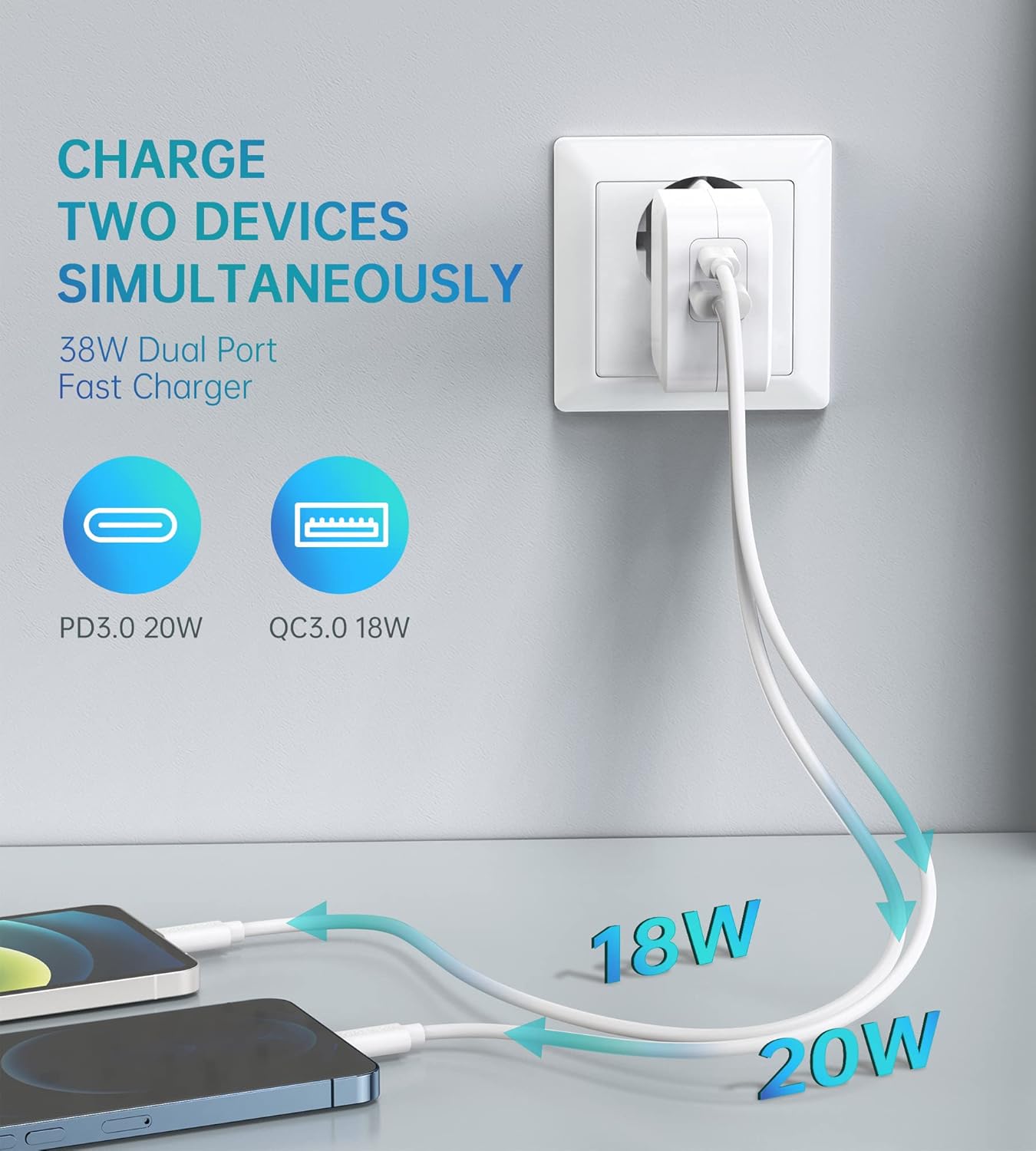
Image: Illustration showing the CHOETECH PD5002 charger plugged into a wall, with two cables extending to charge two smartphones. One cable is labeled 20W (USB-C) and the other 18W (USB-A), demonstrating simultaneous charging.
Możliwości szybkiego ładowania:
This charger supports Power Delivery (PD) 3.0 via the USB-C port and Quick Charge (QC) 3.0 via the USB-A port, enabling significantly faster charging speeds for compatible devices compared to standard chargers.

Image: The CHOETECH PD5002 charger plugged into a wall outlet, connected to an iPhone 12 via a USB-C to Lightning cable. Text highlights "20W Power Delivery for the new iPhone 12 series" and "4X FASTER Than Original 5W Chargers."

Image: The CHOETECH PD5002 charger plugged into a wall outlet, connected to a Samsung smartphone via a USB-A to USB-C cable. Text highlights "18W QUICK CHARGE 3.0" and "3X Faster Than Standard Chargers."
Konserwacja
- Czyszczenie: Przed czyszczeniem odłącz ładowarkę od gniazdka elektrycznego. Do przecierania powierzchni użyj miękkiej, suchej ściereczki. Nie używaj płynnych ani aerozolowych środków czyszczących.
- Składowanie: Store the charger in a cool, dry place when not in use. Avoid storing it in areas with high humidity or extreme temperatures.
- Obsługiwanie: Unikaj upuszczania ładowarki i narażania jej na silne uderzenia, ponieważ może to spowodować uszkodzenie jej wewnętrznych podzespołów.
Rozwiązywanie problemów
Urządzenie się nie ładuje:
- Sprawdź połączenia: Ensure the charger is securely plugged into the wall outlet and the charging cable is firmly connected to both the charger and your device.
- Wypróbuj inne gniazdko: Test the charger with a different wall outlet to rule out a faulty power source.
- Sprawdź kabel: Try using a different charging cable. Damaged cables can prevent charging.
- Zgodność urządzenia: Confirm that your device is compatible with USB charging and that the cable matches the device's port type.
Powolne ładowanie:
- Jakość kabla: Ensure you are using a high-quality charging cable that supports fast charging protocols (PD or QC). Generic or old cables may limit charging speed.
- Obsługa urządzeń: Verify that your device supports Power Delivery (PD) or Quick Charge (QC) for optimal fast charging.
- Aplikacje działające w tle: Zamknij wszystkie energochłonne aplikacje działające w tle na Twoim urządzeniu.
- Czynniki środowiskowe: Extreme temperatures can affect charging efficiency. Charge in a moderate environment.
Specyfikacje
| Numer modelu | PD5002 |
| Wejście AC | 100-240V, 50/60Hz, 1.0A (Max) |
| USB Type-C Output (PD 3.0) | 5 V-3 A, 9 V-2.22 A, 12 V-1.67 A (maks. 20 W) |
| USB Type-A Output (QC 3.0) | 5 V-3 A, 9 V-2 A, 12 V-1.5 A (maks. 18 W) |
| Całkowita moc wyjściowa | 38 W (maks.) |
| Technologia łączności | USB |
| Cechy specjalne | Lightweight design, Fast charging |
| Kolor | Biały |
| Wymiary produktu | Wymiary 4 x 11 x 10 cm |
| Waga przedmiotu | 5 gramów |
| Kompatybilne urządzenia | Mobile phones, tablets, and other USB-powered devices |
Gwarancja i wsparcie
CHOETECH products are designed and manufactured to the highest quality standards. For information regarding warranty coverage or technical support, please refer to the warranty card included with your purchase or visit the official CHOETECH website. If you encounter any issues not covered in this manual, please contact CHOETECH customer service for assistance.