
JOYING 6GB+128GB
JOYING 10.1 Inch Android Car Stereo User Manual
Model: 6 GB + 128 GB
Wstęp
This manual provides comprehensive instructions for the installation, operation, maintenance, and troubleshooting of your JOYING 10.1 Inch Android Car Stereo. Please read this manual thoroughly before using the device to ensure proper functionality and safety.
The JOYING Android Car Stereo is an advanced in-dash navigation and entertainment system designed to enhance your driving experience. It features a high-resolution display, powerful processing capabilities, and seamless smartphone integration.

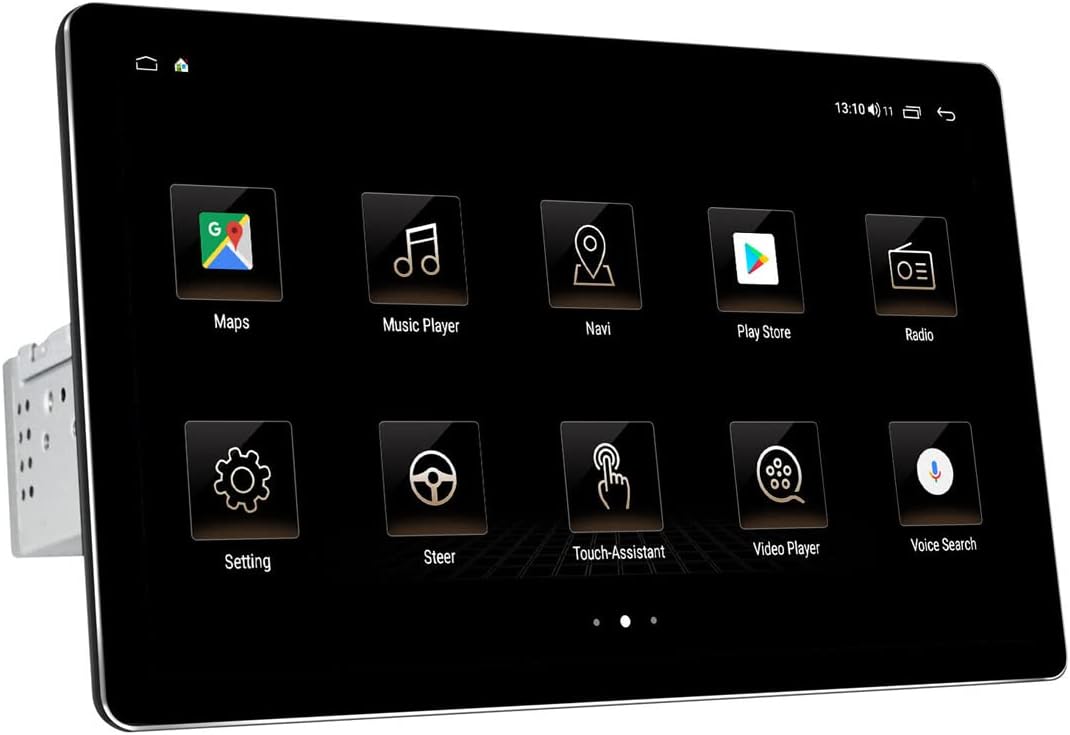
Przód view of the JOYING 10.1 Inch Android Car Stereo.
Konfiguracja i instalacja
Prawidłowa instalacja jest kluczowa dla optymalnego działania radia samochodowego. Jeśli nie masz doświadczenia w okablowaniu car audio, zaleca się zlecenie instalacji profesjonaliście.
1. Zawartość opakowania i wymiary
Before beginning, verify all components are present as listed in the package contents. Familiarize yourself with the unit's dimensions to ensure compatibility with your vehicle's dashboard.

Dimensions and included accessories for the JOYING car stereo.
2. Detachable Screen and Adjustable Mount
The unit features a detachable screen and an adjustable fixed mount. This design allows for flexible positioning to avoid obstructing air-conditioning vents or control switches during installation.

Illustration of the detachable screen and adjustable mounting system.
3. Okablowanie i połączenia
Connect the main power harness, speaker wires, and other necessary cables to the corresponding ports on the back of the unit. Ensure all connections are secure. If your car has a CANbus system, an additional CANbus decoder harness may be required (sold separately).

Szczegółowy view of the rear connections and ports on the car stereo.

Example of the wiring harness for connecting the stereo to the vehicle's electrical system.
4. SIM Card and WiFi Setup
The unit supports a built-in 4G module. Insert a SIM card for internet access. It also supports dual-band WiFi (2.4GHz and 5GHz) for stable network connectivity.

Instructions for inserting a SIM card into the unit's 4G module.
5. Initial Power-Up and Screen Attachment
After all connections are made, power on the unit. The first boot-up may take longer (approx. 30-40 seconds). Once the main unit is powered, attach the display screen to the main unit using the provided connectors.
Video demonstrating the physical dimensions, screen attachment, and initial setup of the JOYING 10.1 Inch Car Radio.
Instrukcja obsługi
Your JOYING car stereo runs on Android 10 OS, providing a familiar and intuitive user interface.
1. Nawigacja interfejsu użytkownika
The 10.1-inch touchscreen allows for easy navigation through various applications and settings. The home screen provides quick access to frequently used functions like Maps, Music Player, and Radio.

Examples of the JOYING car stereo's user interface screens.
2. CarLink (Android Auto / CarPlay)
The unit features built-in Carlink, supporting both wired/wireless CarPlay (iOS 10.1 or later) and wired Android Auto (Android 7.0 or later). This allows for seamless integration of your smartphone for navigation, calls, and music, minimizing distractions while driving.

CarPlay interface displaying navigation and music simultaneously.

Explanation of Car-Smartphone Connectivity features.
3.Bluetooth 5.1
With Bluetooth 5.1, the stereo supports audio streaming, automatic phone book transfer, and hands-free calling. Note that it primarily supports phone and OBD dongle connections.
4. Built-in DSP and Audio Settings
The unit features a built-in Digital Signal Processor (DSP) with a 32-band equalizer, allowing independent adjustment for front and rear speakers. This provides enhanced sound quality and customizable audio experiences, including bass reinforcement and filtering.
DSP interface for advanced audio customization.

Visual representation of the Built-in DSP capabilities.
5. Video Playback and Display Quality
The 1920x1200 resolution screen offers a high-definition viewing experience for videos and other media. The brightness adjusts to ensure clear visibility even in daylight.

Resolution comparison illustrating the superior clarity of the 1920x1200 display.
6. Sterowanie z kierownicy
The unit supports factory steering wheel controls, allowing you to easily switch songs, radio channels, and adjust volume for a safer and more enjoyable journey.

Steering wheel control integration for convenient operation.
Konserwacja
Aby zapewnić długowieczność i optymalną pracę radia samochodowego JOYING, należy przestrzegać poniższych wskazówek dotyczących konserwacji:
- Czyszczenie ekranu: Delikatnie przetrzyj ekran dotykowy miękką, niepozostawiającą włókien ściereczką. W przypadku uporczywych plam delikatnie przetrzyj.ampPrzetrzyj ściereczkę wodą lub środkiem do czyszczenia ekranów. Unikaj materiałów ściernych i silnych środków chemicznych.
- Usuwanie kurzu: Regularly use a soft brush or compressed air to remove dust from vents and connection ports to prevent overheating and maintain proper airflow.
- Aktualizacje oprogramowania: Okresowo sprawdzaj producenta website or the unit's settings for available software updates. Keeping the software updated can improve performance, add new features, and fix bugs.
- Warunki środowiskowe: Unikaj wystawiania urządzenia na działanie ekstremalnych temperatur, długotrwałego bezpośredniego światła słonecznego i nadmiernej wilgoci.
Rozwiązywanie problemów
If you encounter issues with your JOYING car stereo, refer to the following common problems and their solutions:
| Problem | Możliwa przyczyna | Rozwiązanie |
|---|---|---|
| Urządzenie nie włącza się. | Nieprawidłowe okablowanie; Przepalony bezpiecznik; Problem z zasilaniem. | Check all power connections (yellow and red wires may need to be swapped if not powering on correctly). Inspect the fuse on the unit's wiring harness. Ensure stable power supply from the vehicle. |
| Poor sound quality or crackling microphone. | Improper audio settings; Loose speaker connections; External microphone interference. | Adjust DSP and equalizer settings. Ensure all speaker wires are securely connected. Check external microphone placement and connection; consider relocating it if experiencing excessive noise. |
| Main screen/launcher cannot be changed or font is too small. | Default software limitations; Display scaling settings. | While direct font size adjustment may be limited, some users report success by enabling Developer Options (Settings > About device > Build number, tap 7 times) and adjusting 'Smallest width' (DPI) settings. Installing an alternative launcher from the Play Store may also provide more customization. |
| CarPlay/Android Auto not connecting or unstable. | Incorrect cable; Software incompatibility; Phone settings. | Ensure you are using a high-quality USB cable. Verify your phone's operating system is compatible (Android 7.0+ for Android Auto, iOS 10.1+ for CarPlay). Check phone settings for CarLink permissions. Try restarting both the phone and the car stereo. |
| Sterowanie z kierownicy nie działa. | Incorrect wiring; Missing CANbus decoder. | Ensure the steering wheel control wires are correctly connected. If your car has a CANbus system, an additional CANbus decoder harness may be required for full functionality. |
Specyfikacje
- Wymiary produktu: 9.65 x 5.08 x 6.34 cala
- Waga przedmiotu: 5.99 funta
- ASIN: B09CM17SZ2
- Data pierwszej dostępności: 14 sierpnia 2021 r.
- Producent: RADOŚĆ
- Marka: RADOŚĆ
- Technologia łączności: Bluetooth, Wi-Fi, USB
- Rodzaj kontrolera: iOS, Android
- Dodatek specjalny: ZIMNICA
- Zgodne urządzenia: Smartfon, głośnik
- Całkowita liczba portów HDMI: 4
- Typ złącza: USB
- Kodowanie audio: Stereofoniczny
- Tryb wyjścia audio: Stereofoniczny
- Konfiguracja kanałów dźwięku przestrzennego: Kanał 4
Gwarancja i wsparcie
For warranty information and technical support, please refer to the official JOYING webOdwiedź stronę internetową lub skontaktuj się bezpośrednio z działem obsługi klienta. Zachowaj paragon jako dowód zakupu na wypadek ewentualnych roszczeń gwarancyjnych.
Ask a question about this manual
Ask about setup, troubleshooting, compatibility, parts, safety, or missing instructions. Manuals+ will review the question and use this page’s manual context to help answer it.