
Baseus NGTW060001
Baseus W11 True Wireless Earbuds User Manual
Model: NGTW060001
1. Wprowadzenie
Thank you for choosing Baseus W11 True Wireless Earbuds. This manual provides detailed instructions for the proper use and maintenance of your device. Please read it carefully before use.

Image: Baseus W11 True Wireless Earbuds and Charging Case.
2. Co znajduje się w pudełku
W skład pakietu wchodzą następujące elementy:
- Baseus W11 True Wireless Earbuds (Left and Right)
- Etui z ładowaniem bezprzewodowym
- Kabel ładujący USB-C
- Multiple sizes of silicone ear tips (XS, S, M, L)
- Instrukcja obsługi
Video: TWS W11 Operation Guide Video, demonstrating unboxing and initial setup steps.
3. Koniec produktuview
Słuchawki douszne
- Dotykowy obszar sterowania
- Mikrofon
- Kontakty ładowania
- Silikonowa końcówka do uszu
Etui ładujące
- Gniazda ładowania słuchawek
- Kontrolka baterii
- Port ładowania USB-C
- Przycisk funkcyjny

Image: Baseus W11 Earbuds inside their charging case, showing the earbuds and charging contacts.
4. Konfiguracja
4.1 Pierwsze ładowanie
Before first use, ensure the charging case and earbuds are fully charged. Remove any insulation stickers from the earbud charging contacts.
- Connect the USB-C cable to the charging case and a power source.
- Można również umieścić etui ładujące na kompatybilnej podkładce do ładowania bezprzewodowego.
- Kontrolka na obudowie pokaże stan ładowania.

Image: Baseus W11 charging case on a wireless charging pad, illustrating wireless charging capability.

Image: Baseus W11 charging case connected via USB-C cable, showing fast charging feature.
4.2 Parowanie z urządzeniem
- Otwórz etui ładujące. Słuchawki automatycznie przejdą w tryb parowania.
- Włącz Bluetooth na swoim urządzeniu (smartfonie, tablecie itp.).
- Szukaj "Baseus Encok W11" in the list of available Bluetooth devices and select it to connect.
- Po nawiązaniu połączenia usłyszysz komunikat dźwiękowy i słuchawki będą gotowe do użycia.
4.3 Instalacja aplikacji Baseus
For enhanced features like anti-lost function, gesture customization, and firmware updates, download the official Baseus app from your device's app store.

Image: Baseus app interface showing anti-lost function, low latency, and button customization options.
5. Instrukcja obsługi
5.1 Noszenie słuchawek dousznych
Choose the ear tips that provide the most comfortable and secure fit for your ears. Insert the earbuds into your ear canal and gently twist them to lock them in place.

Image: Man wearing Baseus W11 earbuds while running, demonstrating the secure and comfortable fit for active use.
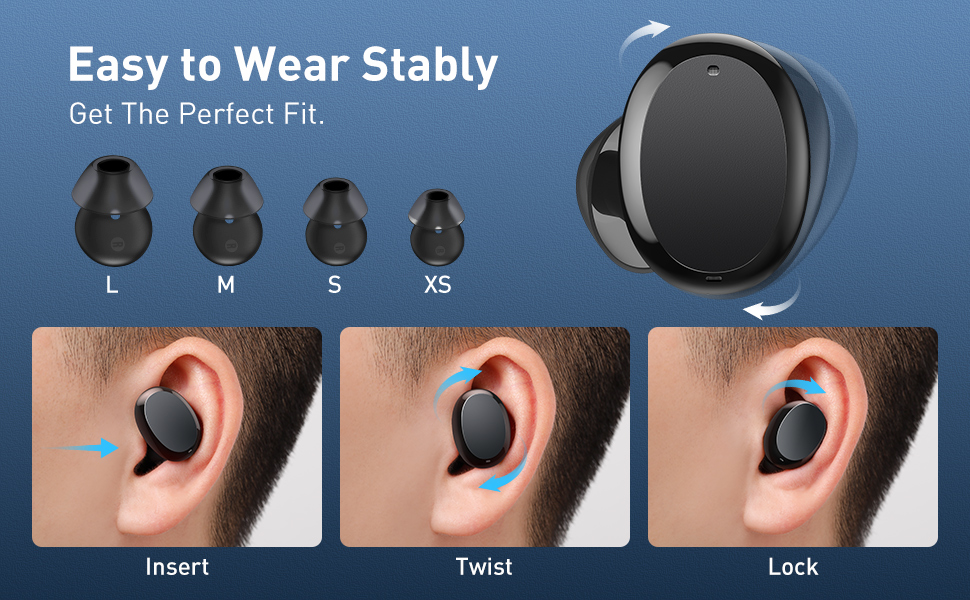
Image: Diagram illustrating the three steps to achieve a secure fit for the Baseus W11 earbuds: insert, twist, and lock.
5.2 Sterowanie dotykowe
The earbuds feature smart touch controls. Functions can be customized via the Baseus app.
- Odtwórz/Pauza: Double-tap Left/Right earbud.
- Następny utwór: Long press Right earbud.
- Poprzedni utwór: Long press Left earbud.
- Aktywuj asystenta głosowego: Triple-tap Left/Right earbud.
- Odbierz/rozłącz połączenie: Double-tap Left/Right earbud.
- Odrzuć połączenie: Long press Left/Right earbud.
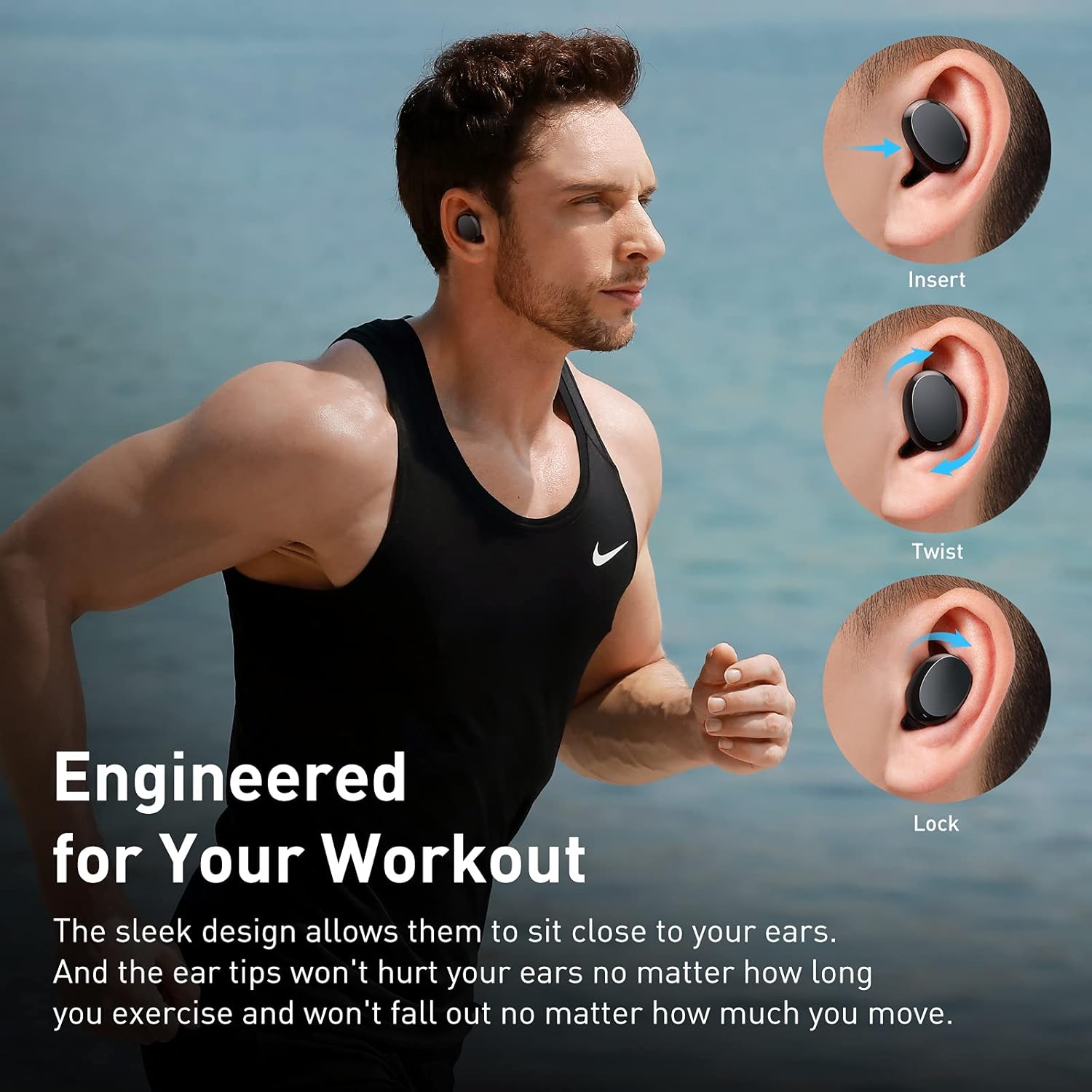
Image: Diagram illustrating the various touch control functions for the Baseus W11 earbuds, including play/pause, track skipping, voice assistant, and call management.
5.3 Korzystanie z jednej słuchawki dousznej
The Baseus W11 earbuds support independent use. You can use either the left or right earbud individually while the other is charging or stored.
6. Ładowanie
6.1 Ładowanie słuchawek dousznych
Place the earbuds into the charging case. They will automatically begin charging. The case's indicator light will show the charging status.
6.2 Ładowanie etui
The charging case can be charged via the included USB-C cable or wirelessly using a compatible Qi-certified wireless charger.
6.3 Szybkie ładowanie
The earbuds feature fast charging. A 10-minute charge can provide up to 4 hours of playback time.
7. Konserwacja
7.1 Stopień wodoodporności (IPX8)
The Baseus W11 earbuds are IPX8 waterproof, providing protection against sweat and rain. This makes them suitable for sports and outdoor activities. Avoid prolonged submersion in water.
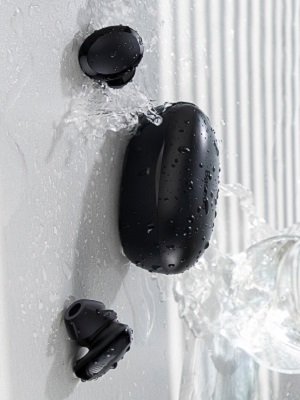
Image: Baseus W11 earbuds and case with water splashing, demonstrating IPX8 waterproof rating.
7.2 Czyszczenie
Regularly clean the earbuds and charging case with a soft, dry cloth. Ensure charging contacts are free from dust and debris to maintain optimal charging performance.
8. Rozwiązywanie Problemów
- Słuchawki nie łączą się: Ensure both earbuds are fully charged and removed from the case. Check your device's Bluetooth settings and try reconnecting. If issues persist, try resetting the earbuds (refer to the app or full user manual for specific reset instructions).
- Jedna słuchawka nie działa: Ensure both earbuds are charged. Try placing them back in the case and taking them out again. If only one earbud connects, try re-pairing them as a pair.
- Problemy z jakością dźwięku: Ensure ear tips are properly fitted to create a good seal. Check the audio source and volume levels on both your device and the earbuds.
- Lost Earbuds: Use the anti-lost function in the Baseus app to locate misplaced earbuds by making them emit a sound.
Video: Great Waterproof Wireless Earbuds with Locator App, demonstrating the app's anti-lost feature.
9. Specyfikacje
| Funkcja | Specyfikacja |
|---|---|
| Nazwa modelu | NGTW060001 (W11) |
| Technologia łączności | Bezprzewodowy (Bluetooth) |
| Technologia komunikacji bezprzewodowej | Bluetooth V5.0 |
| Pojemność baterii słuchawek | 40mAh (0.148Wh) |
| Pojemność akumulatora skrzynki ładującej | 300mAh (1.11Wh) |
| Zakres odpowiedzi częstotliwościowej | 20Hz-20kHz |
| Interfejs ładowania | Typ C |
| Poziom wodoodporności | Wodoodporność IPX8 |
| Typ sterownika audio | Przetwornik dynamiczny 10 mm |
| Metoda kontroli | Aplikacja, dotyk |
| Waga | 5.1 uncji (całkowita waga przedmiotu) |
| Tworzywo | Durable Plastic or Rubber |
10. Gwarancja i wsparcie
Baseus products come with a standard manufacturer's warranty. For warranty claims, technical support, or any product-related inquiries, please contact Baseus customer service through their official webstronę internetową lub dane kontaktowe znajdujące się na opakowaniu produktu.
Aby uzyskać więcej pomocy, odwiedź stronę: www.baseus.com/support