
1. Wprowadzenie i koniecview
The Brifit EU-WA100 Indoor Outdoor Thermometer provides real-time monitoring of temperature and humidity in up to four locations simultaneously. This device includes a main unit and three wireless remote sensors, allowing you to track environmental conditions both indoors and outdoors. It features a large backlit LCD display, records maximum and minimum values, and indicates comfort levels.

Image: The Brifit EU-WA100 main display unit and three wireless remote sensors.
2. Zawartość opakowania
Sprawdź przesyłkę, aby upewnić się, że znajdują się w niej wszystkie elementy:
- 1 x Brifit EU-WA100 Main Thermometer Host Unit
- 1 x USB Charging Cable (100 cm length)
- 3 x Wireless Remote Sensors (with lanyards)
- 3 x Transparent Suction Cups
- 1 x Instrukcja obsługi
3. Funkcje produktu
- Jednoczesne wyświetlanie: Large 4.6-inch backlit LCD screen displays temperature and humidity for the main unit and three remote sensors, along with trend indicators and comfort levels.
- Monitorowanie na żywo: Provides current temperature and humidity readings.
- Rekordy danych: Records maximum and minimum temperature and humidity values for the last 24 hours or all-time.
- Three Wireless Sensors: Includes three remote sensors for monitoring multiple locations.
- Rozszerzony zasięg: Sensors can transmit data up to 100 meters (328 feet) in open areas without obstacles.
- Podwójne zasilanie: Main unit can be powered by 3x AA batteries or a USB cable. Remote sensors require 2x AAA batteries each.
- Wszechstronne rozmieszczenie: Main unit supports standing, wall-mounting, and magnetic attachment. Remote sensors can be stood, wall-mounted, or attached with suction cups.
- Jednostki temperatury: Easily switch between Celsius (℃) and Fahrenheit (℉).
- Podświetlenie: The main unit features a backlight for easy reading in low light conditions.

Obraz: Ponadview of the Brifit thermometer's key features, including temperature, humidity, trend indicator, high precision, and 3 channels.
4. Konfiguracja
4.1 Main Unit Setup
- Zasilanie:
- Insert 3x AA batteries (not included) into the battery compartment, observing correct polarity.
- Alternatively, connect the provided USB charging cable to the main unit and a power source. If both are connected, the USB power will be prioritized.
- The main unit will power on and display indoor temperature and humidity.
4.2 Remote Sensor Setup
- Insert 2x AAA batteries (not included) into each remote sensor, observing correct polarity.
- The sensors will automatically attempt to pair with the main unit. The main unit will display the readings from each connected sensor on channels 1, 2, and 3.
- If a sensor does not connect, press the "RF SEARCH CHANNEL" button on the main unit to initiate a search. Ensure sensors are within range.
- Place the remote sensors in desired locations (e.g., outdoors, in a greenhouse, or another room). Avoid placing them in direct sunlight or areas with poor ventilation, as this can affect measurement accuracy.

Image: Illustration of the main unit's dual power supply options: USB cable or 3x AA batteries.
5. Działanie
5.1 Wyświetl ponadview

Obraz: Szczegółowy view of the main unit's LCD display, showing channels, RF signal, temperature, humidity, and trend indicators.
- Channels 1, 2, 3: Display readings from the respective remote sensors.
- Indoor: Displays readings from the main unit's internal sensor.
- Sygnał RF: Indicates successful connection to remote sensors.
- Current Temperature/Humidity: Real-time measurements.
- Trend Indicator: Arrows show if temperature/humidity is rising, falling, or stable.
- Comfort Status: Icons (DRY, COM, WET) indicate air comfort levels based on humidity.
5.2 Funkcje przycisków
- Przycisk ℃/℉: Naciśnij, aby przełączać się między jednostkami temperatury w stopniach Celsjusza i Fahrenheita.
- Przycisk MIN/MAX:
- Naciśnij raz, aby view maximum temperature and humidity recorded.
- Naciśnij ponownie, aby view minimum temperature and humidity recorded.
- Press and hold to clear the recorded MAX/MIN values.
- RF SEARCH CHANNEL Button: Press to manually search for and pair with remote sensors.
- Przycisk ŚWIATŁA: Press to activate the backlight.
- When powered by USB, there are two backlight levels (semi-bright, full-bright).
- When powered by batteries, the backlight is fixed.
5.3 Wskaźnik komfortu
The display shows a comfort indicator based on humidity levels:
- SUCHY: Wilgotność < 40%
- COM (Comfort): Wilgotność 40% ~ 70%
- MOKRY: Wilgotność > 70%

Image: Visual representation of the air comfort indicator (DRY, COM, WET) based on humidity percentagt.j.
6. Metody instalacji
6.1 Rozmieszczenie jednostki głównej
The main unit offers three installation options:
- Na stojąco: Use the integrated kickstand to place it on a desk or table.
- Mocowanie ścienne: Hang it on a wall using the mounting hole on the back.
- Magnetyczny: Attach it to a metallic surface, such as a refrigerator, using the magnetic back.

Image: The main unit standing upright on a surface next to a plant.

Image: The main unit mounted on a wall above a sofa.

Image: The main unit magnetically attached to a refrigerator door.
6.2 Umiejscowienie czujnika zdalnego
Each remote sensor is equipped with a lanyard and a suction cup for flexible placement:
- Na stojąco: Place on any flat surface.
- Mocowanie ścienne: Hang using the lanyard or a screw.
- Przyssawka: Attach to smooth surfaces like windows or tiles.
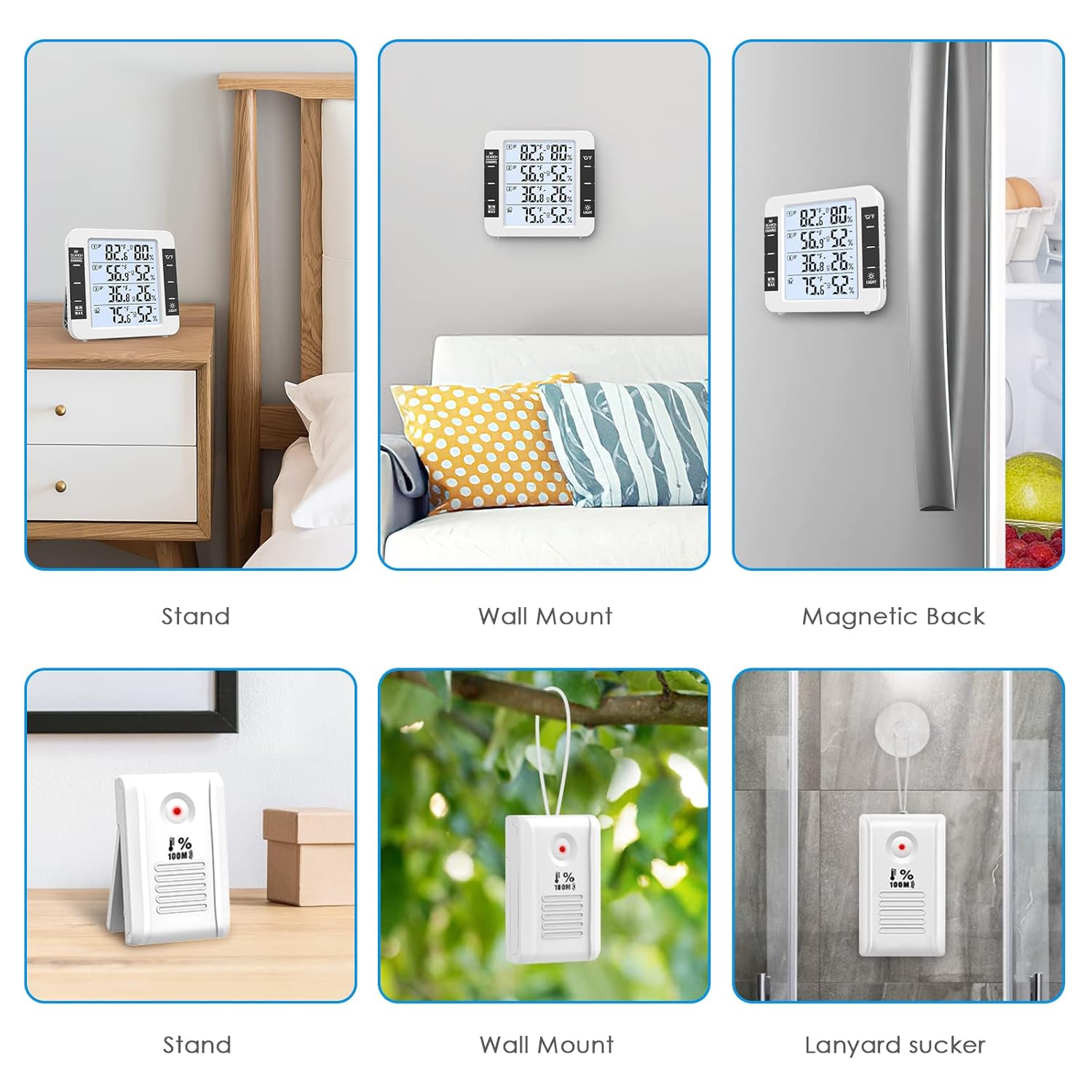
Image: Various installation methods for the main unit (stand, wall mount, magnetic) and remote sensors (stand, wall mount, suction cup).
7. Zasilanie
The main unit and remote sensors have different power requirements:
- Jednostka główna: Requires 3x AA batteries (not included) or can be powered via the included USB cable.
- Zdalne czujniki: Each sensor requires 2x AAA batteries (not included).
When battery levels are low, a low battery symbol will appear on the corresponding channel on the main unit's display.

Image: The main unit displaying a low battery icon for a sensor, indicating it's time to replace batteries.
8. Konserwacja
- Czyszczenie: Wipe the device and sensors with a soft, dry cloth. Do not use abrasive cleaners or immerse in water.
- Wymiana baterii: Replace batteries promptly when the low battery indicator appears to ensure continuous operation and accurate readings.
- Umieszczenie: Avoid placing sensors in direct sunlight, near heat sources, or in areas with poor ventilation to maintain accuracy. Do not install in air vents.
- Składowanie: Jeśli urządzenie będzie przechowywane przez dłuższy czas, należy wyjąć wszystkie baterie, aby zapobiec wyciekowi.
9. Rozwiązywanie Problemów
| Problem | Możliwa przyczyna | Rozwiązanie |
|---|---|---|
| Brak obrazu na jednostce głównej. | Baterie są rozładowane lub nieprawidłowo włożone; kabel USB nie jest podłączony lub jest uszkodzony. | Sprawdź biegunowość baterii i wymień ją w razie potrzeby. Upewnij się, że kabel USB jest prawidłowo podłączony do działającego źródła zasilania. |
| Remote sensor not displaying data. | Sensor batteries are dead; sensor is out of range; interference; sensor not paired. | Replace sensor batteries. Move sensor closer to the main unit. Press "RF SEARCH CHANNEL" on the main unit to re-pair. Avoid strong electromagnetic interference. |
| Niedokładne odczyty. | Sensor placed in direct sunlight, near heat/cold sources, or in poor ventilation. | Relocate sensors to a shaded, well-ventilated area away from extreme temperature sources. Allow time for readings to stabilize after relocation. |
| Podświetlenie nie działa lub jest słabe. | Battery power only; low battery. | Connect via USB for brighter backlight options. Replace main unit batteries if backlight is dim on battery power. |
10. Specyfikacje
| Funkcja | Szczegół |
|---|---|
| Numer modelu | EU-WA100 |
| Wymiary jednostki głównej | 11.8 x 11.2 x 2.5 cm (4.64 x 4.4 x 0.98 cala) |
| Remote Sensor Dimensions | 8.3 x 5 x 2 cm (3.27 x 1.97 x 0.79 cala) |
| Wyświetlacz | LCD z podświetleniem |
| Kolor | Biały |
| Zakres temperatury wewnętrznej | -20°C do 70°C (-4°F do 158°F) |
| Zakres temperatury zewnętrznej | -50°C do 70°C (-58°F do 158°F) |
| Zakres wilgotności | Wilgotność względna od 10% do 99% |
| Dokładność temperatury | ±1°C (±2°F) |
| Dokładność wilgotności | ±5% wilgotności względnej |
| Zasięg transmisji bezprzewodowej | Do 100 metrów (328 stóp) na otwartej przestrzeni |
| Zasilanie jednostki głównej | 3x AA batteries (not included) or USB cable |
| Moc czujnika | 2 baterie AAA na czujnik (brak w zestawie) |
| Technologia łączności | Wireless RF, USB |
| Tworzywo | Plastikowy |

Image: Diagram showing the dimensions of the main unit and the effective range of the wireless sensors, with examples of sensor placement.

Image: Infographic detailing the detection ranges for indoor/outdoor temperature and humidity, along with accuracy specifications.
11. Gwarancja i wsparcie
Information regarding specific warranty terms and customer support contact details is not provided in the product data. Please refer to the product packaging or the manufacturer's official webStrona zawierająca informacje o gwarancji i dane kontaktowe działu obsługi klienta.
12. Scenariusze zastosowań
The Brifit EU-WA100 thermometer is suitable for various environments:

Image: Collage showing various places where the thermometer can be used, including bedroom, living room, office, greenhouse, warehouse, and wine cellar.

Obraz: Byłyamples of diverse environments for the thermometer, such as bedroom, office, cellar, greenhouse, and incubator.