Instrukcja obsługi: ANBERNIC RG351M Retro Game Handheld Console
Model: RG351M
Wstęp
The ANBERNIC RG351M is a portable retro game handheld console designed for an immersive gaming experience. Featuring a 3.5-inch IPS screen and powered by an RK3326 quad-core processor, it supports a wide range of classic game formats. This manual provides essential information for setting up, operating, maintaining, and troubleshooting your device.
Informacje dotyczące bezpieczeństwa
- Nie wystawiaj urządzenia na działanie ekstremalnych temperatur, bezpośredniego światła słonecznego i wysokiej wilgotności.
- Unikaj upuszczania i narażania urządzenia na silne uderzenia.
- Use only the provided USB charging cable and a compatible power adapter (maximum load 2A) for charging.
- Nie próbuj samodzielnie demontować ani naprawiać urządzenia. Skontaktuj się z wykwalifikowanym personelem serwisowym.
- Trzymaj urządzenie z dala od wody i innych płynów.
- Podczas użytkowania i ładowania należy zapewnić odpowiednią wentylację.
Zawartość opakowania

Image: The ANBERNIC RG351M console, its retail packaging, and the included USB charging cable.
Po rozpakowaniu należy sprawdzić zawartość opakowania, aby upewnić się, że znajdują się w nim wszystkie elementy:
- 1 x RG351M Game Console
- 1 x kabel USB
- 1 x Instrukcja obsługi (ten dokument)
- 1 x karta TF o pojemności 64 GB (z zainstalowanymi grami)
Produkt ponadview
Przód View

Obraz: Przód view of the RG351M console, highlighting the 3.5-inch IPS screen, D-pad, dual analog joysticks, and action buttons (A, B, X, Y), along with SELECT and START buttons.
- Ekran IPS 3.5 cala: High-definition display for clear visuals.
- Pad kierunkowy: Directional pad for navigation and game control.
- Joysticki analogowe: Dual 3D rocker sticks for precise movement.
- Przyciski akcji (A, B, X, Y): Standardowe przyciski do gier.
- Przycisk WYBIERZ: Used for various in-game functions and menu navigation.
- Przycisk Start: Used for pausing games, confirming selections, and menu navigation.
Góra i dół Views (Porty i sterowanie)

Image: Top edge of the console, displaying the L1, L2, R1, R2 shoulder buttons, a Type-C OTG port, a 3.5mm earphone jack, and another Type-C port labeled OTG/DC for data transfer and charging.

Image: Bottom edge of the console, showing the TF card slot for expandable storage and the recessed Reset button.
- Przyciski L1/L2/R1/R2: Przyciski na ramionach zapewniające dodatkowe funkcje sterowania w grze.
- OTG 1 (Type-C): USB Type-C port for data transfer.
- Gniazdo słuchawkowe 3.5 mm: Do podłączenia słuchawek.
- OTG 2 (Type-C / Charging Port): USB Type-C port for data transfer and charging.
- Gniazdo karty TF: For inserting the game TF card (supports up to 256GB).
- Przycisk resetowania: A small, recessed button to restart the device if it becomes unresponsive.
- Prelegenci: High-quality double horn stereo speakers.
Z powrotem View

Obraz: Tył view of the RG351M console, displaying the ANBERNIC logo, model number (RG351M), and battery specifications (Li-Po 3500mAh).
Organizować coś
1. Ładowanie początkowe
Before first use, fully charge the console. Connect the provided USB Type-C cable to the OTG 2 (charging) port on the top of the device and the other end to a compatible USB power adapter (not included, recommended 5V/1.3A to 2A). The charging indicator light will illuminate. A full charge typically takes about 4 hours.
2. Wkładanie karty TF
The console comes with a 64GB TF card pre-installed with games. If you need to remove or insert the TF card, gently push it into the TF card slot on the bottom of the device until it clicks into place. To remove, push it again until it springs out.
Instrukcja obsługi
Włączanie/wyłączanie zasilania
- Włączanie: Press and hold the Power button (located on the left side) for a few seconds until the screen illuminates.
- Aby wyłączyć: Press and hold the Power button until a power-off menu appears on the screen. Select "Power Off" or "Shutdown". Alternatively, a quick press of the power button will put the device into sleep mode.
Poruszanie się po systemie
The RG351M runs on an open-source Linux system. Use the D-pad or analog joysticks to navigate through menus and game lists. The 'A' button typically confirms selections, and the 'B' button typically goes back.
Granie w gry
Select a game from the main menu. The console supports various game formats including PSP, N64, NDS, PS1, CPS1, CPS2, FBA, NEOGEO, GBA, GBC, GB, SFC, FC, MD, SMS, GG, MSX, PCE, WSC, and transplant games. Refer to specific emulator controls within the system for optimal gameplay.
Łączność Wi-Fi

Image: The RG351M console showing a game in progress, with an overlay graphic indicating fast Wi-Fi connectivity (2.4GHz 802.11b/g/n).
The RG351M supports 2.4GHz Wi-Fi (802.11b/g/n) for online features, such as game updates or online multiplayer (where supported by the game/emulator).
- Przejdź do menu ustawień systemowych.
- Wybierz „Sieć” lub „Ustawienia Wi-Fi”.
- Włącz Wi-Fi i wybierz żądaną sieć z listy.
- Jeśli zostaniesz o to poproszony, wprowadź hasło.
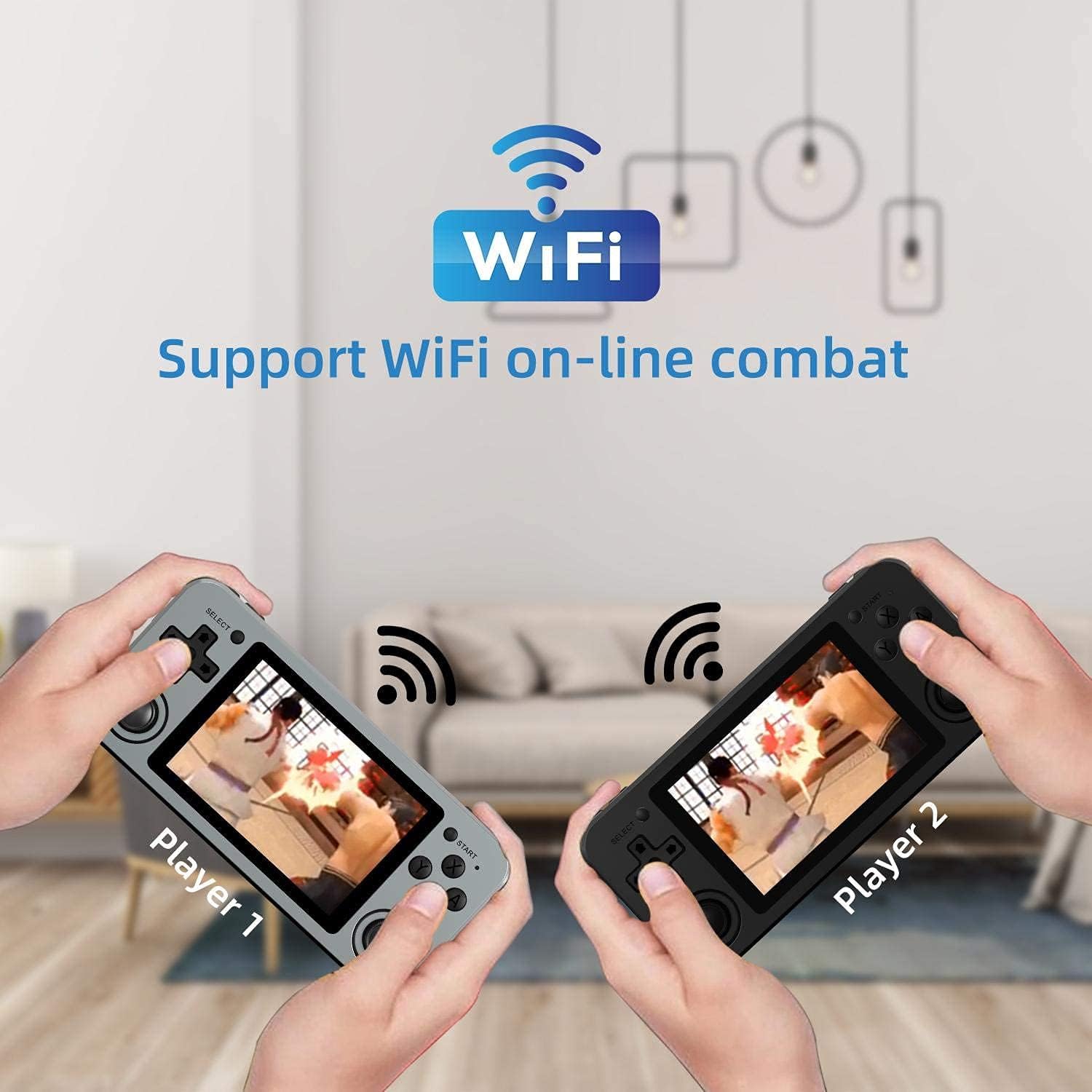
Image: Two RG351M consoles held by hands, illustrating the capability for Wi-Fi online combat between players.
Konserwacja
- Czyszczenie: Use a soft, dry cloth to clean the console's exterior. For the screen, use a microfiber cloth specifically designed for electronics. Do not use liquid cleaners directly on the screen.
- Składowanie: When not in use for extended periods, store the console in a cool, dry place, away from direct sunlight.
- Pielęgnacja baterii: Aby przedłużyć żywotność baterii, unikaj częstego całkowitego rozładowywania. Regularnie ładuj urządzenie, nawet jeśli nie jest używane, aby utrzymać baterię w dobrym stanie.
- Aktualizacje oprogramowania: Periodically check for system updates (if available through the open-source community) to ensure optimal performance and compatibility.
Rozwiązywanie problemów
| Problem | Możliwe rozwiązanie |
|---|---|
| Urządzenie nie włącza się. | Upewnij się, że bateria jest naładowana. Podłącz ładowarkę i odczekaj kilka minut przed ponownym włączeniem. |
| Ekran jest zablokowany lub nie reaguje. | Locate the recessed Reset button on the bottom of the device and press it gently with a thin, non-metallic object (e.g., a paperclip) to restart the console. |
| Gry się nie ładują lub działają wolno. | Ensure the TF card is properly inserted. Some games may require specific emulator settings or may be too demanding for the hardware. Check online communities for compatibility lists or optimization tips. |
| Brak dźwięku z głośników lub słuchawek. | Check the volume level using the volume buttons on the right side of the console. Ensure headphones are fully plugged in. Restart the device. |
| Problemy z połączeniem Wi-Fi. | Ensure you are within range of a 2.4GHz Wi-Fi network. Double-check the Wi-Fi password. Restart the console and your Wi-Fi router. |
Specyfikacje
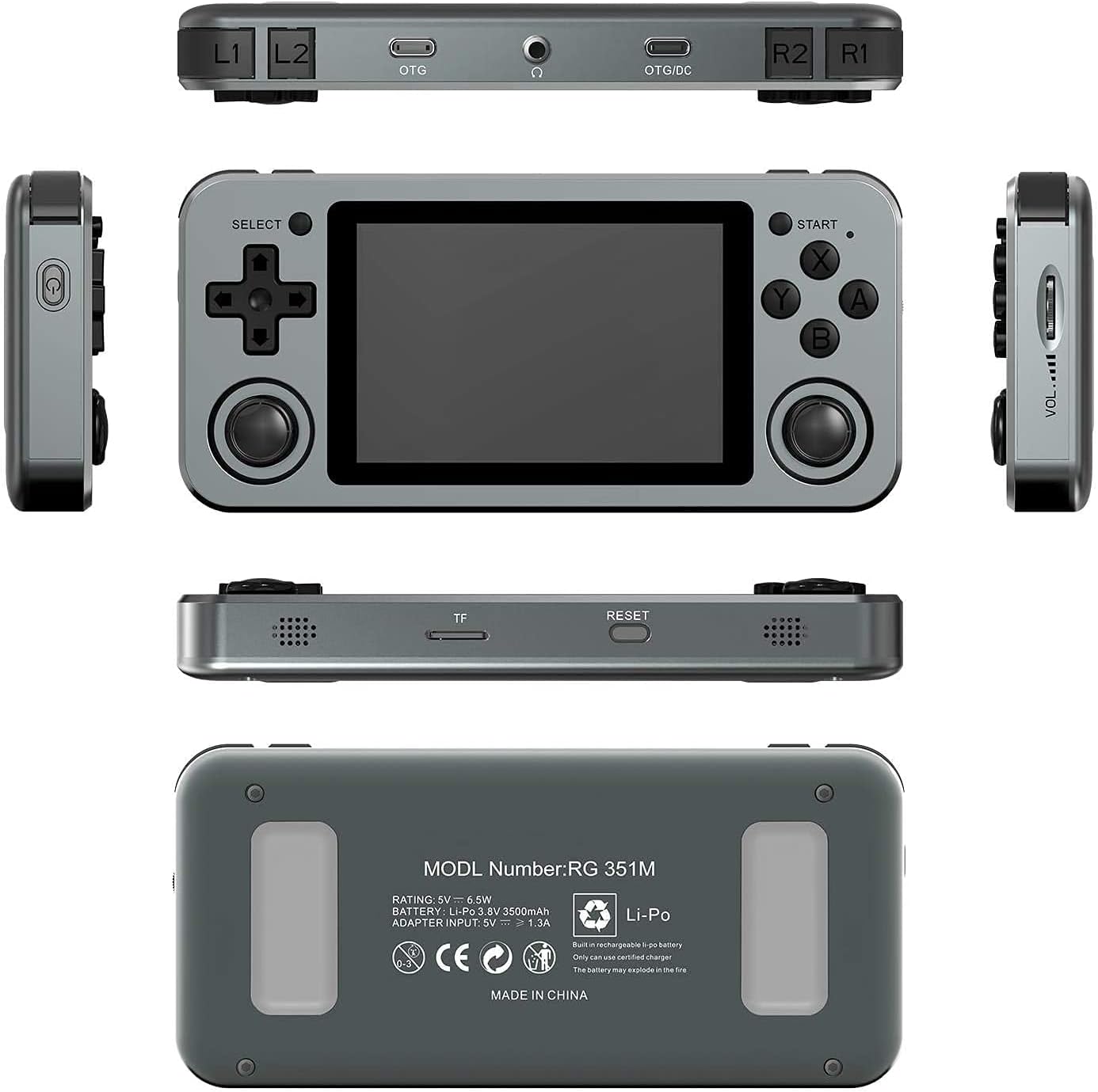
Image: A composite image showing the ANBERNIC RG351M from various angles, including front, top, bottom, sides, and back, providing a comprehensive view of its design and ports.
| Funkcja | Szczegół |
|---|---|
| Model | RG351M |
| Procesor | RK3326 quad core 1.5 GHz |
| Procesor graficzny | Mali-G31 MP2 |
| BARAN | DDR3L 1GB |
| Pamięć | 64 GB (karta TF) |
| Ekran | 3.5 inch IPS, OCA full lamination, 320*480 resolution |
| System | Open source Linux system |
| Bateria | Li-polymer 3500 mAh, up to 8 hours battery life |
| Ładowanie | 1.3A charging, max 2A, USB Type-C, 4 hours full charge |
| Obsługa kart TF | Maksymalnie 256 GB |
| Interfejs | TF Card Slot, 3.5mm Earphone, OTG 1 (Type-C), OTG 2 (Type-C Data/Charging) |
| Wymiary (konsola) | 15.2 cm (dł.) x 7.1 cm (szer.) x 1.8 cm (wys.) |
| Waga (konsola) | 0.19kg (approx. 6.7 oz) |
Gwarancja i wsparcie
For warranty information and technical support, please refer to the retailer or the official ANBERNIC website. Keep your proof of purchase for warranty claims. This manual provides general guidance; specific software-related issues may require consulting community forums or official support channels.