
1. Wprowadzenie
This instruction manual provides detailed information on the setup, operation, maintenance, and troubleshooting for your Aibecy withzoom 1080P 3X Optical Zoom Webcam. Please read this manual thoroughly before using the product to ensure proper functionality and to prevent damage.
2. Koniec produktuview
2.1 Główne cechy
- 1080P Full HD Video Resolution
- Obiektyw z 3-krotnym zoomem optycznym
- 355° Horizontal Rotation and 90° Vertical Rotation
- Obsługa za pomocą pilota
- Łączność USB
- Compatible with Windows, Mac, Linux, and Chromebook operating systems
- Infrared (IR) support
2.2 Zawartość opakowania
Sprawdź, czy w opakowaniu znajdują się wszystkie elementy:
- Aibecy withzoom Webkrzywka
- Zdalne sterowanie
- Zasilacz sieciowy
- Kabel USB
- Uchwyt montażowy
- Śruby do montażu

Rysunek 1: Zawartość opakowania
2.3 Diagram produktu

Rycina 2: Przód View i komponenty
- Obiektyw HD: Nagrywa wideo w wysokiej rozdzielczości.
- 355° Rotating Gimbal: Allows for wide-angle coverage and precise positioning.
- IR Infrared Receiver: Odbiera sygnały z pilota.
- Wskaźnik zasilania: Pokazuje stan zasilania urządzenia.
- Remote Indicator: Lights up when a remote control signal is received.
3. Przewodnik konfiguracji
3.1 Metody instalacji
The Aibecy withzoom webcam offers flexible installation options:
- Umieszczenie stołu: Place the camera on a flat surface such as a desk or conference table.
- Montaż sufitowy: Use the included mounting bracket and screws to attach the camera to the ceiling. Ensure the image flip function is enabled if mounting upside down.
- Montaż uchwytu: Attach the camera to a tripod or other compatible bracket using the screw hole at the bottom.

Rysunek 3: Opcje instalacji
3.2 Podłączanie aparatu
Follow these steps to connect your webkrzywka:
- Podłączenie zasilania: Connect the AC power adapter to the camera's 12V power input port and plug it into a power outlet.
- Połączenie USB: Connect the USB cable from the camera's USB port to an available USB port on your computer (Windows, Mac, Linux, or Chromebook). The camera is plug-and-play and does not require driver software.
- Optional RS232/RS422 Connection: If advanced control via RS232 or RS422 is required, connect the appropriate cable from the camera to your control device.

Rysunek 4: Schemat połączeń
Once connected, open your video conferencing software (e.g., Zoom, Skype, Microsoft Teams) and select the Aibecy withzoom camera as your video input device.
4. Instrukcja obsługi
4.1 Podstawowa obsługa
- Włączanie: After connecting the power adapter, the camera will automatically power on. The Power Indicator light will illuminate.
- Wyłączone: Disconnect the power adapter from the camera.
4.2 Korzystanie z pilota zdalnego sterowania
The included remote control allows for easy adjustment of camera functions.

Rysunek 5: Webcam and Remote Control
- Camera Selection Buttons: If multiple cameras are connected, use these buttons to select the camera you wish to control.
- Kontrola prędkości obrotowej: Adjust the pan/tilt speed for smoother movements.
- Pan/Tilt/Zoom (PTZ) Controls: Use the directional arrows to pan (left/right) and tilt (up/down) the camera. Use the zoom in/out buttons to adjust the optical zoom.
- Preset Function Area: Save and recall specific camera positions and zoom levels using the preset buttons.
4.3 Camera Movement and Zoom
The camera supports wide-range movement for comprehensive coverage:
- Obrót poziomy: The camera head can rotate 355 degrees horizontally.
- Obrót pionowy: The camera head can tilt 90 degrees vertically.
- Zoom optyczny: Utilize the 3X optical zoom to focus on specific areas without loss of image quality.
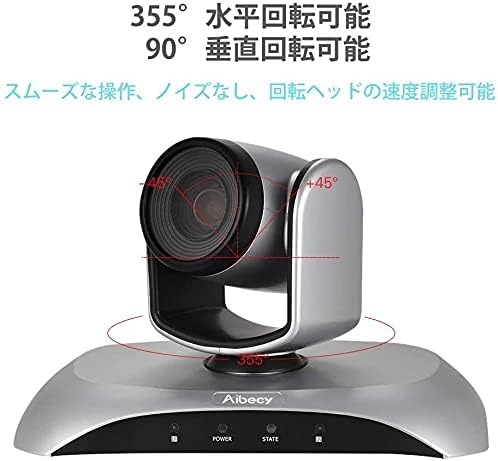
Figure 6: Camera Rotation Capabilities
4.4 Image Flip Function
If the camera is mounted upside down (e.g., on a ceiling), you can use the image flip function to correct the video orientation.

Figure 7: Image Flip Function in Use
Refer to the remote control instructions for the specific button to activate or deactivate the image flip function.
5. Konserwacja
Właściwa konserwacja zapewnia długowieczność i optymalną wydajność Twojego webkamera
- Czyszczenie: Do czyszczenia korpusu aparatu używaj miękkiej, suchej ściereczki. Do czyszczenia obiektywu użyj specjalnej ściereczki i płynu do czyszczenia obiektywów. Unikaj środków czyszczących o właściwościach ściernych i rozpuszczalników.
- Składowanie: Jeśli aparat nie będzie używany przez dłuższy czas, należy przechowywać go w chłodnym, suchym miejscu, z dala od bezpośredniego światła słonecznego i ekstremalnych temperatur.
- Obsługiwanie: Unikaj upuszczania aparatu i narażania go na silne uderzenia.
6. Rozwiązywanie Problemów
If you encounter issues with your Aibecy withzoom webcam, refer to the table below for common problems and solutions.
| Problem | Możliwa przyczyna | Rozwiązanie |
|---|---|---|
| No image or video output | Power not connected; USB cable loose; Incorrect camera selected in software. | Ensure power adapter is securely connected. Check USB cable connection. Select the Aibecy withzoom camera in your video conferencing software settings. |
| Pilot nie działa | Batteries low/dead; Obstruction between remote and camera; Remote not pointed at IR receiver. | Replace remote control batteries. Ensure a clear line of sight to the camera's IR receiver. Point the remote directly at the camera. |
| Obraz jest do góry nogami | Camera mounted upside down and image flip not activated. | Activate the image flip function using the remote control. |
| Słaba jakość wideo | Insufficient lighting; Dirty lens; Network bandwidth issues. | Ensure adequate lighting in the room. Clean the camera lens. Check your internet connection speed. |
7. Specyfikacje techniczne
| Funkcja | Specyfikacja |
|---|---|
| Marka | Aibecy |
| Numer modelu | withzoom |
| Rozdzielczość przechwytywania wideo | 1080p |
| Zoom optyczny | 3X |
| Obrót poziomy | 355° |
| Rotacja pionowa | 90° |
| Technologia łączności | USB |
| Kompatybilne urządzenia | Windows, Mac, Linux, Chromebook |
| Cechy specjalne | Remote Control, Infrared |
| Stabilizacja obrazu | NIE |
| Wymiary opakowania | Wymiary 29.7 x 22.4 x 19.9 cm |
| Waga przedmiotu | 1.51 kilogramów |
8. Informacje o pomocy technicznej
For further assistance or inquiries not covered in this manual, please refer to the official Aibecy support channels or contact your retailer. Keep your purchase receipt for warranty purposes.