Wstęp
Thank you for choosing the Monster Bluetooth FM Transmitter. This device allows you to stream audio from your smartphone to your car's FM radio, make hands-free calls, and charge your devices quickly. Please read this manual carefully to ensure proper use and optimal performance.
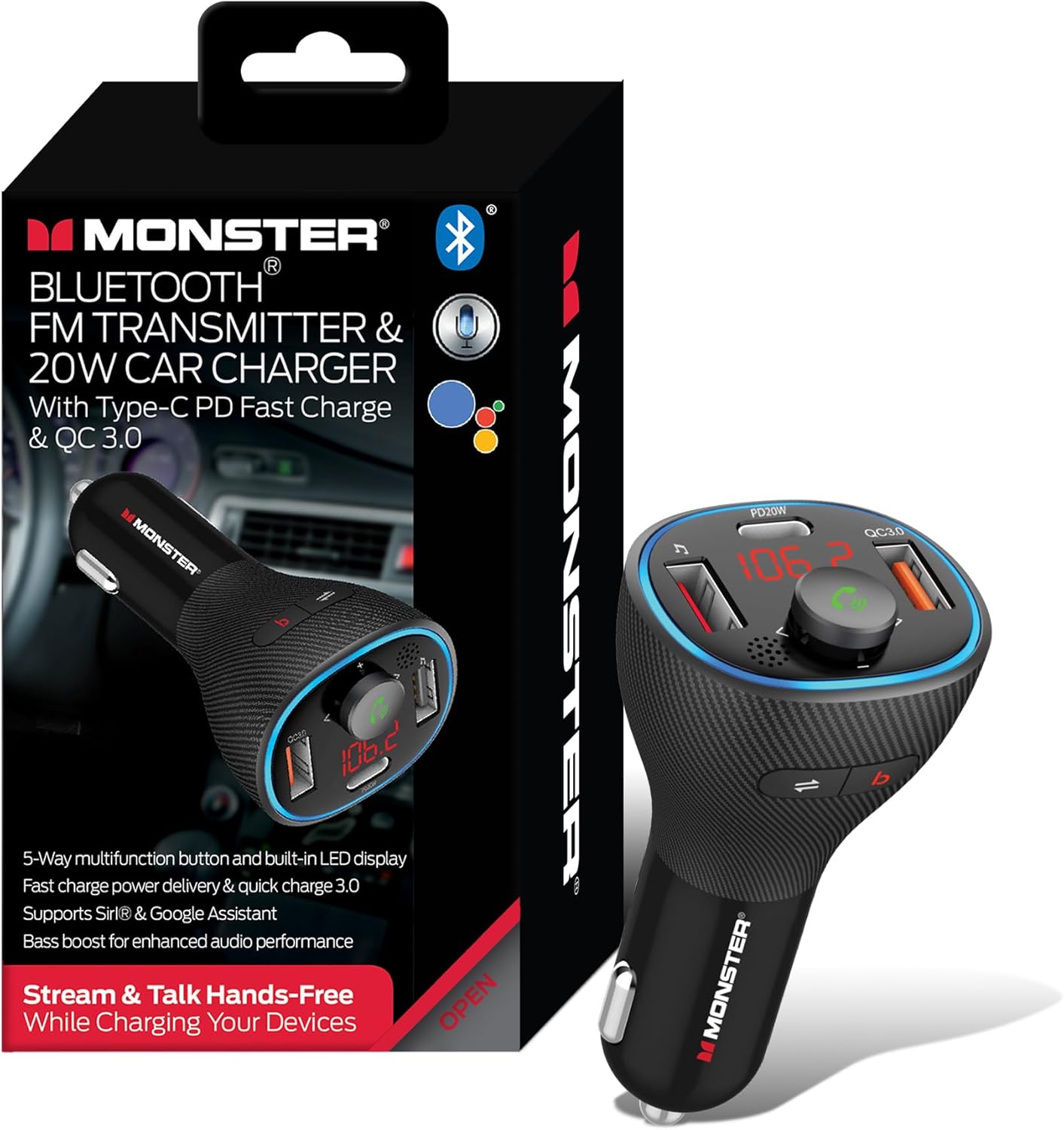
Image: The Monster Bluetooth FM Transmitter shown alongside its retail packaging, highlighting its compact design and key features.
Główne cechy
- Wireless Audio & Hands-Free Calls: Stream music and manage calls via Bluetooth.
- Powerful 20W Fast Charging: Equipped with QC3.0 USB-A and USB-C Power Delivery (PD) ports for rapid charging.
- Enhanced Sound with Bass Boost: Activate bass boost for deeper audio with a dedicated button.
- Multiple Music Playback Options: Obsługuje strumieniowanie Bluetooth i odtwarzanie z dysków flash USB.
- Voice Assistant & Universal Compatibility: Works with Google Voice Assistant and Siri, compatible with 12V-24V vehicles.

Image: A detailed diagram illustrating the various components of the Monster FM Transmitter, including the Bass Boost button, QC 3.0 USB Port, LED Display, Mode Switch, USB Music Port, Multifunction Button, and 20W PD Type-C Port.
Zawartość opakowania
- Nadajnik FM Bluetooth Monster
- Instrukcja obsługi
Organizować coś
Konfiguracja początkowa
Krok 1: Włączanie
Insert the Monster Bluetooth FM Transmitter into your vehicle's 12V/24V cigarette lighter socket. The LED display will light up, indicating it is powered on and ready for use.

Image: The Monster FM Transmitter securely plugged into a car's cigarette lighter socket, displaying its active LED screen and illuminated ports.
Step 2: Tuning FM Frequency
- Find an empty (static-free) FM frequency on your car's radio.
- On the transmitter, press and hold the Multifunction Button until the FM frequency on the LED display starts flashing.
- Rotate the Multifunction Button left or right to adjust the transmitter's frequency to match the empty frequency on your car radio.
- Press the Multifunction Button once to confirm the frequency setting.
Krok 3: Parowanie Bluetooth
- Włącz Bluetooth w swoim smartfonie lub innym urządzeniu audio.
- Szukaj available Bluetooth devices and select "Monster MCC9-1035" to pair.
- Once paired, the transmitter's LED display will show a stable Bluetooth icon, and you will hear a confirmation tone.

Image: A smartphone screen displaying the Bluetooth settings menu, with the "Monster MCC9-1035" device listed and ready for connection, indicating successful pairing.
Video: An official product video demonstrating the setup and basic functions of the Monster Wireless FM Transmitter and Car Charger, including FM tuning, Bluetooth pairing, and hands-free calling.
Instrukcja obsługi
Odtwarzanie muzyki
Transmisja strumieniowa Bluetooth
Once paired, open your favorite music app on your smartphone. Audio will automatically stream through your car's FM radio. Use the Multifunction Button to control playback:
- Naciśnij raz, aby odtworzyć/wstrzymać.
- Obróć w prawo, aby zwiększyć głośność.
- Obróć przeciwnie do ruchu wskazówek zegara, aby zmniejszyć głośność.
- Press the 'Next Track' button (▶▶) to skip to the next song.
- Press the 'Previous Track' button (◀◀) to go to the previous song.
Odtwarzanie pamięci flash USB
Insert a USB flash drive containing MP3, WMA, WAV, or FLAC audio files into the USB Music Port. The transmitter will automatically detect and play the music. Use the same controls as Bluetooth streaming for playback.
Rozmowy bez użycia rąk
When a call comes in, the music will pause, and the transmitter will announce the incoming call. Use the Multifunction Button to manage calls:
- Press once to Answer an incoming call.
- Press once during a call to End the call.
- Press and hold to Reject an incoming call.
- Double-press to Redial the last number.

Image: A hand pressing the multifunction button on the Monster FM Transmitter, with visual cues indicating options to Answer, Hang up, or Decline a call, demonstrating its hands-free calling capability.
Funkcja wzmocnienia basów
Press the 'B' button (Bass Boost) on the transmitter to enhance the bass output of your audio. Press it again to turn off the bass boost.
Aktywacja asystenta głosowego
Press and hold the Multifunction Button for 2 seconds to activate your smartphone's voice assistant (Siri or Google Assistant). You can then use voice commands for navigation, calls, or music control.

Image: A woman in a car interacting with her smartphone's voice assistant (Siri or Google Assistant) via the Monster FM Transmitter, with example voice commands like "Play my 'Favorite Road Trip' playlist" and "Give me directions to the nearest gas station" displayed.
Ładowanie urządzenia
The transmitter features a QC3.0 USB-A port and a 20W USB-C PD port for fast charging. Connect your compatible devices using appropriate charging cables to these ports.

Image: Two smartphones, one charging via USB-C PD and the other via USB-A, connected to the Monster FM Transmitter, illustrating its dual fast-charging capabilities.
Konserwacja
To ensure the longevity and optimal performance of your Monster Bluetooth FM Transmitter, follow these simple maintenance guidelines:
- Czyszczenie: Use a soft, dry cloth to wipe the surface of the device. Do not use liquid cleaners or abrasive materials, as they may damage the unit.
- Składowanie: Jeśli urządzenie nie będzie używane przez dłuższy czas, należy je przechowywać w chłodnym i suchym miejscu, z dala od bezpośredniego światła słonecznego i ekstremalnych temperatur.
- Obsługiwanie: Unikaj upuszczania urządzenia i narażania go na silne uderzenia, ponieważ mogą one uszkodzić jego wewnętrzne podzespoły.
Rozwiązywanie problemów
| Problem | Możliwa przyczyna | Rozwiązanie |
|---|---|---|
| Brak zasilania/wyświetlacz LED wyłączony | Not properly inserted into socket; vehicle power issue. | Ensure the transmitter is fully inserted. Check vehicle's cigarette lighter fuse. |
| Szum lub słaba jakość dźwięku | Zakłócenia częstotliwości FM; słaby sygnał. | Find a clearer, unused FM frequency on your car radio and match the transmitter. Avoid frequencies used by strong local stations. |
| Bluetooth nie łączy się | Transmitter not in pairing mode; device already paired to another unit; Bluetooth off on phone. | Ensure transmitter is in pairing mode. Turn off Bluetooth on other nearby devices. Restart phone's Bluetooth. |
| Nie można wykonywać/odbierać połączeń | Not paired correctly; microphone blocked. | Re-pair the device. Ensure nothing is obstructing the microphone on the transmitter. |
| Powolne ładowanie | Cable not compatible; device not supporting fast charge. | Use a high-quality, compatible charging cable. Ensure your device supports QC3.0 or PD fast charging. |
Specyfikacje
| Funkcja | Szczegół |
|---|---|
| Wymiary produktu | 2.87 x 2.15 x 4.75 cala |
| Waga przedmiotu | 2.39 uncji |
| Technologia łączności | Bluetooth, USB |
| Źródło zasilania | Corded Electric (12V-24V Car Socket) |
| Porty ładowania | QC3.0 USB-A, 20W USB-C PD |
| Obsługiwane formaty audio | MP3, WMA, WAV, FLAC (via USB Flash Drive) |
| Funkcja specjalna | Car Charger, Bass Boost, Voice Assistant Compatibility |
| Producent | Akcesoria Jem |
| Kraj pochodzenia | Chiny |
Informacje dotyczące bezpieczeństwa
Obsługa baterii: Keep batteries away from extreme temperatures and humidity. Do not dispose of batteries in fire. Użycie Bluetooth: Avoid using while driving unless in a hands-free mode. Ingerencja: This device may interfere with other wireless devices. Dispose of according to local regulations.
Gwarancja i wsparcie
For warranty information or technical support, please refer to the contact details provided on the product packaging or visit the official XTREME DIGITAL LIFESTYLE ACCESSORIES webZachowaj paragon jako dowód zakupu na wypadek ewentualnych roszczeń gwarancyjnych.


