
Wstęp
This manual provides detailed instructions for the proper use, setup, operation, and maintenance of your MIUFLY 1296P 32GB Body Camera with Magnet Mount. Please read this manual thoroughly before using the device to ensure optimal performance and safety. Keep this manual for future reference.
Produkt ponadview
Komponenty i elementy sterujące
The MIUFLY 1296P 32GB Body Camera is designed for reliable video and photo capture. Familiarize yourself with the camera's components and controls:
- Soczewka przednia: Main camera lens for video and photo recording.
- Diody IR: Infrared lights for low-light and night vision recording.
- Wskaźniki stanu: LEDs indicating recording status, battery, and other functions.
- Przycisk zasilania: To turn the camera on or off.
- Przycisk nagrywania: Rozpoczyna i zatrzymuje nagrywanie wideo.
- Przycisk zdjęć: Rejestruje nieruchome obrazy.
- Przyciski menu/nawigacji: For accessing settings and navigating menus.
- Port USB: Do ładowania i przesyłania danych.
- Port HDMI: Do podłączania zewnętrznych wyświetlaczy.
- Port AV: Do wyjścia audio/wideo.
- Magnet Mount Interface: Connection point for the magnet mount accessory.

Obraz: Przód view of the MIUFLY 1296P Body Camera positioned on its charging dock. The camera features a central lens, surrounding IR LEDs, and the MIUFLY logo.

Obraz: góra i bok view of the MIUFLY 1296P Body Camera, highlighting the 32GB storage indicator, GPS label, and various ports including AV and HDMI.
Zawartość opakowania
Sprawdź, czy w przesyłce znajdują się wszystkie elementy:
- MIUFLY 1296P 32GB Body Camera
- Kabel USB
- Stacja ładująca
- Universal Metal Clip and Epaulet Clip
- Instrukcja obsługi (ten dokument)
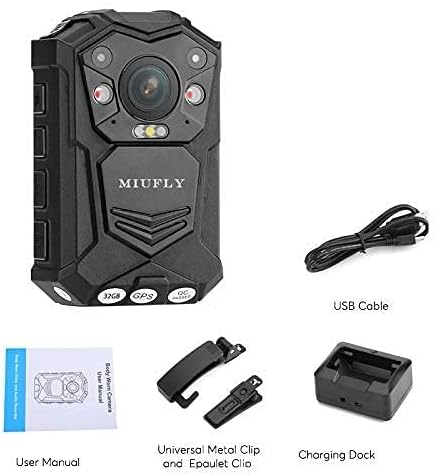
Obraz: Ponadview of the MIUFLY 1296P Body Camera package contents, including the camera, USB cable, charging dock, various clips, and the user manual.
Organizować coś
Ładowanie aparatu
- Connect the USB cable to the charging dock.
- Podłącz drugi koniec kabla USB do kompatybilnego zasilacza USB (nie ma go w zestawie) lub do portu USB komputera.
- Place the body camera into the charging dock, ensuring proper alignment with the charging pins.
- The charging indicator light on the camera or dock will illuminate, typically red for charging and green for fully charged.
- Pełne naładowanie trwa około 3–4 godzin.
Attaching the Magnet Mount
The magnet mount provides a secure and flexible way to attach your body camera to clothing or other surfaces.
- Identify the two parts of the magnet mount: the inner plate and the outer plate.
- Attach the outer plate to the back of the body camera by sliding it into the designated slot until it clicks securely.
- Position the inner plate inside your clothing (e.g., shirt, jacket, vest) at the desired location.
- Align the camera with the outer plate on the outside of your clothing, allowing the magnets to connect and hold the camera firmly in place.

Image: The two distinct components of the MIUFLY magnet mount, labeled 'Inside' and 'Outside', designed for secure attachment of the body camera.

Image: A MIUFLY Body Camera securely attached to a safety vest using the magnet mount, demonstrating its practical application.
Instrukcja obsługi
Włączanie/wyłączanie zasilania
- Włączanie: Press and hold the Power button for approximately 3 seconds until the camera vibrates and the indicator lights turn on.
- Aby wyłączyć: Press and hold the Power button for approximately 3 seconds until the camera vibrates and the indicator lights turn off.
Nagrywanie wideo
The camera supports 1296P video resolution.
- Upewnij się, że kamera jest włączona.
- Press the Record button once to start video recording. The recording indicator light will typically flash red.
- To stop recording, press the Record button again. The camera will save the current video file.
Ujęcie
- Ensure the camera is powered on and not currently recording video.
- Press the Photo button once to capture a still image. The camera may briefly flash or make a shutter sound.
Odtwarzanie i File Kierownictwo
Aby ponownieview recorded videos and photos, connect the camera to a computer using the provided USB cable. The camera will appear as a removable disk drive, allowing you to access and transfer files. Alternatively, connect the camera to an external display via the HDMI or AV port for direct playback.
Nawigacja w menu i ustawienia
Use the Menu/Navigation buttons to access the camera's settings. Here you can adjust parameters such as video resolution, loop recording, date/time stamp, and other advanced features like anti-shake, low light mode, and time lapse.
Konserwacja
Czyszczenie
- Przetrzyj korpus aparatu miękką, suchą ściereczką.
- Do czyszczenia soczewek należy używać specjalnej ściereczki i płynu do czyszczenia soczewek, aby uniknąć zarysowań.
- Nie używaj żrących chemikaliów ani ściernych środków czyszczących.
Składowanie
- Przechowuj kamerę w chłodnym, suchym miejscu, z dala od bezpośredniego światła słonecznego i ekstremalnych temperatur.
- Jeśli akumulator będzie przechowywany przez dłuższy czas, należy upewnić się, że jest częściowo naładowany (około 50%), aby wydłużyć jego żywotność.
Pielęgnacja baterii
- Unikaj częstego całkowitego rozładowywania akumulatora.
- Aby zachować sprawność baterii, ładuj ją regularnie, nawet jeśli jej nie używasz.
Rozwiązywanie problemów
| Problem | Możliwe rozwiązanie |
|---|---|
| Kamera się nie włącza. | Upewnij się, że bateria jest naładowana. Podłącz ją do źródła zasilania i spróbuj ponownie. |
| Nie można nagrywać filmów/robić zdjęć. | Check if the internal 32GB memory is full. Transfer files to a computer to free up space. Ensure the camera is not in another mode (e.g., playback). |
| Jakość wideo jest słaba. | Clean the camera lens. Check settings to ensure the highest resolution (1296P) is selected. Ensure adequate lighting or enable low light mode if necessary. |
| Camera is not recognized by computer. | Try a different USB port or cable. Ensure the camera is powered on when connected. Restart both the camera and the computer. |
| Magnet mount is not holding securely. | Ensure the inner and outer plates are correctly aligned. The thickness of the clothing may affect magnetic strength; try a thinner fabric. |
Specyfikacje
| Funkcja | Szczegół |
|---|---|
| Marka | MIASTA |
| Model | 1296P 32GB Body Camera |
| Rozdzielczość przechwytywania wideo | 1296p |
| Pojemność pamięci masowej | 32 GB (wbudowane) |
| Format przechwytywania wideo | Format pliku MPEG4 |
| Cechy specjalne | Anti-Shake, Low Light, Time Lapse |
| Typ soczewki | Brzęczenie |
| Typ powiększenia | Zoom optyczny |
| Współczynnik kształtu | Kompaktowy |
| ASIN | B09B4SRNJX |
Gwarancja i wsparcie
This MIUFLY product is covered by a standard manufacturer's warranty. For specific warranty terms and conditions, please refer to the documentation included with your purchase or visit the official MIUFLY website. If you encounter any issues or require technical assistance, please contact MIUFLY customer support through their official channels.