
1. Wprowadzenie
This manual provides detailed instructions for the installation, operation, and maintenance of your HARFO D02 Smart Deadbolt. The HARFO D02 is an advanced 4-in-1 keyless entry door lock designed for enhanced security and convenience in homes and offices. It offers multiple unlocking methods including fingerprint, passcode, access card, and traditional key.
Please read this manual carefully before installation and use to ensure proper functionality and to maximize the lifespan of your smart deadbolt. Keep this manual for future reference.
2. Koniec produktuview i funkcje
The HARFO D02 Smart Deadbolt combines modern design with robust security features, providing a versatile access solution.
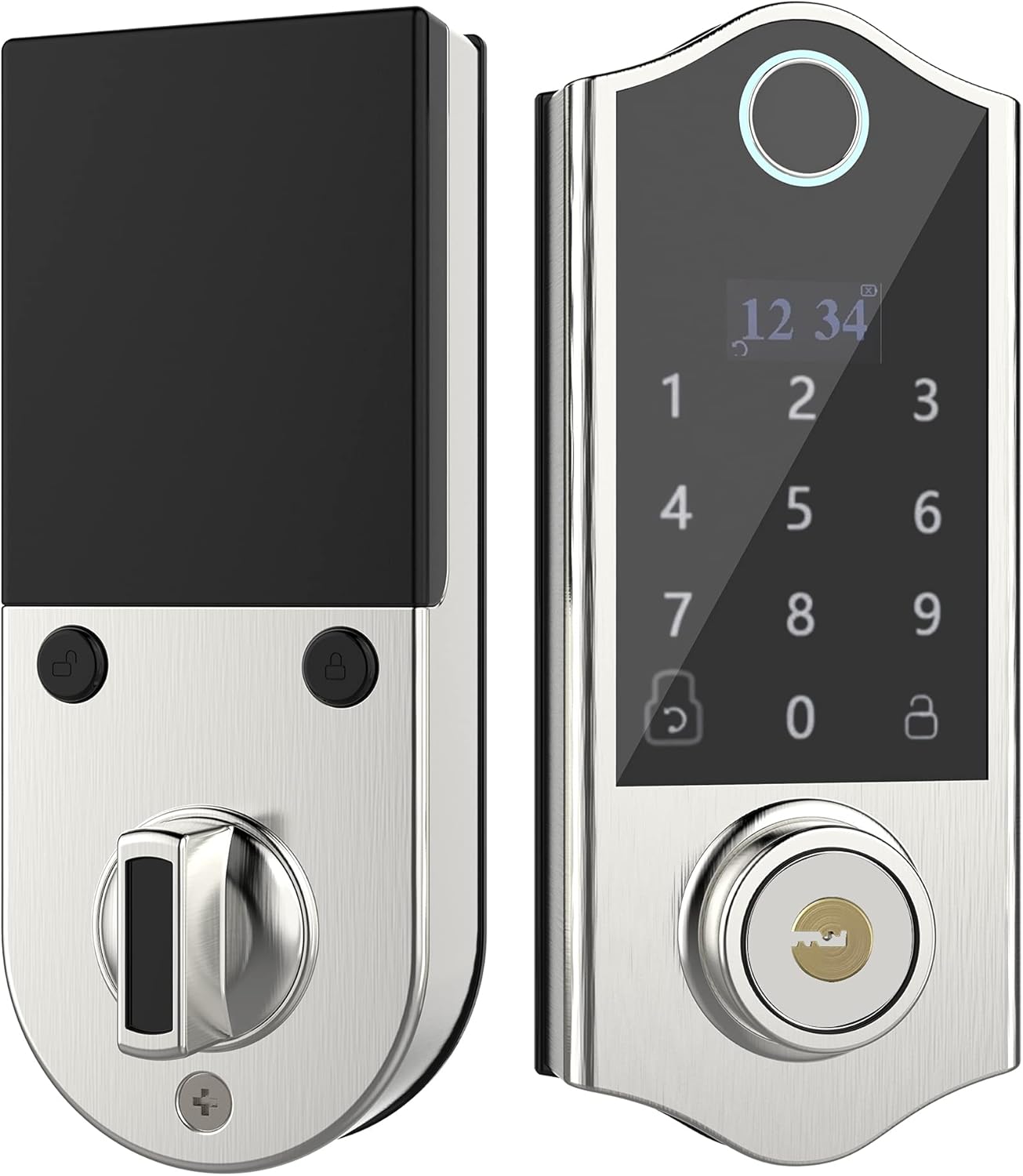
Obraz: przód i tył view of the HARFO D02 Smart Deadbolt, showcasing its sleek silver finish and integrated keypad and fingerprint sensor on the exterior unit, and the thumb-turn on the interior unit.
Główne cechy:
- Metody odblokowywania 4 w 1: Fingerprint, Passcode, Access Card, and Mechanical Key.
- Intuitive OLED Display: Provides clear visual guidance for programming and operation.
- Przewodnik głosowy: Assists users through the setup and programming process.
- Advanced Fingerprint Sensor: Fast and secure recognition system.
- Anti-peep Touchscreen: Supports virtual passwords to prevent unauthorized viewing of your code.
- Hidden Backup Key Hole: Provides traditional key access for emergencies.
- Micro USB Emergency Power: Allows temporary power supply in case of battery depletion.
- Automatyczne blokowanie: Configurable auto-lock feature (5-20 seconds).
- Wysoka pojemność użytkownika: Obsługuje do 300 użytkowników.
- Adjustable for Left & Right Doors: Easily configured to fit various door orientations.

Image: A visual representation of the four unlocking methods: entering a password on the keypad, swiping an access card, using a fingerprint, and inserting a physical key.

Image: An infographic detailing various features of the HARFO D02 lock, including its voice guide, OLED display, advanced fingerprint sensor, anti-peep touchscreen, and emergency power options.
3. Specyfikacje
| Specyfikacja | Wartość |
|---|---|
| Marka | HARFO |
| Model | D02 |
| Typ zamka | Klawiatura Deadbolt |
| Cechy specjalne | Fingerprint, Touchscreen, Voice Guide, OLED Display |
| Kolor | Srebrny |
| Zakres grubości drzwi | 1 3/8 inch to 2 3/16 inch (35mm-55mm) |
| Źródło zasilania | 4 x 1.5V AA Dry Batteries (not included) |
| Zasilanie awaryjne | Mikro USB |
| Waga przedmiotu | 1 funt |
| Wymiary opakowania | 9.25 x 7.64 x 4.02 cala |
| Protokół łączności | Wi-Fi (for potential future features, not for direct app control) |

Image: Detailed dimensions of the HARFO D02 Smart Deadbolt, including overall height (168mm / 6-3/5"), and depth measurements for the exterior and interior units, along with the compatible door thickness range of 35-55mm (1-3/8" ~ 2-3/16").
4. Przewodnik instalacji (konfiguracja)
The HARFO D02 Smart Deadbolt is designed for easy installation without the need for drilling additional holes for standard door preparations.
4.1 Przed instalacją:
- Ensure your door thickness is within the supported range: 1 3/8 inch to 2 3/16 inch (35mm-55mm).
- Zbierz niezbędne narzędzia: śrubokręt krzyżakowy.
- Do not install batteries until the lock is fully installed.
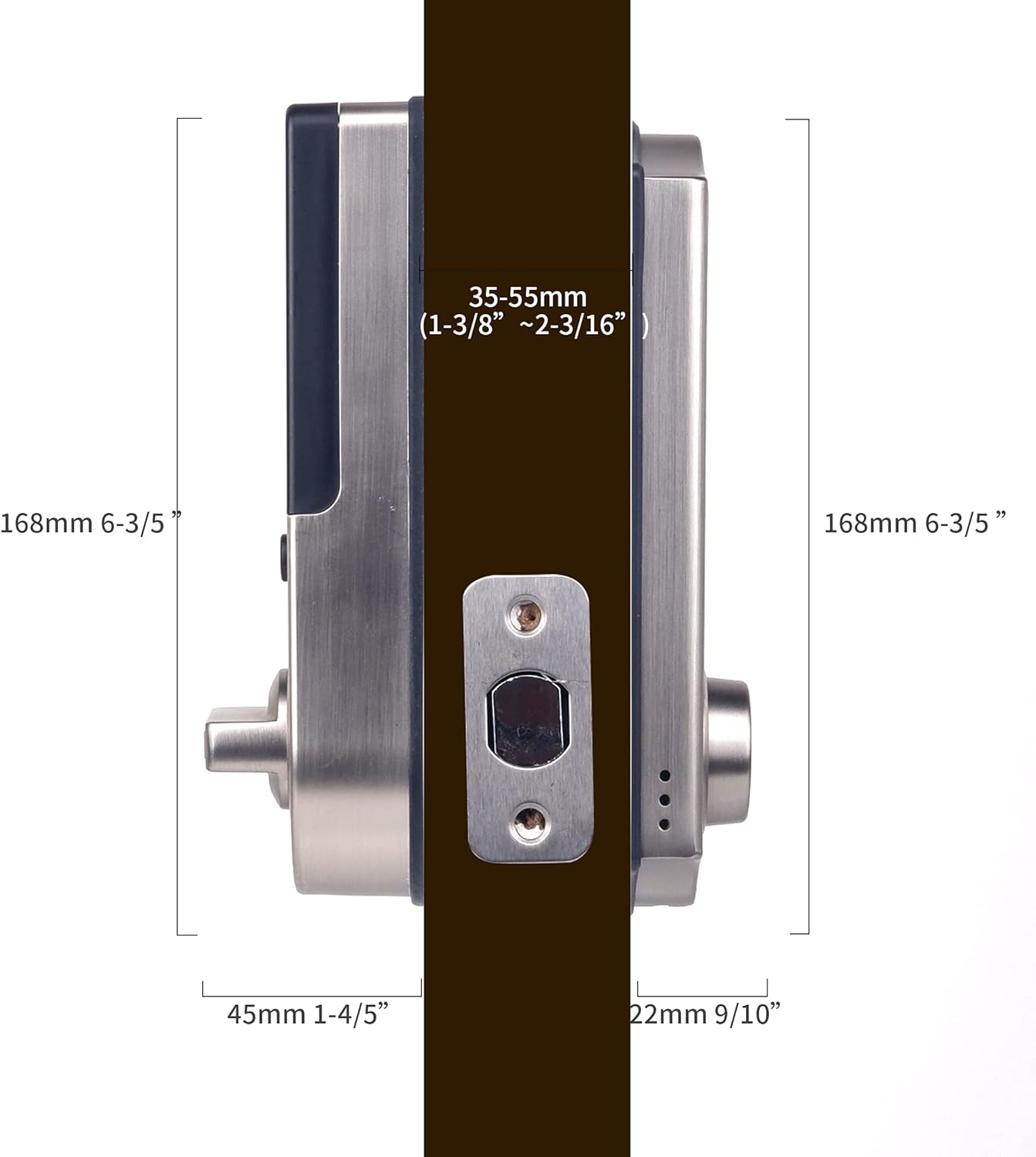
Image: A visual demonstrating the straightforward installation process of the HARFO D02 Smart Deadbolt, emphasizing that no additional drilling is required.
4.2 Adjusting for Left or Right Handed Doors:
The HARFO D02 is compatible with both left-handed and right-handed doors. You will need to adjust the rotary knob and the 'L/R Button' on the interior unit to match your door's orientation.
- Locate the rotary knob and the L/R button on the interior assembly.
- Follow the instructions provided by the voice guide during initial setup or refer to the detailed steps in the full user manual for specific adjustment procedures.
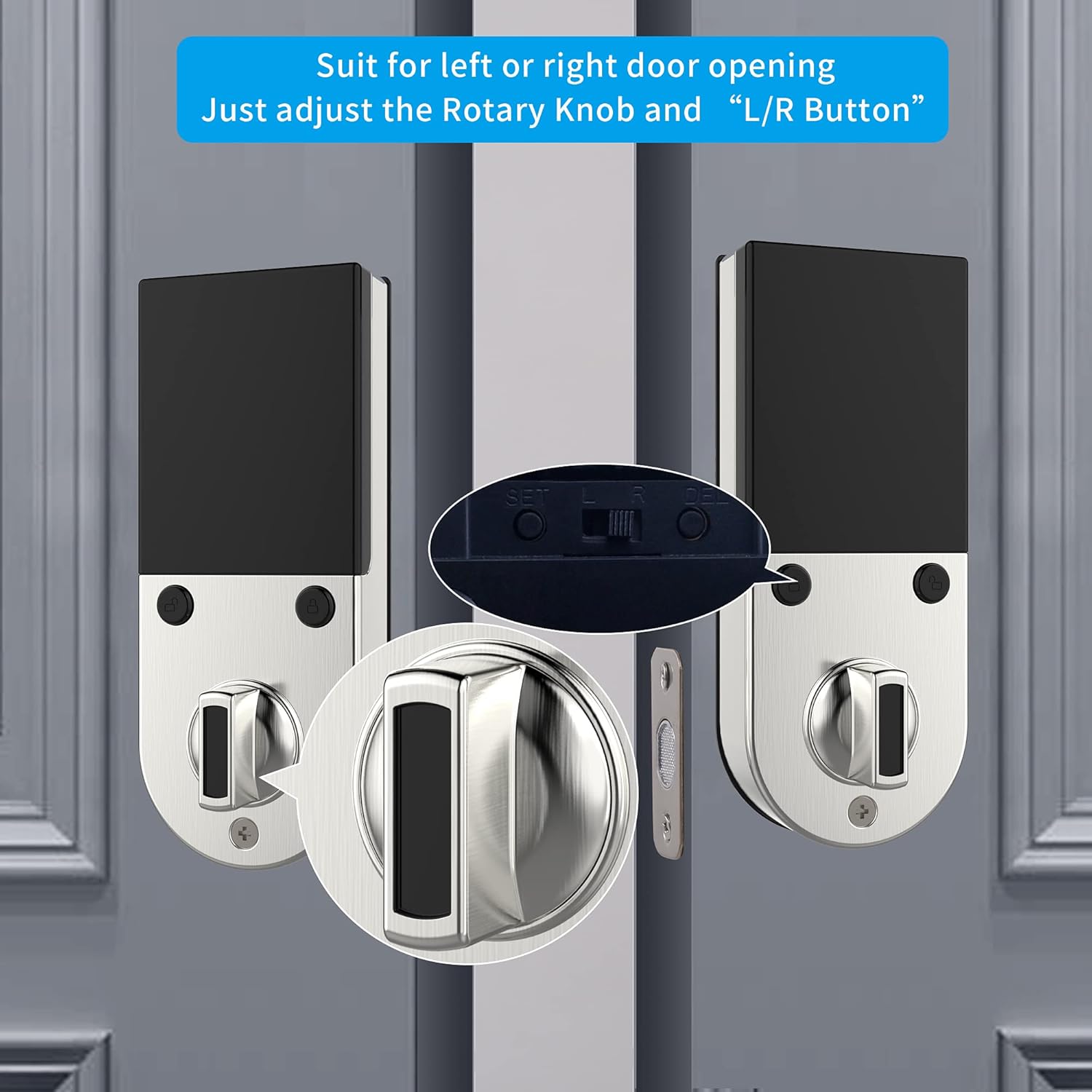
Obraz: Zbliżenie view illustrating the rotary knob and the L/R button on the interior side of the lock, which are used to configure the deadbolt for either left-handed or right-handed door installations.
4.3 Instalacja krok po kroku:
- Zamontuj zasuwkę na krawędzi drzwi.
- Install the exterior assembly, ensuring the spindle passes through the latch.
- Install the mounting plate on the interior side.
- Podłącz kabel z zespołu zewnętrznego do zespołu wewnętrznego.
- Secure the interior assembly to the mounting plate.
- Insert 4 AA dry batteries into the battery compartment.
- Perform the door handing identification process as prompted by the voice guide.
For a detailed visual guide, please refer to the installation video provided by HARFO (if available on the product page or manufacturer's webStrona).
5. Instrukcja obsługi
The HARFO D02 Smart Deadbolt offers multiple convenient ways to lock and unlock your door.
5.1 Initial Setup and Programming:
Upon first power-up, the lock will guide you through the initial setup using its OLED display and voice prompts. This includes setting the master code and performing door handing identification.
- Follow the voice guide to set up your master passcode. This code is essential for all programming functions.
- The voice guide will prompt you to register fingerprints, passcodes, and access cards for regular users.
5.2 Odblokowanie drzwi:
- Odcisk palca: Umieść zarejestrowany palec na czytniku linii papilarnych. Blokada zostanie odblokowana po pomyślnym rozpoznaniu.
- Kod dostępu: Enter your registered passcode on the touchscreen keypad, followed by the '#' key.
- Karta dostępu: Present your registered access card to the card reader area on the lock.
- Klucz mechaniczny: Insert the physical key into the hidden keyhole and turn to unlock.
- Hasło wirtualne: To enhance security, you can enter random digits before or after your actual passcode. For example, if your passcode is 123456, you can enter **123456** or 7891234560. This prevents others from guessing your code by observing finger movements.

Image: A visual explanation of the virtual password feature, showing how random digits can be added before or after the actual passcode to obscure it from onlookers.
5.3 Zamykanie drzwi:
- Automatyczne blokowanie: The lock can be set to automatically lock after a configurable delay (5-20 seconds) once the door is closed.
- Blokowanie ręczne: Press and hold the '#' key on the keypad, or use the thumb-turn on the interior unit.

Image: An icon representing the automatic locking feature, indicating a configurable delay of 5 to 20 seconds before the deadbolt automatically engages.
5.4 Emergency Access:
- Klucz zapasowy: Always keep at least one physical key in a safe place outside your home for emergency access.
- Micro USB Emergency Power: If the batteries are completely drained, connect a standard Micro USB power bank to the Micro USB port located on the bottom of the exterior unit to temporarily power the lock and gain entry.

Obraz: Zbliżenie view highlighting the hidden backup keyhole and the Micro USB port on the exterior unit of the HARFO D02 Smart Deadbolt, used for emergency access and power.
6. Konserwacja
6.1 Wymiana baterii:
The HARFO D02 Smart Deadbolt requires 4 x 1.5V AA dry batteries. Rechargeable batteries are not recommended as their typical voltage (1.2V) may not provide optimal performance.
- The lock will provide a low battery warning via the OLED display and voice prompt when batteries are running low. Replace all four batteries promptly when this warning appears.
- To replace batteries, remove the battery cover on the interior unit, replace old batteries with new ones, and reattach the cover.

Image: A visual icon representing a low battery warning, prompting the user to replace the batteries in the smart deadbolt.
6.2 Czyszczenie:
- Wytrzyj powierzchnię zamka miękką, suchą szmatką.
- Unikaj stosowania środków czyszczących o działaniu ściernym, rozpuszczalników i silnych środków chemicznych, ponieważ mogą one uszkodzić wykończenie i podzespoły elektroniczne.
- Keep the fingerprint sensor and touchscreen clean and free of debris for optimal performance.
7. Rozwiązywanie Problemów
If you encounter issues with your HARFO D02 Smart Deadbolt, please refer to the following common solutions:
| Problem | Możliwa przyczyna | Rozwiązanie |
|---|---|---|
| Zamek nie reaguje / Brak zasilania. | Rozładowane baterie. | Replace all 4 AA dry batteries. Use Micro USB emergency power to gain entry if needed. |
| Odcisk palca nie został rozpoznany. | Palec jest brudny/mokry, czujnik jest brudny lub odcisk palca nie został prawidłowo zarejestrowany. | Ensure finger and sensor are clean and dry. Try a different registered finger. Re-register fingerprint if issue persists. |
| Kod dostępu nie działa. | Incorrect passcode entered, or passcode not registered. | Verify the correct passcode. Ensure you are pressing '#' after the code. Try using the virtual password feature. Re-register passcode if necessary. |
| Zamek nie blokuje się/odblokowuje płynnie. | Misalignment of lock components or door frame. Incorrect door handing setting. | Check door and frame alignment. Ensure the deadbolt latch moves freely. Verify the L/R button setting is correct for your door. |
| Voice guide is unclear or not working. | Volume setting too low or a temporary glitch. | Adjust volume settings (refer to full manual). Remove and reinsert batteries to reset the lock. |
If the problem persists after trying these solutions, please contact HARFO customer support for further assistance.
8. Gwarancja i wsparcie
HARFO stands behind the quality of its products. For specific warranty information regarding your D02 Smart Deadbolt, please refer to the warranty card included with your product or visit the official HARFO webstrona.
Obsługa klienta:
If you have any questions, require technical assistance, or need to report an issue, please contact HARFO customer support through the following channels:
- Webstrona: Visit the official HARFO webwitryna z odpowiedziami na często zadawane pytania, zasobami pomocy i formularzami kontaktowymi.
- E-mail: Refer to your product packaging or the HARFO webstrona zawierająca adres e-mail działu obsługi klienta.
- Telefon: Check the HARFO website for available customer service phone numbers.
Please have your product model (D02) and purchase information ready when contacting support to ensure efficient service.