Wstęp
Thank you for choosing the Remax RB-T32 Wireless Bluetooth Earphone. This manual provides detailed instructions on how to set up, operate, and maintain your new earphone. Please read this manual carefully before use to ensure optimal performance and longevity of your device.
Zawartość opakowania
Proszę sprawdzić, czy w paczce znajdują się następujące elementy:
- Remax RB-T32 Wireless Bluetooth Earphone
- Kabel ładujący
- Nauszniki (różne rozmiary)
- Instrukcja obsługi
Produkt ponadview
Familiarize yourself with the components of your Remax RB-T32 earphone.
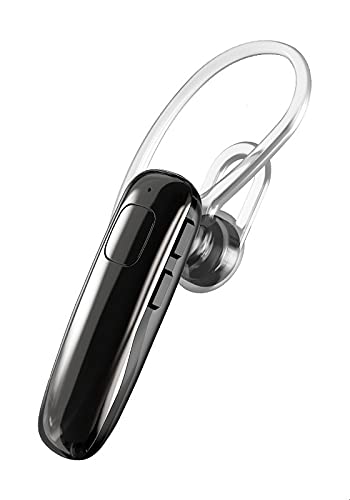
Image: The Remax RB-T32 Wireless Bluetooth Earphone, showcasing its compact design and in-ear form factor. This image provides a general view produktu.
The earphone features a compact in-ear design with integrated touch controls for easy operation. It includes a charging port, an LED indicator, and a built-in microphone for calls.
Organizować coś
1. Ładowanie słuchawek
- Podłącz kabel ładujący do portu ładowania słuchawek.
- Podłącz drugi koniec kabla do źródła zasilania USB (np. komputera, zasilacza ściennego).
- The LED indicator will show the charging status. A full charge typically takes approximately 1-2 hours.
- Once fully charged, the LED indicator will change or turn off. Disconnect the earphone from the charger.
2. Parowanie z urządzeniem Bluetooth
- Ensure the earphone is charged and turned off.
- Press and hold the multi-function button (or touch area) on the earphone until the LED indicator flashes red and blue alternately, indicating pairing mode.
- Włącz Bluetooth na swoim urządzeniu (smartfonie, tablecie itp.) i wyszukaj dostępne urządzenia.
- Select "RB-T32" from the list of found devices.
- Once successfully paired, the LED indicator will flash blue slowly or turn off, and you will hear a confirmation tone.
- The earphone will automatically connect to the last paired device when turned on, if Bluetooth is enabled on the device.
Instrukcja obsługi
Włączanie/wyłączanie zasilania
- Włączanie: Press and hold the touch area for approximately 3 seconds until the LED indicator flashes blue and you hear a power-on prompt.
- Wyłączone: Press and hold the touch area for approximately 5 seconds until the LED indicator flashes red and you hear a power-off prompt.
Odtwarzanie muzyki
- Odtwórz/Pauza: Dotknij obszaru dotykowego raz.
- Następny utwór: Kliknij dwukrotnie obszar dotykowy na prawej słuchawce.
- Poprzedni utwór: Kliknij dwukrotnie obszar dotykowy na lewej słuchawce.
Zarządzanie połączeniami
- Odbieranie/kończenie połączeń: Tap the touch area once during an incoming call or an active call.
- Odrzuć połączenie: Podczas połączenia przychodzącego naciśnij i przytrzymaj obszar dotykowy przez 2 sekundy.
Kontrola głośności
- Zwiększ głośność: Triple-tap the touch area on the right earphone.
- Zmniejsz głośność: Triple-tap the touch area on the left earphone.
Asystent głosowy
- Aktywuj asystenta głosowego: Press and hold the touch area for 2 seconds (when not on a call) to activate your device's voice assistant (e.g., Siri, Google Assistant).
Konserwacja
- Czyszczenie: Do czyszczenia słuchawek używaj miękkiej, suchej ściereczki. Nie używaj silnych środków chemicznych ani materiałów ściernych.
- Składowanie: Przechowuj słuchawki w chłodnym, suchym miejscu, z dala od bezpośredniego światła słonecznego i ekstremalnych temperatur.
- Pielęgnacja baterii: To preserve battery life, charge the earphone regularly, even if not in use for extended periods. Avoid fully discharging the battery frequently.
- Wodoodporność: Słuchawki nie są wodoodporne. Unikaj narażenia na działanie wody i nadmiernej wilgoci.
Rozwiązywanie problemów
| Problem | Rozwiązanie |
|---|---|
| Słuchawki nie włączają się. | Ensure the earphone is fully charged. |
| Nie można sparować z urządzeniem. |
|
| Brak dźwięku lub niski poziom głośności. |
|
| Przerywane połączenie. |
|
Specyfikacje
| Funkcja | Szczegół |
|---|---|
| Marka | Remax |
| Nazwa modelu | RB-T32 |
| Technologia łączności | Bezprzewodowy (Bluetooth) |
| Współczynnik kształtu słuchawek | W uchu |
| Typ sterowania | Volume Control (Touch) |
| Kompatybilne urządzenia | Multi-device compatible |
| Zawarte komponenty | Poduszki na uszy |
| Opis przedziału wiekowego | Dorosły |
| Kolor | Czarny |
Gwarancja i wsparcie
The Remax RB-T32 Wireless Bluetooth Earphone comes with a standard manufacturer's warranty. Please refer to the warranty card included in your package for specific terms and conditions, including the warranty period and coverage details.
For technical support, troubleshooting assistance, or warranty claims, please contact your local Remax distributor or the retailer where you purchased the product. Keep your proof of purchase for warranty validation.