
1. Wprowadzenie
Thank you for choosing the SNDWAY SW-TG100 Laser Distance Meter. This device is designed for precise and rapid measurement of distances, areas, and volumes. It utilizes laser technology to provide accurate readings up to 100 meters, making it an essential tool for professionals and DIY enthusiasts in construction, interior design, and various other fields. Please read this manual carefully before using the device to ensure safe and optimal operation.
2. Informacje dotyczące bezpieczeństwa
To urządzenie emituje laser klasy 2. Należy przestrzegać następujących środków ostrożności:
- Do not stare into the laser beam directly. Direct exposure to the laser can cause eye damage.
- Nie kieruj wiązki lasera na ludzi ani zwierzęta.
- Nie rozmontowuj i nie modyfikuj urządzenia. Unauthorized modifications can lead to hazardous laser radiation exposure.
- Przechowywać urządzenie w miejscu niedostępnym dla dzieci.
- Używaj urządzenia wyłącznie zgodnie z jego przeznaczeniem opisanym w niniejszej instrukcji.
- Unikaj używania urządzenia w otoczeniu zagrożonym wybuchem lub w pobliżu materiałów łatwopalnych.
3. Koniec produktuview
The SNDWAY SW-TG100 is a compact and ergonomic laser distance meter. Below is an image illustrating the device's general appearance.
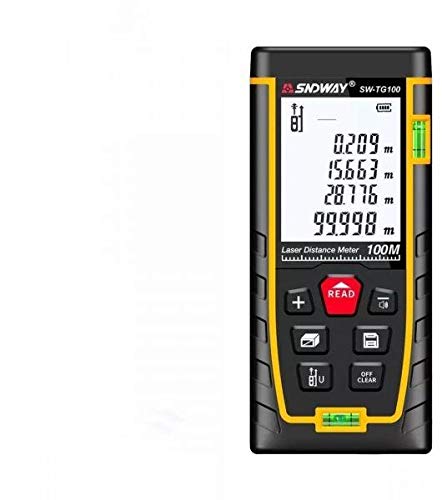
Rycina 1: Przód view of the SNDWAY SW-TG100 Laser Distance Meter. The image shows the device's display screen, measurement buttons, and the laser emission/reception lens.
Kluczowe elementy obejmują zazwyczaj:
- Wyświetlacz LCD: Shows measurement results, unit, battery status, and function indicators.
- Przycisk pomiaru: Inicjuje pomiary pojedyncze lub ciągłe.
- Przyciski funkcyjne: For selecting measurement modes (distance, area, volume, Pythagorean, etc.), unit conversion, and saving data.
- Przycisk Wyczyść/Wyłącz: Clears the last measurement or turns the device off.
- Apertura laserowa: Where the laser beam is emitted and received.
- Komora baterii: (If applicable) For inserting or accessing batteries.
4. Konfiguracja
4.1 Włączanie/wyłączanie
- Włączanie: Naciśnij [MEAS] button briefly. The display will light up.
- Aby wyłączyć: Naciśnij i przytrzymaj [CLEAR/OFF] button for a few seconds until the display turns off. The device will also automatically power off after a period of inactivity to conserve battery.
4.2 Montaż baterii (jeśli dotyczy)
While the product specifications indicate no batteries are required, this typically implies an internal rechargeable battery. If your model requires external batteries, open the battery compartment cover located on the back or bottom of the device. Insert the specified battery type (e.g., AAA batteries) according to the polarity indicators (+/-). Close the compartment cover securely.
4.3 Ustawienie jednostki
Aby zmienić jednostkę miary (np. metry, stopy, cale), naciśnij przycisk [JEDNOSTKA] Naciskaj przycisk aż do wyświetlenia żądanej jednostki.
5. Instrukcja obsługi
5.1 Pojedynczy pomiar odległości
- Włącz urządzenie.
- Skieruj laser na powierzchnię docelową.
- Naciśnij [MEAS] Naciśnij przycisk raz. Laser zostanie aktywowany.
- Naciśnij [MEAS] button again. The measurement will be taken, and the result will appear on the display.
5.2 Pomiar powierzchni
- Naciśnij [FUNKCJONOWAĆ] button until the area measurement icon (usually a square or rectangle) appears on the display.
- Measure the first side (e.g., length) by pointing the laser and pressing [MEAS].
- Measure the second side (e.g., width) by pointing the laser and pressing [MEAS] Ponownie.
- Urządzenie automatycznie obliczy i wyświetli powierzchnię.
5.3 Pomiar objętości
- Naciśnij [FUNKCJONOWAĆ] button until the volume measurement icon (usually a cube) appears on the display.
- Measure the length by pointing the laser and pressing [MEAS].
- Measure the width by pointing the laser and pressing [MEAS].
- Measure the height by pointing the laser and pressing [MEAS].
- Urządzenie automatycznie obliczy i wyświetli głośność.
5.4 Pomiar ciągły (śledzenie)
This mode allows for dynamic measurement, displaying the distance in real-time as you move the device.
- Naciśnij i przytrzymaj [MEAS] button (or press it twice quickly, depending on the model) to enter continuous measurement mode.
- Move the device slowly towards or away from the target. The display will update with the current distance.
- Naciskać [MEAS] or [CLEAR/OFF] aby wyjść z trybu pomiaru ciągłego.
6. Konserwacja
- Czyszczenie: Użyj miękkiego, damp ściereczka do czyszczenia urządzenia casing. Do not use abrasive cleaners or solvents. Clean the laser lens carefully with a soft, lint-free cloth, similar to cleaning camera lenses.
- Składowanie: Store the device in a cool, dry place, away from direct sunlight and extreme temperatures. If storing for an extended period, remove any external batteries (if applicable).
- Unikaj uderzenia: Chroń urządzenie przed upadkami i silnymi uderzeniami, które mogą mieć wpływ na jego dokładność i funkcjonalność.
7. Rozwiązywanie Problemów
| Problem | Możliwa przyczyna | Rozwiązanie |
|---|---|---|
| Urządzenie się nie włącza. | Niski poziom naładowania baterii lub jej rozładowanie. | Charge the device or replace batteries (if applicable). |
| Niedokładne pomiary. | Dirty laser lens; unstable measurement surface; strong light interference. | Clean the laser lens; ensure a stable measurement point; measure in less bright conditions if possible. |
| Na wyświetlaczu pojawia się komunikat „Błąd”. | Measurement out of range; poor reflection from target. | Ensure target is within measurement range (0.05m-100m); use a reflective target plate if measuring against highly reflective or transparent surfaces. |
8. Specyfikacje
| Funkcja | Szczegół |
|---|---|
| Producent | Droga SNDWAY |
| Model | SW-TG100 |
| Zakres pomiaru | Do 100 metrów |
| Dokładność pomiaru | Typically ±2mm (specific accuracy may vary based on conditions) |
| Jednostki miary | m / stopy / cale |
| Klasa laserowa | Klasa 2 |
| Waga przedmiotu | 260 gramów |
| Wymiary opakowania | Wymiary 16 x 8.8 x 5.2 cm |
| Wymagane baterie | No (implies internal rechargeable battery) |
| Data pierwszej dostępności | 7 lipca 2021 r. |
9. Gwarancja i wsparcie
SNDWAY products are manufactured to high-quality standards. For specific warranty information, please refer to the warranty card included with your product or contact the retailer from whom you purchased the device. For technical support, troubleshooting assistance beyond this manual, or service inquiries, please contact SNDWAY customer service through their official webstronie internetowej lub danych kontaktowych podanych przy zakupie.
Proszę zachować dowód zakupu na potrzeby roszczeń gwarancyjnych.


