
Wstęp
Thank you for choosing the CORN HB001 Bluetooth Wireless Headphones. This manual provides essential information for setting up, operating, and maintaining your headphones. Please read it carefully before use to ensure optimal performance and longevity of your device. Keep this manual for future reference.
Produkt ponadview
The CORN HB001 headphones offer a comfortable on-ear design with wireless Bluetooth connectivity, allowing you to enjoy high-quality audio without the constraints of cables. They also feature a 3.5mm audio jack for wired connection when wireless is not preferred or battery is low.
Komponenty słuchawek
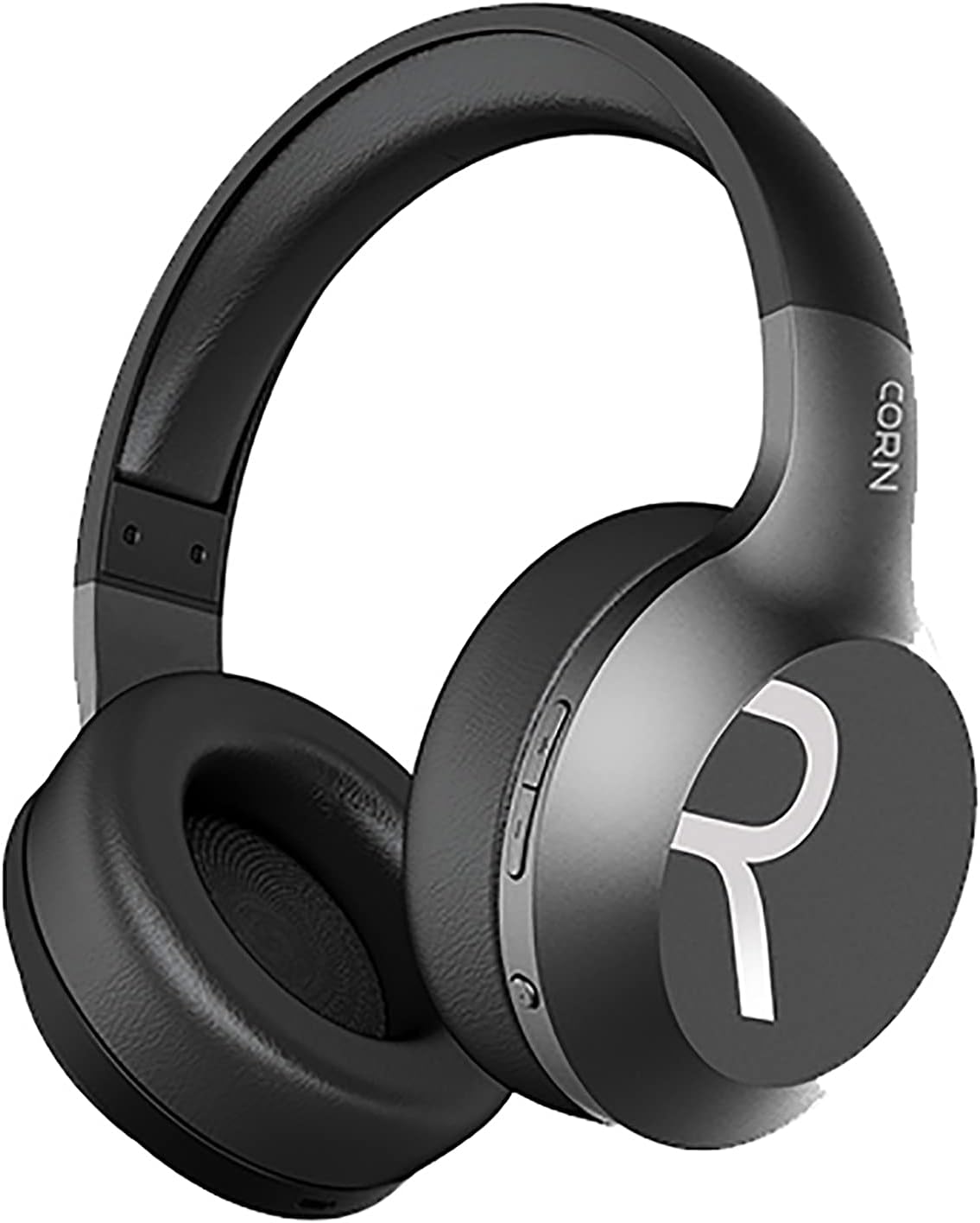
Obraz 1: Ogólnie view of the CORN HB001 Bluetooth Wireless Headphones. The image displays the black on-ear headphones with adjustable headband and earcups, featuring the 'CORN' brand logo on the side.
Układ elementów sterujących

Obraz 2: Close-up of the control buttons located on the right earcup. These typically include volume up/down and a multi-function button for power, play/pause, and call management.
Familiarize yourself with the buttons and ports on your headphones. Typically, you will find a power/multi-function button, volume controls, a charging port (e.g., USB-C), and a 3.5mm audio jack.
Organizować coś
1. Ładowanie słuchawek
Before first use, fully charge your headphones. Connect the charging cable (usually USB) to the charging port on the headphones and the other end to a USB power source (e.g., computer, wall adapter). The LED indicator will typically show red during charging and turn off or blue when fully charged.
- Czas ładowania: Około 2 godzin.
- Pojemność baterii: 300 mAh.
2. Parowanie Bluetooth
Aby bezprzewodowo podłączyć słuchawki do urządzenia:
- Sprawdź, czy słuchawki są naładowane i wyłączone.
- Naciśnij i przytrzymaj przycisk zasilania/wielofunkcyjny przez około 5–7 sekund, aż dioda LED zacznie migać naprzemiennie na niebiesko i czerwono, wskazując tryb parowania.
- Na swoim urządzeniu (smartfonie, tablecie, komputerze) włącz Bluetooth i wyszukaj nowe urządzenia.
- Select "CORN HB001" from the list of available devices.
- Once connected, the LED indicator will usually flash blue slowly or turn solid blue.
- Po włączeniu słuchawki automatycznie podejmą próbę ponownego połączenia się z ostatnio sparowanym urządzeniem.
Instrukcja obsługi
Włączanie/wyłączanie zasilania
- Włączanie: Press and hold the Power/Multi-function button for about 3 seconds until the LED indicator lights up blue.
- Wyłączone: Press and hold the Power/Multi-function button for about 3-5 seconds until the LED indicator turns red and then off.
Odtwarzanie muzyki
- Odtwórz/Pauza: Naciśnij przycisk zasilania/wielofunkcyjny jeden raz.
- Zwiększenie głośności: Naciśnij przycisk '+'.
- Ściszanie: Naciśnij przycisk '-'.
- Następny utwór: Naciśnij i przytrzymaj przycisk „+”.
- Poprzedni utwór: Naciśnij i przytrzymaj przycisk „-”.
Zarządzanie połączeniami
- Odbieranie/kończenie połączeń: Naciśnij przycisk zasilania/wielofunkcyjny jeden raz.
- Odrzuć połączenie: Press and hold the Power/Multi-function button for about 2 seconds.
- Ponowne wybieranie ostatniego numeru: Naciśnij dwukrotnie przycisk zasilania/wielofunkcyjny.
Wired Mode (3.5mm Audio Jack)
You can use the headphones in wired mode even if the battery is depleted. Simply connect one end of a 3.5mm audio cable (not always included) to the headphone's 3.5mm jack and the other end to your audio source. In wired mode, Bluetooth functions are disabled, and controls on the headphones may not function.
Konserwacja
Właściwa konserwacja gwarantuje długą żywotność słuchawek.
- Czyszczenie: Use a soft, dry cloth to wipe the headphones. Do not use abrasive cleaners or solvents. For ear cushions, gently wipe with a damp ściereczką i pozostawić do całkowitego wyschnięcia.
- Składowanie: Store the headphones in a cool, dry place away from direct sunlight and extreme temperatures. If your headphones are foldable, fold them carefully to prevent damage.
- Narażenie na działanie wody: Słuchawki nie są wodoodporne. Unikaj narażenia na działanie wody, wilgoci i deszczu.
Rozwiązywanie problemów
Jeśli napotkasz problemy, wypróbuj następujące rozwiązania:
| Problem | Rozwiązanie |
|---|---|
| Słuchawki nie włączają się | Ensure the headphones are fully charged. Press and hold the Power button for a few seconds. |
| Nie można sparować z urządzeniem | Ensure headphones are in pairing mode (flashing blue/red). Turn off and on Bluetooth on your device. Forget previous pairings and try again. Ensure headphones are within 10m range. |
| Brak dźwięku | Check volume levels on both headphones and your device. Ensure headphones are properly paired. Try wired connection if available. |
| Słaba jakość dźwięku | Move closer to your device to reduce interference. Ensure no physical obstructions between headphones and device. |
Specyfikacje
| Funkcja | Szczegół |
|---|---|
| Nazwa modelu | HB001 |
| Nazwa marki | KUKURYDZA |
| Technologia łączności | Bezprzewodowy, Bluetooth |
| Wersja bezprzewodowa | V5.0 |
| Odległość robocza | 10 metrów |
| Rozmiar sterownika głośnika | Φ40mm |
| Impedancja głośnika | 32Ω |
| Moc głośnika | 15mW |
| Pojemność baterii | 300 mAh |
| Czas ładowania | Około 2 godzin |
| Czas pracy | Około 8 godzin |
| Współczynnik kształtu słuchawek | Nauszne |
| Gniazdo słuchawkowe | 3.5mm Jack (for wired use) |
| Zawarte komponenty | Poduszki na uszy |
| Opis przedziału wiekowego | Dorosły |
| Tworzywo | Plastikowy |
| Kolor | Czarny |
Gwarancja i wsparcie
For warranty information or technical support, please refer to the documentation included with your purchase or contact the manufacturer directly through their official webna stronie internetowej lub w kanałach obsługi klienta. Zachowaj dowód zakupu na wypadek roszczeń gwarancyjnych.