
Wstęp
The Poly DA75 is a versatile USB-A/USB-C digital adapter designed to connect Poly Quick Disconnect (QD) headsets to computers. It ensures clear audio quality for call center environments, supporting both USB-A and USB-C connections for compatibility with various systems. This adapter is engineered to work seamlessly with platforms such as Avaya, Genesys, and Cisco, providing a reliable audio solution for professionals.
Główne cechy obejmują:
- Uniwersalna łączność: Equipped with both USB-A and USB-C connectors on the cable for broad compatibility with new and legacy equipment.
- Intelligent Headset Recognition: Automatically adjusts audio performance to the specific Poly Quick Disconnect headset for optimized call quality.
- Acoustic Protection: Incorporates features to manage safe volume levels, protecting user hearing.
- Platform Integration: Fully compatible with leading call center platforms including Avaya, Genesys, and Cisco.
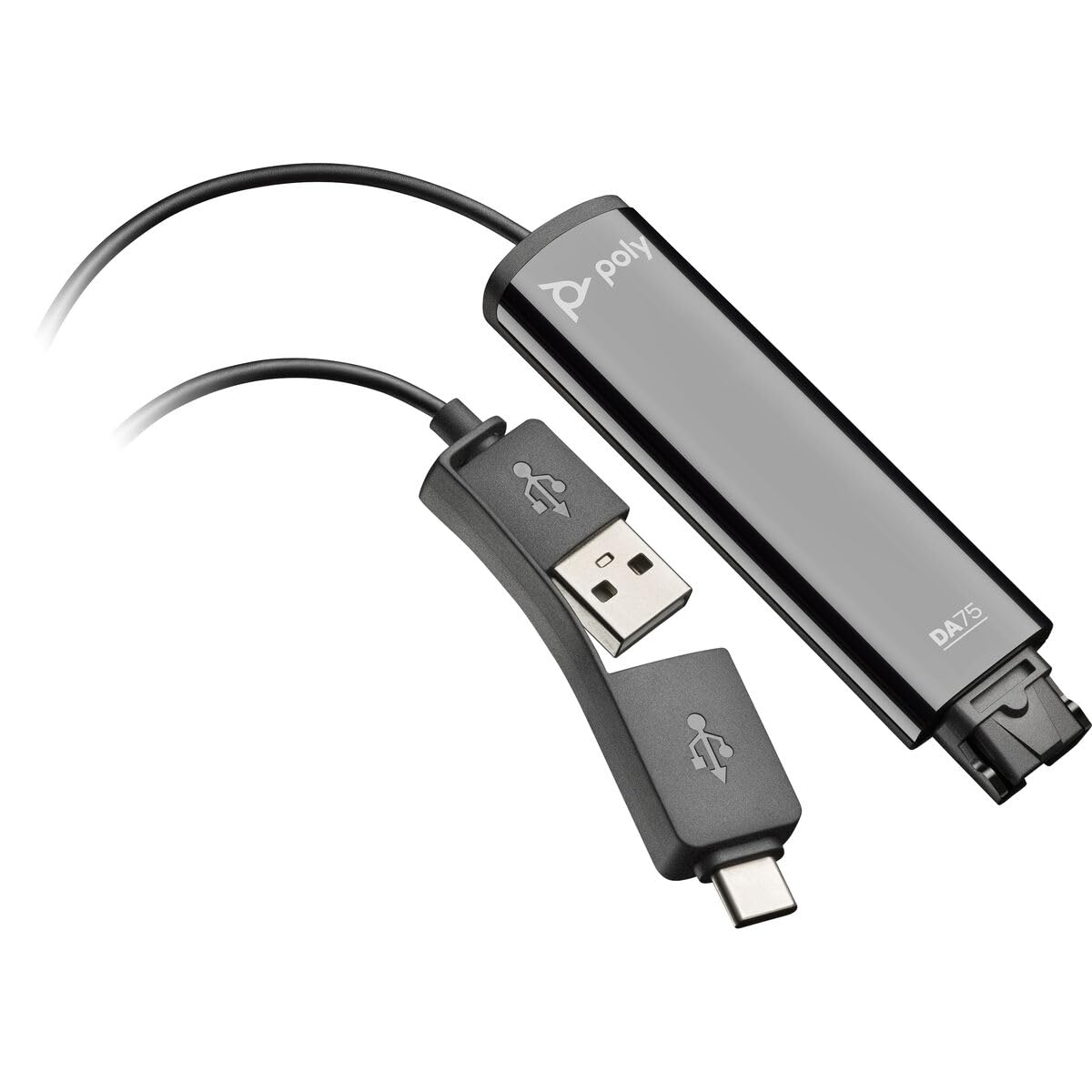
Image: The Poly DA75 USB-A/USB-C Digital Adapter, showing its dual USB-A and USB-C connectors and the Quick Disconnect port for headsets.
Co jest w pudełku
The Poly DA75 package typically includes the following items:
- Poly DA75 USB-A/USB-C Digital Adapter
- Dokumentacja (skrócony przewodnik, informacje dotyczące bezpieczeństwa)
Note: Headsets are sold separately and are not included with the DA75 adapter.
Organizować coś
Follow these steps to set up your Poly DA75 Digital Adapter:
- Podłącz zestaw słuchawkowy: Connect your Poly Quick Disconnect (QD) headset to the QD port on the Poly DA75 adapter. Ensure the connection is secure.
- Połącz z komputerem:
- If your computer has a USB-A port, use the USB-A connector on the DA75 cable.
- If your computer has a USB-C port, use the USB-C connector on the DA75 cable.
Plug the appropriate USB connector into an available USB port on your computer.
- Instalacja sterownika: The DA75 is a plug-and-play device. Your operating system (Windows, macOS) should automatically detect the device and install the necessary drivers. This process may take a few moments.
- Sprawdź rozpoznawanie urządzenia:
- Okna: Idź do Ustawienia > System > Dźwięk or Panel sterowania > Dźwięk. The Poly DA75 should appear as an audio input and output device.
- MacOS: Idź do System Settings > Sound. The Poly DA75 should appear as an input and output device.
Select the Poly DA75 as your default communication device for both playback and recording.
- Konfiguracja oprogramowania: If you are using communication software (e.g., Avaya, Genesys, Cisco, Microsoft Teams, Zoom), ensure that the Poly DA75 is selected as the audio device within the application's settings.
Instrukcja obsługi
The Poly DA75 adapter facilitates audio communication through your connected Poly QD headset. Its operation is primarily managed through your computer's operating system and communication software.
- Wykonywanie/odbieranie połączeń: Use your communication software to initiate or answer calls. The audio will be routed through your connected Poly QD headset via the DA75 adapter.
- Regulacja głośności: Adjust the listening volume using your computer's system volume controls or the volume controls within your communication application.
- Wyciszenie mikrofonu: Mute and unmute your microphone using the controls provided by your communication software.
- Optymalizacja dźwięku: The DA75 automatically optimizes audio for your specific Poly QD headset. No manual adjustments are typically required for audio profiles.
Konserwacja
To ensure the longevity and optimal performance of your Poly DA75 Digital Adapter, follow these maintenance guidelines:
- Czyszczenie: Gently wipe the adapter with a soft, dry, anti-static cloth. Do not use liquid cleaners or abrasive materials.
- Składowanie: Przechowywać adapter w chłodnym i suchym miejscu, z dala od bezpośredniego światła słonecznego i ekstremalnych temperatur.
- Obsługiwanie: Aby zapobiec uszkodzeniom wewnętrznym, należy unikać nadmiernego zginania lub skręcania kabla, zwłaszcza w pobliżu złączy.
- Łączność: Ensure the Quick Disconnect (QD) connection and USB connections are clean and free of debris before connecting.
Rozwiązywanie problemów
If you encounter issues with your Poly DA75 Digital Adapter, refer to the following troubleshooting steps:
| Problem | Możliwa przyczyna | Rozwiązanie |
|---|---|---|
| Brak dźwięku z zestawu słuchawkowego |
|
|
| Mikrofon nie działa |
|
|
| Adapter nie jest rozpoznawany przez komputer |
|
|
Specyfikacje
| Funkcja | Szczegół |
|---|---|
| Numer modelu | 218266-01 |
| Marka | POLICJA |
| Typ złącza | USB-A, USB-C (dual connector) |
| Kompatybilne urządzenia | Poly Quick Disconnect (QD) Headsets |
| Konkretne zastosowania | PC, Call Center Platforms (Avaya, Genesys, Cisco) |
| Kolor | Czarny |
| Pozycja Wymiary (dł. x szer. x wys.) | 0.98 x 0.39 x 2.95 cala |
| Waga przedmiotu | 30 gram |
| Liczba portów | 2 (USB-A/USB-C to QD) |
| UPC | 197029650054, 017229175112 |
Gwarancja i wsparcie
Informacje o gwarancji: The Poly DA75 Digital Adapter comes with a 2-roczna ograniczona gwarancja producentaNiniejsza gwarancja obejmuje wady materiałowe i wykonawcze powstałe w wyniku normalnego użytkowania. Prosimy zachować dowód zakupu na potrzeby roszczeń gwarancyjnych.
Wsparcie techniczne: For technical assistance, product inquiries, or warranty service, please contact Poly customer support. Visit the official Poly website for the most up-to-date support contact information, FAQs, and additional resources.
Zasoby internetowe: Wsparcie techniczne Webstrona