
Wstęp
Thank you for choosing the PHEANOO D6 Sound Bar System. This 2.1 channel soundbar with a dedicated wired subwoofer is designed to enhance your audio experience, providing clear dialogue, powerful bass, and immersive sound for your home entertainment. This manual provides detailed instructions for setup, operation, maintenance, and troubleshooting to ensure optimal performance and longevity of your device.
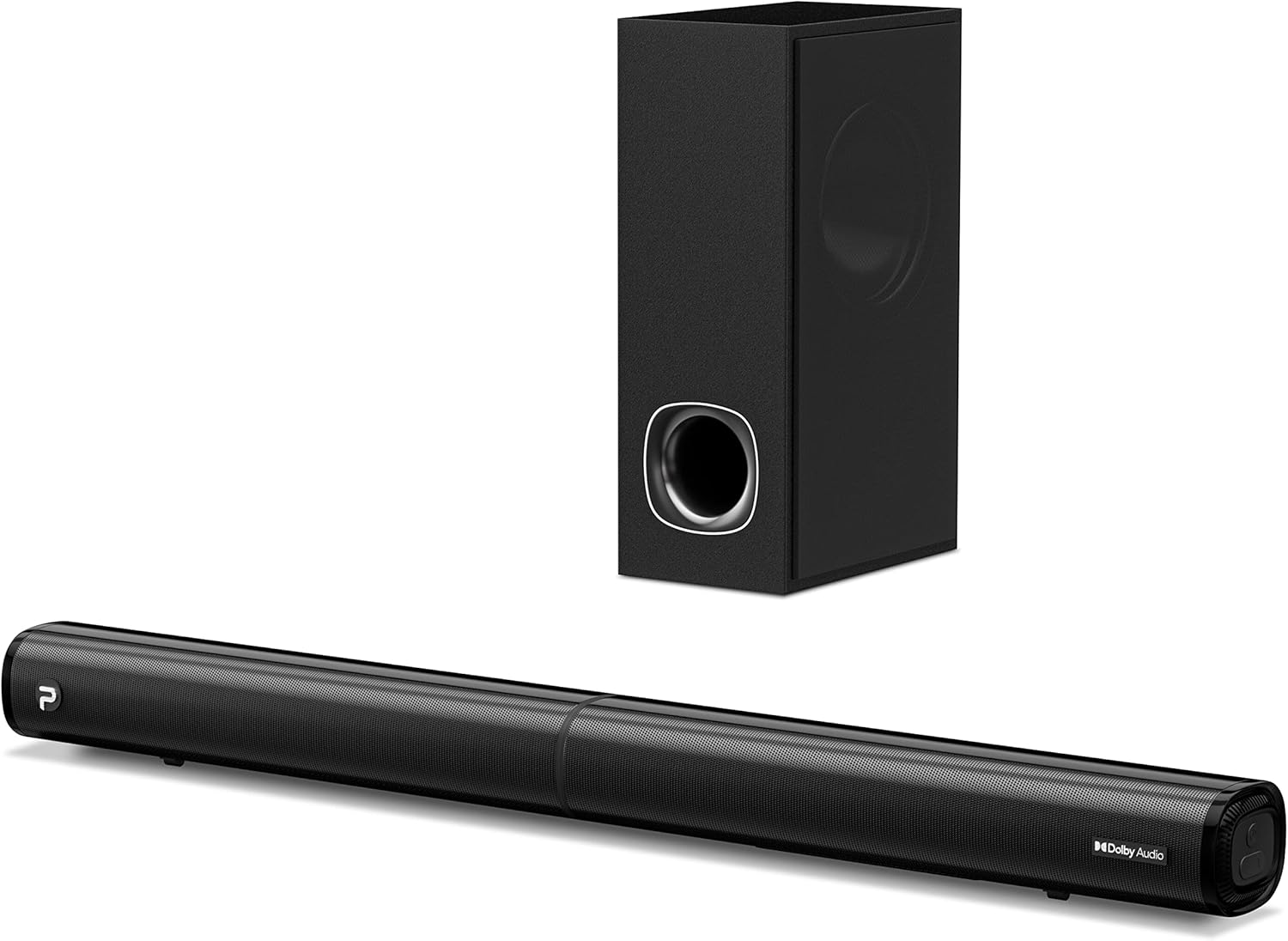
Image: The PHEANOO D6 Sound Bar and its accompanying wired subwoofer, showcasinw ich eleganckim czarnym wzornictwie.
Co jest w pudełku
Prosimy o dokładne sprawdzenie zawartości opakowania. Jeśli brakuje któregokolwiek z elementów lub jest on uszkodzony, prosimy o kontakt z obsługą klienta.
- Soundbar and Wired Subwoofer
- Kabel HDMI
- Kabel audio RCA
- Zestaw do montażu na ścianie (śruby i kotwy)
- Pilot zdalnego sterowania (baterie nie są dołączone)
- Zasilacz

Image: All components included in the PHEANOO D6 Sound Bar package, laid out for clear identification, including the soundbar, subwoofer, cables, remote, and wall mount kit.
Organizować coś
1. Assembling the Soundbar (Detachable Design)
The PHEANOO D6 soundbar features a unique detachable design for flexible placement. Follow these steps to assemble it:
- Align the audio connector from one half of the soundbar with the corresponding port on the other half.
- Gently push the two halves together until they click into place.
- Twist the two halves to secure the connection, ensuring the soundbar is firmly assembled.

Image: A three-step visual guide demonstrating how to connect the two halves of the detachable soundbar, ensuring proper alignment and secure locking.
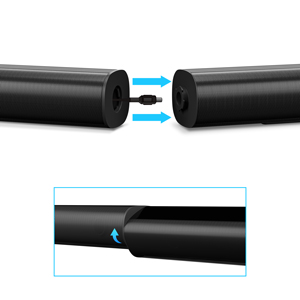
Obraz: Zbliżenie view of the soundbar's detachable connection point, showing the male and female connectors.
2. Podłączenie subwoofera
Podłącz przewodowy subwoofer do soundbara za pomocą dedykowanego kabla subwoofera. Upewnij się, że połączenie jest stabilne.
3. Opcje rozmieszczenia
You can place the soundbar on a tabletop or mount it on a wall.
- Umiejscowienie blatu: Place the soundbar directly in front of your TV, ensuring it does not obstruct the TV's remote sensor.
- Montaż na ścianie: Use the included wall mount kit. It is recommended to measure and mark the drilling points accurately, rather than relying solely on the paper stencil, to ensure a level installation.
4. Połączenia audio
The PHEANOO D6 offers multiple connectivity options. Choose the best one for your device:
- HDMI (ARC): For the best audio quality and control, connect an HDMI cable from the soundbar's HDMI (ARC) port to your TV's HDMI (ARC) port. This allows your TV remote to control the soundbar's volume.
- Optyczny: Connect an optical cable from the soundbar's Optical port to your TV's Optical Digital Audio Out port.
- AUX: Use the 3.5mm AUX cable to connect to devices with a 3.5mm audio output.
- Bluetooth 5.0: For wireless connection, pair your device via Bluetooth.

Image: The rear panel of the PHEANOO D6 Sound Bar, highlighting the HDMI (ARC), Bluetooth, Optical, and AUX input ports with corresponding icons.

Obraz: szczegółowy view of the soundbar's input panel, showing the AUX, Optical, and HDMI (ARC) ports clearly labeled.
5. Podłączenie zasilania
Connect the power adapter to the soundbar and then plug it into a wall outlet.
Instrukcja obsługi
Zdalne sterowanie
The included remote control allows you to manage all functions of the soundbar. Insert two AAA batteries (not included) into the remote before use.

Image: The remote control for the PHEANOO D6 Sound Bar, showing its buttons and an indicator light.
Włączanie/wyłączanie zasilania
Press the power button on the remote or the soundbar to turn the unit on or off.
Wybór wejścia
Press the "Input" button on the remote to cycle through available input sources: HDMI (ARC), Optical, AUX, and Bluetooth.
Parowanie Bluetooth
Aby sparować urządzenie Bluetooth:
- Select Bluetooth input on the soundbar. The indicator light will flash.
- Enable Bluetooth on your device (smartphone, tablet, etc.) and search for "PHEANOO D6".
- Select the soundbar from the list to pair. Once connected, the indicator light will be solid.

Image: A smartphone displaying a music app, wirelessly connected to the PHEANOO D6 Sound Bar via Bluetooth, indicated by a Wi-Fi like symbol.
Tryby dźwięku
Soundbar oferuje różne tryby dźwięku, które optymalizują wrażenia słuchowe:
- Tryb dialogu: Poprawia klarowność głosu, dzięki czemu mowa staje się łatwiejsza do zrozumienia.
- Tryb muzyczny: Zoptymalizowany pod kątem odtwarzania muzyki, zapewnia zrównoważony dźwięk.
- Tryb filmu: Delivers an immersive cinematic experience with enhanced effects.
- Tryb 3D: Creates a wider, more enveloping soundstage.

Image: Icons representing different sound modes: Dialogue, Music, Movie, and 3D, indicating the soundbar's versatility.
Regulacja basów
Use the dedicated bass control buttons on the remote to increase or decrease the subwoofer's output level to your preference.

Image: A close-up of the subwoofer, with a visual effect suggesting powerful bass emanating from it.
Dolby Digital Support
The PHEANOO D6 Sound Bar supports Dolby Digital decoding, providing a rich and dynamic audio experience for compatible content.

Image: A living room setup with the soundbar and TV, overlaid with a grid pattern indicating premium 3D surround sound powered by Dolby Audio.

Image: The Dolby Audio logo accompanied by visual representations of sound waves, emphasizing the enhanced audio quality.
Gotowy na telewizor Roku
This soundbar is certified to work seamlessly with your Roku TV. Enjoy smooth setup, easy access to sound settings, and compatibility with any Roku TV remote.

Image: A television screen displaying the "Roku TV Ready" setup interface, with the PHEANOO Soundbar and subwoofer positioned below it, illustrating seamless integration.
Konserwacja
- Czyszczenie: Do czyszczenia powierzchni soundbara i subwoofera używaj miękkiej, suchej ściereczki. Nie używaj płynów ani aerozoli czyszczących.
- Wentylacja: Zapewnij odpowiednią wentylację wokół soundbara i subwoofera, aby zapobiec przegrzaniu. Nie blokuj otworów wentylacyjnych.
- Składowanie: Jeśli urządzenie będzie przechowywane przez dłuższy czas, należy odłączyć je od zasilania i przechowywać w chłodnym, suchym miejscu.
Rozwiązywanie problemów
| Problem | Możliwa przyczyna | Rozwiązanie |
|---|---|---|
| Brak zasilania | Kabel zasilający nie jest podłączony; gniazdko elektryczne nie działa. | Upewnij się, że kabel zasilający jest dobrze podłączony. Spróbuj użyć innego gniazdka elektrycznego. |
| Brak dźwięku | Wybrano niewłaściwe wejście; Głośność jest zbyt niska; Kable nie są prawidłowo podłączone. | Wybierz prawidłowe źródło sygnału. Zwiększ głośność. Sprawdź wszystkie połączenia kabli audio. |
| Parowanie Bluetooth nie powiodło się | Soundbar nie jest w trybie parowania; Urządzenie jest za daleko; Zakłócenia. | Ensure soundbar is in Bluetooth input and indicator is flashing. Move device closer. Turn off other Bluetooth devices. |
| Słaba jakość dźwięku | Incorrect sound mode; Source audio quality is low. | Try different sound modes (Music, Movie, Dialogue). Ensure the audio source is high quality. |
| Pilot nie działa | Batteries dead or incorrectly inserted; Obstruction between remote and soundbar. | Wymień baterie, zwracając uwagę na prawidłową biegunowość. Usuń wszelkie przeszkody. |
For more detailed troubleshooting, refer to the official Troubleshooting Guide PDF available on the product page or contact PHEANOO customer support.
Specyfikacje
| Funkcja | Szczegół |
|---|---|
| Model | D6 |
| Marka | FEANOO |
| Typ głośnika | Soundbar z przewodowym subwooferem |
| Konfiguracja kanałów | 2.1 kanał |
| Technologia łączności | HDMI (ARC), Bluetooth 5.0, Optical, AUX |
| Zasięg Bluetooth | Do 100 metrów (ok. 328 stóp) |
| Maksymalna moc wyjściowa głośnika | 240 watów |
| Wymiary produktu (soundbar) | 29.5" szer. x 2.4" wys. x 2.8" gł. |
| Waga przedmiotu | 11.57 funtów |
| Typ kontrolera | Zdalne sterowanie |
| Cechy specjalne | Dolby Digital Decoding, Dialogue Enhancement, Bass Adjustable, Detachable Design, Roku TV Ready |
Gwarancja i wsparcie
The PHEANOO D6 Sound Bar System comes with a Ograniczona gwarancjaSzczegółowe warunki gwarancji można znaleźć w karcie gwarancyjnej dołączonej do opakowania.
For technical support, warranty claims, or further assistance, please visit the official PHEANOO website or contact their customer service department. You can also find additional resources like the Instrukcja użytkownika (PDF) I Przewodnik rozwiązywania problemów (PDF) w sieci.