
EGLOO S4
EGLOO S4 Smart Home Security Camera User Manual
Model: S4 (TSC-221P)
Wstęp
The EGLOO S4 is a versatile 1080P Wi-Fi smart camera designed for comprehensive home monitoring. It functions as a security camera, baby monitor, and pet camera, offering advanced features such as integrated temperature and humidity monitoring, remote appliance control, motion and sound detection with real-time alerts, clear IR night vision, and two-way audio communication. Its wide field of view and digital zoom capabilities provide comprehensive coverage for various indoor environments.
Informacje dotyczące bezpieczeństwa
- Ensure the camera is placed on a stable, flat surface to prevent falling.
- Trzymaj urządzenie z dala od wody, wilgoci i ekstremalnych temperatur.
- Nie próbuj samodzielnie demontować ani naprawiać urządzenia. Skontaktuj się z wykwalifikowanym personelem serwisowym.
- Aby uniknąć uszkodzeń, należy używać wyłącznie dołączonego zasilacza.
- Keep out of reach of children and pets to avoid accidental damage or injury.
- Unikaj wystawiania aparatu na bezpośrednie działanie promieni słonecznych lub umieszczania go w pobliżu źródeł ciepła.
Zawartość opakowania
Sprawdź, czy w przesyłce znajdują się wszystkie elementy:
- EGLOO S4 Smart Home Security Camera
- Zasilacz
- Instrukcja obsługi (ten dokument)
- Mounting Accessories (if applicable, not specified but common)
Produkt ponadview

Przód view of the EGLOO S4 camera, showcasing its compact dome design with a black camera head and a light-colored base.

The EGLOO S4 camera held in a hand, illustrating its small and portable size.
Główne cechy:
- Wideo w jakości Full HD 1080P: Provides clear and detailed video monitoring.
- Czujnik temperatury i wilgotności: Real-time environmental monitoring.
- Detekcja ruchu i dźwięku: Otrzymuj natychmiastowe alerty na swoje urządzenie mobilne.
- Motion Tracking (AI Supported): Automatycznie śledzi wykryty ruch.
- Remote Appliance Control: Control compatible appliances from anywhere.
- Clear IR Night Vision: Zapewnia widoczność w warunkach słabego oświetlenia.
- Obiektyw szerokokątny 140°: Oferuje szerokie pole view.
- 8-krotny zoom cyfrowy: Zoom in for closer details.
- Dwukierunkowy dźwięk: Komunikuj się z ludźmi lub zwierzętami za pomocą kamery.
- 4-Channel Simultaneous Screen: Monitor multiple cameras or views na raz.
- Łatwa konfiguracja: Zaprojektowane z myślą o szybkim i prostym montażu.

Diagram illustrating the key features of the EGLOO S4 camera, including temperature/humidity, motion/sound alerts, motion tracking, 1080P video, and easy setup.

A smartphone screen displaying a 4-channel simultaneous view from the EGLOO S4 camera, highlighting features like night vision, wide angle, digital zoom, and two-way audio.
Przewodnik po konfiguracji
1. Download the EGLOO App:
Szukaj "EGLOO" in your mobile device's app store (App Store for iOS or Google Play Store for Android) and download the official application. Alternatively, scan the QR code below:

Scan this QR code to quickly download the EGLOO application.
Więcej informacji znajdziesz na stronie: http://m.site.naver.com/0ZStX
2. Włącz kamerę:
Connect the provided power adapter to the camera's power port and plug it into a wall outlet. The camera will power on automatically.
3. Add Device in App:
- Open the EGLOO app and create an account or log in.
- Follow the in-app instructions to add a new device. This typically involves selecting your camera model and connecting it to your Wi-Fi network (2.4GHz Wi-Fi is supported).
- Ensure your mobile device is connected to the same Wi-Fi network during the setup process.

A hand holding a smartphone displaying the EGLOO application logo, indicating readiness for setup.
Instrukcja obsługi
Na żywo View i sterowanie:
Once connected, you can access the live video feed from your camera through the EGLOO app. Use the on-screen controls to pan, tilt, and zoom the camera, activate two-way audio, or take snapshots/record video.
Monitorowanie temperatury i wilgotności:
The EGLOO S4 continuously monitors the ambient temperature and humidity. View real-time data directly within the app to ensure optimal environmental conditions, especially for baby or pet monitoring.
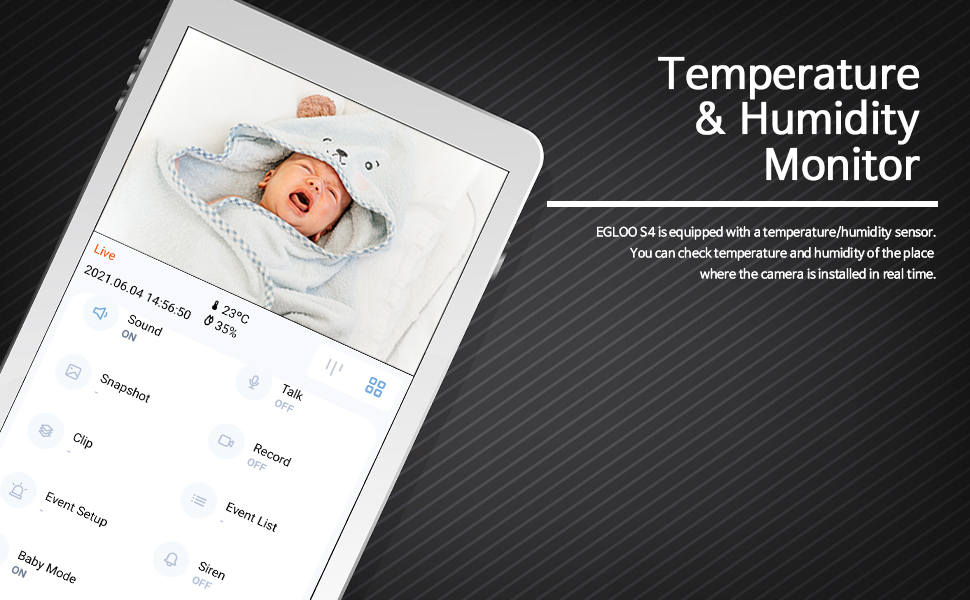
The EGLOO app interface displaying real-time temperature and humidity readings alongside the live camera feed, useful for monitoring a baby's room.
Detekcja ruchu i dźwięku:
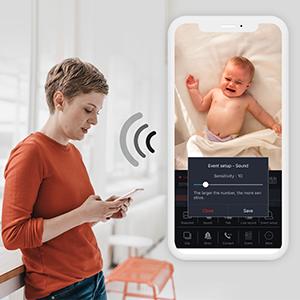
Configure motion and sound detection settings in the app to receive instant push notifications when activity is detected. Adjust sensitivity levels to minimize false alerts.

A woman checking her smartphone, which displays notification alerts from the EGLOO S4 camera for motion and sound detection.
Remote Appliance Control:
The EGLOO S4 can act as a smart remote control for various home appliances. Follow the in-app guide to pair your appliances with the camera for remote operation.

An illustration showing the EGLOO S4 camera positioned in a living room, with lines indicating its ability to connect and control various home appliances remotely.

A smartphone screen displaying controls for an air conditioner, demonstrating the remote appliance control feature of the EGLOO S4 camera.
Widzenie nocne:
The camera automatically switches to infrared (IR) night vision in low-light conditions, providing clear black-and-white video. The "Night Color" technology enhances visibility.
A split image demonstrating the difference between normal lighting and the clear infrared night vision capability of the camera in a room setting.
Dwukierunkowy dźwięk:
Utilize the two-way audio feature to speak through the camera and hear responses. This is ideal for comforting a baby, communicating with a pet, or interacting with family members.

An image of a puppy with a speech bubble saying "Hi, puppy!", illustrating the two-way audio communication feature of the camera for interacting with pets.
Konserwacja
- Czyszczenie: Delikatnie przetrzyj obiektyw i korpus aparatu miękką, suchą ściereczką. Nie używaj silnych środków chemicznych ani ściernych środków czyszczących.
- Składowanie: If storing the camera for an extended period, disconnect it from power and keep it in a cool, dry place.
- Aktualizacje oprogramowania: Regularly check the EGLOO app for firmware updates to ensure optimal performance and security.
Rozwiązywanie problemów
| Problem | Możliwa przyczyna | Rozwiązanie |
|---|---|---|
| Kamera nie łączy się z siecią Wi-Fi. | Nieprawidłowe hasło Wi-Fi; kamera znajduje się za daleko od routera; sieć Wi-Fi 5 GHz. | Verify Wi-Fi password. Move camera closer to router. Ensure you are connecting to a 2.4GHz Wi-Fi network. Restart camera and router. |
| Nie otrzymano żadnych powiadomień. | App notification settings disabled; phone notification settings disabled; incorrect detection sensitivity. | Check notification settings within the EGLOO app. Verify phone's system notification settings for the EGLOO app. Adjust motion/sound detection sensitivity. |
| Słaba jakość wideo. | Weak Wi-Fi signal; insufficient bandwidth. | Ensure strong Wi-Fi signal. Reduce other network activity. Consider moving camera closer to router or upgrading internet plan. |
| Kamera nie reaguje. | Problem z zasilaniem; błąd oprogramowania. | Unplug the power adapter, wait 10 seconds, then plug it back in to restart the camera. If the issue persists, contact customer support. |
Specyfikacje
| Funkcja | Szczegół |
|---|---|
| Nazwa modelu | S4 |
| Numer modelu przedmiotu | TSC-221P |
| Technologia łączności | Bezprzewodowy (Wi-Fi) |
| Rozdzielczość przechwytywania wideo | 1080p |
| Maksymalny WebRozdzielczość obrazu kamery | 200 MP |
| Pole View | 360 stopni |
| Typ powiększenia | Zoom cyfrowy |
| Technologia słabego oświetlenia | Kolor nocy |
| Tryb pracy | Dźwięk i ruch |
| Pozycja Wymiary (dł. x szer. x wys.) | 4.34 x 3.1 x 4.34 cala |
| Waga przedmiotu | 0.44 funta (7 uncji) |
| Źródło zasilania | AC Adapter (Batteries Not Required) |
| Międzynarodowa Ocena Ochrony | IP65 |
| Producent | PRAWDZIWY |
Gwarancja i wsparcie
For warranty information and technical support, please refer to the official EGLOO website or contact the manufacturer directly. The installation manual is available as a PDF document for further reference.
Producent: PRAWDZIWY
Instrukcja instalacji (PDF): Pobierz PDF
Ask a question about this manual
Ask about setup, troubleshooting, compatibility, parts, safety, or missing instructions. Manuals+ will review the question and use this page’s manual context to help answer it.