
1. Wprowadzenie
Thank you for choosing the AIYIMA A05 TPA3221 Power Amplifier. This compact 2.0 channel stereo amplifier is designed to deliver high-fidelity audio to passive speakers, featuring both Bluetooth and RCA input options. This manual provides detailed instructions for setup, operation, and maintenance to ensure optimal performance and longevity of your device.
2. Instrukcje bezpieczeństwa
- Zasilanie: Use only the specified power adapter (DC 12-32V) to prevent damage. Ensure the power outlet voltage jest kompatybilny.
- Wentylacja: Umieść amplifier in a well-ventilated area. Do not block ventilation openings. Avoid placing it on soft surfaces that may obstruct airflow.
- Wilgoć: Keep the device away from water, humidity, and liquids. Do not operate with wet hands.
- Ciepło: Avoid direct sunlight, heat sources, or extreme temperatures.
- Czyszczenie: Przed czyszczeniem odłącz zasilanie. Użyj miękkiej, suchej ściereczki. Nie używaj środków czyszczących w płynie ani aerozolu.
- Serwisowanie: Nie próbuj samodzielnie naprawiać ani demontować urządzenia. Wszelkie prace serwisowe zleć wykwalifikowanemu personelowi.
- Dzieci: Przechowywać w miejscu niedostępnym dla dzieci.
3. Zawartość opakowania
Proszę sprawdzić, czy w paczce znajdują się następujące elementy:
- AIYIMA A05 Bluetooth 5.0 Ampliyfikator x 1
- Antena Bluetooth x 1
- Instrukcja obsługi x 1
- Karta gwarancyjna x 1
- Zasilacz DC 32 V x 1

Obraz 3.1: Contents of the AIYIMA A05 amppakiet lifier, w tym amplifier unit, Bluetooth antenna, user manual, warranty card, and power adapter.
4. Koniec produktuview
4.1 Elementy sterujące na panelu przednim
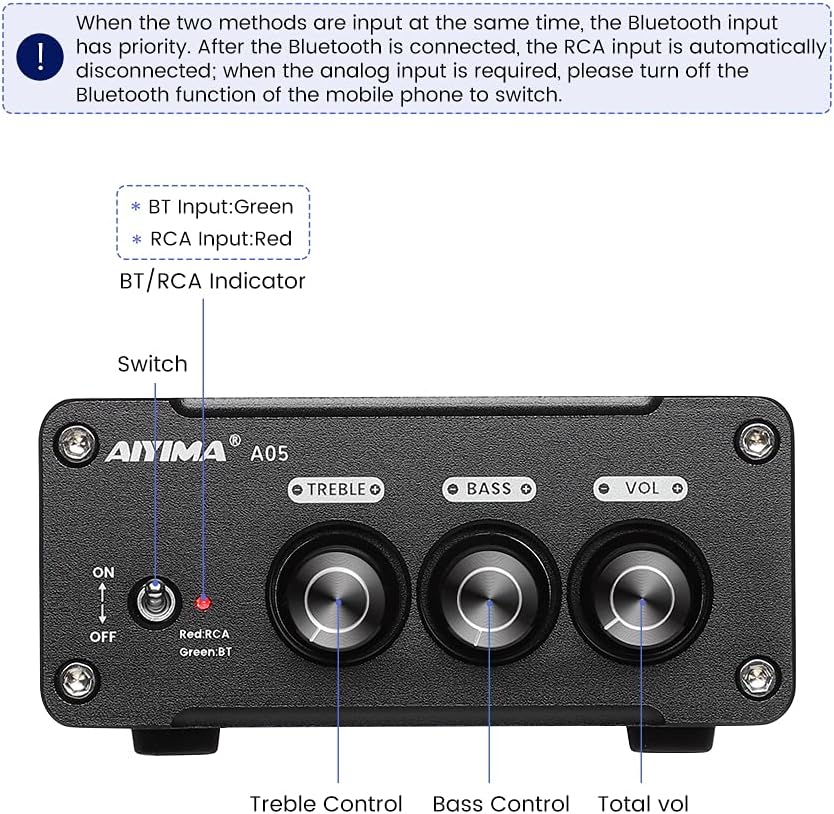
Obraz 4.1: Front panel of the AIYIMA A05 amplifier, showing the power switch, input indicator, treble, bass, and volume controls.
- Przełącznik zasilania (WŁ./WYŁ.): Przełącza ampmoc lifiera.
- BT/RCA Indicator: Displays the active input source. Green indicates Bluetooth (BT) input, Red indicates RCA input.
- Kontrola tonów wysokich: Dostosowuje wyjście audio o wysokiej częstotliwości.
- Kontrola basu: Dostosowuje wyjście audio o niskiej częstotliwości.
- Regulacja głośności: Reguluje ogólny poziom wyjściowy dźwięku.

Obraz 4.2: Z bliska view of the power switch and the BT/RCA input indicator on the front panel.

Obraz 4.3: Z bliska view of the Treble, Bass, and Volume control knobs.
4.2 Połączenia panelu tylnego

Obraz 4.4: Rear panel of the AIYIMA A05 amplifier, showing the Bluetooth antenna port, RCA audio input, speaker outputs, and DC power input.
- ANT (Bluetooth Antenna Port): Connect the included Bluetooth antenna here for wireless audio reception.
- AUDIO IN (RCA Input): Connect audio sources (e.g., CD player, TV, DAC) using RCA cables.
- SPEAKER (Audio Output): Connect passive speakers using speaker wires. Ensure correct polarity (+ to + and - to -).
- DC 24-32V (Power Input): Connect the provided DC power adapter.
5. Instrukcje konfiguracji
Aby skonfigurować urządzenie AIYIMA A05, wykonaj poniższe kroki ampLiyfikator:
- Podłącz antenę Bluetooth: Screw the included Bluetooth antenna into the ANT port on the rear panel.
- Podłącz głośniki: Connect your passive speakers to the SPEAKER output terminals on the rear panel. Ensure the positive (+) terminal of the amplifier connects to the positive (+) terminal of the speaker, and the negative (-) terminal connects to the negative (-).
- Connect Audio Source (RCA): If using a wired audio source, connect it to the AUDIO IN (RCA) ports on the rear panel using appropriate RCA cables.
- Podłącz zasilanie: Connect the DC power adapter to the DC 24-32V input port on the rear panel, then plug the adapter into a wall outlet.
- Włączanie: Flip the power switch on the front panel to the "ON" position. The input indicator will light up.

Obraz 5.1: Tylny panel amplifier with Bluetooth antenna, RCA cables, speaker wires, and power adapter connected.
6. Instrukcja obsługi
6.1 Włączanie/wyłączanie
Aby włączyć amplifier, flip the front panel switch to the "ON" position. To power off, flip the switch to the "OFF" position.
6.2 Połączenie Bluetooth
- Zapewnij amplifier is powered on and the BT/RCA indicator is green, indicating Bluetooth mode. If it's red, ensure no RCA cable is connected or disconnect it.
- Na urządzeniu mobilnym (telefonie, tablecie itp.) włącz Bluetooth i wyszukaj dostępne urządzenia.
- Z listy urządzeń do sparowania wybierz „AIYIMA A05”.
- Once paired, the indicator light will remain green, and you can play audio from your device through the ampliyfikator.
6.3 RCA Input Usage
- Connect your audio source to the RCA input ports on the rear panel.
- Zapewnij amplifier is powered on. The BT/RCA indicator should be red, indicating RCA input mode.
- If the indicator is green (Bluetooth mode), ensure Bluetooth is disconnected on any paired device, or turn off Bluetooth on your mobile device to switch to RCA input.
6.4 Regulacja dźwięku
- Tom: Rotate the "VOL" knob clockwise to increase volume and counter-clockwise to decrease.
- Potroić: Rotate the "TREBLE" knob to adjust high-frequency sounds to your preference.
- Bas: Rotate the "BASS" knob to adjust low-frequency sounds to your preference.
7. Konserwacja
- Czyszczenie: Disconnect the power adapter before cleaning. Use a soft, dry, lint-free cloth to wipe the surface of the amplifier. Do not use harsh chemicals or abrasive materials.
- Składowanie: If not in use for an extended period, store the ampPrzechowywać w chłodnym i suchym miejscu, z dala od bezpośredniego światła słonecznego i ekstremalnych temperatur.
- Znajomości: Okresowo sprawdzaj wszystkie połączenia kablowe, aby mieć pewność, że są solidne i nie są skorodowane.
8. Rozwiązywanie Problemów
Jeśli masz problemy z urządzeniem AIYIMA A05 amplifier, zapoznaj się z poniższymi typowymi problemami i rozwiązaniami:
| Problem | Możliwa przyczyna | Rozwiązanie |
|---|---|---|
| Brak dźwięku |
|
|
| Distorted or buzzing sound |
|
|
| Bluetooth nie łączy się |
|
|
| Loud noise/ticking on startup |
|
|
Jeśli po wypróbowaniu tych rozwiązań problem nadal występuje, skontaktuj się z obsługą klienta AIYIMA w celu uzyskania dalszej pomocy.
9. Specyfikacje

Obraz 9.1: Dimensions of the AIYIMA A05 amplifier: 107mm (4.2in) width, 87mm (3.4in) depth, 36mm (1.4in) height.
| Funkcja | Specyfikacja |
|---|---|
| Model | A05 |
| Moc wyjściowa | 105 Watts (at 4 Ω) |
| Liczba kanałów | 2.0 (stereo) |
| Wersja Bluetooth | QCC3034 APTX Bluetooth 5.0 |
| Zestaw układów scalonych | TPA3221 |
| Minimalna podaż objtage | 12 V (prąd stały) |
| Maksymalna objętość dostawtage | 32 V (prąd stały) |
| Waga przedmiotu | 500 gram |
| Wymiary (w przybliżeniu) | 107mm (W) x 87mm (D) x 36mm (H) |
10. Gwarancja i wsparcie
AIYIMA A05 amplifier comes with a warranty. Please refer to the included Warranty Card for specific terms and conditions. For technical support, troubleshooting assistance, or warranty claims, please contact AIYIMA customer service through the retailer where the product was purchased or visit the official AIYIMA webstrona.
Zasoby internetowe: For additional information and support, you may visit the AIYIMA store page: Oficjalny sklep AIYIMA