
CDIYTOOL 4yhujuyj
CDIYTOOL 100A MPPT Solar Charge Controller User Manual
Model: 4yhujuyj
Wstęp
This manual provides essential information for the safe and efficient operation of your CDIYTOOL 100A MPPT Solar Charge Controller. This controller is designed for 36V, 48V, and 60V battery systems and features an LCD display, multiple load control modes, and dual USB outputs. Please read this manual thoroughly before installation and use.
The controller automatically adapts to 36V/48V/60V systems and is not suitable for 12V/24V systems. It utilizes innovative MPPT technology for high tracking efficiency, detecting the maximum charging current.
Instrukcje bezpieczeństwa
Always adhere to the following safety guidelines to prevent injury and damage to the controller or other components.
- Upewnij się, że bateria ma wystarczającą pojemnośćtage for the controller to recognize the correct battery type upon first use.
- Connect the battery to the controller first, then connect the solar panels. Reversing this order can damage the controller.
- Maksymalna wejściowa voltage is 50V. Ensure your solar panel configuration does not exceed this limit. For example, a 19V photovoltaic panel matches a 12V battery, and a 38V photovoltaic panel matches a 24V battery. When a 38V panel is connected, the maximum voltage may reach 42V.
- The controller is suitable for various battery types (including open, lead-acid, gel, and lithium batteries). Refer to the controller's settings for specific battery types.
- The controller provides protection against overvoltage, short circuit, overload, overcharge, and over-discharge.
- Nie próbuj samodzielnie demontować ani naprawiać kontrolera. W celu uzyskania pomocy skontaktuj się z wykwalifikowanym personelem.

Image: Excerpt from the user manual detailing safety instructions and a connection diagram.
Cechy produktu
- Wielofunkcyjny wyświetlacz LCD: Provides real-time display of charging current, discharge current, and power generation.
- Technologia MPPT: Innovative Maximum Power Point Tracking with high efficiency (up to 99%) for optimal solar energy harvesting.
- Niezawodna ochrona: Zawiera overvoltage, short circuit, overload, overcharge, and over-discharge protection.
- Automatic Focusing MPPT Tracking: Ensures high charging efficiency and bidirectional focusing tracking.
- Kompensacja temperatury: Automatycznie dostosowuje głośność ładowaniatage w oparciu o zmiany temperatury otoczenia.
- Dwa wyjścia USB: Provides 5V/2A output for charging mobile devices.

Obraz: Przód view of the CDIYTOOL 100A MPPT Solar Charge Controller, highlighting the LCD display and dual USB ports.
Konfiguracja i instalacja
Follow these steps for proper installation of the solar charge controller:
- Przygotuj okablowanie: Ensure all wires are correctly sized for the expected current and are properly insulated.
- Podłącz akumulator: Connect the battery to the charge controller first. Ensure correct polarity (+ to + and - to -). The controller requires sufficient battery voltage to recognize the system type.
- Podłącz panel słoneczny: Connect the solar panel(s) to the charge controller. Ensure correct polarity. Do not exceed the maximum input voltage 50V.
- Podłącz obciążenie (opcjonalnie): Connect your DC load to the load terminals of the controller. The controller can manage load output based on settings.
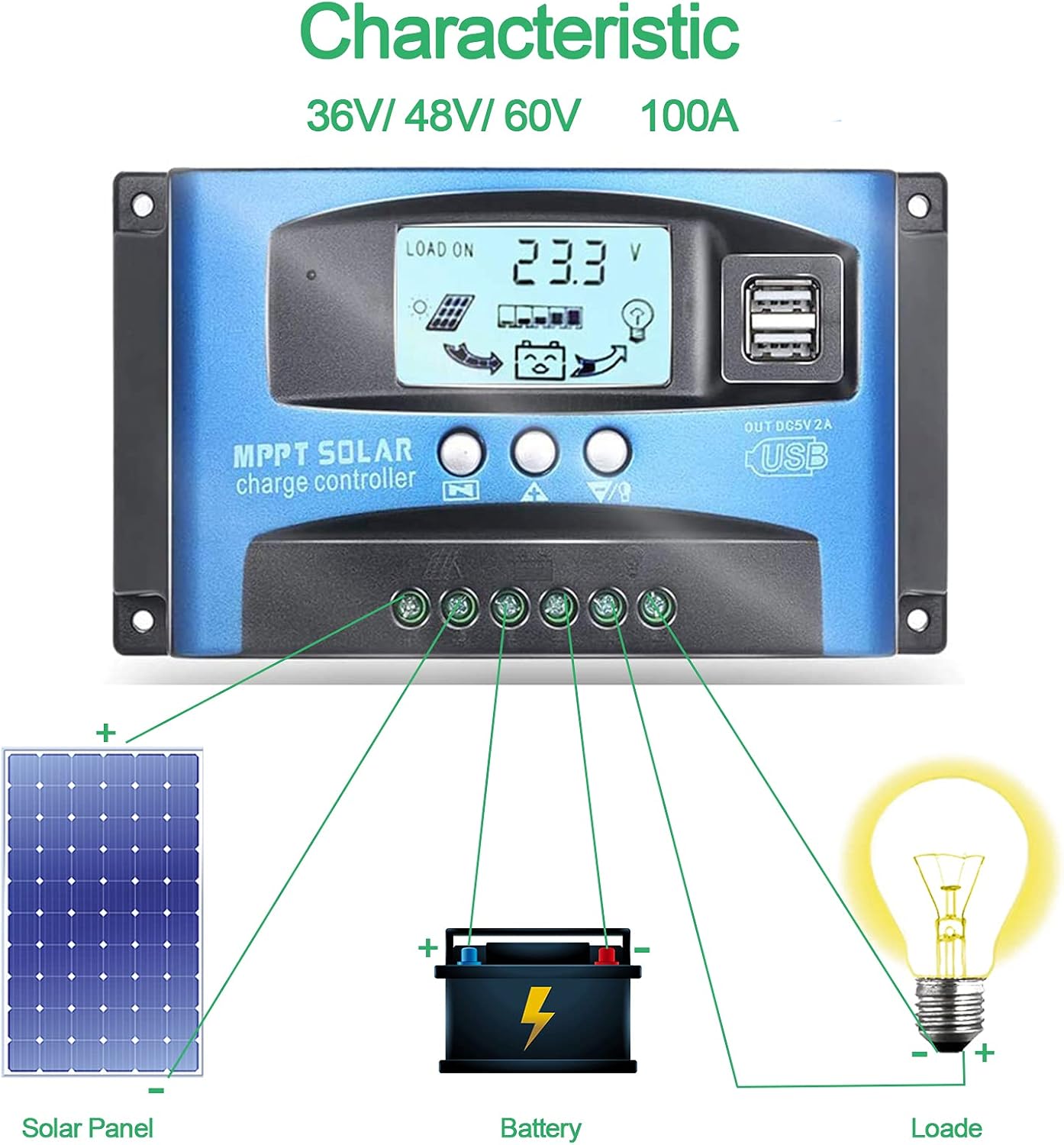
Image: Connection diagram illustrating how to connect solar panels, battery, and load to the charge controller.

Obraz: Szczegółowy view of the controller with labels for its components, including buttons, LCD, USB ports, and connection points.
Instrukcja obsługi
Kontroler wyposażony jest w wyświetlacz LCD i trzy przyciski do obsługi: Menu, Page Up i Page Down/Manual.
Wyświetlacz LCD
Na wyświetlaczu LCD wyświetlane są różne parametry, w tym pojemność bateriitage, charging current, discharge current, and system status. The icons on the display indicate solar panel activity, battery charge level, and load status.
Funkcje przycisków
- Przycisk menu: Press to enter the menu interface and cycle through different settings. Long press to modify parameters.
- Przycisk „Page Up”: Służy do zwiększania wartości lub poruszania się w górę menu.
- Przycisk Page Down/Manual: Used to decrease values or navigate downwards in menus. Also functions as a manual load control switch (on/off) when on the main interface.
Ładowanie przez USB
The controller is equipped with dual USB ports providing 5V/2A output for charging compatible devices such as mobile phones and tablets.

Image: Demonstration of the controller's dual USB ports being used to charge a mobile phone.
Konserwacja
Regularna konserwacja zapewnia długowieczność i optymalną wydajność regulatora ładowania słonecznego.
- Sprawdź połączenia: Okresowo sprawdzaj wszystkie połączenia przewodów pod kątem szczelności i korozji. Luźne połączenia mogą prowadzić do utraty zasilania lub przegrzania.
- Wyczyść kontroler: Utrzymuj kontroler w czystości, bez kurzu i zanieczyszczeń. Do czyszczenia powierzchni używaj suchej ściereczki. Nie używaj płynnych środków czyszczących.
- Monitoruj wydajność: Regularly check the LCD display for normal operation and expected voltage/bieżące odczyty.
- Stan baterii: Ensure your battery is well-maintained and within its recommended operating parameters.
Rozwiązywanie problemów
W tej sekcji znajdziesz rozwiązania typowych problemów, na jakie możesz natrafić.
| Sytuacja | Prawdopodobna przyczyna | Rozwiązanie |
|---|---|---|
| Brak wyświetlania na ekranie | Akumulator nie jest podłączony lub jego głośność jest niskatage | Connect battery, check battery voltage |
| No charge when sunny | Solar panel reversed or open circuit | Reconnect solar panel, check wiring |
| Ładowanie nie działa | Load short circuit, overload, or over-discharge protection | Check load wiring, reduce load, or charge battery |
| Kontroler nie ładuje się | Panel słoneczny objtage too low or battery full | Ensure sufficient solar input, check battery status |
The controller includes built-in protections for reverse polarity, overvoltage, short circuit, overload, overcharge, and over-discharge. If an issue persists after troubleshooting, contact customer support.
Specyfikacje
| Parametr | Wartość |
|---|---|
| Model | 4yhujuyj |
| Marka | CDIYTOOL |
| Prąd znamionowy | 100A |
| Objętość systemutage | 36V/48V/60V Auto Adapt (Not for 12V/24V) |
| Maksymalna objętość wejściowa energii słonecznejtage | 50 V |
| Wyjście USB | Podwójne 5V/2A |
| Typ wyświetlacza | LCD |
| Waga przedmiotu | 14.4 uncji |
| Wymiary opakowania | 6.81 x 3.98 x 2.01 cala |

Image: Diagram showing the physical dimensions of the solar charge controller.
Dodatkowe zasoby i wsparcie
For further assistance or to access the mobile application for monitoring, please refer to the following:
Aplikacja mobilna
The BL-912V APP can be installed on your Android phone to monitor and control the solar charge controller. Scan the QR code below or visit the provided link to download and install the application.
Link do pobrania: http://fir.sdhzwl.cn/5w4b
The mobile phone app allows for remote monitoring of charging and discharging data, daily power generation, and other functions.
Image: Section of the user manual detailing the BL-912V APP installation process, including a QR code.
Gwarancja i obsługa klienta
For warranty information or technical support, please contact CDIYTOOL customer service through the platform where you purchased the product. Keep your purchase receipt for warranty claims.
Typowe zastosowania
The CDIYTOOL MPPT Solar Charge Controller is suitable for a variety of off-grid solar power applications, including:
- Residential solar power systems
- RV and marine solar setups
- Solar street lighting
- Remote monitoring stations
- Agricultural irrigation systems

Obraz: Byłyamples of typical applications for the solar charge controller in various settings.