
Wstęp
Welcome to the user manual for your new Other T11 Smart Watch. This device is designed to enhance your daily life with features such as fitness tracking, health monitoring, and smart notifications. Please read this manual carefully to understand the functions and proper operation of your smartwatch. This watch is compatible with both Android and iOS devices.
Organizować coś
1. Ładowanie inteligentnego zegarka
Before initial use, fully charge your T11 Smart Watch. Connect the provided charging cable to the charging port on the back of the watch and plug the USB end into a standard USB power adapter (not included) or a computer USB port. The watch display will indicate charging status.
2. Pobieranie aplikacji towarzyszącej
To unlock all features and synchronize data, download the dedicated companion app on your smartphone. Szukaj the app name (usually indicated in the quick start guide or on the watch packaging) in the Apple App Store (for iOS) or Google Play Store (for Android).
3. Parowanie ze smartfonem
- Upewnij się, że Bluetooth jest włączony w Twoim smartfonie.
- Otwórz aplikację towarzyszącą na swoim smartfonie.
- Follow the in-app instructions to search for and connect to your T11 Smart Watch. The watch name should appear in the list of available devices.
- Jeśli pojawi się monit, potwierdź prośbę o sparowanie zarówno na telefonie, jak i na zegarku.
Instrukcja obsługi
Podstawowa nawigacja
The T11 Smart Watch features a full touch screen for easy navigation. Swipe left, right, up, or down to access different menus and functions. Tap to select an option or confirm an action.
Changing Watch Dials
The T11 Smart Watch offers various beautiful dials to personalize your experience. You can change the watch face directly by touching and holding the screen, then swiping to browse available options and tapping to select. No phone connection is needed for this function.

Image: The T11 Smart Watch allows users to easily change between various pre-installed watch faces by interacting directly with the touch screen.
Real-time Information Reminders
Once paired with your smartphone via Bluetooth, the T11 Smart Watch can provide real-time reminders for calls and messages. Ensure your phone's Bluetooth is active and the companion app is running in the background. The watch will vibrate to alert you, displaying the content of messages or caller ID directly on the screen.
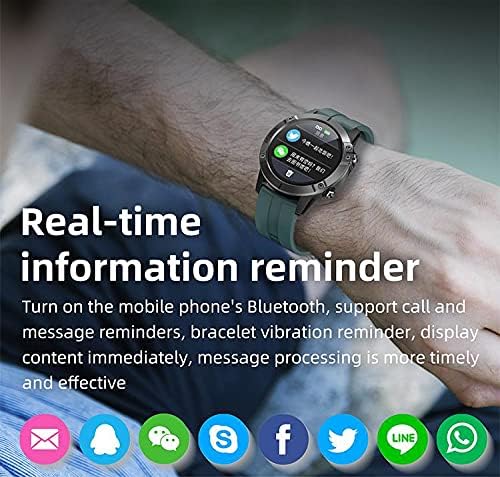
Image: The T11 Smart Watch on a wrist, showing notifications from various social media and messaging applications.
Wiele trybów sportowych
The T11 Smart Watch supports multiple sports modes to track your physical activities. These modes include hiking, climbing, running, swimming, cycling, walking, football, basketball, badminton, and more. Select the appropriate mode before starting your activity for accurate data recording.

Image: A visual representation of the T11 Smart Watch's multiple sports modes, including walking, running, riding, climbing, football, basketball, table tennis, and badminton.
Monitorowanie zdrowia
The watch includes several health monitoring features:
- Heart Rate Tracker: Monitoruje tętno przez cały dzień.
- Monitor tlenu we krwi: Mierzy poziom nasycenia krwi tlenem.
- Monitorowanie snu: Analyzes your sleep patterns, including deep sleep and light sleep.
- Monitor aktywności fizycznej: Rejestruje kroki, dystans i spalone kalorie.
Dodatkowe funkcje
- Sterowanie muzyką: Steruj odtwarzaniem muzyki na swoim smartfonie bezpośrednio z zegarka.
- Zdalna kamera: Używaj zegarka jako zdalnego wyzwalacza migawki aparatu w swoim smartfonie.
- Budzik: Ustaw alarmy, które Cię obudzą lub przypomną o zadaniach.
- Śledzenie nastroju: (Functionality may vary, refer to app for details).

Obraz: Ponadview of the T11 Smart Watch's key features: full touch screen, sport pedometer, music control, multiple sports modes, health assistant, large-capacity battery, and remote camera.
Konserwacja
Wodoodporność (IP67)
The T11 Smart Watch is IP67 water-resistant, meaning it is protected against dust and can withstand immersion in water up to 1 meter for 30 minutes. It is suitable for daily use and activities like hand washing or light rain. However, it is not recommended for swimming, diving, or hot water activities.
Czyszczenie
Regularnie czyść zegarek i pasek miękką, suchą ściereczką. W razie potrzeby użyj lekko wilgotnej ściereczki.amp cloth and then dry thoroughly. Avoid using harsh chemicals or abrasive materials, as these can damage the device.
Pielęgnacja baterii
To prolong battery life, avoid fully discharging the watch frequently. Charge it regularly, especially if you plan not to use it for an extended period.
Rozwiązywanie problemów
Zegarek się nie włącza
- Upewnij się, że zegarek jest w pełni naładowany. Podłącz go do ładowarki na co najmniej 30 minut.
- Press and hold the power button (if available) for several seconds.
Nie można sparować ze smartfonem
- Upewnij się, że Bluetooth jest włączony w Twoim smartfonie.
- Upewnij się, że zegarek znajduje się w zasięgu Bluetooth Twojego telefonu (zazwyczaj 10 metrów).
- Uruchom ponownie smartfon i zegarek.
- Wyczyść pamięć podręczną Bluetooth w telefonie lub zapomnij o urządzeniu i spróbuj sparować je ponownie.
- Upewnij się, że aplikacja towarzysząca jest zaktualizowana do najnowszej wersji.
Niedokładne dane dotyczące zdrowia
- Upewnij się, że zegarek ściśle przylega do nadgarstka — nie jest za ciasny, ani za luźny.
- Wyczyść czujniki z tyłu zegarka.
- Avoid excessive movement during measurements for better accuracy.
Powiadomienia się nie pojawiają
- Sprawdź uprawnienia dotyczące powiadomień dla aplikacji towarzyszącej w ustawieniach telefonu.
- Upewnij się, że aplikacja działa w tle i nie została zamknięta przez funkcje oszczędzania energii telefonu.
- Sprawdź, czy powiadomienia są włączone w ustawieniach aplikacji towarzyszącej.
Dane techniczne
| Funkcja | Specyfikacja |
|---|---|
| Nazwa modelu | T11 |
| Nazwa marki | Inny |
| System operacyjny | Wiele |
| Kompatybilne systemy operacyjne | Android, iOS |
| Typ wyświetlacza | LCD |
| Rozmiar ekranu | 1.3 cali |
| Rezolucja | 320x240 |
| Wejście interfejsu ludzkiego | Sterowanie dotykowe |
| Technologia łączności | Bezprzewodowy |
| Standard komunikacji bezprzewodowej | Bluetooth 4.0 |
| Pojemność baterii | 280 mAh |
| Czas czuwania | Około. 35 dni |
| Godziny pracy | 7-10 dni |
| Międzynarodowa Ocena Ochrony | IP67 (Wodoodporność) |
| Głębokość wodoodporności | 1 metr |
| Rodzaj materiału paska | Silikon |
| Rodzaj materiału obudowy | Plastikowy |
| Kolor | Czarny |
| Zawarte komponenty | Silicone bracelet (black), 280 mAh battery, 280 mAh battery charger |
Gwarancja i wsparcie
Aby uzyskać informacje o gwarancji i obsłudze klienta, zapoznaj się z dokumentacją dołączoną do zakupu lub skontaktuj się ze sprzedawcą. Zachowaj dowód zakupu na wypadek roszczeń gwarancyjnych.