
1. Wprowadzenie
The eufy Security Floodlight Cam S330 is an advanced outdoor security camera system designed to provide comprehensive surveillance and intelligent lighting for your property. With its 360-degree pan and tilt capabilities, 2K Full HD video, and powerful 3,000-lumen floodlights, it ensures detailed monitoring day and night. The integrated AI subject lock and tracking feature enhances security by intelligently following detected individuals.
Co jest zawarte:
- Floodlight Cam 2 Pro unit
- Zestaw montażowy
- Pakiety śrub
- Szybki przewodnik
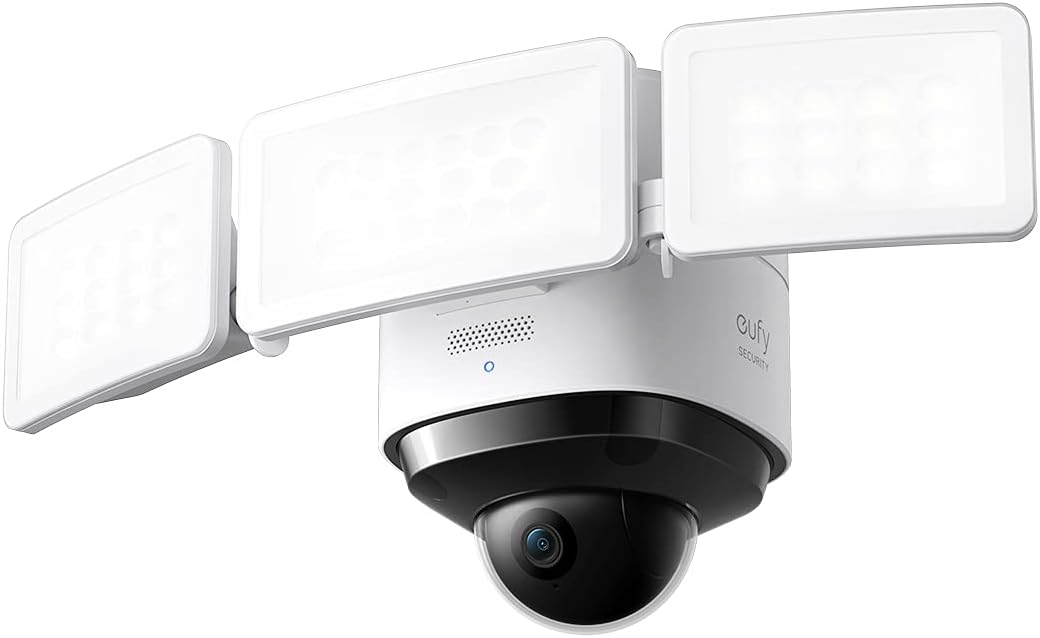
Image: The eufy Security Floodlight Cam S330, featuring a central camera unit with two adjustable floodlight panels.
2. Konfiguracja
2.1 Zagadnienia do rozważenia przed instalacją
- Źródło zasilania: This device is hardwired and requires a 120-volt power supply. Ensure power is turned off at the circuit breaker before beginning installation.
- Łączność Wi-Fi: The camera connects via Wi-Fi. Ensure a strong Wi-Fi signal at the installation location for optimal performance.
- Miejsce montażu: The Floodlight Cam is designed for outdoor wall mounting. Choose a location that provides the desired coverage area and is within reach of existing electrical wiring.
2.2 Fizyczna instalacja
- Wyłącz zasilanie: Locate the circuit breaker controlling the outdoor light fixture you intend to replace and turn off the power. Verify the power is off using a voltagtester.
- Usuń istniejące wyposażenie: Carefully remove your existing floodlight or outdoor fixture from the junction box. Disconnect all wiring.
- Zainstaluj wspornik montażowy: Attach the provided mounting bracket to the junction box using the screw packs. Ensure it is securely fastened.
- Wire the Floodlight Cam: Connect the wires from the Floodlight Cam to your home's electrical wiring according to the Quick Start Guide. Typically, this involves connecting live, neutral, and ground wires.
- Zabezpiecz jednostkę: Mount the Floodlight Cam S330 onto the installed mounting bracket and secure it with the provided screws.
- Przywróć zasilanie: Once the installation is complete and all connections are secure, turn the power back on at the circuit breaker.
2.3 Konfiguracja aplikacji
- Pobierz aplikację eufy Security: Download the eufy Security app from your smartphone's app store (iOS or Android).
- Utwórz konto: If you are a new user, create a eufy Security account and log in.
- Dodaj urządzenie: In the app, tap the '+' icon or select "Add Device" and choose "Floodlight Cam S330" from the list.
- Postępuj zgodnie z instrukcjami wyświetlanymi na ekranie: The app will guide you through connecting the camera to your Wi-Fi network and completing the setup process. This typically involves scanning a QR code on the device.
3. Operating the Floodlight Cam S330
3.1 360° Pan and Tilt Camera Coverage
The Floodlight Cam S330 features a motorized pan and tilt lens, allowing you to remotely adjust the camera's viewing angle. This provides 360-degree horizontal coverage, eliminating blind spots and giving you a complete view of your property. Use the controls within the eufy Security app to pan (move horizontally) and tilt (move vertically) the camera lens.

Zdjęcie: Zdjęcie lotnicze view demonstrating the 360-degree coverage provided by a single eufy Floodlight Cam, ensuring no blind spots around a property.

Image: A close-up of the camera's dome, illustrating its ability to rotate 360 degrees for comprehensive surveillance.
3.2 2K Full HD Video
The camera records and streams video in crisp 2K Full HD resolution, ensuring clear and detailed footage. This high resolution is crucial for identifying subjects and capturing important details, even when zoomed in.

Image: A scene demonstrating the clarity of 2K resolution, capturing fine details of a child and a dog.
3.3 Smart Lighting with Tunable Light Panels
The Floodlight Cam S330 features three tunable light panels that provide 3,000 lumens of super-bright illumination. You can adjust the spotlight color temperature (from warm to cool) and brightness levels directly from the eufy Security app. Lighting can be configured based on:
- Wschód i zachód słońca: Automatically adjust light behavior based on natural light cycles.
- Harmonogramy: Set custom schedules for when the lights should turn on or off.
- Detekcja ruchu: Lights can be activated automatically when motion is detected, deterring intruders and illuminating the area for clear recordings.

Image: A visual representation of the adjustable brightness feature, allowing users to set the floodlight from super bright to a gentle glow.
3.4 AI Subject Lock and Tracking
The on-device AI recognizes when a person is present within the camera's view. Once a person is detected, the camera can automatically lock onto, track, and record the subject as they move across the monitored area. This ensures that critical events are captured even if the subject moves out of the initial field of view.

Image: A graphic illustrating the AI subject lock and tracking feature, showing the camera's ability to follow a moving person.
3.5 Widzenie nocne
With its 3,000-lumen super-bright motion-activated floodlights, the Floodlight Cam S330 effectively turns night into day. This ensures that recordings are in detailed, full-color even in low-light conditions, enhancing visibility and deterrence.
4. Konserwacja
To ensure optimal performance and longevity of your eufy Security Floodlight Cam S330, regular maintenance is recommended:
- Cleaning the Lens and Lights: Periodically wipe the camera lens and floodlight panels with a soft, damp szmatką, aby usunąć kurz, brud lub plamy wodne, które mogą blokować view or reduce light output. Avoid abrasive cleaners.
- Sprawdź, czy nie ma przeszkód: Ensure no tree branches, foliage, or other objects are blocking the camera's view or the floodlights.
- Odporność na warunki atmosferyczne: The unit is weatherproof (IP65 rated). However, ensure all seals and connections remain intact and free from damage to maintain its resistance to outdoor elements.
5. Rozwiązywanie Problemów
If you encounter issues with your Floodlight Cam S330, consider the following common troubleshooting steps:
- Brak zasilania/światła się nie włączają: Double-check the circuit breaker to ensure power is on. Verify all electrical connections are secure and correctly wired.
- Słabe połączenie Wi-Fi: Ensure the camera is within range of your Wi-Fi router. If necessary, consider using a Wi-Fi extender to boost the signal strength.
- Blurry Video/Moisture Inside Dome: If moisture appears inside the camera dome, it may indicate a seal issue. Contact eufy support for assistance.
- Problemy z wykrywaniem ruchu: Adjust the motion detection sensitivity settings in the eufy Security app. Ensure the detection zones are correctly configured to cover the desired areas.
- AI Tracking Inaccuracy: Ensure the camera's mounting height and angle are appropriate for effective AI tracking. Adjust settings in the app if the camera overshoots or loses track of subjects.
- Problemy z łącznością aplikacji: Ensure your eufy Security app is updated to the latest version. Try restarting the app or your smartphone.
6. Specyfikacje
| Funkcja | Specyfikacja |
|---|---|
| Zastosowanie wewnątrz/na zewnątrz | Plenerowy |
| Kompatybilne urządzenia | Smartfon |
| Źródło zasilania | Podłączony na stałe |
| Protokół łączności | Wi-Fi |
| Typ kontrolera | Apple HomeKit |
| Typ montażu | Montaż ścienny |
| Rozdzielczość przechwytywania wideo | 2K |
| Kolor | Biały |
| Liczba elementów | 1 |
| Zawarte komponenty | Floodlight Cam 2 Pro, Mounting Kit, Screw Packs, Quick Start Guide |
| Liczba kanałów | 1 |
| Technologia komunikacji bezprzewodowej | Wi-Fi |
| Współczynnik kształtu | Kopuła |
| Viewing kąt | 360 stopni |
| Typ instalacji | Wkręcać |
| Tworzywo | Plastikowy |
| Tomtage | 120 wolty |
| Cotage | 30 watów |
| Wymiary przedmiotu Dł. x Szer. x Wys. | 12.2 x 7.87 x 7.09 cala |
| Poziom wodoodporności | Wodoodporny (IP65) |
| Czy potrzebne są baterie? | NIE |
| Waga przedmiotu | 3.02 funtów |
| Strumień świetlny | 3000 lumenów |
| Tryb pracy | Tylko ruch |
| Nazwa modelu | eufy Security Floodlight Cam 2 Pro |
7. Gwarancja i wsparcie
7.1 Informacje o gwarancji
The product's warranty description states: "None." Please refer to your purchase documentation or contact eufy Security directly for the most current and detailed warranty information.
7.2 Obsługa klienta
For technical assistance, troubleshooting, or further inquiries, please visit the official eufy Security support website or contact their customer service. Keep your product model number (T8423121) and purchase details ready when contacting support.


