
EuroFone S2 Black
EuroFone S2 Motorcycle Bluetooth Headset User Manual
Model: S2 Black
1. Wprowadzenie
The EuroFone S2 Motorcycle Bluetooth Headset is designed to provide seamless communication and entertainment for motorcycle riders. Featuring Bluetooth 5.1 technology, it offers stable connections, clear audio, and a range of functions including rider-to-rider intercom, hands-free calling, music playback, and FM radio. Its robust IP67 waterproof and dustproof design ensures reliable performance in various weather conditions.
2. Główne cechy
- 2-Rider Full Duplex Intercom: Communicate with a riding partner up to 800 meters away.
- Wodoodporność i pyłoszczelność IP67: Designed to withstand rain, dust, snow, and low temperatures.
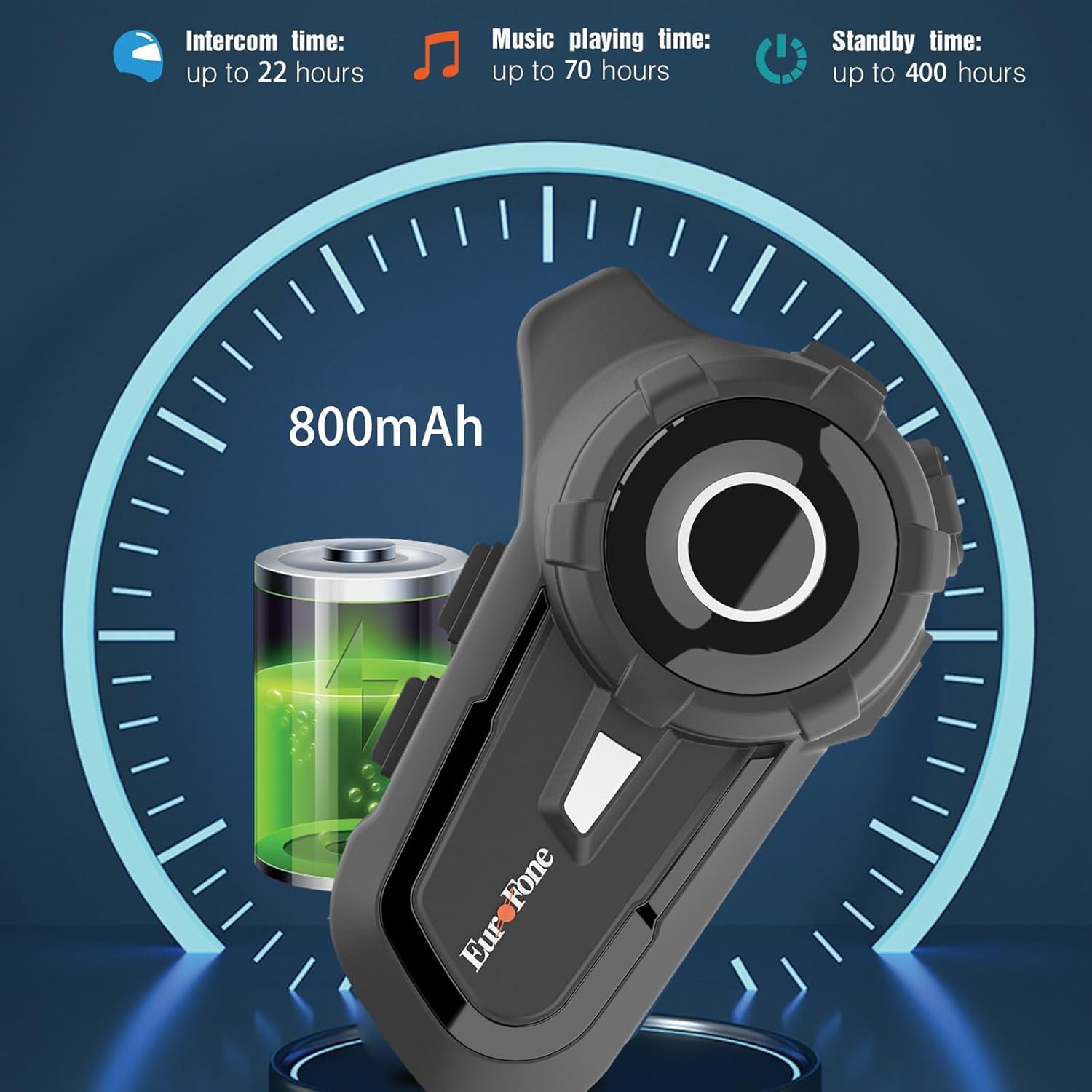
- Długa żywotność baterii: 800 mAh battery provides up to 20 hours of working time and 18 months standby.
- Auto Answer & Voice Control: Automatically answers calls in 10 seconds and supports voice assistant/Siri.
- Noise Reduction & Hi-Fi Stereo Sound: CVC advanced noise cancellation for clear audio and high-fidelity sound quality.
- Bluetooth 5.1: Zapewnia stabilne i wydajne połączenie bezprzewodowe.
- Radio FM: Wbudowane radio FM zapewniające rozrywkę w podróży.
- Pozycjonowanie GPS: Can connect to GPS devices for navigation.
3. Zawartość opakowania
Sprawdź, czy w przesyłce znajdują się wszystkie elementy:
- EuroFone S2 Bluetooth Headset Unit
- Hard Microphone (Boom Mic)
- Soft Microphone (Wired Mic)
- Zestaw głośników
- Kabel do ładowania USB typu C.
- Montaż Clamp
- Podkładki na rzepy do głośników
- Instrukcja obsługi

4. Konfiguracja i instalacja
4.1 Ładowanie urządzenia
Before first use, fully charge the EuroFone S2 headset. Connect the provided USB Type-C cable to the charging port on the unit and to a USB power source. The indicator light will show charging status. A full charge takes approximately 2.5 hours.

4.2 Installing into Helmet
Follow these steps to install the headset into your motorcycle helmet:
- Przygotuj hełm: Carefully remove the internal padding of your helmet to access the ear pockets and inner shell.
- Podłącz głośniki: Use the provided velcro pads to attach the speakers inside the helmet's ear pockets. Ensure they are positioned directly over your ears for optimal sound quality. Route the speaker wires neatly under the lining.
- Zainstaluj mikrofon: Choose either the hard boom microphone (for open-face/modular helmets) or the soft wired microphone (for full-face helmets). Attach the microphone to the helmet lining near your mouth using the adhesive base. Route the microphone cable along with the speaker wires.
- Montaż jednostki głównej: Secure the main headset unit to the side of the helmet using the mounting clamp. Tighten the screws to ensure a firm attachment.
- Podłącz kable: Plug the speaker and microphone cables into the corresponding ports on the main headset unit. Ensure connections are secure.
- Ponowne złożenie hełmu: Carefully reinsert the helmet's internal padding, ensuring all wires are tucked away and do not interfere with comfort or safety.

5. Instrukcja obsługi
5.1 kontroli nadview
The EuroFone S2 features intuitive controls for easy operation:
| Kontrola | Funkcjonować |
|---|---|
| Klawisz wł. / Wył | Włączanie/wyłączanie zasilania |
| Klawisz wielofunkcyjny | Play/Pause music, Answer/End calls, Activate voice assistant |
| Knob (Jog Dial) | Rotate clockwise for Volume Up, Counter-clockwise for Volume Down. Short press rotate for Next/Previous track. |
| Klawisz FM | Activate/Deactivate FM Radio |
| Talkback Key (Intercom Button) | Initiate/End intercom communication |
| Charging Port & K-wire Interface | For charging and connecting external devices. |
| Gniazdo telefoniczne | For wired audio connection (if applicable). |

5.2 Parowanie Bluetooth (telefon)
To pair your EuroFone S2 headset with your mobile phone:
- Upewnij się, że zestaw słuchawkowy jest wyłączony.
- Jednocześnie naciśnij i przytrzymaj Przycisk interkomu i Przycisk wielofunkcyjny for approximately 5 seconds until you hear a "di di" voice prompt indicating factory settings restoration. Release the buttons.
- Turn on the power button until you hear a voice prompt. The indicator light will flash blue and red, indicating pairing mode.
- Na telefonie komórkowym przejdź do ustawień Bluetooth i wyszukaj dostępne urządzenia.
- Select "S2" from the list of Bluetooth devices.
- Once paired, the headset will confirm with a voice prompt, and the indicator light will show a steady blue light or slow flashes.
5.3 Intercom Pairing (Two Units)
To pair two EuroFone S2 units for intercom communication:
- Upewnij się, że oba zestawy słuchawkowe są wyłączone.
- On the first headset, turn on the power button and press and hold the Przycisk interkomu for approximately 5 seconds until the indicator flashes with a quick blue light. You will hear a "pairing mode" voice prompt.
- On the second headset, turn on the power button and press and hold the Przycisk interkomu for approximately 5 seconds until the indicator flashes with a quick blue light. You will also hear a "pairing mode" voice prompt.
- Wait for a few seconds. The two headsets will automatically pair with each other. The indicator lights will change to a steady blue or slow flashes once connected.
5.4 Reconnecting Intercom
If the intercom connection is lost or you wish to re-establish it:
- Short click the Przycisk wielofunkcyjny on either headset to hear the prompt "end intercom".
- Kliknij dwukrotnie Przycisk interkomu on any one of the headsets.
- Następnie kliknij Przycisk wielofunkcyjny. You will hear the "start intercom" voice prompt again, indicating the connection is re-established.
5.5 Odtwarzanie muzyki
After pairing with your phone, you can control music playback:
- Odtwórz/Pauza: Kliknij Przycisk wielofunkcyjny odtwarzać lub wstrzymywać muzykę.
- Regulacja głośności: Obróć Pokrętło jog clockwise to increase volume, counter-clockwise to decrease volume.
- Następny / poprzedni utwór: Short press and rotate the Pokrętło jog counter-clockwise to play the next song. Short press and rotate clockwise to play the previous song.
5.6 Rozmowy telefoniczne
Manage phone calls hands-free:
- Odbierz połączenie: The headset will automatically answer incoming calls after 10 seconds. You can also click the Przycisk wielofunkcyjny to answer immediately.
- Zakończ połączenie: Kliknij Przycisk wielofunkcyjny to end an ongoing call.
- Odrzuć połączenie: Naciśnij i przytrzymaj Przycisk wielofunkcyjny na 2 sekundy, aby odrzucić połączenie przychodzące.
- Asystent głosowy/Siri: Naciśnij Przycisk wielofunkcyjny twice to activate your phone's voice assistant (Siri, Google Assistant, etc.).
5.7 Radio FM
Aby skorzystać z wbudowanego radia FM:
- Włączanie/wyłączanie FM: Kliknij Klawisz FM to activate or deactivate the FM radio.
- Stacje skanowania: While FM is on, press and hold the Klawisz FM aby automatycznie skanować i zapisywać dostępne stacje.
- Zmiana stacji: Obróć Pokrętło jog to switch between saved FM stations.
6. Konserwacja i pielęgnacja
- Czyszczenie: Przetrzyj słuchawkę miękką szmatką.amp płótno. Nie używaj ostrych środków chemicznych ani ściernych środków czyszczących.
- Narażenie na działanie wody: While IP67 waterproof, avoid prolonged submersion. Ensure charging port cover is securely closed when not charging.
- Składowanie: Przechowuj zestaw słuchawkowy w chłodnym, suchym miejscu, z dala od bezpośredniego światła słonecznego i ekstremalnych temperatur.
- Pielęgnacja baterii: Aby zapewnić optymalną żywotność baterii, ładuj urządzenie regularnie, nawet jeśli nie jest często używane. Unikaj całkowitego rozładowywania baterii przez dłuższy czas.
7. Rozwiązywanie Problemów
| Problem | Możliwa przyczyna | Rozwiązanie |
|---|---|---|
| Urządzenie nie włącza się. | Niski poziom naładowania baterii. | Całkowicie naładuj urządzenie. |
| Nie można sparować z telefonem. | Headset not in pairing mode; phone Bluetooth off; previously paired device interfering. | Ensure headset is in pairing mode (flashing blue/red). Turn phone Bluetooth off/on. Forget previous pairings on phone. Perform factory reset on headset. |
| Intercom nie łączy się. | Headsets not in intercom pairing mode; out of range. | Ensure both headsets are in intercom pairing mode. Move closer to each other. Re-initiate intercom connection as per section 5.4. |
| Brak dźwięku lub niski poziom głośności. | Volume too low; speakers not positioned correctly; loose connections. | Increase volume using the Jog Dial. Adjust speaker position in helmet. Check all cable connections. |
| Słaba jakość dźwięku/szum. | Microphone not positioned correctly; excessive wind noise; interference. | Adjust microphone position. Ensure microphone foam cover is in place. Reduce speed if wind noise is excessive. |
8. Specyfikacje
| Funkcja | Szczegół |
|---|---|
| Nazwa modelu | S2 Czarny |
| Wersja Bluetooth | 5.1 |
| Zasięg domofonu | Up to 800 meters (2-riders) |
| Pojemność baterii | 800 mAh |
| Czas ładowania | 2.5 godzin |
| Working Time (Intercom) | Do 22 godzin |
| Working Time (Music) | Do 70 godzin |
| Czas czuwania | Do 18 miesięcy |
| Poziom wodoodporności | IP67 Waterproof & Dustfree |
| Kontrola hałasu | Aktywna redukcja szumów (CVC) |
| Wymiary | 3.35 x 2.17 x 0.98 cala |
| Waga przedmiotu | 12.7 uncji |
| Producent | Shenzhen Goldstar Electronics Co., Ltd |
9. Gwarancja i wsparcie
For warranty information and technical support, please refer to the official EuroFone webOdwiedź stronę internetową lub skontaktuj się bezpośrednio z działem obsługi klienta. Zachowaj paragon jako dowód zakupu na wypadek ewentualnych roszczeń gwarancyjnych.
Możesz odwiedzić EuroFone Store on Amazon Aby uzyskać więcej informacji o produkcie i zasobach pomocy.
Ask a question about this manual
Ask about setup, troubleshooting, compatibility, parts, safety, or missing instructions. Manuals+ will review the question and use this page’s manual context to help answer it.