
1. Wprowadzenie
Thank you for choosing the MEDION X64060 Party Speaker. This manual provides essential information for the safe and efficient use of your device. Please read it thoroughly before operating the speaker and keep it for future reference.
The MEDION X64060 is a versatile party speaker designed for various entertainment needs, featuring powerful audio output, integrated DJ and karaoke functions, and dynamic light effects.
2. Instrukcje bezpieczeństwa
- Przed użyciem należy uważnie przeczytać wszystkie instrukcje.
- Trzymaj głośnik z dala od wody, wilgoci i ekstremalnych temperatur.
- Nie blokuj otworów wentylacyjnych.
- Używaj wyłącznie przewodu zasilającego dołączonego do urządzenia.
- Nie próbuj samodzielnie naprawiać urządzenia. Wszelkie naprawy zlecaj wykwalifikowanemu personelowi.
- Upewnij się, że głośnik jest umieszczony na stabilnej i równej powierzchni, aby zapobiec jego przewróceniu.
- Aby zapobiec uszkodzeniu słuchu, należy unikać długotrwałego narażenia na wysoki poziom głośności.
3. Zawartość opakowania
Proszę sprawdzić, czy w paczce znajdują się następujące elementy:
- MEDION X64060 Party Speaker
- 1 x Mikrofon
- Przewód zasilający
- Instrukcja obsługi (ten dokument)
4. Koniec produktuview
Familiarize yourself with the main components and controls of your MEDION X64060 Party Speaker.

Image: Control Panel Overview
This image displays a close-up of the speaker's top control panel, showing various knobs and buttons for audio adjustments, DJ functions, and input selections.

Image: Speaker Dimensions and Connections
This image illustrates the overall dimensions of the speaker (980mm height, 350mm width, 340mm depth) and highlights the available connection ports: 1x USB, 2x Microphone (6.3 mm), 1x Guitar (6.3 mm), 1x Audio Input (3.5 mm), and 1x Audio Input (RCA).
4.1 Panel przedni
- Prelegenci: Two main speakers with integrated LED lighting.
- Efekty świetlne: Dynamic LED lights that synchronize with music.
4.2 Górny panel sterowania
- Przycisk zasilania: To turn the speaker on/off.
- Regulacja głośności: Main volume, microphone volume (MIC1 VOL, MIC2 VOL), guitar volume (GUITAR VOL), and echo volume (ECHO VOL).
- Korektor (EQ): 5-band equalizer for sound adjustment.
- Selektory wejść: Buttons for Bluetooth, USB, AUX.
- DJ Functions: Cross-fader, scratch wheel, drum pads (HI-HAT, SNARE, BASS DRUM, CYMBAL, TOM1, TOM2), and record function.
- Port USB: Do odtwarzania przez USB.
- Wejścia mikrofonowe: Two 6.3 mm jack inputs.
- Wejście gitarowe: One 6.3 mm jack input.
- Wejście AUX: 3.5 mm jack input.
4.3 Panel tylny
- Pobór mocy: Do podłączenia przewodu zasilającego.
- Wejście audio RCA: Additional audio input.
4.4 Mobility Features
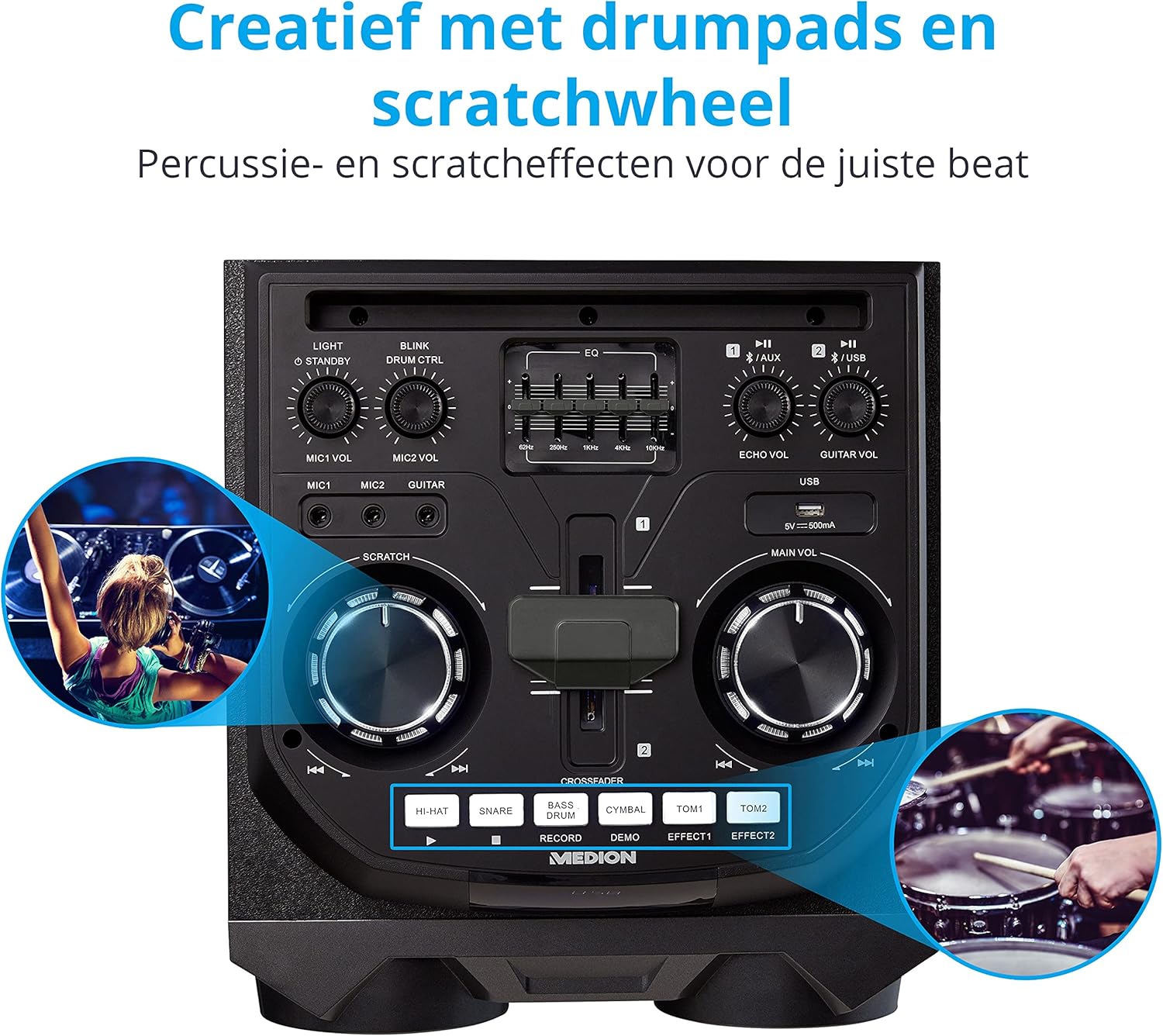
Image: Integrated Wheels for Portability
This image shows the back of the speaker, highlighting the integrated wheels at the bottom, designed for easy transport.
- Zintegrowane koła: For easy transportation of the speaker.
- Uchwyty: Ergonomic handles for lifting and moving.
5. Konfiguracja
5.1 Początkowe umiejscowienie
Umieść głośnik na stabilnej, płaskiej powierzchni. Zapewnij odpowiednią wentylację wokół urządzenia. Unikaj umieszczania go w pobliżu źródeł ciepła lub w bezpośrednim świetle słonecznym.
5.2 Połączenie zasilania
- Podłącz dołączony przewód zasilający do gniazda zasilania z tyłu głośnika.
- Podłącz drugi koniec przewodu zasilającego do odpowiedniego gniazdka ściennego.
- Press the power button on the top control panel to turn on the speaker. The LED lights will illuminate.
5.3 Connecting a Microphone or Guitar
For karaoke or live instrument performance:
- Plug your microphone(s) into the MIC1 or MIC2 6.3 mm jack inputs on the top panel.
- Plug your guitar into the GUITAR 6.3 mm jack input on the top panel.
- Adjust the respective volume knobs (MIC1 VOL, MIC2 VOL, GUITAR VOL) and ECHO VOL to your preference.
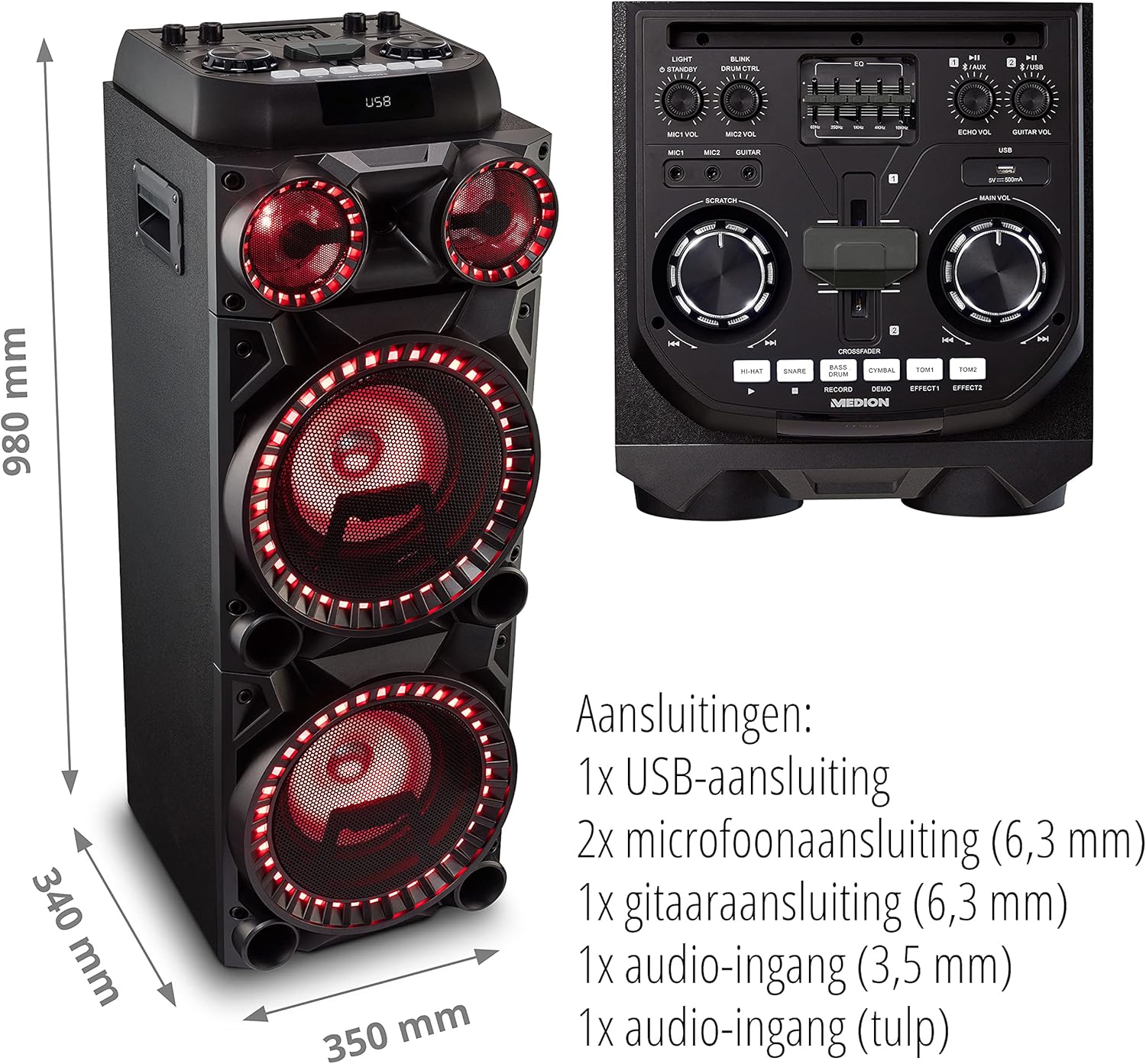
Image: Microphone and Guitar Connection for Karaoke
This image shows individuals enjoying karaoke, demonstrating the use of a microphone connected to the speaker for singing.
6. Instrukcja obsługi
6.1 Połączenie Bluetooth
- Naciśnij Bluetooth button on the control panel. The Bluetooth indicator will blink.
- Włącz Bluetooth w swoim smartfonie, tablecie lub innym urządzeniu audio.
- Szukaj "MEDION X64060" in your device's Bluetooth settings and select it to pair.
- Once connected, the Bluetooth indicator will stop blinking and remain solid. You can now play music wirelessly.

Image: Bluetooth Music Playback
This image shows a smartphone displaying a music application, indicating a wireless Bluetooth connection to the speaker for audio streaming.
6.2 Odtwarzanie USB
- Włóż dysk flash USB zawierający dźwięk files into the USB port on the top panel.
- Naciśnij USB przycisk, aby wybrać tryb USB.
- The speaker will automatically detect and begin playing audio files from the USB drive. Use the playback controls (play/pause, skip track) on the control panel.
6.3 Wejście AUX
- Connect an external audio device (e.g., MP3 player, laptop) to the 3.5 mm AUX input or the RCA audio input on the rear panel using an appropriate audio cable (not included).
- Naciśnij AUX przycisk umożliwiający wybór trybu AUX.
- Play audio from your connected device. The speaker will output the sound.
6.4 DJ Functions
The MEDION X64060 includes various DJ features for creative sound mixing.

Image: DJ Function Controls
Na tym obrazie przedstawiono szczegółowo view of the DJ control section, including the cross-fader, scratch wheel, and various drum pads.
- Cross-fader: Use the cross-fader to smoothly transition between different audio sources or effects.
- Scratch Wheel: Manipulate the scratch wheel for classic DJ scratch effects.
- Pady perkusyjne: Naciśnij HI-HAT, SIDŁA, BĘBEN BASOWY, TALERZ, TOM1, I TOM2 pads to add drum sound effects to your music.
- Funkcja nagrywania: Użyj NAGRYWAĆ button to record your drum pad sequences.
6.5 Funkcja karaoke
Connect a microphone as described in section 5.3. Play your chosen karaoke track via Bluetooth, USB, or AUX. Adjust the microphone and echo volumes for the desired effect.
6.6 Efekty świetlne
The speaker features dynamic LED light effects that respond to the music. These lights automatically activate when the speaker is on. There may be a dedicated button (e.g., "LIGHT" or "BLINK") to control or cycle through different light modes, refer to the control panel for specific options.

Image: Dynamic Blue Light Effects
This image showcases the speaker with its blue LED lights illuminated, demonstrating the atmospheric light effects.

Image: Dynamic Red Light Effects
This image shows the speaker with its red LED lights illuminated, highlighting another color option for the atmospheric light effects.
7. Konserwacja
7.1 Czyszczenie
- Przed czyszczeniem należy zawsze odłączyć głośnik od gniazdka elektrycznego.
- Do wycierania powierzchni zewnętrznych należy używać miękkiej, suchej ściereczki.
- Do not use liquid cleaners, aerosols, or abrasive materials, as these can damage the finish or internal components.
7.2 Przechowywanie
When not in use for extended periods, store the speaker in a cool, dry place, away from direct sunlight and extreme temperatures. Cover the unit to protect it from dust.
8. Rozwiązywanie Problemów
| Problem | Możliwa przyczyna | Rozwiązanie |
|---|---|---|
| Brak zasilania | Power cord not connected properly; Power outlet not working. | Ensure the power cord is securely plugged into both the speaker and a working wall outlet. Test the outlet with another device. |
| Brak dźwięku | Volume too low; Incorrect input selected; Device not paired (Bluetooth); Cable not connected (AUX/Guitar/Mic). | Increase the main volume and individual input volumes. Select the correct input source (Bluetooth, USB, AUX). Re-pair Bluetooth device. Check all cable connections. |
| Połączenie Bluetooth nie działa | Głośnik nie jest w trybie parowania; Urządzenie jest za daleko; Zakłócenia. | Ensure the speaker is in Bluetooth pairing mode (blinking indicator). Move your device closer to the speaker. Avoid obstacles and other wireless devices. |
| Mikrofon/gitara nie działa | Volume too low; Cable faulty; Incorrect input. | Increase MIC/GUITAR VOL. Check microphone/guitar cable. Ensure the instrument is properly connected. |
9. Specyfikacje
| Marka | MEDION |
| Numer modelu | X64060 | MD44060 |
| Moc wyjściowa | 2 x 100 W RMS (2 x 1000 W max. music output power) |
| Technologia łączności | Bluetooth 5.0, USB, AUX (3.5mm, RCA) |
| Wejścia audio | 2 x Microphone (6.3 mm), 1 x Guitar (6.3 mm), 1 x AUX (3.5 mm), 1 x RCA |
| Wyrównywacz | 5-pasmowy |
| Kolor | Czarny |
| Tworzywo | Plastikowy |
| Wymiary produktu (dł. x szer. x wys.) | Wymiary 38.8 x 35 x 101 cm |
| Waga przedmiotu | 15 kilogramów |
| Typ montażu | Stały podłogowe |
| Źródło zasilania | Elektryczny przewodowy |
| Kompatybilne urządzenia | Laptopa, smartfona |
10. Gwarancja i wsparcie
For warranty information and technical support, please refer to the warranty card included with your product or visit the official MEDION webZachowaj dowód zakupu na wypadek roszczeń gwarancyjnych.
Obsługa klienta MEDION: For assistance, please contact MEDION customer support through their official channels. Contact details can typically be found on the MEDION webmiejscu lub w opakowaniu produktu.