
1. Wprowadzenie
This manual provides detailed instructions for the installation, operation, and maintenance of your REVOTECH HD 3MP Mini Fisheye Security IP Camera (Model I706-3-FHW). This indoor camera is designed for surveillance, offering high-resolution video and a wide-angle view to monitor your space effectively.
2. Funkcje produktu
The REVOTECH I706-3-FHW camera is equipped with advanced features for reliable security monitoring:
- Wysoka rozdzielczość: 3.0 Megapixel (2304 x 1296P) 1/3'' CMOS Sensor for clear images at 20 frames per second.
- Wide Angle Fisheye Lens: A 1.7mm fisheye lens provides a 170° viewkąt, obejmujący duży obszar.
- Efektywna kompresja wideo: Supports H.265 and H.264 encoding, optimizing bandwidth and storage usage.
- Kompaktowa konstrukcja: Mini IP camera type, easy to install and discreetly place.
- Zdalny Viewing: Zdalne sterowanie P2P viewing capability via smartphone applications and CMS software.
- Smart Alarm Functions: Includes motion detection and email alarm features.
- Trwała konstrukcja: Features a metal material shell.
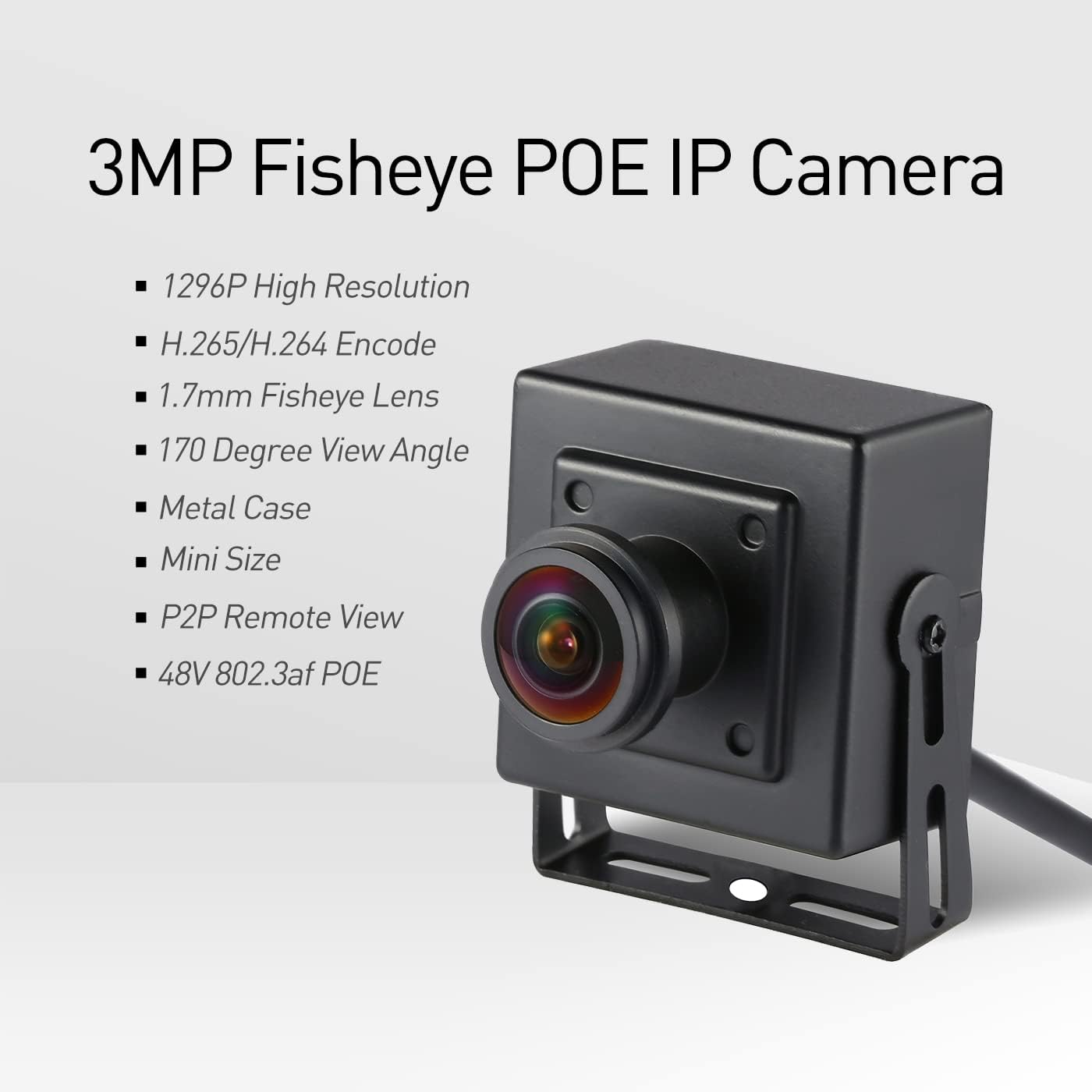
Figure 1: Key Features of the REVOTECH Fisheye IP Camera

Figure 2: 1.7mm Fisheye Lens Wide View Zdolność

Figure 3: Compact Size for Discreet Placement
3. Zawartość opakowania
Sprawdź, czy w przesyłce znajdują się wszystkie elementy:
- 1 x REVOTECH HD 3MP Mini Fisheye Security IP Camera
- 1 x Instrukcja obsługi (angielski)
- 1 x Screws Set for installation
- 1 x Download Card (for software/drivers)
Note: A 12V/2A power supply is required for operation and is NOT included in the package.

Rysunek 4: Zawartość opakowania
4. Konfiguracja i instalacja
Follow these steps to set up your REVOTECH IP camera:
- Zasilanie: Connect a DC 12V/2A power adapter (not included) to the camera's power port.
- Połączenie internetowe: Connect the camera to your network router or NVR using an Ethernet cable via the RJ45 port. This camera requires a wired connection; it does not support Wi-Fi.
- Montowanie: Use the provided screws to mount the camera in your desired indoor location. The adjustable mounting bracket allows for flexible positioning.
- Konfiguracja wstępna: This camera is not a 'plug-and-play' device. Manual IP camera configuration knowledge is recommended. Ensure your NVR supports 3MP resolution and H.265 encoding. If not, the camera can be configured to 1080P (2MP) and H.264.

Figure 5: Camera Components and Ports
5. Instrukcja obsługi
Once the camera is physically installed and connected to the network, you can access and manage it using the following methods:
- Aplikacja na smartfona: Download and install the "NVSEE Int 'I" app on your iOS or Android smartphone. Follow the in-app instructions to add your camera for remote viewing, playback, and configuration.
- CMS Software: For Windows computers, use the provided CMS software (available via the download card or manufacturer's website). This software allows for comprehensive management, including live view, recording, and advanced settings. Note: This software is not compatible with MAC OS or Linux.
- Integracja NVR: If connected to a compatible NVR, the camera's feed will be integrated into your NVR system for recording and monitoring. Adjust camera settings (like resolution) via the NVR interface or the camera's web interface if needed.
- Detekcja ruchu i alarm e-mailowy: Configure motion detection zones and email alarm settings through the app or CMS software to receive alerts when activity is detected.

Figure 6: NVSEE App Interface for Smartphone Viewwchodzenie

Figure 7: CMS Software Interface for Computer Viewwchodzenie
6. Konserwacja
Aby zapewnić optymalną wydajność i trwałość aparatu:
- Czyszczenie: Delikatnie przetrzyj obiektyw i korpus aparatu miękką, suchą ściereczką. Unikaj stosowania silnych środków chemicznych i materiałów ściernych.
- Zarządzanie ciepłem: It is normal for the camera's casing to feel warm during operation, especially due to its compact size. This is safe and does not indicate a malfunction.
- Aktualizacje oprogramowania układowego: Okresowo sprawdzaj producenta website or app for available firmware updates to improve performance and security.
7. Rozwiązywanie Problemów
Jeśli masz problemy z aparatem, zapoznaj się z poniższymi, typowymi rozwiązaniami:
- Brak zasilania: Ensure the DC 12V/2A power adapter is correctly connected and functioning. Verify the power outlet is active.
- Brak połączenia sieciowego: Check the Ethernet cable connection to both the camera and your router/NVR. Confirm your network is operational.
- Brak wideo/słaba jakość: Verify that your NVR or viewing software supports 3MP resolution and H.265 encoding. If not, adjust the camera's settings to 1080P (2MP) and H.264. Check network bandwidth.
- Nie można uzyskać zdalnego dostępu do kamery: Ensure the camera is properly configured on your network and that P2P services are enabled. Check your router's firewall settings.
- Zapomniałeś hasła: This camera typically does not have an external reset button. It is crucial to remember your administrator password. If lost, contact REVOTECH support for assistance.
8. Specyfikacje
| Funkcja | Specyfikacja |
|---|---|
| Model | I706-3-FHW |
| Rezolucja | 2304 x 1296P (3.0 megapikseli) |
| Transduktor | FH8852+GC2053 |
| Minimalne oświetlenie | 0.1 luksa przy (F1.2, AGC WŁ.) |
| Szybkość klatek | 3MP/20fps |
| Obiektyw | 1.7mm Fisheye Lens |
| Viewing kąt | 170 stopni |
| Typ interfejsu obiektywu | M12 |
| Prędkość migawki | 1/25 seconds - 1/100,000 seconds |
| Format kompresji | H.265/H.264 |
| Opcje przechowywania | NVR lub komputer |
| Adres IP | Dynamiczny (domyślny)/Statyczny |
| Inteligentny alarm | Detekcja ruchu, alarm e-mailowy |
| Obsługiwane protokoły | ONVIF, HTTP, TCP/IP, ICMP, RTSP, RTP, RTCP, SMTP, DHCP, DNS, PPPoE, NTP |
| Sieć Ethernetowa | 10M/100M mbps (RJ-45) |
| Temperatura pracy | -25°C ~ 60°C |
| Wilgotność robocza | 10% ~ 90% |
| Zasilacz | Prąd stały 12 V/2 A |
| Wymiary (cm) | Wymiary 5.3 x 4.5 x 4 cm |
| Waga | 0.2 kilogramów |
| Materiał obudowy | Metal |
| Zastosowanie wewnątrz/na zewnątrz | Wnętrz |
| Stopień wodoodporności | IP67 (Note: Product is specified for Indoor use) |
9. Gwarancja i wsparcie
For warranty information, please refer to the terms and conditions provided at the time of purchase or contact your retailer. For technical support, refer to the included User Manual and Download Card for contact details or visit the official REVOTECH website for resources and assistance.