1. Wprowadzenie
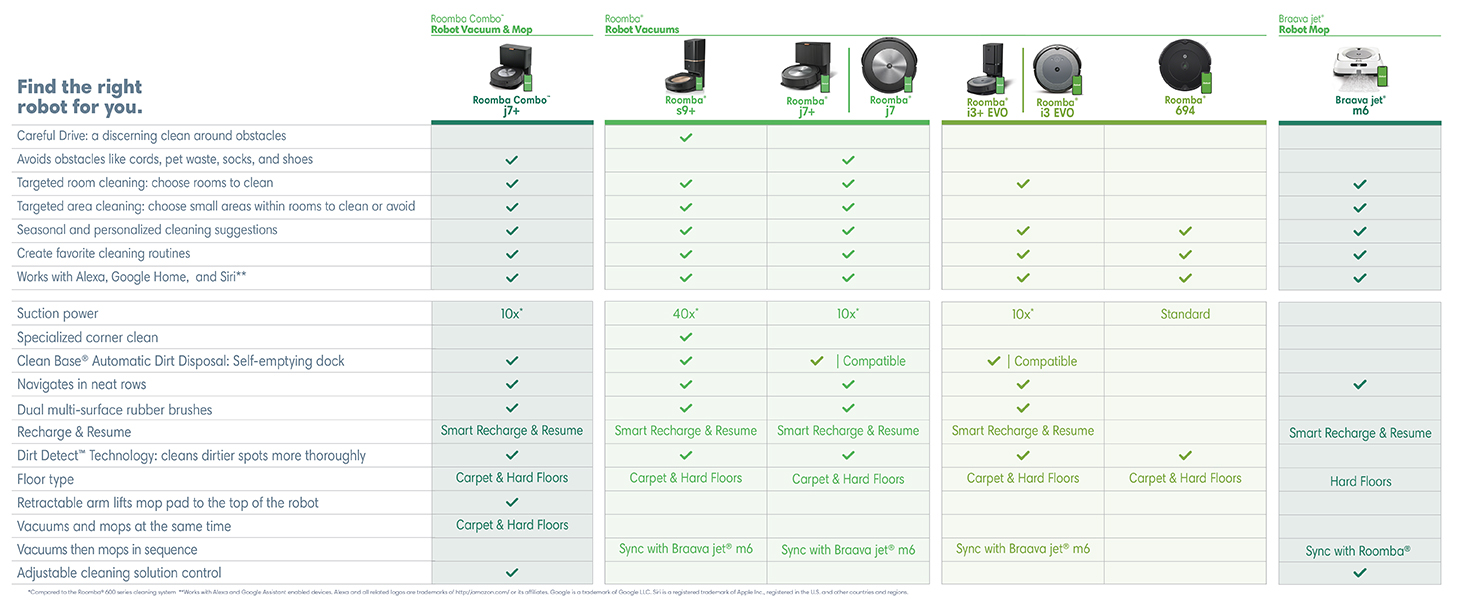
The iRobot Roomba j7 (7150) Wi-Fi Connected Robot Vacuum is designed to provide intelligent and convenient cleaning for your home. Equipped with Genius technology, it adapts to your specific needs, avoiding obstacles like pet waste and cords, and offering smart mapping capabilities for efficient cleaning.
Główne cechy:
- Inteligentne mapowanie nadruku: Control and schedule room-specific cleaning, with support for multiple floor plans.
- Unikanie przeszkód: Identifies and avoids common household obstacles, including pet waste and charging cords.
- Automatyczne czyszczenie: Można ustawić automatyczne rozpoczęcie sprzątania po wyjściu z urządzenia i zakończenie po powrocie.
- Zaawansowane czujniki: Navigates under and around furniture, along edges, and features Cliff Detect to prevent falls.

2. Konfiguracja
Before using your Roomba j7, ensure it is properly set up and charged. The package includes the Roomba j7 Robot Vacuum, a Home Base Charging Station, a filter, and an extra corner brush.
Początkowe kroki konfiguracji:
- Rozpakować: Ostrożnie wyjąć wszystkie elementy z opakowania.
- Place Home Base: Position the Home Base Charging Station against a wall in an open, uncluttered area. Ensure there is at least 18 inches of space on both sides and 4 feet of clear space in front for optimal navigation.
- Opłata: Place the Roomba j7 onto the Home Base. The robot will begin charging automatically. Allow it to fully charge before its first cleaning mission.
- Połącz się z Wi-Fi: Download the iRobot Home App on your smartphone or tablet. Follow the in-app instructions to connect your Roomba j7 to your home Wi-Fi network. This enables smart features, scheduling, and control.
3. Instrukcja obsługi
The Roomba j7 is designed for intelligent and autonomous cleaning. Utilize its smart features for a customized cleaning experience.
Funkcje inteligentnego czyszczenia:
- Inteligentne mapowanie: The robot learns your home's layout, allowing you to define specific rooms and areas for cleaning or to avoid.
- PrecisionVision Navigation: Identifies and avoids common obstacles such as pet waste, charging cords, and shoes. The robot can even send you photos of obstacles it encounters for future reference.
- Technologia Dirt Detect: Focuses cleaning efforts on dirtier areas of your home, ensuring a thorough clean where it's needed most.
- Automatyczne harmonogramy czyszczenia: Set the robot to clean automatically when you leave home and return to a clean space.
- Sterowanie aplikacją i głosem: Control your Roomba j7 using the iRobot Home App or through voice commands with compatible devices like Amazon Alexa and Google Home.


4. Konserwacja
Regular maintenance ensures your Roomba j7 operates efficiently and extends its lifespan. The iRobot Home App can track the life of your robot's components and notify you when maintenance is needed.
Kluczowe zadania konserwacyjne:
- Opróżnianie pojemnika na kurz: The Roomba j7 can clean multiple rooms before its dust bin needs emptying. The bin is easily removed by pressing a button on the side, and another button opens it for disposal. The dust bin can be washed with warm water and soap.
- Czyszczenie filtra: The filter should be tapped over a trash bin to clear it. Do not get the filter wet.
- Czyszczenie szczotek i kół: Periodically check and clean the dual multi-surface rubber brushes and the edge-sweeping brush to remove tangled hair or debris.
5. Rozwiązywanie Problemów
If you encounter issues with your Roomba j7, refer to the following common problems and solutions:
- Robot stops and requests bin emptying, but bin is not full: This can occur if the dust sensor is obscured by pet hair or debris. Try cleaning the sensor. In the app, you can set the robot to run even if it thinks the bin is full, which may resolve this issue for homes with high pet hair volume.
- Robot does not detect or avoid pet waste: While the Roomba j7 is designed to avoid pet waste, occasional misses can occur. Ensure the camera lens is clean. If the issue persists, contact iRobot support as per the Pet Owner Official Promise.
- Robot często się zacina: Ensure the area is clear of excessive clutter, loose cords, or small objects. The robot's sensors help it navigate, but a clear path is always best.
- Robot returns to base without finishing job: This can happen if the battery is low or if it encounters an unexpected obstacle. The robot will recharge and resume cleaning. Ensure sufficient lighting as the robot relies on light for navigation.
6. Specyfikacje
| Funkcja | Szczegół |
|---|---|
| Marka | iRobot |
| Nazwa modelu | Roomba j7 |
| Numer modelu | j715020 |
| ASIN | B094NW318F |
| UPC | 885155025807 |
| Kolor | Grafit |
| Wymiary produktu | 13.34" dł. x 13.34" szer. x 3.4" wys. |
| Waga przedmiotu | 7.5 funta |
| Żywotność baterii | 75 minut |
| Typ filtra | Nabój |
| Metoda kontroli | Aplikacja, dotyk |
| Kompatybilne urządzenia | Smartfony, Amazon Echo, tablety, Google Home |
7. Gwarancja i wsparcie
For detailed information regarding your iRobot Roomba j7, including warranty terms and support options, please refer to the official documentation.
- Instrukcja obsługi: Pobierz instrukcję obsługi (PDF)
- Informacje o gwarancji: Pobierz gwarancję (PDF)
Plany ochrony:
- 2-letni plan ochrony: Dostępny do zakupu.
- 3-letni plan ochrony: Dostępny do zakupu.
- Complete Protect: Miesięczny plan obejmujący kwalifikujące się zakupy dokonane w przeszłości i w przyszłości.
Oficjalna obietnica właściciela zwierzęcia domowego (POOP):
iRobot guarantees that the Roomba j7 robot vacuum will steer clear of your pet's solid waste. If it doesn't, iRobot will replace your robot for free. This offer is valid for 1 year from purchase and covers replacement product only. Valid only for solid cat or dog waste. Additional terms and conditions apply.

Obsługa klienta:
For any further assistance, technical support, or warranty claims, please visit the official iRobot website or contact their customer service. Ensure purchases are made from authorized resellers to validate warranty claims.